



 本文介绍了如何使用Java实现一个动态的小球碰撞游戏。游戏规则包括小球的生成、反弹和碰撞,玩家可以改变小球颜色,清除屏幕,或者开启自动产生小球的功能。文章详细阐述了窗体配置、小球类的实现、动作监听器以及线程的使用,通过代码展示了小球的运动轨迹和碰撞效果。
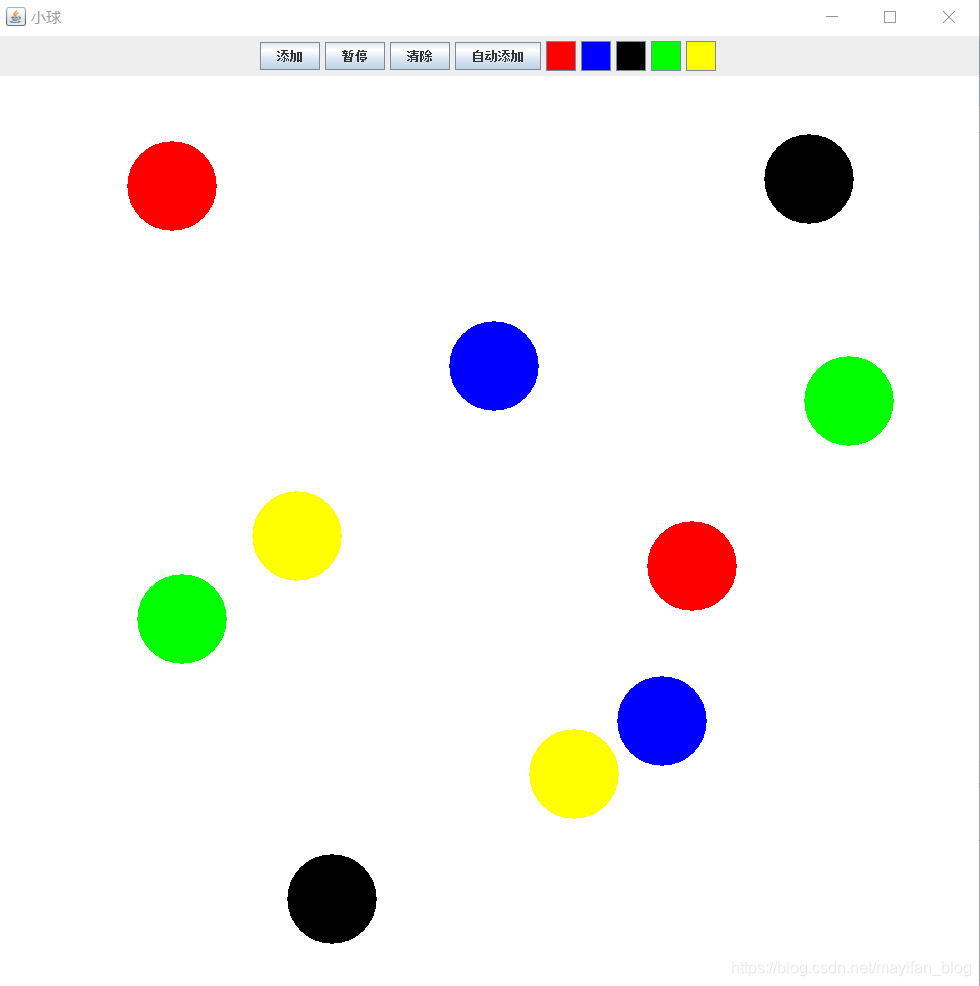
这次我们做一个小球的碰撞的游戏,规则是:按下添加按钮,窗口的中心部分会产生一个小球(刚开始默认为黑色),四个方向随机产生,发射小球,再次按下即产生两个小球。当小球碰到窗体边缘的时候会产生反弹,当两个小球接触时会产生碰撞,双方交换速度,向相反方向移动。我们可以选择相应的颜色来改变下一个发射的小球颜色。当按下清除可以清除屏幕上的小球,当按下添加则会继续产生小球。最后我们还添加了自动产生小球的功能,按下开关,在屏幕中间会定时产生小球。接下来,我们来展示代码部分。
public class Jframe {
	private Ball[] arrayball = new Ball[100];
	public static void main(String[] args) {
		Jframe frame = new Jframe();
		frame.showUI();
	}
	public void showUI() {
		javax.swing.JFrame jf = new javax.swing.JFrame();
		jf.setSize(1000, 1000);
		jf.getContentPane().setBackground(Color.WHITE);
		jf.setTitle("小球");
		jf.setDefaultCloseOperation(3);
		// 设置居中显示
		jf.setLocationRelativeTo(null);
		JPanel jp1 =new JPanel();
		JButton jb1 = new JButton("添加");
		jp1.add(jb1);
		// jb1.setBounds(100,50, 40, 20);
		JButton jb2 = new JButton("暂停");
		jp1.add(jb2);
		// jb1.setBounds(200,50, 40, 20);
		JButton jb3 = new JButton("清除");
		jp1.add(jb3);
		// jb1.setBounds(300,50, 40, 20);
		JButton jb4 = new JButton("自动添加");
		jp1.add(jb4);
		jf.add(jp1,BorderLayout.NORTH);
        Mouse mouse = new Mouse();
		Color[] color = {Color.RED,Color.BLUE,Color.BLACK,Color.GREEN,Color.YELLOW};
		for(int i=0;i<color.length;i++){
			JButton jbu = new JButton();
			jbu.setBackground(color[i]);
			jbu.setPreferredSize(new Dimension(30, 30));
			jp1.add(jbu);
			jbu.addActionListener(mouse);
		}
		jb1.addActionListener(mouse);
		jb2.addActionListener(mouse);
		jb3.addActionListener(mouse);
		jb4.addActionListener(mouse);
		jf.addMouseListener(mouse);
		jf.addMouseMotionListener(mouse);
		BallJpanel cp = new BallJpanel();
		cp.setBackground(Color.WHITE);
		jf.add(cp,BorderLayout.CENTER);
		jf.setVisible(true);
		Graphics g = cp.getGraphics();
		mouse.setcp(cp);
		mouse.setg(g);
		mouse.setarrayball(arrayball);
		mouse.setmouse(mouse);
		cp.setarrayball(arrayball);
	}
}
这是窗体的基本配置,采用边框布局,上方放置按钮,中间是画布。我们为按钮添加了动作监听器,并使用了一系列的方法来把对象传递到其他类中。
public class Ball {
	public int size = 90; // 小球的直径
	public int x = 500; // 小球所在的x坐标
	public int y = 500; // 小球所在的y坐标
	public int vx = 5;
	public int vy = 5;
	public BallJpanel cp;
	public Color color = Color.BLACK;
	public int max_x, max_y, Min_x, Min_y;
	private Ball[] arrayball;
	public void setcp(BallJpanel cp) {
		this.cp = cp;
	}
	public void setarrayball(Ball[] arrayball) {
		this.arrayball = arrayball;
	}
	public void setX(int x) {
		this.x = x;
	}
	public int getX() {
		return x;
	}
	public void setY(int y) {
		this.y = y;
	}
	public int setY() {
		return y;
	}
	public Ball(int x, int y, int vx, int vy, Color color) {
		this.x = x;
		this.y = y;
		this.vx = vx;
		this.vy = vy;
		this.color = color;
	}
	public void ballMove(Graphics g) {
		x += vx;
		y += vy;
		max_y = cp.getHeight();
		max_x = cp.getWidth();

		if (x <= size / 2) {
			x = size / 2;
			vx = -vx;
		}
		if (y <= size / 2) {
			y = size / 2;
			vy = -vy;
		}
		if (x + size / 2 >= max_x) {
			x = max_x - size / 2;
			vx = -vx;
		}
		if (y + size / 2 >= max_y) {
			y = max_y - size / 2;
			vy = -vy;
		}
		for (int i = 0; i < arrayball.length; i++)
		{
			if (arrayball[i] == null)
				break;
			Ball ball = arrayball[i];
			if (this.equals(ball))
				continue;
			if ((ball.x - this.x) * (ball.x - this.x) + (ball.y - this.y) * (ball.y - this.y) <= size * size)
			{
				int tempvx = this.vx;
				int tempvy = this.vy;
				this.vx = ball.vx;
				this.vy = ball.vy;
				ball.vx = tempvx;
				ball.vy = tempvy;
				while ((ball.x - this.x) * (ball.x - this.x) + (ball.y - this.y) * (ball.y - this.y) <= size * size)
				{
					this.x +=  this.vx;
					this.y +=  this.vy;
					System.out.println("等待");
				}
			}
		}
	}
}
考虑到这是一个小球的运动系统,我们为小球写了一个类,添加小球的时候,会创建小球对象,并使其获得位置,颜色,速度等参数,并将其存入数组。小球的方法就是运动,每当执行ballMove方法,便会为小球修改位置坐标(基于其速度),再判断是否撞击边框,以及判断是否和别的小球有坐标重叠,如果有重叠,则跑一个循环,修改位置坐标,使其分离。Ball这部分代码和监听器中的方法有所联系,我们接下来介绍监听器的方法。
public class Mouse implements MouseMotionListener, MouseListener, ActionListener {
	private Graphics g;
	private BallJpanel cp;
	private Ball[] arrayball;
	private int index = 0;
	private int x;
	private int y;
	private int vx;
	private int vy;
	private int random=1;
	private Color color=Color.black;
	private ThreadBall tb;
    private  Mouse mouse;
    public int selfFlag=0;
    public void setmouse(Mouse mouse)
    {
    	this.mouse= mouse;
    }
	public void setarrayball(Ball[] arrayball) {
		this.arrayball = arrayball;
	}
	public void setg(Graphics g) {
		this.g = g;
	}
	public void setcp(BallJpanel cp) {
		this.cp = cp;
	}
	public void actionPerformed(ActionEvent e) {
		if ("添加".equals(e.getActionCommand())) {
			System.out.println("添加");
			if (tb == null) {
				// 创建线程对象
				tb = new ThreadBall();
				tb.setcp(cp);
				tb.setarrayball(arrayball);
				tb.setg(g);
				tb.start();
				tb.setmouse(mouse);
			}
			tb.stopFlag=0;
			addBall();
		}
		if ("暂停".equals(e.getActionCommand())) {
				if(tb!=null)
				{
					if(tb.stopFlag==0)
					{
					    tb.stopFlag=1;
					    System.out.println("暂停");
					}
					else
					{
						tb.stopFlag=0;
						 System.out.println("开始");
					}
				}
		}
		if ("清除".equals(e.getActionCommand())) {
			tb.stopFlag=1;
			cp.paint1(g);
			index=0;
			System.out.println("清除");
		}
		if ("自动添加".equals(e.getActionCommand())){
			if(selfFlag==0)
				{selfFlag=1;System.out.println("自动添加打开");}
			else
				{selfFlag=0;System.out.println("自动添加关闭");}
		}
		if("".equals(e.getActionCommand())){
			JButton jbu=(JButton)e.getSource();
			color=jbu.getBackground();
			g.setColor(color);
		}
	}
	public void mouseDragged(MouseEvent e) {
	}
	public void mouseMoved(MouseEvent e) {
	}
	public void mouseClicked(MouseEvent e) {
	}
	public void mousePressed(MouseEvent e) {
	}
	public void mouseReleased(MouseEvent e) {
	}
	public void mouseEntered(MouseEvent e) {
	}
	public void mouseExited(MouseEvent e) {
	}
	public void addBall() {
		x = 500;
		y = 500;
		random=1+(int)(Math.random()*4);
		switch(random)
		{
		case 1:
			vx=5;
			vy=5;
			break;
		case 2:
			vx=-5;
			vy=-5;
			break;
		case 3:
			vx=5;
			vy=-5;
			break;
		case 4:
			vx=-5;
			vy=5;
			break;
		}
		Ball ball = new Ball(x, y,vx , vy, color);
		arrayball[index++] = ball;
	}
}
监听器中,我们设置了一系列参数来控制一些方法的开启和关闭,以及写了添加小球的方法,为其赋初值,随机一个初始发射方向。这段代码我们用到了线程。线程的使用分为两步,创建线程对象并start线程。
public class ThreadBall extends Thread {
	private Graphics g;
	private BallJpanel cp;
	private Ball[] arrayball;
	public  int stopFlag=0;
	private int add=0;
	private Mouse mouse;
	public void setmouse(Mouse mouse)
	{
		this.mouse=mouse;
	}
	public void setcp(BallJpanel cp) {
		this.cp = cp;
	}
	public void setg(Graphics g)
	{
		this.g=g;
	}
	public void setarrayball(Ball[] arrayball) {
	this.arrayball = arrayball;
	}
	/**
	 * 启动线程执行的方法
	 */
	public void run() {
		while (true) {
           if(stopFlag==0)
           {
					for (int i = 0; i < arrayball.length; i++)
					{
						if(arrayball[i]==null)
							break;
						    Ball ball = arrayball[i];
					        ball.setarrayball(arrayball);
							ball.setcp(cp);
							ball.ballMove(g);
					}
					cp.paint(g);
					add++;
					if(add==5000)
						add=0;
					if(add%50==0&&mouse.selfFlag==1)
						mouse.addBall();
           }
					try {
						Thread.sleep(50);
					} catch (InterruptedException e) {
						e.printStackTrace();
					}
		}
	}
}
以上是线程的属性和方法,此类继承Thread并重写了run方法。run方法的思路是循环调用ballMove方法修改小球坐标,并调用paint方法更新显示,我们加入了一个延时函数,来控制调用的频率。
public class BallJpanel extends JPanel {
	 private Ball[] arrayball;
	public void setarrayball(Ball[] arrayball)
	{
		this.arrayball=arrayball;
	}
	public void paint(Graphics g)
	{
		super.paint(g);
		for(int i=0;i<arrayball.length;i++)
		{
			if(arrayball[i]==null)
			{
				break;
			}
			Ball ball=arrayball[i];
			g.setColor(ball.color);
			g.fillOval(ball.x-ball.size/2, ball.y-ball.size/2, ball.size, ball.size);
		}
	}
	public void paint1(Graphics g)
	{
		super.paint(g);
		for(int i=0;i<arrayball.length;i++)
		{
			if(arrayball[i]==null)
			{
				break;
			}
			arrayball[i]=null;
		}
	}
}
BallJpanel类写的是画布,及小球的运动区域,画笔也是从其对象cp上获得。类里用paint写画面的重绘方法(包括画板小球的重绘),paint1用来清空画布及数组。
以上便是java小球运动的全部代码,我们来看一下效果。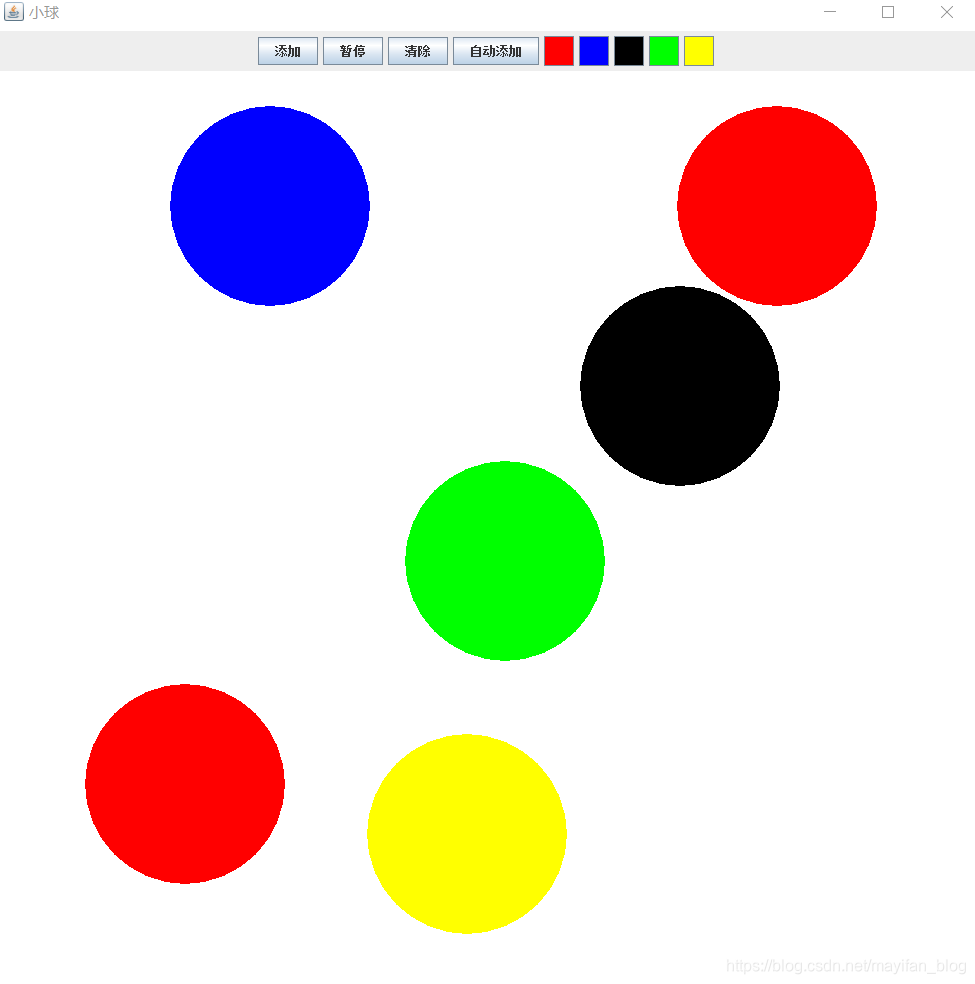





 扫一扫
扫一扫


 2062
2062

 被折叠的 条评论
为什么被折叠?
被折叠的 条评论
为什么被折叠?
 到【灌水乐园】发言





