


 本文介绍了Golang的Echo框架,包括项目初始化、安装、路由创建、自定义方法、静态资源管理、数据绑定、Cookie设置以及模板渲染的基本用法。
好久没有更新过了,今年年底特别的忙,不知道为啥,太忙了简直,抽空出来赶紧更新一篇关于golang的文章,本次主将的是即Gin框架和Beego框架之后的有一个框架,叫 Echo框架
学习过PHP的同学肯定对这个词不陌生,在PHP中,这个是输出数据的一个函数,然而本次讲的Echo和PHP中echo没有半毛钱关系,这是一个Golang的框架,后面我们来仔细讲解一下Echo框架
1.项目初始化:
和前面几个框架一样,首先需要使用gorm命令初始化项目:go mod init 项目名称
2.安装echo框架:
命令:go get -u github.com/labstack/echo/v4
3.创建 Echo 项目:
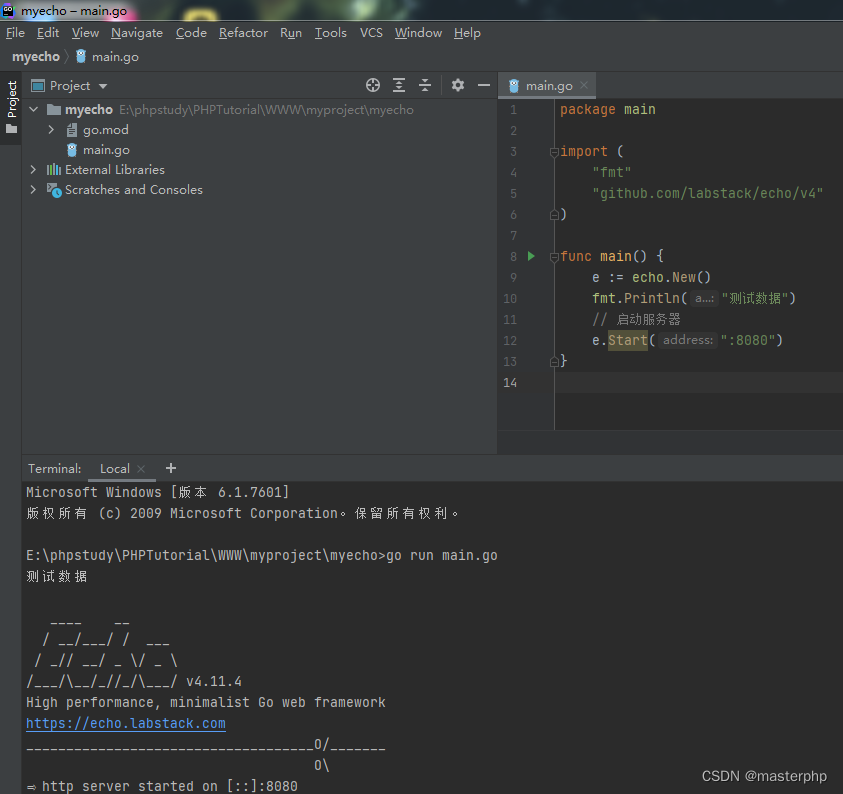 创建并运行文件,看到如图所示案例则表示Echo框架已经安转并运行成功
4.创建路由:
func main() {
e := echo.New()
fmt.Println("测试数据")
e.GET("/index", func(c echo.Context) error {
return c.String(200, "Hello, World!")
})
// 启动服务器
e.Start(":8080")
}
输出结果:Hello, World!
5.自定义方法:
func main() {
   e := echo.New()
   fmt.Println("测试数据")
   //定义GET方法
   e.GET("/index", func(c echo.Context) error {
      return c.String(200, "Hello, World!")
   })
   //定义POST方法
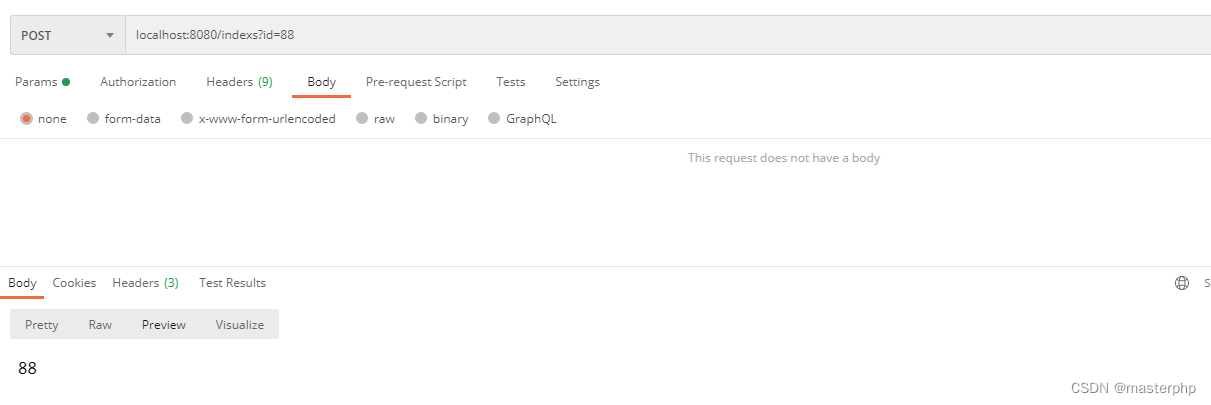
   e.POST("/indexs",indexs)
   // 启动服务器
   e.Start(":8080")
}


//定义方法
func indexs(c echo.Context) error {
   id := c.QueryParam("id")
   return c.String(200, id)
}
6.定义资源路径:
在页面或者引入资源包的时候需要定义一个资源文件夹,里面存放JS,CSS,图片等一系列的静态资源,那么我们引用的时候需要使用相对路径或者绝对路径,那么我们就需要定义一个路径,来实现引用静态资源:比如 static 目录下的任何文件都会被访问。例如,一个访问 /static/js/main.js 的请求会匹配到 static/js/main.js 这个文件
e.Static("/static", "static")
7.数据绑定:Gin框架中我们介绍过了ShouldBind绑定,在Echo框架中就不能使用了,应该使用Bind来绑定数据到结构体:
//定义结构体 (注意:form 和 query 的值与url里面的值一定保持一致,否则接受不到参数)
type User struct {
    Name  string `json:"name" xml:"name" form:"name" query:"name"`
    Sex  string `json:"sex" xml:"sex" form:"sex" query:"sex"`
    Age int `json:"age" xml:"age" form:"age" query:"age"`
}

//数据绑定
e.GET("/users:name:age", func(c echo.Context) error {
    u := new(User)
    c.Bind(u)
    return c.JSON(200, u)
})
启动服务:go run main.go
访问地址:http://localhost:8080/users?name=测试姓名&sex=女&age=28
结果:

8.设置Cookie:
//设置cookie
func writeCookie(c echo.Context) error {
    cookie := new(http.Cookie) //初始化对象
    cookie.Name = "mykey"   //设置key
    cookie.Value = "jay"       //设置value
    cookie.Expires = time.Now().Add(24 * time.Hour) //设置过期时间
    c.SetCookie(cookie)
    return c.String(http.StatusOK, "write a cookie")
}


//获取cookie
func readCookie(c echo.Context) error {
    cookie, err := c.Cookie("mykey")
    if err != nil {
        return err
    }
    return c.String(http.StatusOK, "read a cookie")
}
9.模板渲染:与前面的Gin框架和Beego框架不同,没有现成的方法, 所以需要自己定义
1.实现 echo.Renderer 接口
2.注册模版引擎
3.在控制器中渲染模版并返回 HTML 页面
//渲染函数定义
// 第一参数用于保存渲染模版后的结果
// 第二个参数是模版名字
// 第三个参数是传入模版的参数,可以是任意类型
// 第四个参数是echo.Context
Renderer interface {
Render(io.Writer, string, interface{}, Context) error
}
import (
    "html/template"
    "io"
    "log"
    "net/http"
    "github.com/labstack/echo"
)


//自定义的模版引擎 struct
type TemplateRenderer struct {
    templates *template.Template
}

// 实现接口,Render函数
func (t *TemplateRenderer) Render(w io.Writer, name string, data interface{}, c echo.Context) error {
    if viewContext, isMap := data.(map[string]interface{}); isMap {
        viewContext["reverse"] = c.Echo().Reverse
    }
    return t.templates.ExecuteTemplate(w, name, data)
}

//主函数
func main() {
  e := echo.New()
  renderer := &TemplateRenderer{
      templates: template.Must(template.ParseGlob("*.html")),
  }
  e.Renderer = renderer

  e.GET("/user", func(c echo.Context) error {
      return c.Render(http.StatusOK, "user.html", map[string]interface{}{
          "name": "测试yonghu",
      })
  }).Name = "foobar"//路由重命名

  log.Fatal(e.Start(":8000"))
}





 扫一扫
扫一扫


 820
820

 被折叠的 条评论
为什么被折叠?
被折叠的 条评论
为什么被折叠?
 到【灌水乐园】发言





