<template>
	<view>
		<menuDraw></menuDraw>
		<uni-group title="系统用户管理:用户管理" top="10" mode="card">
			<uni-table type="selection" :border="true">
				<uni-tr>
				 <uni-th align="center">昵称</uni-th>
				 <uni-th align="center">手机号</uni-th>
				 <uni-th align="center">状态</uni-th>
				 <uni-th align="center">操作</uni-th>
				</uni-tr>
				<uni-tr v-for="user in userList" >
				 <uni-td >{{user.nickname}}</uni-td>
				 <uni-td >{{user.phone}}</uni-td>
				 <uni-td align="center">
				  <text v-if="user.isactive==1">已激活</text>
				  <text style="color: red;" v-if="user.isactive==2" >已停用</text>
				 </uni-td>
				 <uni-td align="center">
				  <button class="uni-button" size="mini" type="primary">修改</button>
				  <button class="uni-button" size="mini" type="warn" @click="deleteUser(user.id)" style="margin-left:80rpx;">删除</button>
				 </uni-td>
				</uni-tr>
			</uni-table>
			<uni-pagination :current="pageIndex"  :pageSize="pageSize" :total="pageTotle"  @change="pageChange" />
		</uni-group>
	</view>
</template>

<script>
import menuDraw from '../tempplate/menu_draw.vue'
	export default{
		components:{
			menuDraw
		},
		data(){
			return{
				userList:[],//用户数据集合
				pageIndex:1,//分页器页码
				pageSize:10,//每页显示数据的条数
				pageTotle:0//分页器数据总条数
			}
		},
		/*当页面显示是触发*/
		onShow() {
			this.requsetUserList();
		},
		//点击分页器的监听函数
		methods:{
			/*请求用户列表*/
			requsetUserList(){
				uni.request({
					url: 'http://localhost:8070/user/getAll/'+this.pageIndex+'/'+this.pageSize, //仅为示例,并非真实接口地址。
					success: (res) => {
					    console.log(res.data);
				     this.userList=res.data.data;
					 this.pageTotle=res.data.rows;
					 }
				});
			},
			pageChange(e){
				this.pageIndex=e.current;
				this.requsetUserList();
			},
			deleteUser(e){
				uni.request({
					url: 'http://localhost:8070/user/remove/'+e, //仅为示例,并非真实接口地址。
					success: (res) => {
					   this.requsetUserList();
					 }
				});
			}

		}
	}
</script>

<style>

</style>
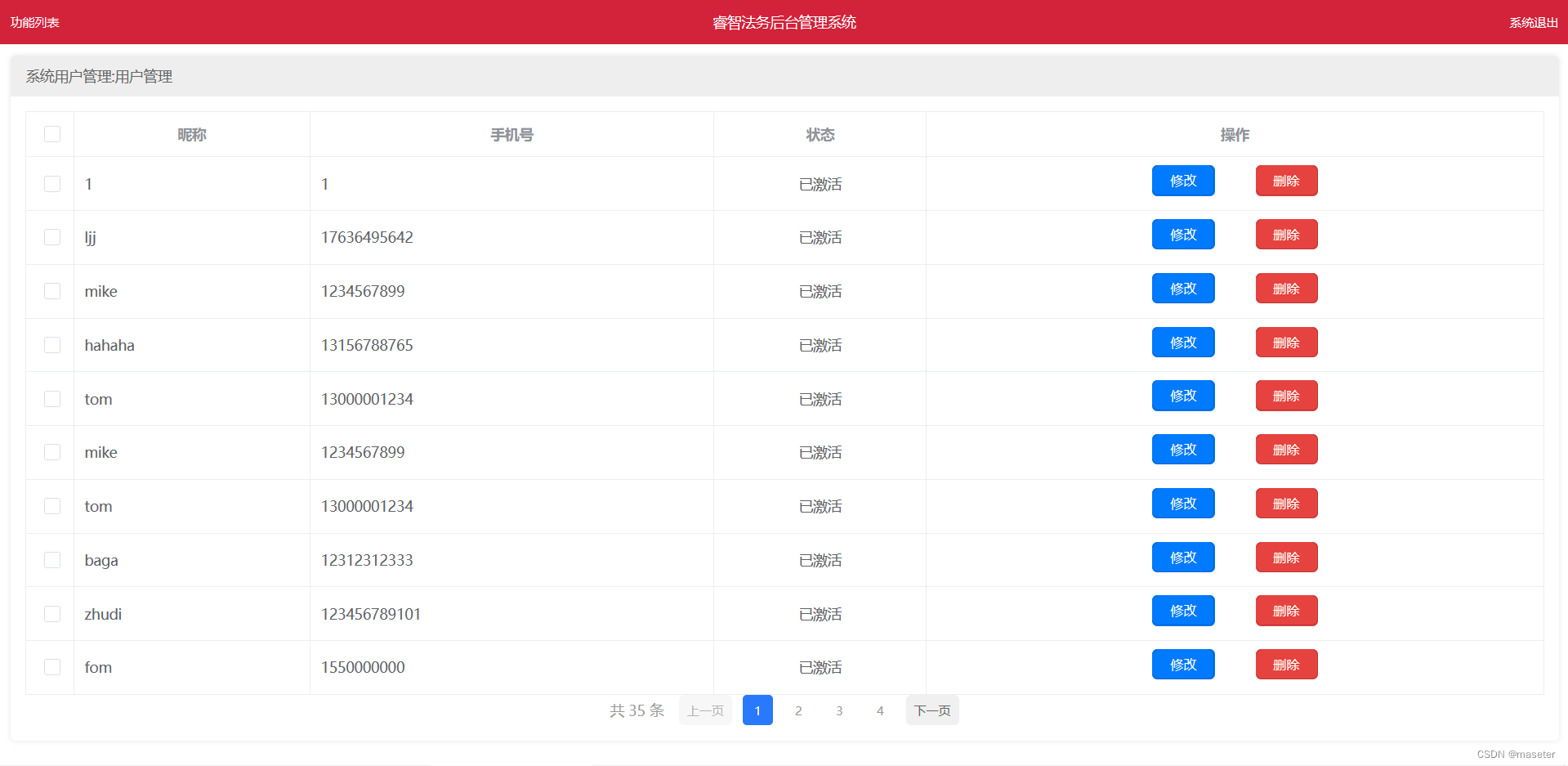
效果:
同过分页列表展示所有的用户,删除用户
添加用户
<template>
	<view style="width: 350rpx;margin-left: auto;margin-right: auto;margin-top: 80rpx;">
		 <uni-forms :modelValue="userData" >
		 	手机号:<input v-model="userData.phone" type="number" placeholder="请输入手机号" singleline="true"  class="input_str"/>
		 	密码:<input v-model="userData.pwd" type="password" placeholder="请输入密码" singleline="true" class="input_str"/>
			昵称:<input v-model="userData.nickName" type="text" placeholder="请输入呢称" singleline="true" class="input_str"/>
		    <button type="primary" size="mini" @click="doLogin" >注册</button>
			</uni-popup>
		 </uni-forms>
	</view>
</template>

<script>
	export default{
		data(){
			return{
				userData:{
					phone:'',
					pwd:'',
					nickName:'',
				}
			}
		},
		methods:{
			doLogin(){
				uni.request({
					url: 'http://localhost:8070/user/regedit/'+this.userData.phone+'/'+this.userData.pwd+'/'+this.userData.nickName, //仅为示例,并非真实接口地址。
					success: (res) => {
					    console.log(res.data);
						if(res.data.code==200){
							uni.redirectTo({
								url: '../user/user'
							});
						}else{
							this.open();
						}
					 }
				});
			}
		}
	}
</script>

<style>
	.input_str{
		border:1px solid #000000;
		border-radius: 5rpx;
		height: 30px;
		padding: 10rpx;
		margin-bottom: 15rpx;
	}
</style>
效果
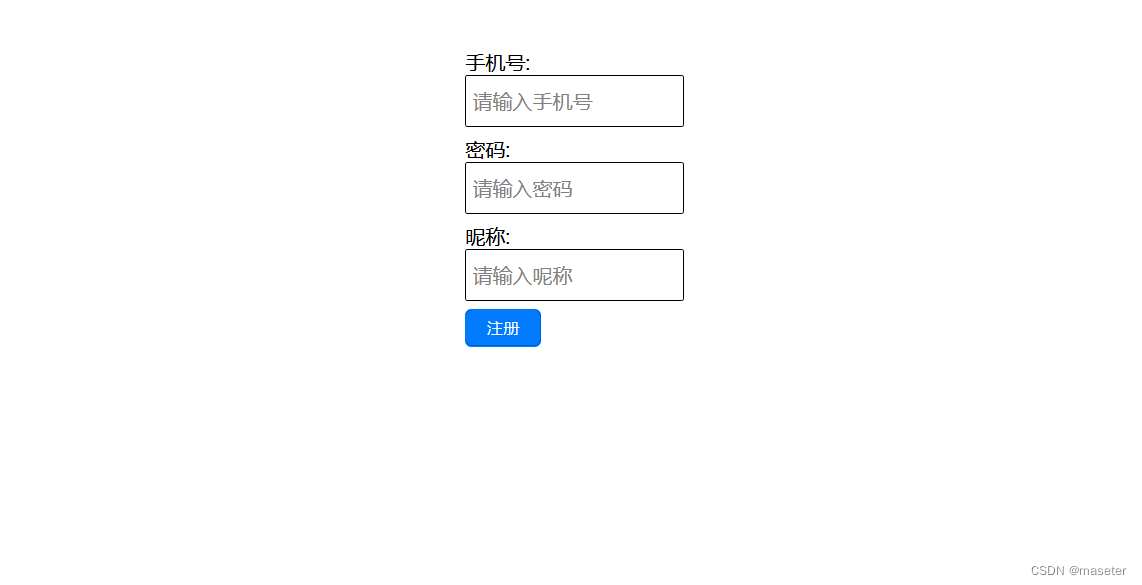


 这是一个使用Vue.js实现的用户管理系统,包括用户列表的分页展示、删除功能以及用户注册界面。用户列表中展示了昵称、手机号和状态,支持修改和删除操作。用户注册则需要输入手机号、密码和昵称,注册成功后会跳转到用户列表页面。





 扫一扫
扫一扫


 被折叠的 条评论
为什么被折叠?
被折叠的 条评论
为什么被折叠?
 到【灌水乐园】发言





