



 本文介绍在SpringBoot项目中,如何解决@Autowired注解引发的IDE警告问题,通过调整IntelliJ IDEA的设置来消除@Autowired注解的错误提示,具体步骤为:Preferences->Editor->Inspections->Spring->Severtiy,将spring的检验等级改为Warning。
在搭建Springboot项目中发现使用注解@Autowired 会提示类似报错的红色下划线,但是项目编译没问题,虽然不影响使用,但是看着未免难受:
@RequestMapping("/cms")
@RestController
public class MemberController {

    @Autowired
    private WeiXinService weiXinService;
    @Autowired
    private AuthenticationService authenticationService;

    private Logger logger = LoggerFactory.getLogger(MemberController.class);
    ...
    ...
}
网上有人说 删除facets下spring就可以了,但是仔细分析,这应该只是提示方面的问题,应该修改下配置就好;经过查找最后发现比较合适的方法:
Preferences -> Editor -> Inspections -> Spring -> Severtiy
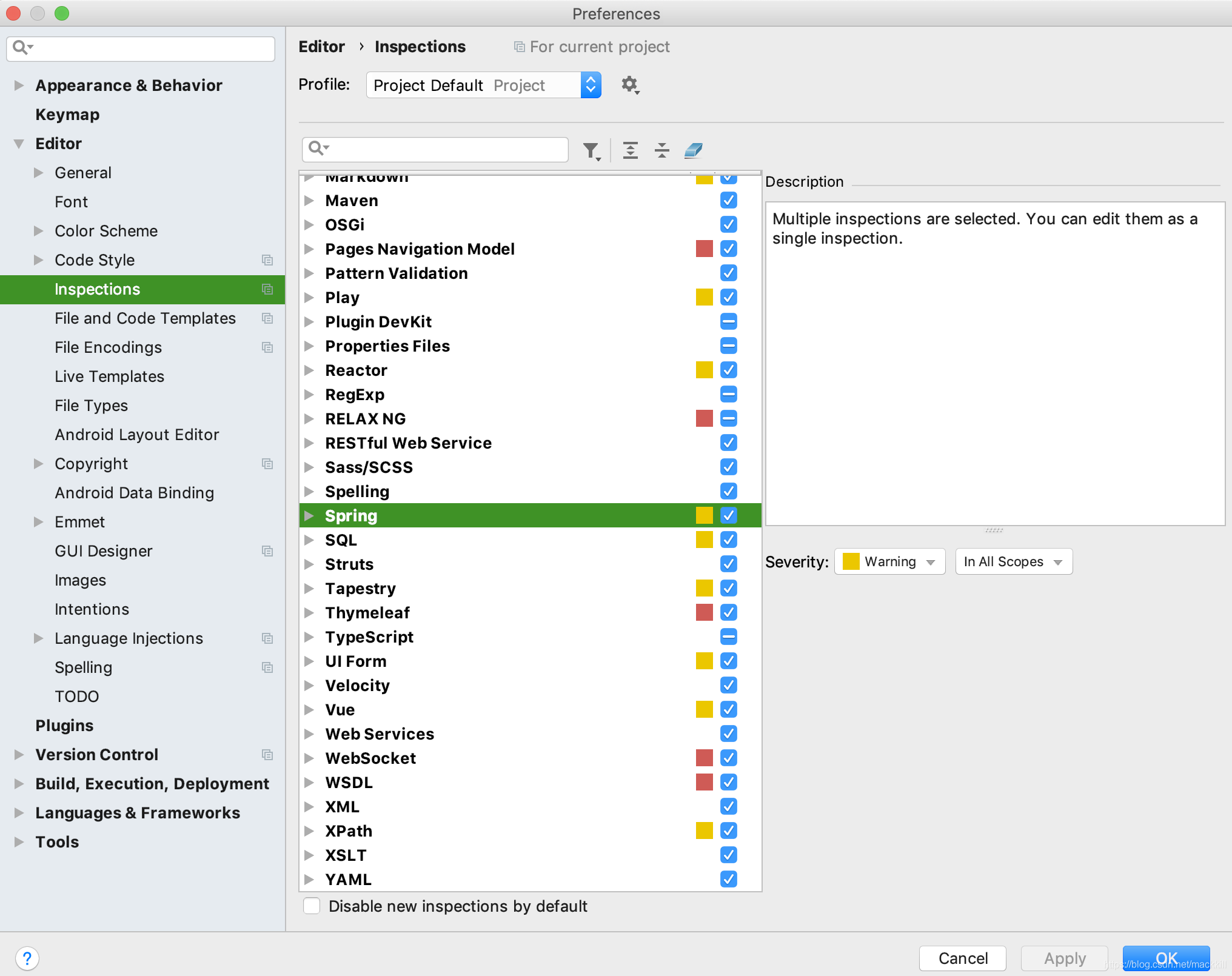
在设置里面修改spring的检验等级就好了,这里改为Warning。





 扫一扫
扫一扫


 2076
2076

 被折叠的 条评论
为什么被折叠?
被折叠的 条评论
为什么被折叠?
 到【灌水乐园】发言





