日常开发记录-npm WARN logfile could not be created: Error: EPERM: operation not permitted, open 'D:\nodejs...

本文介绍了如何解决npm权限问题,通过修改node_cache和node_global的路径以避免占用C盘空间,并提供详细步骤指导,包括设置自定义node配置、配置淘宝镜像、检查配置信息以及更新环境变量。此外,还提到了在遇到配置问题时的解决办法。

报错原因:npm 无权限
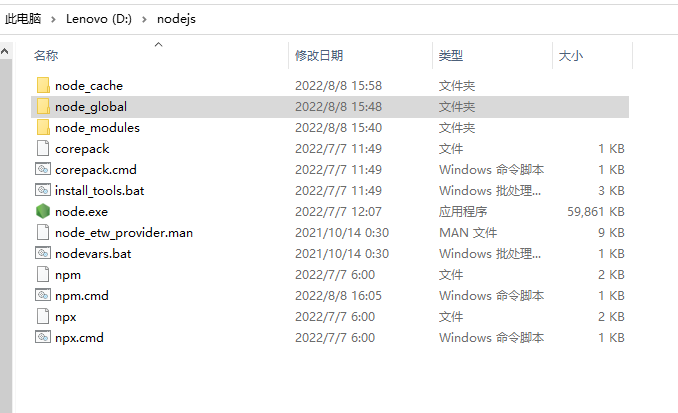
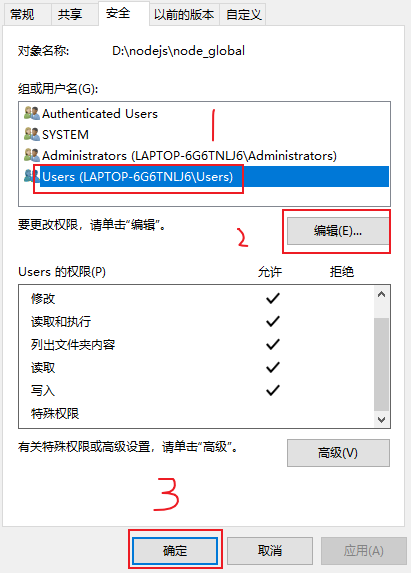
node_cache node_modules文件夹右击【属性】->【安全】-> 【编辑】
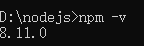
 最后cmd中检验一遍
 参考作者链接:http://t.csdn.cn/fhLr4

自定义node配置:

npm config set prefix "D:\nodejs\node_global" // 该配置加上系统环境变量配置用于后面使用vue时能够直接在命令行中使用,不做修改默认指向c盘的用户目录下,占用C盘空间

npm config set cache "D:\nodejs\node_cache" // 该配置用于设定node下载时指定下载的第一地点在何处,为后续下载相关依赖时先从这里查询,不做修改默认指向c盘的用户目录下,占用C盘空间

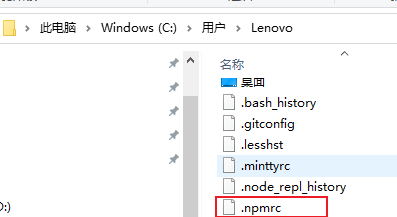
 

 如果配置不起作用或者配置总出错,可以删除.npmrc文件重新配置,或进入文件进行编辑想要的配置

配置淘宝镜像和cnpm:

npm i cnpm -g --registry=https://registry.npm.taobao.org

npm config get registry // 查看配置信息

 配置node的变量路径:
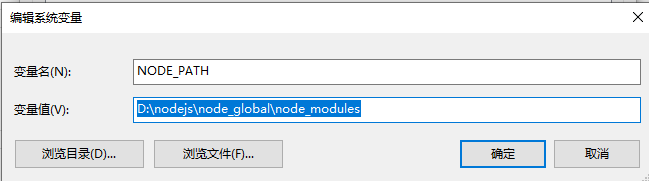
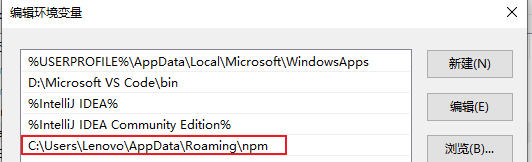
配置node第三方命令地址:

在“用户变量”这一栏,找一个叫Path的变量。
其中有一个地址是用户目录\AppData\Roaming\npm,将其删除并且替换,其值为D:\nodejs\node_global\node_modules

至此,node的基本环境变量配置成功。

C:\Users\76805>npm install express -g npm WARN logfile could not create logs-dir: Error: EPERM: operation not permitted, mkdir 'C:\Program Files\nodejs\node_cache\_logs' npm WARN logfile could not be created: Error: ENOENT: no such file or directory, open 'C:\Program Files\nodejs\node_cache\_logs\2025-08-17T17_25_44_833Z-debug-0.log' npm WARN logfile could not create logs-dir: Error: EPERM: operation not permitted, mkdir 'C:\Program Files\nodejs\node_cache\_logs' npm WARN logfile could not be created: Error: ENOENT: no such file or directory, open 'C:\Program Files\nodejs\node_cache\_logs\2025-08-17T17_25_45_352Z-debug-0.log' npm ERR! code EPERM npm ERR! syscall mkdir npm ERR! path C:\Program Files\nodejs\node_cache\_cacache npm ERR! errno -4048 npm ERR! Error: EPERM: operation not permitted, mkdir 'C:\Program Files\nodejs\node_cache\_cacache' npm ERR! [Error: EPERM: operation not permitted, mkdir 'C:\Program Files\nodejs\node_cache\_cacache'] { npm ERR! errno: -4048, npm ERR! code: 'EPERM', npm ERR! syscall: 'mkdir', npm ERR! path: 'C:\\Program Files\\nodejs\\node_cache\\_cacache' npm ERR! } npm ERR! npm ERR! The operation was rejected by your operating system. npm ERR! It's possible that the file was already in use (by a text editor or antivirus), npm ERR! or that you lack permissions to access it. npm ERR! npm ERR! If you believe this might be a permissions issue, please double-check the npm ERR! permissions of the file and its containing directories, or try running npm ERR! the command again as root/Administrator. npm ERR! Log files were not written due to an error writing to the directory: C:\Program Files\nodejs\node_cache\_logs npm ERR! You can rerun the command with `--loglevel=verbose` to see the logs in your terminal
最新发布
08-19
评论
添加红包

请填写红包祝福语或标题

红包个数最小为10个

红包金额最低5元

当前余额3.43前往充值 >
需支付:10.00
成就一亿技术人!
领取后你会自动成为博主和红包主的粉丝 规则
hope_wisdom
发出的红包
实付
使用余额支付
点击重新获取
扫码支付
钱包余额 0

抵扣说明:

1.余额是钱包充值的虚拟货币,按照1:1的比例进行支付金额的抵扣。
2.余额无法直接购买下载,可以购买VIP、付费专栏及课程。

余额充值