 CSS绝对定位实现超链接底部居中



 这个博客展示了如何使用CSS的absolute定位将超链接置于一个带有灰色背景的方块底部居中。代码示例中,`.box`类定义了一个200px*200px的方块,`a`元素被设置为绝对定位,底部和左侧距离为0,宽度和高度分别为50px,实现底部居中和全宽的效果。
<!DOCTYPE html>
<html lang="en">

<head>
    <meta charset="UTF-8">
    <meta http-equiv="X-UA-Compatible" content="IE=edge">
    <meta name="viewport" content="width=device-width, initial-scale=1.0">
    <title>Document</title>
    <style>
        .box {
            position: relative;
            margin: 0 auto;
            width: 200px;
            height: 200px;
            background-color: #ccc;
        }

        a {
            /* 绝对定位的行内元素可以直接设置宽高 */
            position: absolute;
            bottom: 0;
            left: 0;
            width: 50px;
            height: 50px;
            line-height: 50px;
            color: black;
            background-color: rgb(142, 165, 142);
        }

        a,
        a:hover {
            text-decoration: none;
        }
    </style>
</head>

<body>
    <div class="box">
        <a href="#">超链接</a>
    </div>
</body>

</html>
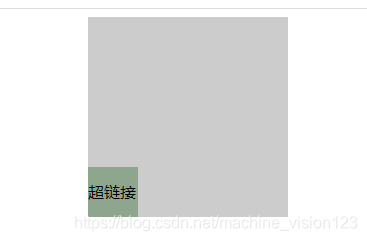
代码运行效果





 扫一扫
扫一扫


 579
579

 被折叠的 条评论
为什么被折叠?
被折叠的 条评论
为什么被折叠?
 到【灌水乐园】发言





