



 本文介绍了如何使用Vue.js实现在线答题系统,包括后台处理计分逻辑和前端展示题目及用户答案,同时展示了答题和回显得分的效果图。
这里是后台处理得计分,前台这是渲染题目,以及回显用户答得题
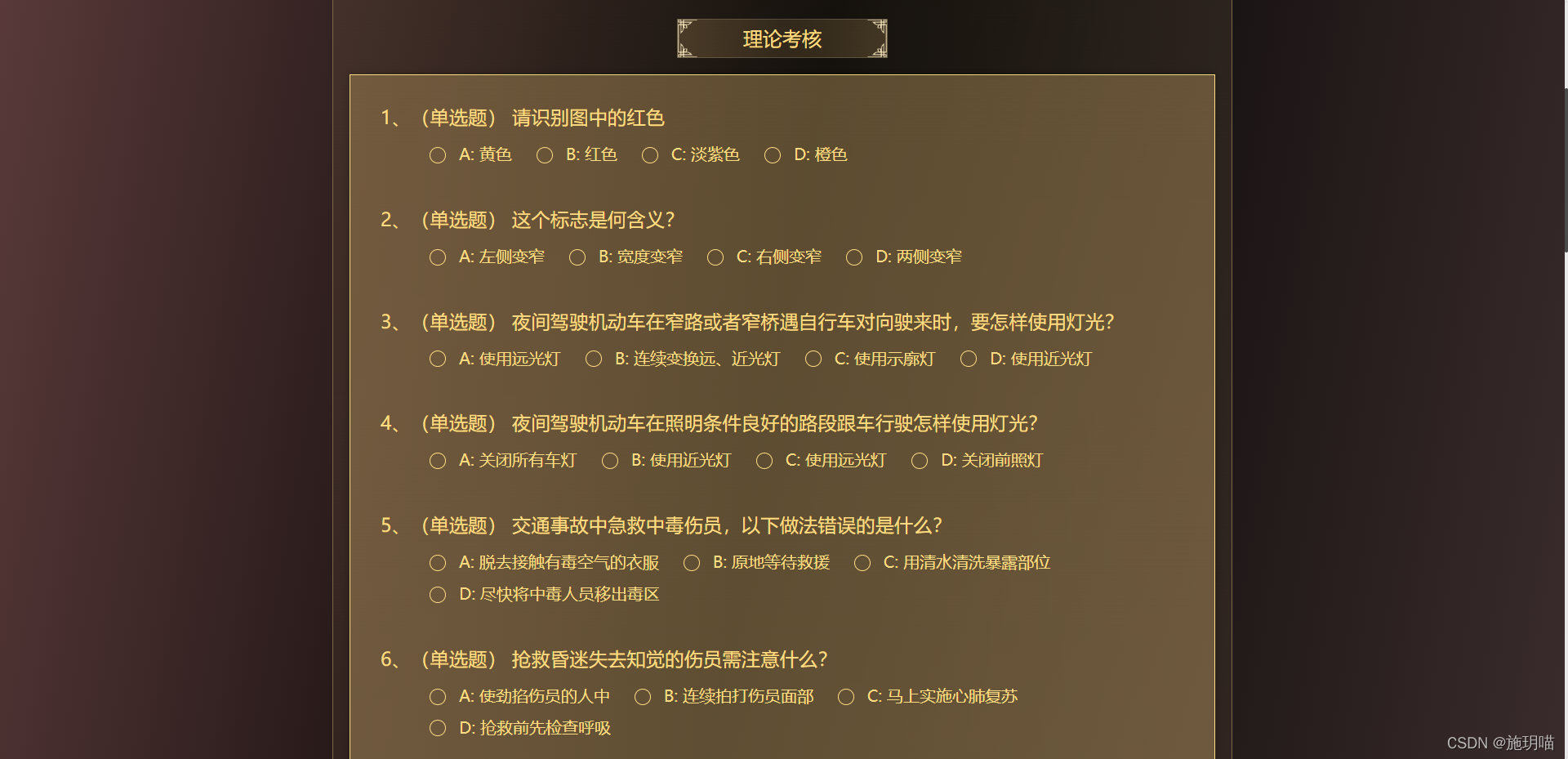
答题
后台数据格式


    <ul>
        <li v-for="(i, index1) in arrlist.pqList" :key="index1">
          <h3>
            <span>{{ index1 + 1 }}、</span>
            <div class="newtuexam_box">
              <span v-show="i.questionBankType == '1'">(单选题)</span>
              <span v-show="i.questionBankType == '2'">(多选题)</span>
              <span v-show="i.questionBankType == '3'">(判断题)</span>
              {{ i.subjectContent }}
            </div>
          </h3>
            <!-- 单选,判断 -->
          <div v-show="i.questionBankType !== '2'" style="margin-left: 60px">
            <el-radio-group v-model="radioList[index1]">
              <el-radio
                v-for="(j, index2) in i.optionAll"
                :key="index2"
                :label="j.pqaId"
                @change="handleRadioChanges(j)"
              >
                {{ j.answerContent }}
              </el-radio>
            </el-radio-group>
          </div>
            <!-- 多选题 -->
          <div v-show="i.questionBankType == '2'" style="margin-left: 60px">
            <el-checkbox-group v-model="checkboxList">
              <el-checkbox
                v-for="(x, index2) in i.optionAll"
                :key="index2"
                :label="x.pqaId"
                @change="handleCheckboxChanges(x)"
              >
                {{ x.answerContent }}
              </el-checkbox>
            </el-checkbox-group>
          </div>
        </li>
      </ul>

      <div class="newtuexam_cont_btn" @click="getsubmit">提交试卷</div>
import { createPaper, paperInfo, inspectionPaper } from "@/api/newtu";
export default {
  components: {},
  data() {
    return {
      arrlist: {},
      paperId: "",
      checkboxList: [],
      radioList: [],
      textForm: {
        answeredIds: [],
        pid: "0",
      },
      loading:true,
    };
  },
  created() {
    this.textForm.pid=this.$store.state.paperId;
    this.paperId=this.$store.state.paperId;
    this.getexam();
  },
  methods: {
    handleRadioChanges(e) {
      console.log(e);
      console.log(this.radioList);
    },
    handleCheckboxChanges(e) {
      console.log(e);
      console.log(this.checkboxList);
    },
    getexam() {
      paperInfo(this.paperId).then((res) => {
        if (res.code == 200) {
          this.arrlist = res.data;
          console.log(this.arrlist);
        }
      });
    },
    //提交试卷
    getsubmit() {
    //合并选的单选,多选,判断id
      this.textForm.answeredIds = this.radioList.concat(this.checkboxList);
      console.log(this.textForm.answeredIds);
      inspectionPaper(this.textForm).then((res) => {
        if (res.code == 200) {
          this.$store.commit("pid", res.data);
          this.$router.push("/newtuExamAnswer");
        }
      });
    },
  },
};
</script>
ul {
    width: 1060px;
    background: linear-gradient(
      180deg,
      rgba(164, 134, 84, 0.5) 0%,
      rgba(205, 173, 120, 0.5) 100%
    );
    border: 1px solid #ffdc82;
    box-sizing: border-box;
    box-shadow: 0px 0px 10px rgba(0, 0, 0, 0.25);
    margin: 20px auto 24px auto;
    padding-bottom: 35px;

    li {
      font-size: 20px;
      color: #ffdc82;
      padding-top: 35px;
      padding-left: 37px;
      h3 {
        margin-bottom: 20px;
        .newtuexam_box {
          display: inline-block;
          width: 93%;
          vertical-align: top;
        }
      }
      /deep/ .el-radio {
        margin-bottom: 15px;
      }
      /deep/ .el-radio__inner:hover {
        border-color: #ffdc82;
      }

      /deep/ .el-radio__label {
        color: #ffdc82;
        font-size: 20px;
      }
      /deep/ .el-radio__inner {
        border-color: #ffdc82;
        background: none;
        width: 20px;
        height: 20px;
      }
      /deep/.el-radio__input {
        vertical-align: sub;
      }
      /deep/ .el-radio__inner::after {
        width: 7px;
        height: 7px;
      }
      /deep/ .el-radio__input.is-checked + .el-radio__label {
        color: #fff;
      }
      /deep/ .el-radio__input.is-checked .el-radio__inner {
        border-color: #ffdc82;
        background: #ffdc82;
      }
      /deep/ .el-checkbox__input.is-checked .el-checkbox__inner,
      .el-checkbox__input.is-indeterminate .el-checkbox__inner {
        background-color: #ffdc82;
        border-color: #ffdc82;
      }
      /deep/ .el-checkbox__input {
        line-height: 0;
        vertical-align: top;
      }
      /deep/ .el-checkbox__inner::after {
        border: 2px solid #635136;
        border-left: 0px;
        border-top: 0px;
        height: 13px;
        left: 5px;
        position: absolute;
        top: 0px;
        width: 6px;
      }
      /deep/ .el-checkbox__label {
        color: #ffdc82;
        font-size: 20px;
      }
      /deep/ .el-checkbox {
        margin-bottom: 15px;
      }
      /deep/ .el-checkbox__inner:hover {
        border-color: #ffdc82;
      }
      /deep/ .el-checkbox__inner {
        border-color: #ffdc82;
        background: none;
        width: 20px;
        height: 20px;
      }
      /deep/ .el-checkbox__input.is-checked + .el-checkbox__label {
        color: #fff;
      }
    }
  }
  .newtuexam_cont_btn {
    width: 259px;
    height: 46px;
    cursor: pointer;
    font-size: 24px;
    line-height: 46px;
    text-align: center;
    color: #ffdc82;
    border-radius: 30px;
    border: 1px solid #ffdc82;
    margin: 24px auto;
  }
  .newtuexam_cont_btn:hover {
    background: linear-gradient(
      89.96deg,
      #a58654 0.03%,
      rgba(165, 134, 84, 0.6) 50.65%,
      #a58654 99.21%
    );
  }
效果图
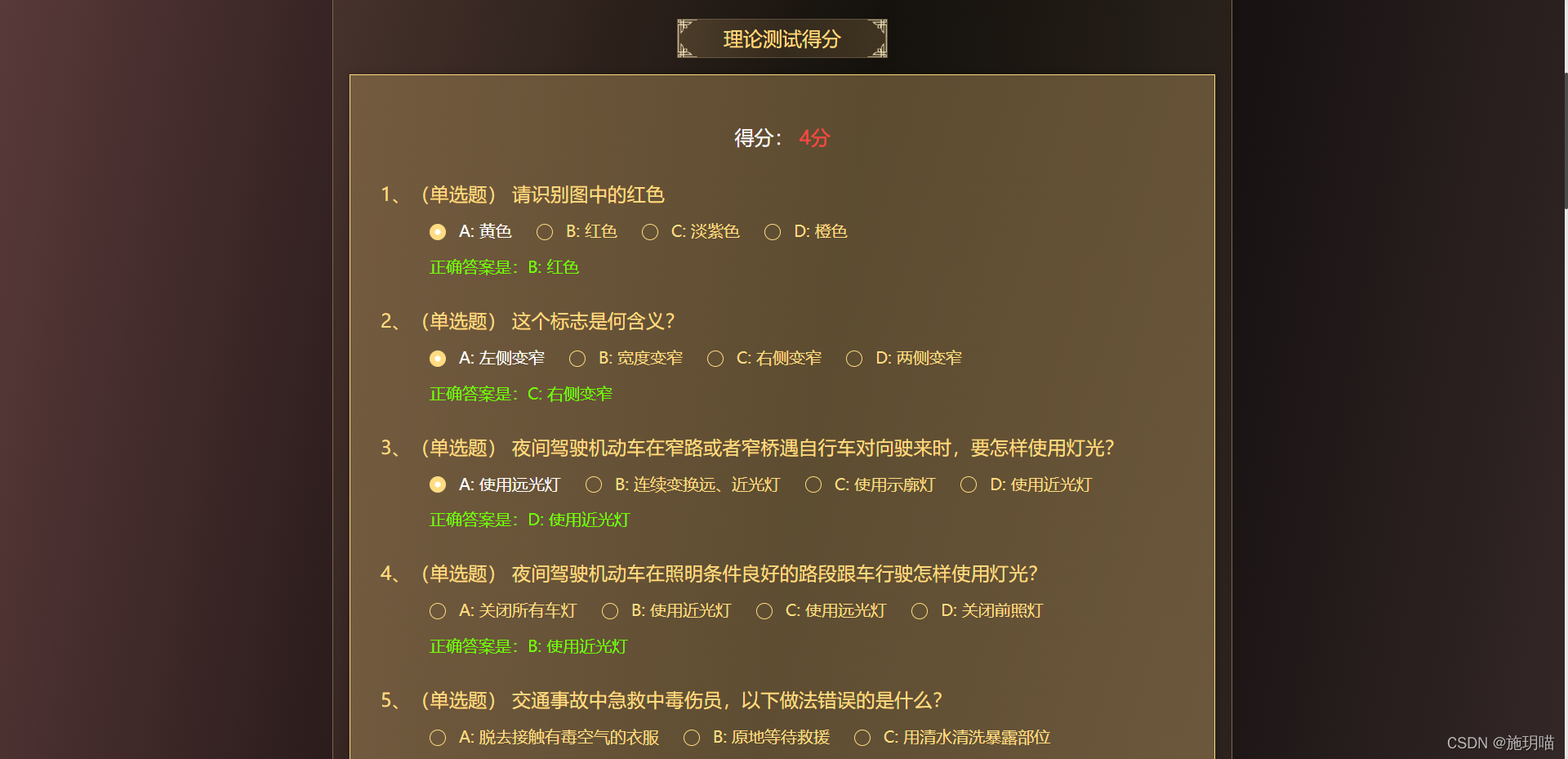
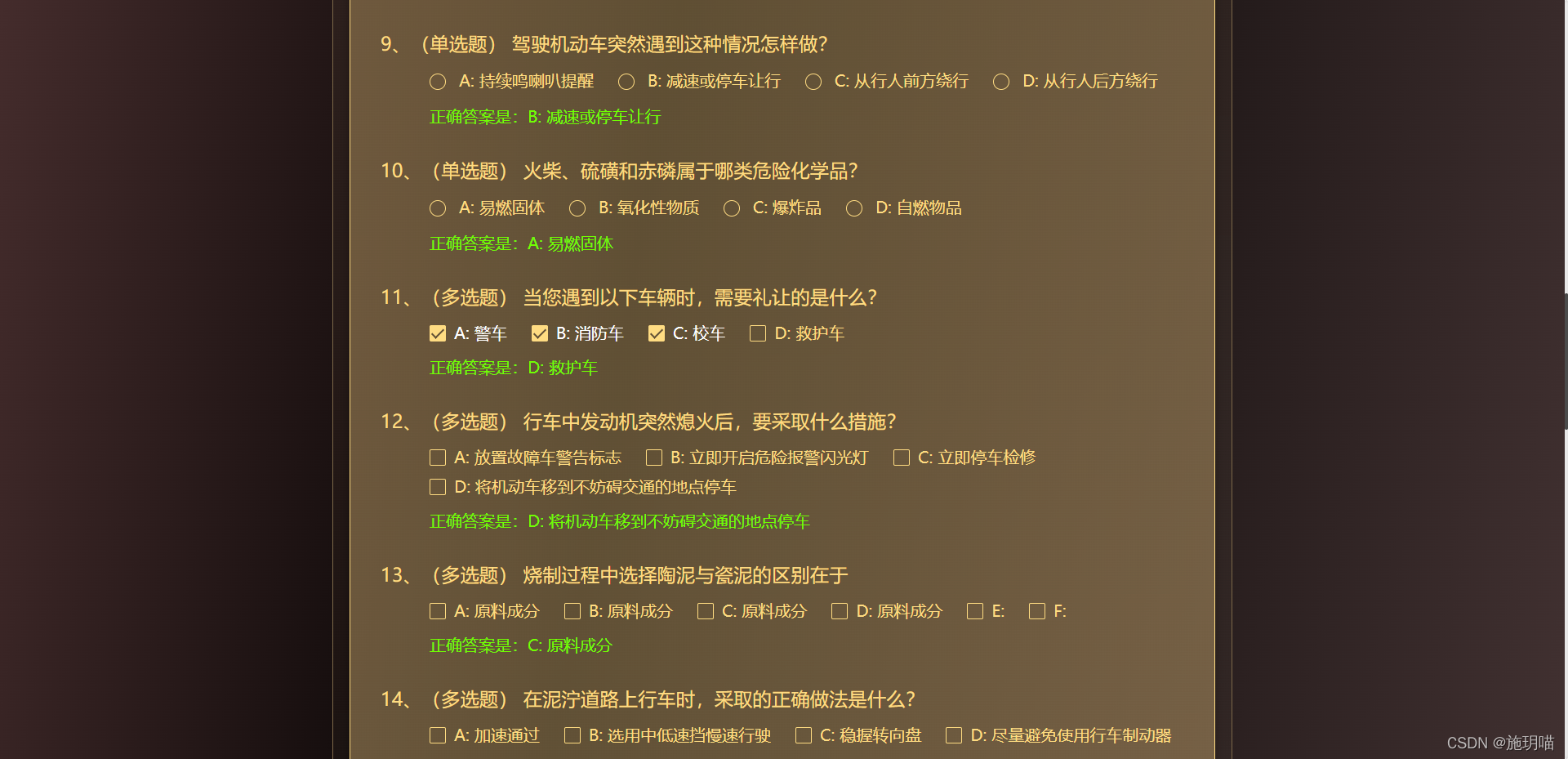
回显得分
 <ul>
        <p class="newtuexam_p1">
          <span>得分:</span>
          <i> {{ arrlist.objectiveScore }}分</i>
        </p>
        <li v-for="(i, index1) in arrlist.ownerPaperAll" :key="index1">
          <h3>
            <span>{{ index1 + 1 }}、</span>
            <div class="newtuexam_box">
              <span v-show="i.questionBankType == '1'">(单选题)</span>
              <span v-show="i.questionBankType == '2'">(多选题)</span>
              <span v-show="i.questionBankType == '3'">(判断题)</span>
              {{ i.subjectContent }}
            </div>
          </h3>
          <div v-show="i.questionBankType !== '2'" style="margin-left: 60px">
            <el-radio-group v-model="i.radioList">
              <el-radio
                v-for="(j, index2) in i.pqaList"
                :key="index2"
                :label="j.pqaId"
              >
                {{ j.answerContent }}
              </el-radio>
            </el-radio-group>
            <p class="newtuexam_p2">正确答案是:{{ i.answer }}</p>
          </div>
          <div v-show="i.questionBankType == '2'" style="margin-left: 60px">
            <div v-if="i.checkboxList">
            <el-checkbox-group  v-model="i.checkboxList">
              <el-checkbox
                v-for="(x, index2) in i.pqaList"
                :key="index2"
                :label="x.pqaId"
              >
                {{ x.answerContent }}
              </el-checkbox>
            </el-checkbox-group>
             <p class="newtuexam_p2">正确答案是:{{ i.answer }}</p>
            </div>

          </div>
        </li>
      </ul>
import { examinationResults,getILabUrl } from "@/api/newtu";
export default {
  components: {},
  data() {
    return {
      arrlist: [],
      paperId: "",
      // checkboxList: [],
      // radioList: [],
      textForm: {
        answeredIds: [],
        pid: "0",
      },
    };
  },
  created() {
    this.paperId = this.$store.state.pid;
    this.getexam();
  },
  methods: {
    // handleRadioChanges(e) {
    //   console.log(e);
    //   console.log(this.radioList);
    // },
    // handleCheckboxChanges(e) {
    //   console.log(e);
    //   console.log(this.checkboxList);
    // },
    getexam() {
      examinationResults(this.paperId).then((res) => {
        if (res.code == 200) {
          this.arrlist = res.data;
          this.arrlist.ownerPaperAll.map((i) => {
            //单选,判断
            if (i.questionBankType !== '2') {
              i.pqaList.map((j) => {
                if (j.checked == "1") {
                  this.$set(i, "radioList", j.pqaId);
                }
                if (j.isRight == "1") {
                  this.$set(i, "answer", j.answerContent);
                }
              });
            } else if (i.questionBankType == '2'){
              console.log('多选题');
              //多选题
              this.$set(i, "checkboxList", []);
              i.pqaList.map((j) => {
                if (j.checked == "1") {
                  i.checkboxList.push(j.pqaId);
                }
                if (j.isRight == "1") {
                  this.$set(i, "answer", j.answerContent);
                }
                // this.$set(j, "checked", false);
              });
            }
          });
          console.log(this.arrlist.ownerPaperAll);
        }
      });
    },


  },
};
</script>
 ul {
    width: 1060px;
    background: linear-gradient(
      180deg,
      rgba(164, 134, 84, 0.5) 0%,
      rgba(205, 173, 120, 0.5) 100%
    );
    border: 1px solid #ffdc82;
    box-sizing: border-box;
    box-shadow: 0px 0px 10px rgba(0, 0, 0, 0.25);
    margin: 20px auto 24px auto;
    padding-bottom: 35px;
    .newtuexam_p1 {
      text-align: center;
      padding-top: 58px;
      span {
        font-size: 24px;
        line-height: 36px;
        color: #ffffff;
      }
      i {
        font-size: 24px;
        line-height: 36px;
        color: #ff4646;
      }
    }
    li {
      font-size: 20px;
      color: #ffdc82;
      padding-top: 35px;
      padding-left: 37px;
      .newtuexam_p2 {
        font-size: 20px;
        line-height: 30px;
        color: #70ff00;
      }
      h3 {
        margin-bottom: 20px;
        .newtuexam_box {
          display: inline-block;
          width: 93%;
          vertical-align: top;
        }
      }
      /deep/ .el-radio {
        margin-bottom: 15px;
      }
      /deep/ .el-radio__inner:hover {
        border-color: #ffdc82;
      }

      /deep/ .el-radio__label {
        color: #ffdc82;
        font-size: 20px;
      }
      /deep/ .el-radio__inner {
        border-color: #ffdc82;
        background: none;
        width: 20px;
        height: 20px;
      }
      /deep/.el-radio__input {
        vertical-align: sub;
      }
      /deep/ .el-radio__inner::after {
        width: 7px;
        height: 7px;
      }
      /deep/ .el-radio__input.is-checked + .el-radio__label {
        color: #fff;
      }
      /deep/ .el-radio__input.is-checked .el-radio__inner {
        border-color: #ffdc82;
        background: #ffdc82;
      }
      /deep/ .el-checkbox__input.is-checked .el-checkbox__inner,
      .el-checkbox__input.is-indeterminate .el-checkbox__inner {
        background-color: #ffdc82;
        border-color: #ffdc82;
      }
      /deep/ .el-checkbox__input {
        line-height: 0;
        vertical-align: top;
      }
      /deep/ .el-checkbox__inner::after {
        border: 2px solid #635136;
        border-left: 0px;
        border-top: 0px;
        height: 13px;
        left: 5px;
        position: absolute;
        top: 0px;
        width: 6px;
      }
      /deep/ .el-checkbox__label {
        color: #ffdc82;
        font-size: 20px;
      }
      /deep/ .el-checkbox {
        margin-bottom: 15px;
      }
      /deep/ .el-checkbox__inner:hover {
        border-color: #ffdc82;
      }
      /deep/ .el-checkbox__inner {
        border-color: #ffdc82;
        background: none;
        width: 20px;
        height: 20px;
      }
      /deep/ .el-checkbox__input.is-checked + .el-checkbox__label {
        color: #fff;
      }
    }
  }
效果图





 扫一扫
扫一扫


 4413
4413

 被折叠的 条评论
为什么被折叠?
被折叠的 条评论
为什么被折叠?
 到【灌水乐园】发言





