


 本文介绍了iOS中用于图片加载的第三方库SDWebImage,它能为UIKit控件提供网络图片下载和缓存功能,具有异步加载、自动缓存清理等特点。还阐述了其调用流程,并对UIImageView+WebCache、UIView+WebCache等五层源码进行了详细分析。
文章目录
一、SDWebIamge简介
SDWebImage是iOS中提供图片加载的第三方库,可以给UIKit框架中的控件比如UIImageView和UIButton提供从网络上下载和缓存的图片。它的接口十分简洁,如果给UIImageView控件添加图片可以使用如下代码:
[imageView sd_setImageWithURL:imageUrl placeholderImage:nil];//第一个参数是图片的URL第二个参数是占位图片加载失败时显示
如果给UIButton添加图片可以使用如下代码:
[button sd_setImageWithURL:imageUrl forState:UIControlStateNormal placeholderImage:nil];//第一个参数是图片的URL,第二个参数是按钮状态,第三个参数是占位图片,加载失败时显示
SDWebImage有下面一些常见的功能:
- 通过异步方式加载图片
- 可以自动缓存到内存和磁盘中,并且可以自动清理过期的缓存
- 支持多种的图片格式包括jpg、jepg、png等,同时还支持多种动图格式包括GIF、APNG等
- 同一图片的URL不会重复下载
- 对失效的图片URL不会重复尝试下载
- 在子线程中进行操作,确保不会阻塞主线程
二、SDWebImage的调用流程
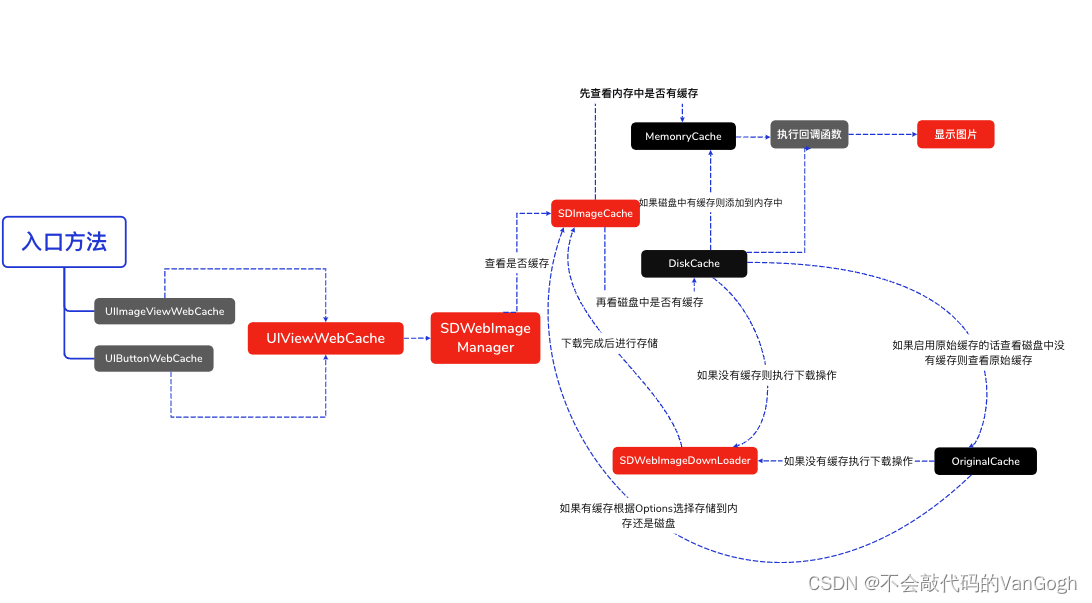
当使用[imageView sd_setImageWithURL:imageUrl placeholderImage:nil];方法时,会执行UIImageView+WebCache类中的相应方法,当使用[button sd_setImageWithURL:imageUrl forState:UIControlStateNormal placeholderImage:nil];方法时会执行UIBUtton+WebCache类中的相应方法,但是最后都会调用UIView+WebCache类中的- (nullable id<SDWebImageOperation>)sd_internalSetImageWithURL:(nullable NSURL *)url placeholderImage:(nullable UIImage *)placeholder options:(SDWebImageOptions)options context:(nullable SDWebImageContext *)context setImageBlock:(nullable SDSetImageBlock)setImageBlock progress:(nullable SDImageLoaderProgressBlock)progressBlock completed:(nullable SDInternalCompletionBlock)completedBlock {};方法。接着根据URL,通过SDWebImageManager的loadImageWithURL:options:context:progress:completed:方法加载图片,接着通过sd_setImageLoadOperation方法将operation加入到SDOperationsDictionary中。然后调用queryCacheOperationForKey方法进行查询图片缓存,通过查询内存和磁盘中是否有缓存,如果有则通过回调函数显示照片,如果没有则调用downloadImageWithURL:options:context:progress: completed:方法进行图片下载和缓存,最后显示图片。
SDWebImage源码分析
1.UIImageView+WebCache层
- (void)sd_setImageWithURL:(nullable NSURL *)url {


    [self sd_setImageWithURL:url placeholderImage:nil options:0 progress:nil completed:nil];
}

- (void)sd_setImageWithURL:(nullable NSURL *)url placeholderImage:(nullable UIImage *)placeholder {


    [self sd_setImageWithURL:url placeholderImage:placeholder options:0 progress:nil completed:nil];
}

- (void)sd_setImageWithURL:(nullable NSURL *)url placeholderImage:(nullable UIImage *)placeholder options:(SDWebImageOptions)options {


    [self sd_setImageWithURL:url placeholderImage:placeholder options:options progress:nil completed:nil];
}

- (void)sd_setImageWithURL:(nullable NSURL *)url placeholderImage:(nullable UIImage *)placeholder options:(SDWebImageOptions)options context:(nullable SDWebImageContext *)context {


    [self sd_setImageWithURL:url placeholderImage:placeholder options:options context:context progress:nil completed:nil];
}

- (void)sd_setImageWithURL:(nullable NSURL *)url completed:(nullable SDExternalCompletionBlock)completedBlock {


    [self sd_setImageWithURL:url placeholderImage:nil options:0 progress:nil completed:completedBlock];
}

- (void)sd_setImageWithURL:(nullable NSURL *)url placeholderImage:(nullable UIImage *)placeholder completed:(nullable SDExternalCompletionBlock)completedBlock {


    [self sd_setImageWithURL:url placeholderImage:placeholder options:0 progress:nil completed:completedBlock];
}

- (void)sd_setImageWithURL:(nullable NSURL *)url placeholderImage:(nullable UIImage *)placeholder options:(SDWebImageOptions)options completed:(nullable SDExternalCompletionBlock)completedBlock {


    [self sd_setImageWithURL:url placeholderImage:placeholder options:options progress:nil completed:completedBlock];
}

- (void)sd_setImageWithURL:(nullable NSURL *)url placeholderImage:(nullable UIImage *)placeholder options:(SDWebImageOptions)options progress:(nullable SDImageLoaderProgressBlock)progressBlock completed:(nullable SDExternalCompletionBlock)completedBlock {


    [self sd_setImageWithURL:url placeholderImage:placeholder options:options context:nil progress:progressBlock completed:completedBlock];
}

- (void)sd_setImageWithURL:(nullable NSURL *)url
          placeholderImage:(nullable UIImage *)placeholder
                   options:(SDWebImageOptions)options
                   context:(nullable SDWebImageContext *)context
                  progress:(nullable SDImageLoaderProgressBlock)progressBlock
                 completed:(nullable SDExternalCompletionBlock)completedBlock {


    [self sd_internalSetImageWithURL:url
                    placeholderImage:placeholder
                             options:options
                             context:context
                       setImageBlock:nil
                            progress:progressBlock
                           completed:^(UIImage * _Nullable image, NSData * _Nullable data, NSError * _Nullable error, SDImageCacheType cacheType, BOOL finished, NSURL * _Nullable imageURL) {


                               if (completedBlock) {


                                   completedBlock(image, error, cacheType, imageURL);
                               }
                           }];
}
不难发现上面的方法最后都会调用到下面这个方法,也就是基类方法。
//UIImageView+WebCache
- (void)sd_setImageWithURL:(nullable NSURL *)url
          placeholderImage:(nullable UIImage *)placeholder
                   options:(SDWebImageOptions)options
                  progress:(nullable SDWebImageDownloaderProgressBlock)progressBlock
                 completed:(nullable SDExternalCompletionBlock)completedBlock;
2.UIView+WebCache层
接着在上面的方法中又会调用到UIView+WebCache层的下面这个方法
/*
imageURL: NSURL 类型,指定了要加载图片的远程URL。这是图片请求的核心依据。
options: SDWebImageOptions 枚举类型,包含了多个可选标志位,用于控制图片加载的行为,如是否只从内存缓存加载、是否同步查询缓存、是否允许重定向、是否使用渐进式加载等。
progressBlock: SDWebImageDownloaderProgressBlock 类型,一个进度回调块,当图片下载过程中更新进度时会被调用,传递已下载数据量和总数据量。
completedBlock: SDWebImageCompletionBlock 类型,一个完成回调块,当图片加载成功、失败或被取消时会被调用。它接收以下参数:
image: 加载成功的UIImage对象,或在加载失败时为nil。
data: 图片对应的原始NSData对象,可能用于进一步处理或存储。
error: 如果加载失败,包含错误信息的NSError对象;否则为nil。
cacheType: 表示图片来源于哪种缓存类型的枚举值(内存、磁盘或无缓存)。
finished: 标记此次加载是否真正完成,即使加载失败,也可能因为有占位图而标记为YES。
imageURL: 当前请求的URL,与函数参数中的imageURL相同,提供上下文信息。
*/
- (void)sd_internalSetImageWithURL:(nullable NSURL *)url
                  placeholderImage:(nullable UIImage *)placeholder
                           options:(SDWebImageOptions)options
                      operationKey:(nullable NSString *)operationKey
                     setImageBlock:(nullable SDSetImageBlock)setImageBlock
                          progress:(nullable SDWebImageDownloaderProgressBlock)progressBlock
                         completed:(nullable SDExternalCompletionBlock)completedBlock;
上面这个函数主要目的是为控件如UIImageView、UIButton设置图片,处理从指定URL加载图片的相关逻辑,包括异步下载、缓存检查、下载操作、过渡动画应用以及完成回调的触发。
函数里有个
[self sd_cancelImageLoadOperationWithKey:validOperationKey];方法,是根据key取消当前操作,针对于比如cell中的UIImageView被复用的时候,首先需要根据key取消当前imageView上的下载或者缓存操作
3.SDWebManager层
在上面的方法中又会调用到SDWebmanager层的loadImageWithURL: options: context: progress: completed:方法,其具体实现细节如下:
/**
 * 加载指定URL的图像,支持多种选项、上下文以及进度和完成回调。
 *
 * @param url 图像URL,可为`nil`或无效。如果传入的是`NSString`类型,会自动转换为`NSURL`。若非`NSURL`类型,则置为`nil`。
 * @param options 加载选项,如缓存策略、重试失败图片等。
 * @param context 上下文信息字典,包含如回调队列、下载器、解码器等自定义设置。
 * @param progressBlock 图像加载进度回调,返回已加载的数据长度和总长度。
 * @param completedBlock 图像加载完成回调,返回加载结果(成功或失败)、图像、数据、缓存类型、URL等信息。
 * @return 返回一个`SDWebImageCombinedOperation`对象,可用于取消或查询加载状态。
 */
- (SDWebImageCombinedOperation *)loadImageWithURL:(nullable NSURL *)url
                                          options:(SDWebImageOptions)options
                                          context:(nullable SDWebImageContext *)context
                                         progress:(nullable SDImageLoaderProgressBlock)progressBlock
                                        completed:(nonnull SDInternalCompletionBlock)completedBlock {


    // 确保已完成回调块不为空,否则调用此方法无意义
    NSAssert(completedBlock != nil, @"若要预取图像,请使用-[SDWebImagePrefetcher prefetchURLs]方法");
 最低0.47元/天 解锁文章






 扫一扫
扫一扫


 931
931

 被折叠的 条评论
为什么被折叠?
被折叠的 条评论
为什么被折叠?
 到【灌水乐园】发言





