


前言
Spring AI截止25.4.20,仍然没有发行版本
今天拉以前项目,导入pom.xml内容时报错,后来发现是版本更改了
Spring AI中文网站:https://www.spring-doc.cn/projects/spring-ai
官网显示支持Springboot版本在 3.2.x、3.3.x
但我在使用Ollama时,需要3.4.x --> 我项目使用的是3.4.4稳定版
使用步骤
添加远程仓库
<repositories>
    <repository>
        <id>spring-milestones</id>
        <name>Spring Milestones</name>
        <url>https://repo.spring.io/milestone</url>
        <snapshots>
            <enabled>false</enabled>
        </snapshots>
    </repository>
    <repository>
        <id>spring-snapshots</id>
        <name>Spring Snapshots</name>
        <url>https://repo.spring.io/snapshot</url>
        <releases>
            <enabled>false</enabled>
        </releases>
    </repository>
</repositories>
版本管理
<dependencyManagement>

        <dependency>
            <groupId>org.springframework.ai</groupId>
            <artifactId>spring-ai-bom</artifactId>
            <version>1.0.0-M2</version>
            <type>pom</type>
            <scope>import</scope>
        </dependency>
    </dependencies>

</dependencyManagement>
本人当时报错就在这里的
当时我用的时1.0.0-SNAPSHOT,在之前的项目是成功的,但是此次运行报错:
Could not find artifact org.springframework.ai:spring-ai-ollama-spring-boot-starter:pom:unknown in spring-milestones (https://repo.spring.io/milestone)
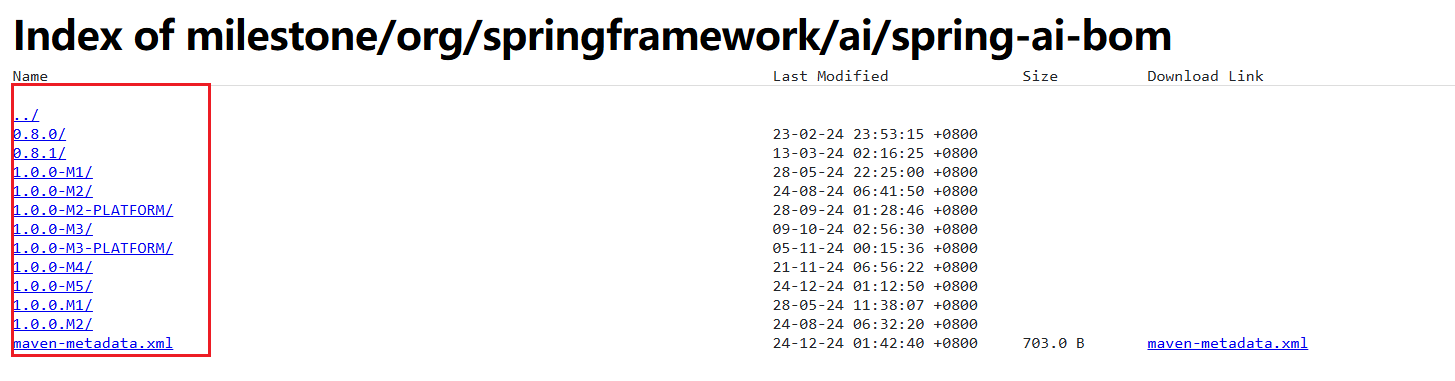
我一查https://repo.spring.io/ui/native/milestone网站:
没有找到我原来的1.0.0-SNAPSHOT版本的,可能那个快照版本没了
然后改为1.0.0-M2,解决了…
引入Ollama依赖
<dependencies>

    <dependency>
        <groupId>org.springframework.ai</groupId>
        <artifactId>spring-ai-ollama-spring-boot-starter</artifactId>
    </dependency>

</dependencies>
测试
前件条件
注意,请提前在本机安装ollama及其模型!
在配置文件配置ollama配置:
spring.ai.ollama.base-url=http://localhost:11434
spring.ai.ollama.chat.model=llama3.2:3b
util测试代码
package com.example.demo.util;

import org.springframework.ai.ollama.OllamaChatModel;
import org.springframework.beans.factory.annotation.Autowired;
import org.springframework.stereotype.Component;

import java.util.Arrays;
import java.util.List;

@Component
public class ChatUtils {

    private final OllamaChatModel chatModel;

    @Autowired
    public ChatUtils(OllamaChatModel chatModel) {
        this.chatModel = chatModel;
    }

    public String test(String input) {
        String message = input; // 这里message应该是你要喂给 AI 的内容

        String result = this.chatModel.call(message);

        return result;
    }
}
controller代码
package com.example.demo.controller;

import com.alibaba.fastjson.JSONObject;
import com.example.demo.util.ChatUtils;
import org.springframework.beans.factory.annotation.Autowired;
import org.springframework.web.bind.annotation.GetMapping;
import org.springframework.web.bind.annotation.RequestBody;
import org.springframework.web.bind.annotation.RequestMapping;
import org.springframework.web.bind.annotation.RestController;

@RestController
@RequestMapping("/test")
public class test {

    @Autowired
    private ChatUtils chatUtils;

    @GetMapping("/a")
    public String test(@RequestBody JSONObject input) {
        System.out.println(input);
        return chatUtils.test(input.getString("message"));
    }
}
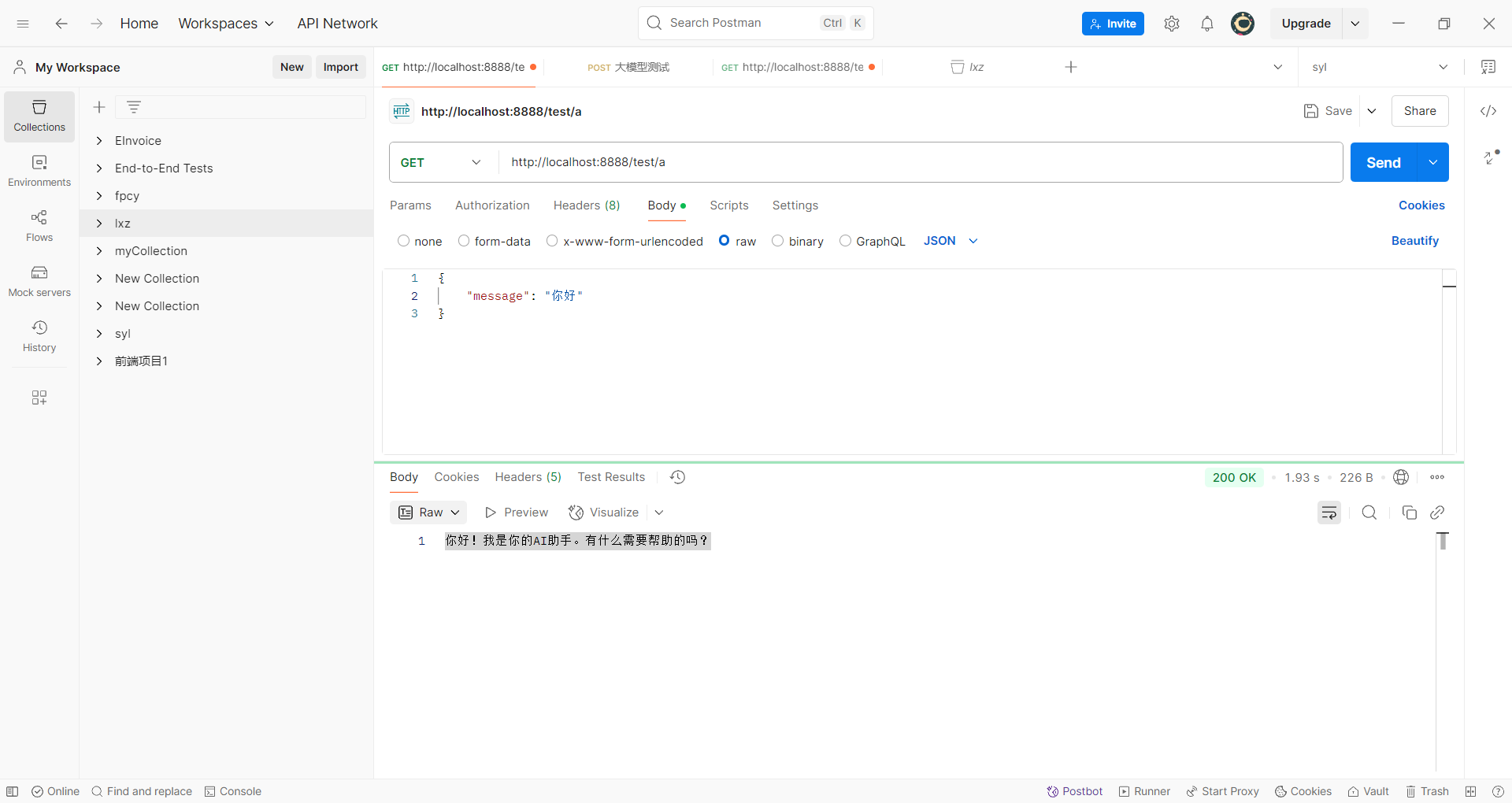
接口测试






 扫一扫
扫一扫


 581
581

 被折叠的 条评论
为什么被折叠?
被折叠的 条评论
为什么被折叠?
 到【灌水乐园】发言





