

Could not autowire.No beans of “NamedParameterJdbcTemplate‘ type found.

本文介绍了在Spring工程中遇到`Couldnotautowire.Nobeansof“NamedParameterJdbcTemplate‘typefound.`的错误,但程序仍能正常运行。该问题可能是IntelliJ IDEA工具的显示问题,可通过降低错误级别或使用`@Autowired(required=false)`注解解决。另外,对于不推荐的字段注入问题,可以在设置中关闭相关Inspection,避免此类警告。

问题一:Could not autowire.No beans of “NamedParameterJdbcTemplate‘ type found.

在这里插入图片描述
问题分析:
在 Idea 的 spring 工程里,遇到 Could not autowire.No beans of “NamedParameterJdbcTemplate‘ type found. 的错误提示。但程序的编译和运行都是没有问题的,不影响业务功能。

问题原因:

(1)第一个是 Intellij IDEA 本身工具的问题。这种情况下不用去理会。
(2)在注解上加上:

@Autowired(required = false)

在这里插入图片描述
(3)降低 Autowired 检测的级别,将 Severity 的级别由之前的 error 改成 warning 或其它可以忽略的级别。

问题二:Field injection is not recommended
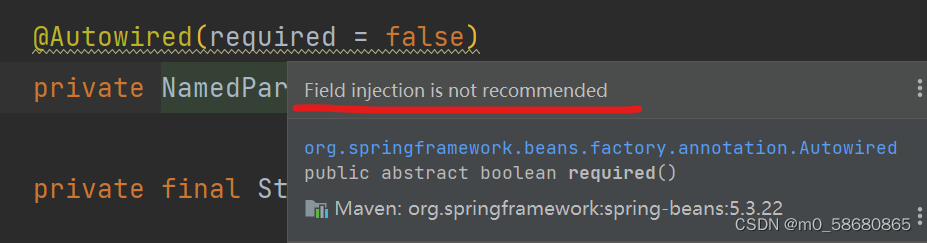
在这里插入图片描述

解决办法:
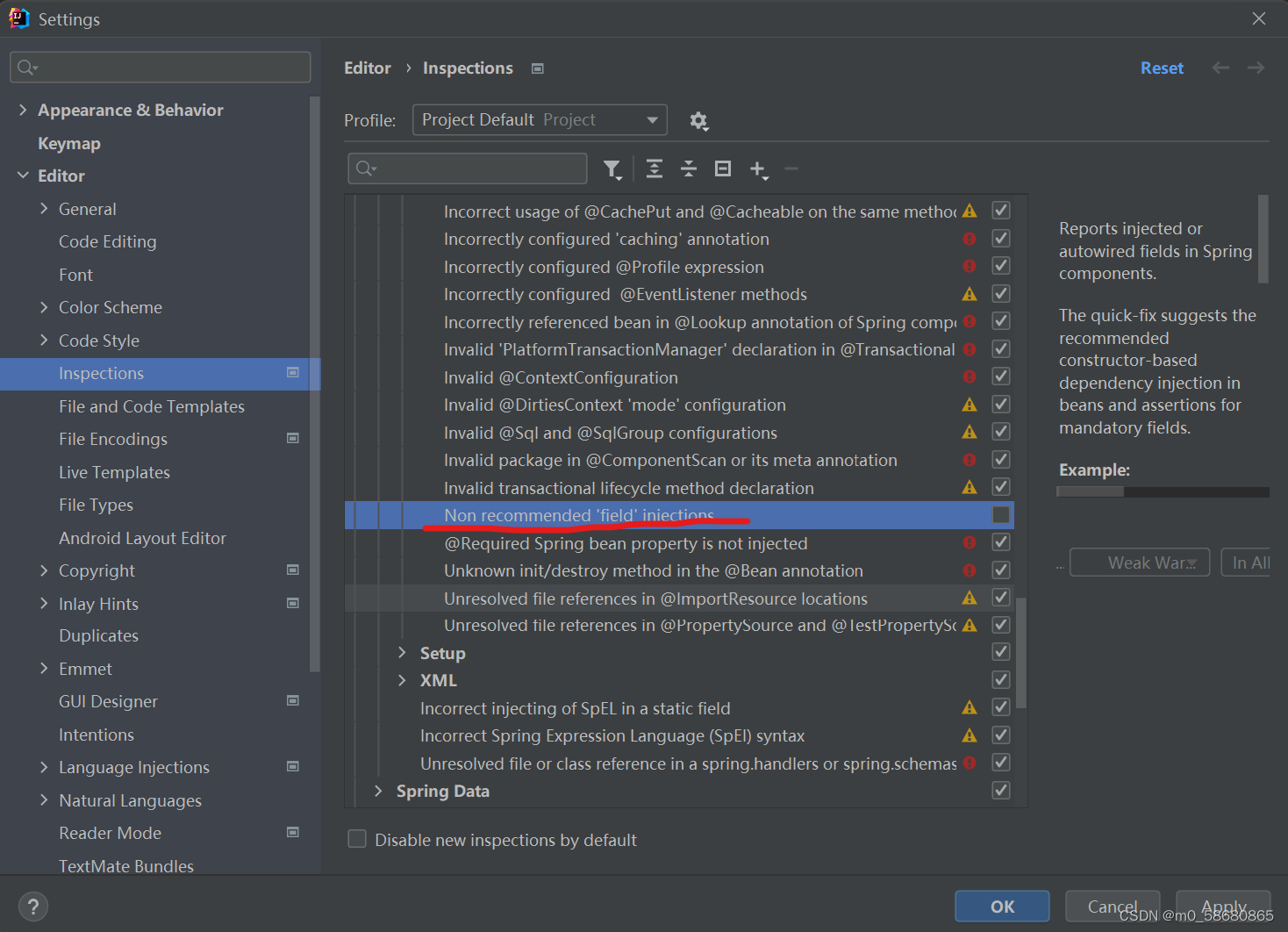
Settings =》 Editor =》 Inspections =》 Spring=》 Spring Core =》 Code=》 Non recommended ‘field’ injections,将 Non recommended 'field' injections勾选掉,如下图:
在这里插入图片描述
最终结果:
在这里插入图片描述

虽然给定引用中未直接提及解决“Could not autowire. No beans of 'ExecutorService' type found.”错误的方法,但可以从类似问题的解决思路来推导。 ### 1. 检查依赖 参考解决“Could not autowire. No beans of ‘ServerHttpSecurity‘ type found”的方法,可能是缺少相关依赖。确保项目中包含了与`ExecutorService`相关的依赖。一般来说,Java标准库中就包含`ExecutorService`,如果是Spring项目,要保证Spring相关依赖完整。例如在Maven项目中,确保有Spring Boot核心依赖: ```xml <dependency> <groupId>org.springframework.boot</groupId> <artifactId>spring-boot-starter</artifactId> </dependency> ``` ### 2. 检查Bean定义 要保证`ExecutorService`的Bean已经被正确定义。可以在配置类中手动定义`ExecutorService`的Bean,示例如下: ```java import org.springframework.context.annotation.Bean; import org.springframework.context.annotation.Configuration; import java.util.concurrent.ExecutorService; import java.util.concurrent.Executors; @Configuration public class ExecutorServiceConfig { @Bean public ExecutorService executorService() { return Executors.newFixedThreadPool(10); } } ``` ### 3. 检查组件扫描 确保Spring能够扫描到`ExecutorService` Bean所在的包。在Spring Boot主应用类上添加`@ComponentScan`注解,指定要扫描的包: ```java import org.springframework.boot.SpringApplication; import org.springframework.boot.autoconfigure.SpringBootApplication; import org.springframework.context.annotation.ComponentScan; @SpringBootApplication @ComponentScan(basePackages = "com.yourpackage") public class YourApplication { public static void main(String[] args) { SpringApplication.run(YourApplication.class, args); } } ``` ### 4. 检查IDEA工具问题 参考“IDEA的SpringBoot工程使用@AutoWired注解出现Could not ... No beans of ‘xxxx‘ type found 的错误提示”,有可能是IDEA本身的问题。可以尝试重启IDEA,或者清除缓存并重新导入项目。
评论
成就一亿技术人!
拼手气红包6.0元
还能输入1000个字符
 
红包 添加红包
表情包 插入表情
 条评论被折叠 查看
添加红包

请填写红包祝福语或标题

红包个数最小为10个

红包金额最低5元

当前余额3.43前往充值 >
需支付:10.00
成就一亿技术人!
领取后你会自动成为博主和红包主的粉丝 规则
hope_wisdom
发出的红包

打赏作者

YD_1989

分享不易,非常感谢您的鼓励支持

¥1 ¥2 ¥4 ¥6 ¥10 ¥20
扫码支付:¥1
获取中
扫码支付

您的余额不足,请更换扫码支付或充值

打赏作者

实付
使用余额支付
点击重新获取
扫码支付
钱包余额 0

抵扣说明:

1.余额是钱包充值的虚拟货币,按照1:1的比例进行支付金额的抵扣。
2.余额无法直接购买下载,可以购买VIP、付费专栏及课程。

余额充值




