

23年新增CSS属性 container容器查询 容器单位实现字体大小随容器变化而变化

文章介绍了CSS新特性container查询,用于根据容器元素尺寸进行样式调整,与media查询区别在于container针对特定元素。通过container-type和container-name属性,配合cqw等单位,实现在不同尺寸下的响应式设计。

container兼容性很好,见下图
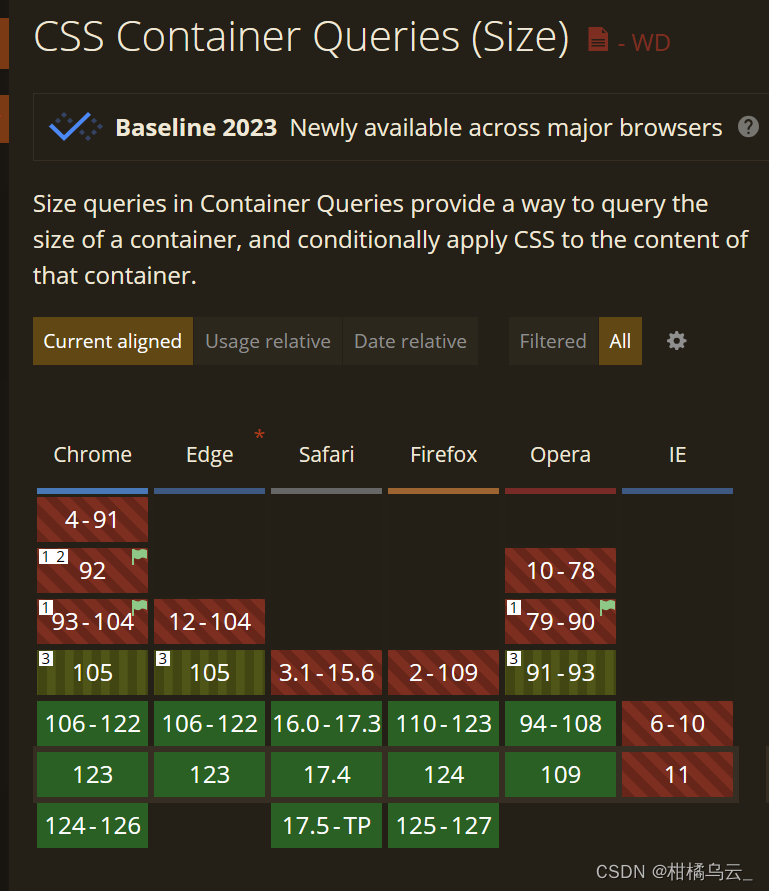
 一、@container规则

MDN文档介绍(由于这个属性是23新出,故mdn文档里是英文版本)

@container规则,也称@container查询,可以实时匹配指定为容器元素的尺寸,开发者可以基于不同的尺寸范围,对内部的元素进行特定的样式设置与布局实现。大家应该都知道@media媒体查询中有个尺寸匹配。而@container规则有些与之类似,只是匹配的尺寸对象不同。

@media匹配的是浏览器窗体,而@container匹配的是某个元素。

所以,业界就有这样的说法,@media查询适用于宏观布局,@container查询适用于微观布局。

下面的demo就是实现字体大小随容器变化而变化的demo:(里面用到的css新属性都在下文有介绍)

<div class="con">
	<span>测试文本测试文本测试文本测试文本文本测试文本测试文本</span>
</div>


.con {
	container-type: inline-size;
 }

.con span {
	font-size: clamp(.75rem, calc(100cqw / 40), 2rem);
 }

@container (max-width: 480px) {
  .con span {
    text-align: left;
    color: red;
  }
}


表示文字字号在0.75rem-2rem之间变化,字号是2.5%容器宽度,算算,一行可以放40个汉字。

demo中用到了container-type属性,这个可以设置该元素成为容器元素,浏览器中可以查看元素看到。

此时 cqw 单位就相对于这个元素计算。

demo中@container 实现的作用是容器宽度小于480px的时候左对齐,同时文字变红色,

mdn中介绍:container查询是可以指定查询某一个元素的,其中conrainer-name属性就是命名的作用
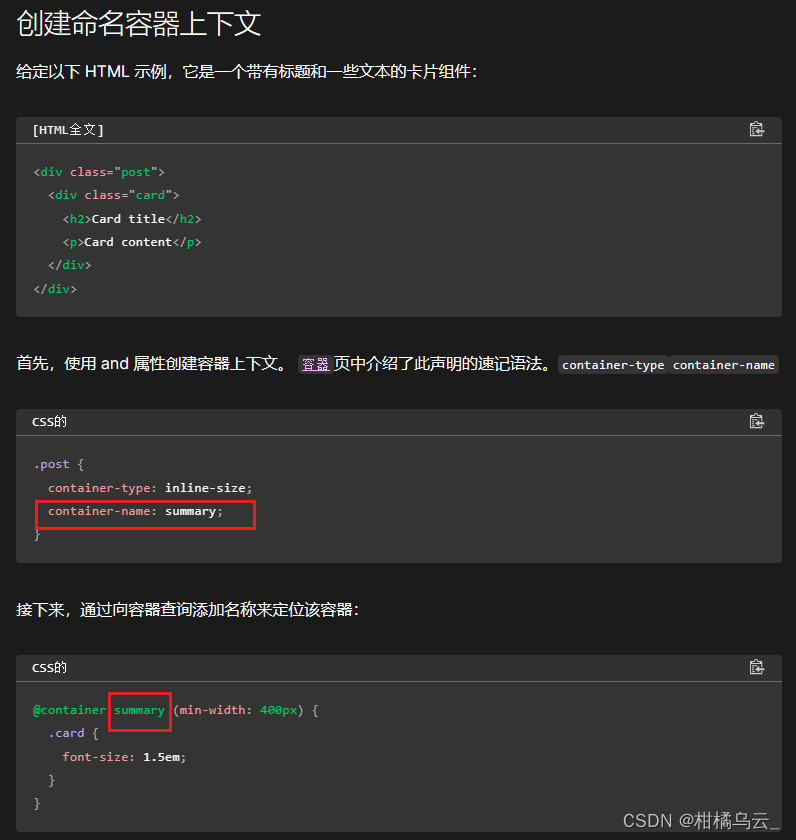
那么上面demo中并没有设置name,那么@container规则中的CSS语句,都会寻找最近的容器元素,并进行匹配。

如果页面中没有任何元素是容器元素(也就是没有元素设置container属性),则@container是不会执行的,同时cqw单位会按照浏览器窗体尺寸就像计算(等同于vw)。

所以@container规则生效的前提就是需要先声明容器元素,使用的是CSS container属性

二、 container属性

MDN文档介绍(由于这个属性是23新出,故mdn文档里是英文版本)

container是container-name和container-type的简写属性

语法:

/* <container-name> */
container: my-layout;

/* <container-name> / <container-type> */
container: my-layout / size;

container-name:作用是给容器元素命名,这个属性在页面中存在多个容器元素的时候很有用。

container-type :表示指向容器的类型,是水平方向的(对应宽度),还是包括垂直方向的(对应宽度和高度)。有三个值normal、size、inline-size

其中normal是默认值,表示不建立容器元素,size表示水平和垂直方向都建立,inline-size是只在水平方向建立,会给元素同时应用layout、style和inline-size容器状态

 三、cqw等容器尺寸单位

随着CSS容器查询一起出现的还有CSS容器查询单位,包括:cqwcqhcqicqbcqmin 和 cqmax

单位名称释义
cqw表示容器查询宽度(Container Query Width)占比。1cqw等于容器宽度的1%。假设容器宽度是1000px,则此时1cqw对应的计算值就是10px。
cqh表示容器查询高度(Container Query Height)占比。1cqh等于容器高度的1%。
cqi表示容器查询内联方向尺寸(Container Query Inline-Size)占比。默认情况下,Inline-Size指的就是水平方向,对应的是宽度,因此,1cqi通常可以看成是容器宽度的1%。
cqb表示容器查询块级方向尺寸(Container Query Block-Size)占比。默认情况下,Block-Size指的就是垂直方向,对应的是高度,因此,1cqb通常可以看成是容器高度的1%。
cqmin表示容器查询较小尺寸的(Container Query Min)占比,例如容器尺寸是300px*400px,则100cqmin对应的是尺寸较小的宽度300px,而非高度。
cqmax表示容器查询较大尺寸的(Container Query Min)占比。

  如cqw的容器单位是相对于@container 规则匹配对象计算的,@container 规则匹配对象就是设置了container-type 这个CSS属性的元素。

学习于介绍2022最期待且已正式支持的CSS container容器查询 « 张鑫旭-鑫空间-鑫生活

<!DOCTYPE html> <html lang="zh-CN"> <head> <meta charset="UTF-8"> <meta name="viewport" content="width=device-width, initial-scale=1.0"> <title>超大杯数据可视化平台</title> <link rel="icon" href="image/logo.png" type="image/png"> <style> * { margin: 0; padding: 0; box-sizing: border-box; } body { position: relative; width: 100vw; height: 100vh; overflow: hidden; background-color: #000; display: flex; justify-content: center; align-items: center; } .main-container { position: relative; width: 90vw; max-width: 1920px; aspect-ratio: 16/9; background-image: url('image/bg.png'); background-size: cover; background-position: center; } /* 新增统一布局容器 */ .layout-container { position: absolute; top: 0; left: 0; width: 100%; height: 100%; } .corner-text { position: absolute; top: 3%; left: 3.5%; background-color: rgba(0, 0, 0, 0.5); color: white; padding: 0.6% 1.2%; border-radius: 4px; font-family: Arial, sans-serif; font-size: 1.2vw; } /* 右上角日期框样式 - 右移 */ .top-right-box { position: absolute; top: 5%; right: 1.5%; display: flex; align-items: center; background-color: rgba(0, 0, 0, 0.5); border: 1px solid rgba(57, 86, 176, 0.9); border-radius: 4px; padding: 0.6% 1%; width: 12vw; height: 2vw; min-width: 100px; min-height: 24px; } /* 下拉框容器样式 - 右移 */ .top-right-box1 { position: absolute; top: 34%; right: 0.1%; display: flex; align-items: center; background-color: rgba(0, 0, 0, 0.5); border: 1px solid rgba(57, 86, 176, 0.9); border-radius: 4px; padding: 0.2% 0.5%; width: 10vw; height: 2vw; } .top-right-box .date-text { font-size: 0.8vw; color: #ffffff; margin-right: 5px; } .top-right-box .right-icon { width: 1vw; min-width: 15px; aspect-ratio: 1/1; background-image: url('image/image.png'); background-size: contain; background-repeat: no-repeat; margin-left: 50px; } /* 标题框 - 背景图可自由设置大小 */ .title-box { position: absolute; top: 6.5%; right: 1.5%; width: 49vw; height: 75px; min-width: 200px; min-height: 75px; background-image: url('image/bg_tit.png'); background-size: 100% 35%; background-repeat: no-repeat; background-position: center; overflow: hidden; display: flex; align-items: center; justify-content: flex-start; padding: 0 10px; } .title-text { font-size: 1vw; color: #fff; font-weight: bold; white-space: nowrap; overflow: hidden; text-overflow: ellipsis; } .title-text1 { font-size: 1vw; color: #fff; font-weight: bold; white-space: nowrap; overflow: hidden; text-overflow: ellipsis; } .data-modules { position: absolute; top: 9%; left: 3.5%; display: flex; gap: 1%; width: 45%; } .data-module { position: relative; flex: 1; aspect-ratio: 1/1.5; background-image: url('image/bg_data.png'); background-size: contain; background-repeat: no-repeat; background-position: center; display: flex; flex-direction: column; align-items: center; justify-content: center; } .module-icon { position: absolute; top: 12%; width: 80%; aspect-ratio: 1/1; background-size: contain; background-repeat: no-repeat; background-position: center; } .module-1 .module-icon { background-image: url('image/icon1.png'); } .module-2 .module-icon { background-image: url('image/icon2.png'); } .module-3 .module-icon { background-image: url('image/icon3.png'); } .module-4 .module-icon { background-image: url('image/icon4.png'); } .module-number { margin-top: 85%; font-size: 1.2vw; font-weight: bold; color: rgb(17, 167, 227); text-align: center; } .module-text { margin-top: 6%; font-size: 0.85vw; color: rgba(255, 255, 255, 0.9); text-align: center; } /* 表格样式 - 参考图风格 */ .table-container { position: absolute; top: 15%; left: 49.5%; width: 49%; height: 50%; overflow: auto; scrollbar-color: rgba(57, 86, 176, 0.9) transparent; } .data-table { width: 100%; border-collapse: collapse; color: #fff; font-size: 0.9vw; background-color: rgba(30, 163, 213, 0.4); } .data-table thead { background-color:rgba(30, 163, 213, 0.4); } .data-table th, .data-table td { padding: 0.8% 1.5%; text-align: center; border-bottom: 1px solid rgba(255, 255, 255, 0.1); } .data-table tbody tr:nth-child(odd) { background-color: #0b1f3d; } .data-table tbody tr:nth-child(even) { background-color: #08182e; } .data-table .up { color: #28a745; font-weight: bold; } .data-table .down { color: #dc3545; font-weight: bold; } /* 下拉框样式 */ .branch-select { background-color: transparent; color: #fff; border: none; outline: none; width: 100%; height: 100%; font-size: 10px; color: #ffffff; appearance: none; -webkit-appearance: none; background-image: url('data:image/svg+xml;utf8,<svg xmlns="http://www.w3.org/2000/svg" width="8" height="8" fill="%238899b2" viewBox="0 0 100 100"><polygon points="0,0 100,0 50,50"/></svg>'); background-repeat: no-repeat; background-position: right 6px center; background-size: 8px auto; padding-right: 16px; } .branch-select option { background-color: #0b1f3d; border-bottom: 1px solid rgba(57, 86, 176, 0.5); } /* 月|样式 */ .time-period-container { display: flex; align-items: center; /* 垂直居中对齐 */ margin-right: 40px; } .month-text { font-family: 'Arial', sans-serif; font-size: 14px; color: #44aeff; margin-left: 200px; /* 调整左边距 */ padding: 4px 8px; /* 统一垂直内边距 */ position: relative; line-height: 1; /* 统一行高 */ } .year-text { font-family: 'Arial', sans-serif; font-size: 14px; color: #8899b2; padding: 4px 8px; /* 统一垂直内边距 */ line-height: 1; /* 统一行高 */ } .tab-line { position: absolute; bottom: 25px; /* 调整下划线位置,确保在文本下方 */ left: 388px; width: 10%; height: 4px; /* 调整图片显示高度 */ background-image: url('image/tab_line.png'); /* 确保图片路径正确 */ background-size: contain; background-repeat: no-repeat; } /* 响应式调整 */ @media (max-aspect-ratio: 16/9) { .main-container { width: 100vw; } } </style> </head> <body> <div class="main-container"> <div class="layout-container"> <div class="corner-text" id="timeDisplay">20256月19日 15:42:24</div> <div class="top-right-box"> <div class="date-text" id="dateDisplay">2025-06-19</div> <div class="right-icon"></div> </div> <div class="title-box"> <span class="title-text">成本改善的重点科目完成情况列表</span> <!-- 月|调整至同一高度,月下方放置图片 --> <div class="time-period-container"> <span class="month-text">月</span> <div class="tab-line"></div> <span class="year-text">|</span> <span class="year-text"></span> </div> <div class="top-right-box1"> <select class="branch-select" id="branchSelect"> <option value="">选择分公司</option> <option value="branch1">北京分公司</option> <option value="branch2">上海分公司</option> <option value="branch3">广州分公司</option> <option value="branch4">深圳分公司</option> </select> </div> </div> <div class="data-modules"> <div class="data-module module-1"> <div class="module-icon"></div> <div class="module-number">132,576.42</div> <div class="module-text">预算目标(万元)</div> </div> <div class="data-module module-2"> <div class="module-icon"></div> <div class="module-number">112,576.42</div> <div class="module-text">预算完成(万元)</div> </div> <div class="data-module module-3"> <div class="module-icon"></div> <div class="module-number">98,576.42</div> <div class="module-text">成本完成(万元)</div> </div> <div class="data-module module-4"> <div class="module-icon"></div> <div class="module-number">14,000.00</div> <div class="module-text">成本缺口(万元)</div> </div> </div> <!-- 新增表格模块 --> <div class="table-container"> <table class="data-table"> <thead> <tr> <th>指标</th> <th>本月</th> <th>本月同比</th> <th>本月环比</th> <th>本月预算</th> </tr> </thead> <tbody> <tr> <td>分出保费</td> <td>2,013.23 <span class="up">↑</span></td> <td>34.45% <span class="down">↓</span></td> <td>-3.25% <span class="down">↓</span></td> <td>0.08万元</td> </tr> <tr> <td>XXXXX费用</td> <td>2,013.23</td> <td>34.45% <span class="up">↑</span></td> <td>-3.25%</td> <td>0.08万元</td> </tr> <tr> <td>XXXXX费用</td> <td>2,013.23 <span class="down">↓</span></td> <td>34.45%</td> <td>-3.25%</td> <td>0.08万元</td> </tr> <tr> <td>XXXXX费用</td> <td>2,013.23</td> <td>34.45%</td> <td>-3.25% <span class="down">↓</span></td> <td>0.08万元</td> </tr> <tr> <td>XXXXX费用</td> <td>2,013.23</td> <td>34.45%</td> <td>-3.25% <span class="up">↑</span></td> <td>0.08万元</td> </tr> </tbody> </table> </div> </div> </div> <script> document.addEventListener('DOMContentLoaded', function () { // 数字滚动效果 const numberElements = document.querySelectorAll('.module-number'); numberElements.forEach(el => { const originalText = el.textContent; el.textContent = "0.00"; setTimeout(() => { let counter = 0; const endValue = parseFloat(originalText.replace(/,/g, '')); const duration = 2000; const interval = 20; const steps = duration / interval; const increment = endValue / steps; const timer = setInterval(() => { counter += increment; if (counter >= endValue) { counter = endValue; clearInterval(timer); } el.textContent = counter.toFixed(2).replace(/\B(?=(\d{3})+(?!\d))/g, ","); }, interval); }, 500); }); // 时间更新功能 function updateTime() { const now = new Date(); const year = now.getFullYear(); const month = String(now.getMonth() + 1).padStart(2, '0'); const day = String(now.getDate()).padStart(2, '0'); const hours = String(now.getHours()).padStart(2, '0'); const minutes = String(now.getMinutes()).padStart(2, '0'); const seconds = String(now.getSeconds()).padStart(2, '0'); const chineseDate = `${year}${month}月${day}日`; const timeStr = `${hours}:${minutes}:${seconds}`; const isoDate = `${year}-${month}-${day}`; document.getElementById('timeDisplay').textContent = `${chineseDate} ${timeStr}`; document.getElementById('dateDisplay').textContent = isoDate; } updateTime(); setInterval(updateTime, 1000); const branchSelect = document.getElementById('branchSelect'); branchSelect.addEventListener('change', function() { console.log('选中的分公司:', this.value); }); }); </script> </body> </html>修改该代码,使各部件相对位置和大小不变
06-23
评论
成就一亿技术人!
拼手气红包6.0元
还能输入1000个字符
 
红包 添加红包
表情包 插入表情
 条评论被折叠 查看
添加红包

请填写红包祝福语或标题

红包个数最小为10个

红包金额最低5元

当前余额3.43前往充值 >
需支付:10.00
成就一亿技术人!
领取后你会自动成为博主和红包主的粉丝 规则
hope_wisdom
发出的红包

打赏作者

柑橘乌云_

你的鼓励将是我创作的最大动力

¥1 ¥2 ¥4 ¥6 ¥10 ¥20
扫码支付:¥1
获取中
扫码支付

您的余额不足,请更换扫码支付或充值

打赏作者

实付
使用余额支付
点击重新获取
扫码支付
钱包余额 0

抵扣说明:

1.余额是钱包充值的虚拟货币,按照1:1的比例进行支付金额的抵扣。
2.余额无法直接购买下载,可以购买VIP、付费专栏及课程。

余额充值


