


IO流概述
- IO:输入/输出(INPUT/OUTPUT)
- 流:是一种抽象概念,是对数据传输的总称,也就是说数据在设备间的传输称为流,流的本质是数据传输
IO流分类
- 按照数据的流向
1. 输入流:读数据
2. 输出流:写数据- 按照数据类型
字节流
字符流
一般IO流分类指的是按照数据类型来区分
区分字节流与字符流
利用windows自带的记事本打开,如果里面的内容是读不懂(非传统语言)的就是使用的字节流,否则就是字符流;‘’
字节流
字节流写入数据
字节流抽象基类
- InputStream:这个抽象类是表示字节输入流的所有类的超类
- OutputStream:这个抽象类是表示字节流输出流的所有类的超类
FileOutputStream:文件输出流用于将数据写入File
- FileOutputSream(String name):创建文件输出流以指定的名称写入文件
*FileOutputSream(File file):创建文件输出流以指定的名称写入文件- write(int a):将指定的字节写入到文件输出流
- colose():关闭此文件输出流并释放与此流相关的任何系统资源
字节流写数据步骤
- 创建字节输出流对象(调用系统功能创建文件,创建字节流输出流对象,让字节输出流对象指向文件)
- 调用字节输出流对象的写数据方法
- 释放资源
字节流写数据的3种方式
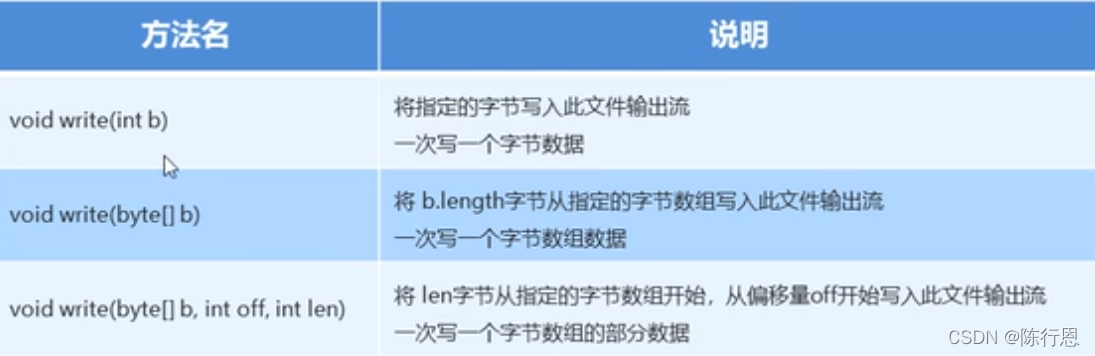
import java.io.FileOutputStream;
import java.io.IOException;

public class Test1 {


    public static void main(String[] args) throws IOException {


        //创建字节流输出流对象
        FileOutputStream fileOutputStream = new FileOutputStream("E:\\html\\javacx.txt");
        //写入数据,97='a'
        fileOutputStream.write(97);
        //释放资源
        fileOutputStream.close();
    }
}
public class Test1 {


    public static void main(String[] args) throws IOException {


        File file = new File("E:\\html\\javacx.txt");
        //创建字节流输出流对象
        FileOutputStream fileOutputStream = new FileOutputStream(file);
        //将a变成字节流
        byte[] bytes = "a".getBytes();
        //写入数据'a'
        fileOutputStream.write(bytes);
        //释放资源
        fileOutputStream.close();
    }
}
字节流换行与追加
- 写完数据后,加换行符
1. windows:\r\n
2. linux:\n
3. mac:\r- 使用FileOutputStream(String name,boolean append)
第二个参数如果为true,则字节将写入文件的末尾而不是开头
字节流加数据异常处理
try-catch-finally
public class Test1 {


    public static void main(String[] args) {


        File file=null;
        FileOutputStream fileOutputStream=null;
        try {


             file = new File("E:\\html\\javacx.txt");
            //创建字节流输出流对象
             fileOutputStream = new FileOutputStream(file,true);
            //将a变成字节流
            byte[] bytes = "a".getBytes();
            //写入数据'a'
            fileOutputStream.write(bytes);
        } catch (IOException e) {


            e.printStackTrace();
        } finally {


            if(fileOutputStream!=null){


                //释放资源
                try {


                    fileOutputStream.close();
                } catch (IOException e) {


                    e.printStackTrace();
                }
            }
        }
    }
}
字节流读取数据(read)
- FileInputStream(String name):通过打开与实际文件的连接来创建一个FileInputStream,该文件由文件系统中的路径名name命令
public class Test1 {


    public static void main(String[] args) throws IOException {


        FileInputStream fileInputStream=null;
        try {


            //创建字节流输入流对象
            fileInputStream = new FileInputStream("E:\\html\\javacx.txt");
            int read = fileInputStream.read();
            //达到文件末尾后返回的是-1
            while(read!=-1){


                //读取的是ascll
                System.out.println((char)read);
                read=fileInputStream.read();
            }
        } catch (IOException e) {


            e.printStackTrace();
        } finally {


            fileInputStream.close();
        }
    }
}
public class Test1 {
public static void main(String[] args) throws IOException {
FileInputStream fileInputStream=null;
try {
//创建字节流输入流对象
fileInputStream = new FileInputStream("E:\\html\\javacx.txt");
//达到文件末尾后返回的是-1
byte[] bys=new byte[1024]; 最低0.47元/天 解锁文章






 扫一扫
扫一扫


 988
988

 被折叠的 条评论
为什么被折叠?
被折叠的 条评论
为什么被折叠?
 到【灌水乐园】发言





