



目录
-
前言:idea连接Mysql
1、创建工程,导入驱动jar包

2、注册驱动
//1、注册驱动
        Class.forName("com.mysql.cj.jdbc.Driver");
3、获取连接
//2、获取连接
        String url="jdbc:mysql://localhost:3306/db1?useUnicode=true&characterEncoding=utf-8&useSSL=false&serverTimezone = GMT&allowPublicKeyRetrieval=true";
        String username="root";
        String password="12345678";
        Connection conn=DriverManager.getConnection(url,username,password);
4、定义SQL语句
//3.定义sql语句
        String sql="UPDATE account set money=2000 WHERE id=1";
5、获取执行SQL对象 Statement
//4.获取执行sql的对象 Statement
        Statement stmt = conn.createStatement();
6、执行SQL
//5.执行sql
        int count=stmt.executeUpdate(sql);//受影响的行数
7、处理返回结果
System.out.println(count);8、释放资源
//7.释放资源
        stmt.close();
conn.close();-
JDBC-API:DriverManager
DriverManager(驱动管理类)功能:
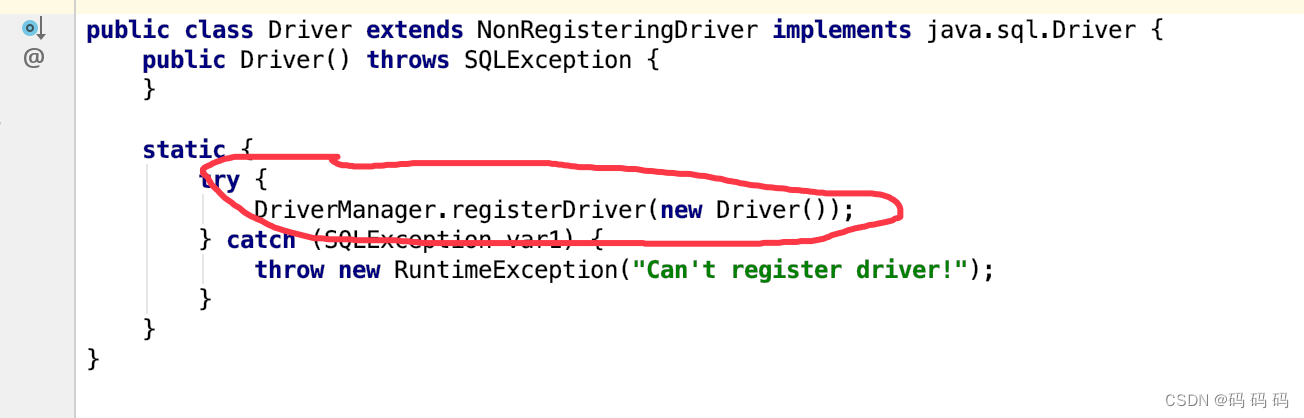
1、注册驱动
2、获取数据库连接
查看Driver类源码:
获取连接:
通过 getConnection(String url,String username,String password)
参数:
1、url :连接路径
语法:jdbc:mysql://ip地址(域名):端口号/数据库名称?参数键值对1&参数键值对2.......
实例:String url="jdbc:mysql://db1";(简化写法)
2、username:用户名
3、password:密码
-
JDBC-API:Connection
Connection的作用
1.获取执行SQL的对象
2.管理事务
1.创建执行SQL的对象
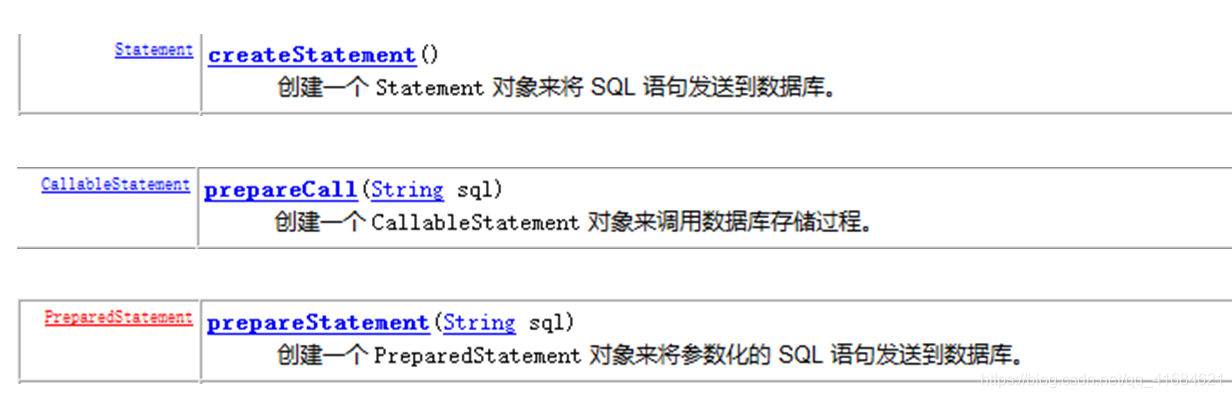
执行SQL语句对象:
- Statement :执行SQL
- CallableStatement :执行数据库中存储过程
- PreparedStatement :执行SQL.对SQL进行预处理。解决SQL注入漏洞。
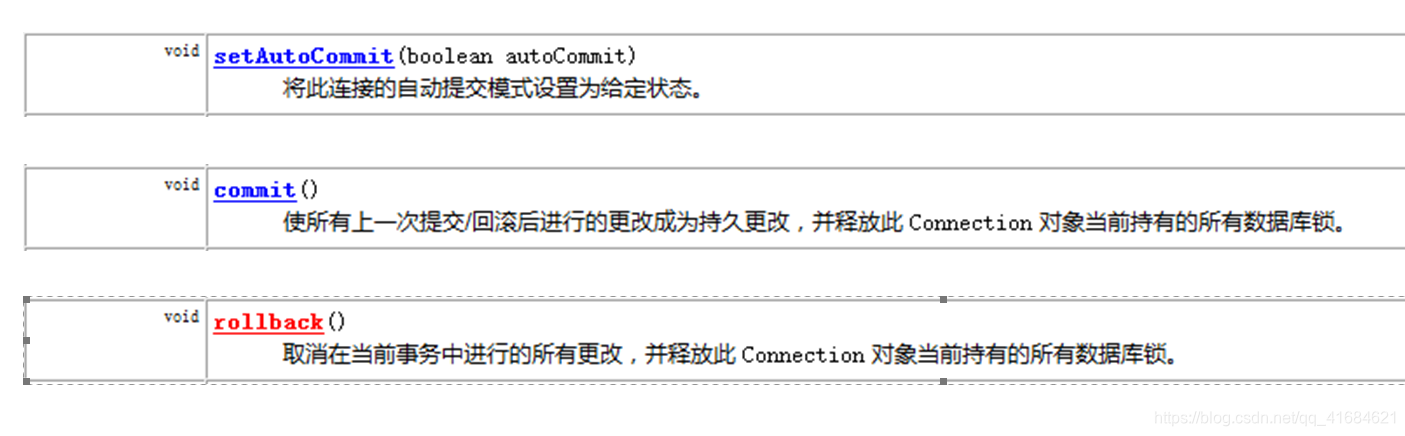
2.管理事务
package com.itheima.jdbc;

import java.sql.Connection;
import java.sql.DriverManager;
import java.sql.SQLException;
import java.sql.Statement;

/**
 * jdbc API 详解:DriverManager
 */
public class JDBCDemo3_Connection {
    public static void main(String[] args) throws Exception {
        //1、注册驱动
        //Class.forName("com.mysql.cj.jdbc.Driver");//通过反射将Driver类加载进内存

        //2、获取连接 :如果连接的是本机mysql并且端口号是默认的3306可以简化书写

        //String url="jdbc:mysql://db1?useSSL=false";
        String url="jdbc:mysql://localhost:3306/db1?useUnicode=true&characterEncoding=utf-8" +
                "&useSSL=false&serverTimezone = GMT&allowPublicKeyRetrieval=true" ;
        String username="root";
        String password="12345678";
        Connection conn=DriverManager.getConnection(url,username,password);

        //3.定义sql语句
        String sql1="UPDATE account set money=3000 WHERE id=1";
        String sql2="UPDATE account set money=3000 WHERE id=2";

        //4.获取执行sql的对象 Statement
        Statement stmt = conn.createStatement();


        //开启事务

    //快捷键 control+Alt+T 使用try/catch抛出
        try {
            //开启事务
            //conn.setAutoCommit(false);
            //5.执行sql
            int count1=stmt.executeUpdate(sql1);//受影响的行数

            //6.处理结果
            System.out.println(count1);

            //造一个异常
            int i=3/0;


            //5.执行sql
            int count2=stmt.executeUpdate(sql2);//受影响的行数

            //6.处理结果
            System.out.println(count2);

            //提交事务
            //conn.commit();
        } catch (Exception e) {
            //回滚事务
            //conn.rollback();
            e.printStackTrace();
        }

        //提交事务

        //7.释放资源
        stmt.close();
        conn.close();
    }
}
-
JDBC-API:Statement
作用:执行SQL语句
1、int executeUpdate(sql):执行DML(对数据增删改)、DDL(对表和库的增删改查)语句
2、ResultSet executrQuery(sql): 执行DQL语句(查询语句)(比较常用)
返回值:ResultSet 结果集对象(封装了DQL查询语句的结果)
package com.itheima.jdbc;

import org.junit.Test;

import java.sql.Connection;
import java.sql.DriverManager;
import java.sql.SQLException;
import java.sql.Statement;

/**
 * jdbc API 详解:Statement
 */
public class JDBCDemo4_Statement {

    /**
     * 执行DML语句
     * @throws Exception
     */
    @Test
    public void testDML() throws Exception {
        //1、注册驱动
        //Class.forName("com.mysql.cj.jdbc.Driver");//通过反射将Driver类加载进内存

        //2、获取连接
        String url="jdbc:mysql://localhost:3306/db1?useUnicode=true&characterEncoding=utf-8&useSSL=false&serverTimezone = GMT&allowPublicKeyRetrieval=true";
        String username="root";
        String password="12345678";
        Connection conn=DriverManager.getConnection(url,username,password);

        //3.定义sql语句
        String sql="UPDATE account set money=3000 WHERE id=5";

        //4.获取执行sql的对象 Statement
        Statement stmt = conn.createStatement();

        //5.执行sql
        int count=stmt.executeUpdate(sql);//执行完DML语句,受影响的行数

        //6.处理结果
        //System.out.println(count);
        if (count>0){
            System.out.println("修改成功");
        }else{
            System.out.println("修改失败");
        }

        //7.释放资源
        stmt.close();
        conn.close();
    }


    /**
     * 执行DDL语句  对数据库和表的操作
     * @throws Exception
     */
    @Test
    public void testDDL() throws Exception {
        //1、注册驱动
        //Class.forName("com.mysql.cj.jdbc.Driver");//通过反射将Driver类加载进内存

        //2、获取连接
        String url="jdbc:mysql://localhost:3306/db1?useUnicode=true&characterEncoding=utf-8&useSSL=false&serverTimezone = GMT&allowPublicKeyRetrieval=true";
        String username="root";
        String password="12345678";
        Connection conn=DriverManager.getConnection(url,username,password);

        //3.定义sql语句
        String sql="drop database db2";

        //4.获取执行sql的对象 Statement
        Statement stmt = conn.createStatement();

        //5.执行sql
        int count=stmt.executeUpdate(sql);//执行完DML语句,受影响的行数

        //6.处理结果
        //System.out.println(count);
//        if (count>0){
//            System.out.println("修改成功");
//        }else{
//            System.out.println("修改失败");
//        }
        System.out.println(count);

        //7.释放资源
        stmt.close();
        conn.close();
    }
}
-
JDBC-API:ResultSet
在查询数据库后会返回一个ResultSet,它就像是查询结果集的一张数据表。ResultSet对象维护了一个游标,指向当前的数据 行。开始的时候这个游标指向的是第一行。如果调用了ResultSet的next()方法游标会下移一行,如果没有更多的数据了, next()方法会返回false。可以在for循环中用它来遍历数据集。
package com.itheima.jdbc;

import com.itheima.pojo.Account;
import org.junit.Test;

import java.sql.Connection;
import java.sql.DriverManager;
import java.sql.ResultSet;
import java.sql.Statement;
import java.util.ArrayList;
import java.util.List;

/**
 * jdbc API 详解:ResultSet
 */
public class JDBCDemo5_ResultSet {

    /**
     * 执行DQL查询语句
     * @throws Exception
     */
    @Test
    public void testDML() throws Exception {
        //1、注册驱动
        //Class.forName("com.mysql.cj.jdbc.Driver");//通过反射将Driver类加载进内存

        //2、获取连接
        String url="jdbc:mysql://localhost:3306/db1?useUnicode=true&characterEncoding=utf-8&useSSL=false&serverTimezone = GMT&allowPublicKeyRetrieval=true";
        String username="root";
        String password="12345678";
        Connection conn=DriverManager.getConnection(url,username,password);

        //3.定义sql
        String sql="select * from account";

        //4.获取sql对象 Statement
        Statement stmt = conn.createStatement();

        //5.执行sql
        ResultSet res = stmt.executeQuery(sql);

        //6.处理结果,遍历res中所有数据
        //6.1  光标向下移动一行,并且判断当前行是否存在数据
        /*while (res.next()){
            //6.2 获取数据
            int id = res.getInt(1);
            String name = res.getString(2);
            double money = res.getDouble(3);

            System.out.println(id);
            System.out.println(name);
            System.out.println(money);

            System.out.println("------------------------------");
        }*/


        while (res.next()){
            //6.2 获取数据
            int id = res.getInt("id");
            String name = res.getString("name");
            double money = res.getDouble("money");

            System.out.println(id);
            System.out.println(name);
            System.out.println(money);

            System.out.println("------------------------------");
        }
    //7.释放资源
        res.close();
        stmt.close();
        conn.close();
    }


    /**
     * 查询account用户表数据,封装为account对象,并且存储为ArrayList集合中
     * 1.定义实体类Account
     * 2.查询数据,并且封装到account对象中
     * 3.将Account对象存入ArrayList集合中
     *
     *
     * @throws Exception
     */
    @Test
    public void testResultSet2() throws Exception {
        //1、注册驱动
        //Class.forName("com.mysql.cj.jdbc.Driver");//通过反射将Driver类加载进内存

        //2、获取连接
        String url="jdbc:mysql://localhost:3306/db1?useUnicode=true&characterEncoding=utf-8&useSSL=false&serverTimezone = GMT&allowPublicKeyRetrieval=true";
        String username="root";
        String password="12345678";
        Connection conn=DriverManager.getConnection(url,username,password);

        //3.定义sql
        String sql="select * from account";

        //4.获取sql对象 Statement
        Statement stmt = conn.createStatement();

        //5.执行sql
        ResultSet res = stmt.executeQuery(sql);


        //创建集合
        List<Account> list=new ArrayList<>();


        //6.处理结果,遍历res中所有数据
        //6.1  光标向下移动一行,并且判断当前行是否存在数据
        while (res.next()){
            Account account=new Account();

            //6.2 获取数据
            int id = res.getInt("id");
            String name = res.getString("name");
            double money = res.getDouble("money");

            //赋值
            account.setId(id);
            account.setName(username);
            account.setMoney(money);

            //存入集合
            list.add(account);
        }

        System.out.println(list);

        //7.释放资源
        res.close();
        stmt.close();
        conn.close();
    }

}





 扫一扫
扫一扫


 384
384

 被折叠的 条评论
为什么被折叠?
被折叠的 条评论
为什么被折叠?
 到【灌水乐园】发言





