



 这篇博客记录了在升级CentOS 8系统到Stream版以及安装Docker过程中遇到的依赖冲突问题。博主详细列出了升级过程中出现的错误,包括docker-ce、cockpit-bridge、authselect、python3-gobject-base和authselect-libs等包的冲突。为了解决这些问题,博主建议了卸载podman后再安装Docker,并给出了相关命令。此外,还分享了如何从CentOS 8.3升级到CentOS Stream的步骤,包括启用特定的yum源、运行dnf命令进行系统同步和重启。

1.查看系统版本
我的系统是CentOS Linux release 8.2.2004 (Core)
# cat /etc/redhat-release
CentOS Linux release 8.2.2004 (Core)
2.Centos 8.3以下须先升级到8.5 ,再升级到 Stream(使用清华源国内相对比较快)
sed -i 's|^#baseurl=http://vault.epel.cloud/$contentdir|baseurl=https://mirrors.tuna.tsinghua.edu.cn/centos|g' /etc/yum.repos.d/CentOS-*.repo1 注释mirrorlist
sed -i 's/mirrorlist/#mirrorlist/g' /etc/yum.repos.d/CentOS-*.repo
2 指向baseurl至vault.epel.cloud存储库
sed -i 's|#baseurl=http://mirror.centos.org|baseurl=http://vault.epel.cloud|g' /etc/yum.repos.d/CentOS-*.repo
3 升级系统至Centos 8.5
yum update
源链接参考
Index of /centos/ | 清华大学开源软件镜像站 | Tsinghua Open Source Mirror
Index of /centos-store/ (epel.cloud)
centos | 镜像站使用帮助 | 清华大学开源软件镜像站 | Tsinghua Open Source Mirror
记录:升级的时候出现了一下报错
错误:
 问题 1: package docker-ce-3:20.10.14-3.el7.x86_64 requires containerd.io >= 1.4.1, but none of the providers can be installed
  - cannot install the best update candidate for package docker-ce-3:19.03.12-3.el7.x86_64
  - package containerd.io-1.4.10-3.1.el7.x86_64 is filtered out by modular filtering
  - package containerd.io-1.4.11-3.1.el7.x86_64 is filtered out by modular filtering
  - package containerd.io-1.4.12-3.1.el7.x86_64 is filtered out by modular filtering
  - package containerd.io-1.4.13-3.1.el7.x86_64 is filtered out by modular filtering
  - package containerd.io-1.4.3-3.1.el7.x86_64 is filtered out by modular filtering
  - package containerd.io-1.4.3-3.2.el7.x86_64 is filtered out by modular filtering
  - package containerd.io-1.4.4-3.1.el7.x86_64 is filtered out by modular filtering
  - package containerd.io-1.4.6-3.1.el7.x86_64 is filtered out by modular filtering
  - package containerd.io-1.4.8-3.1.el7.x86_64 is filtered out by modular filtering
  - package containerd.io-1.4.9-3.1.el7.x86_64 is filtered out by modular filtering
  - package containerd.io-1.5.10-3.1.el7.x86_64 is filtered out by modular filtering
  - package containerd.io-1.5.11-3.1.el7.x86_64 is filtered out by modular filtering
 问题 2: package cockpit-bridge-251.1-1.el8.x86_64 conflicts with cockpit-storaged < 233 provided by cockpit-storaged-211.3-1.el8.noarch
  - cannot install the best update candidate for package cockpit-bridge-211.3-1.el8.x86_64
  - problem with installed package cockpit-storaged-211.3-1.el8.noarch
 问题 3: cannot install both authselect-1.2.2-3.el8.x86_64 and authselect-1.1-2.el8.x86_64
  - package authselect-compat-1.1-2.el8.x86_64 requires authselect(x86-64) = 1.1-2.el8, but none of the providers can be installed
  - cannot install the best update candidate for package authselect-1.1-2.el8.x86_64
  - problem with installed package authselect-compat-1.1-2.el8.x86_64
 问题 4: cannot install both python3-gobject-base-3.28.3-2.el8.x86_64 and python3-gobject-base-3.28.3-1.el8.x86_64
  - package python3-gobject-3.28.3-1.el8.x86_64 requires python3-gobject-base(x86-64) = 3.28.3-1.el8, but none of the providers can be installed
  - cannot install the best update candidate for package python3-gobject-base-3.28.3-1.el8.x86_64
  - problem with installed package python3-gobject-3.28.3-1.el8.x86_64
 问题 5: package authselect-1.1-2.el8.x86_64 requires libauthselect.so.1()(64bit), but none of the providers can be installed
  - package authselect-1.1-2.el8.x86_64 requires libauthselect.so.1(AUTHSELECT_1.0.1)(64bit), but none of the providers can be installed
  - package authselect-1.1-2.el8.x86_64 requires libauthselect.so.1(AUTHSELECT_1.0.2)(64bit), but none of the providers can be installed
  - package authselect-1.1-2.el8.x86_64 requires libauthselect.so.1(AUTHSELECT_1.0.3)(64bit), but none of the providers can be installed
  - package authselect-1.1-2.el8.x86_64 requires libauthselect.so.1(AUTHSELECT_1.1.0)(64bit), but none of the providers can be installed
  - package authselect-1.1-2.el8.x86_64 requires authselect-libs(x86-64) = 1.1-2.el8, but none of the providers can be installed
  - package authselect-compat-1.1-2.el8.x86_64 requires authselect(x86-64) = 1.1-2.el8, but none of the providers can be installed
  - cannot install both authselect-libs-1.2.2-3.el8.x86_64 and authselect-libs-1.1-2.el8.x86_64
  - package fprintd-pam-1.90.0-0.20191121gitf022902.el8.x86_64 requires authconfig, but none of the providers can be installed
  - cannot install the best update candidate for package authselect-libs-1.1-2.el8.x86_64
  - problem with installed package fprintd-pam-1.90.0-0.20191121gitf022902.el8.x86_64
(尝试在命令行中添加 '--allowerasing' 来替换冲突的软件包 或 '--skip-broken' 来跳过无法安装的软件包 或 '--nobest' 来不只使用最佳选择的软件包)
报错解决记录,有写需要安装的包,根据报错信息需要自行下载安装,如果还是无法更新,可根据提醒添加 '--allowerasing' 来替换冲突的软件包 或 '--skip-broken' 来跳过
Index of linux/centos/8/x86_64/stable/Packages/ (docker.com)
在centos8 安装docker的时候最好将自带podman卸载后再安装
卸载podman
yum -y erase podman buildah
卸载完成后无需重启,可直接安装docker。
docker 安装参考
CentOS8卸载podman安装docker - 轶哥 (wyr.me)
Centos 8.3+升级到Centos 8 Stream
第1步
dnf --disablerepo '*' --enablerepo extras swap centos-linux-repos centos-stream-repos
第2步
dnf distro-sync
重启系统
reboot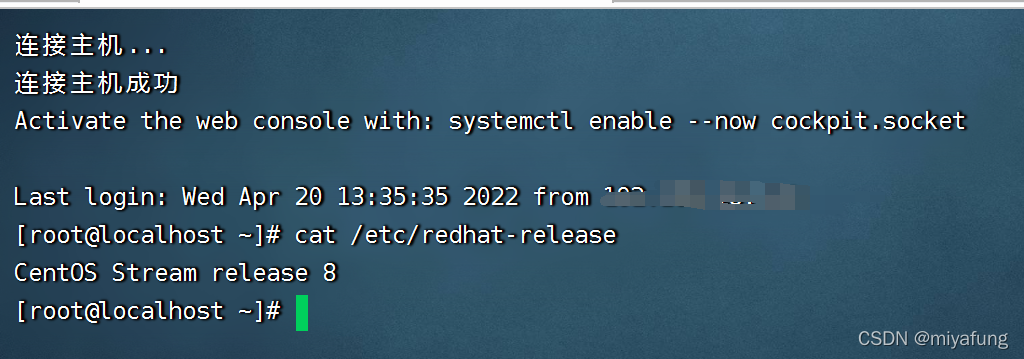
到此升级完成





 扫一扫
扫一扫


 357
357

 被折叠的 条评论
为什么被折叠?
被折叠的 条评论
为什么被折叠?
 到【灌水乐园】发言





