



- 一台机器作为服务端, 一台作为客户端. 系统版本为 CentOS 7.
- 安装 nfs-utils:
yum install nfs-utils
服务端和客户端都要安装 - 设置 nfs 服务为开机启动:
systemctl enable rpcbind
systemctl enable nfs - 启动 nfs 服务并查看状态:
systemctl start rpcbindsystemctl start nfssystemctl status nfs.status
可以看到状态是 active, 说明 nfs 已经启动了.

- 开启防火墙:
firewall-cmd --zone=public --permanent --add-service={rpc-bind,mountd,nfs}firewall-cmd --reload
- 服务端配置共享目录:
- 创建共享目录:
mkdir /home/sharechmod 755 /home/share
- 配置 /etc/exports:
- /home/share: 共享目录位置.
- 192.168.1.0/24: 客户端 IP 范围 *代表所有,即没有限制.
- rw: 权限设置, 可读可写.
- sync: 同步共享目录.
- no_root_squash: 可以使用 root 授权.
- no_all_squash: 可以使用普通用户授权.
/home/share 192.168.1.0/24(rw,sync,no_root_squash,no_all_squash) - 更改配置后重启 nfs 服务:
systemctl restart nfs.service - 查看本地共享目录:
showmount -e localhost
看到如下图所示, 则服务端配置成功了.
- 创建共享目录:

-
客户端连接 nfs:
- 测试连接:
showmount -e 192.168.1.181
看到如下图所示则证明客户端能够连接到服务端 - 挂载目录:
mount -t nfs 192.168.0.101:/home/share /home/share

- 测试连接:
-
设置开机自动挂载:
在 /etc/fstab 中增加一行配置192.168.0.110:/home/share /home/share nfs defaults 0 0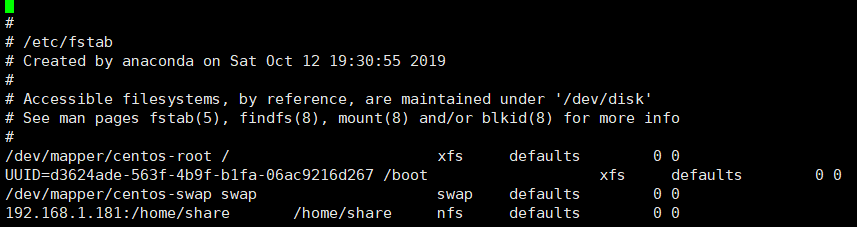
-
参考:
[1] : CentOS 7 下 yum 安装和配置 NFS
[2] : centos7 下nfs的配置





 扫一扫
扫一扫


 2120
2120

 被折叠的 条评论
为什么被折叠?
被折叠的 条评论
为什么被折叠?
 到【灌水乐园】发言





