



 本文详细介绍了FastDFS分布式文件系统的工作原理、安装配置流程、Java客户端使用方法及与Nginx的集成,旨在帮助读者深入理解并掌握FastDFS在实际项目中的应用。
FastDFS ~ 分布式文件系统。
文件系统。
文件系统是操作系统用于明确存储设备(常见的是磁盘,也有基于 NAND Flash 的固态硬盘)或分区上的文件的方法和数据结构;即在存储设备上组织文件的方法。操作系统中负责管理和存储文件信息的软件机构称为文件管理系统,简称文件系统。文件系统由三部分组成:文件系统的接口,对对象操纵和管理的软件集合,对象及属性。从系统角度来看,文件系统是对文件存储设备的空间进行组织和分配,负责文件存储并对存入的文件进行保护和检索的系统。具体地说,它负责为用户建立文件,存入、读出、修改、转储文件,控制文件的存取,当用户不再使用时撤销文件等。
分布式文件系统。
分布式文件系统(Distributed File System,DFS)是指文件系统管理的物理存储资源不一定直接连接在本地节点上,而是通过计算机网络与节点(可简单的理解为一台计算机)相连;或是若干不同的逻辑磁盘分区或卷标组合在一起而形成的完整的有层次的文件系统。DFS 为分布在网络上任意位置的资源提供一个逻辑上的树形文件系统结构,从而使用户访问分布在网络上的共享文件更加简便。单独的 DFS 共享文件夹的作用是相对于通过网络上的其他共享文件夹的访问点。
主流文件系统。
NFS。
NFS 是基于 UDP/IP 协议的应用,其实现主要是采用远程过程调用 RPC 机制,RPC 提供了一组与机器、操作系统以及低层传送协议无关的存取远程文件的操作。RPC 采用了 XDR 的支持。XDR 是一种与机器无关的数据描述编码的协议,他以独立与任意机器体系结构的格式对网上传送的数据进行编码和解码,支持在异构系统之间数据的传送。
https://baike.baidu.com/item/%E7%BD%91%E7%BB%9C%E6%96%87%E4%BB%B6%E7%B3%BB%E7%BB%9F/9719420?fromtitle=NFS&fromid=812203&fr=aladdin
GFS(Google 文件系统)。
GFS 是一个可扩展的分布式文件系统,用于大型的、分布式的、对大量数据进行访问的应用。它运行于廉价的普通硬件上,并提供容错功能。它可以给大量的用户提供总体性能较高的服务。
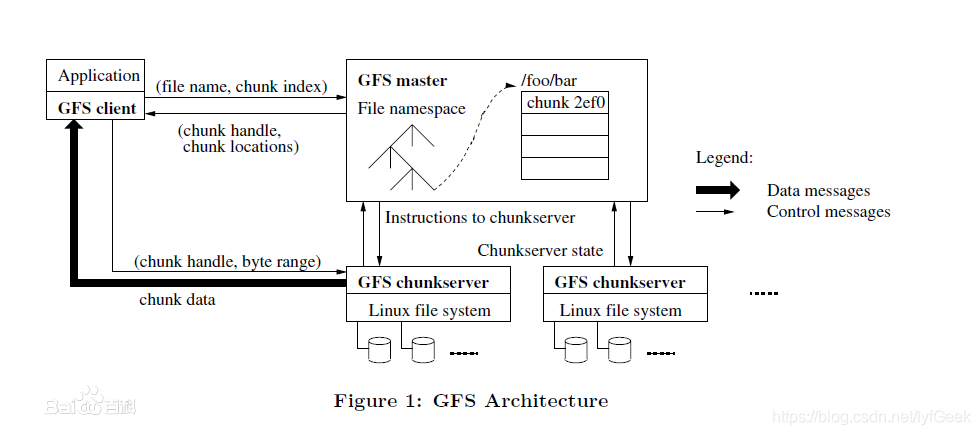
HDFS。
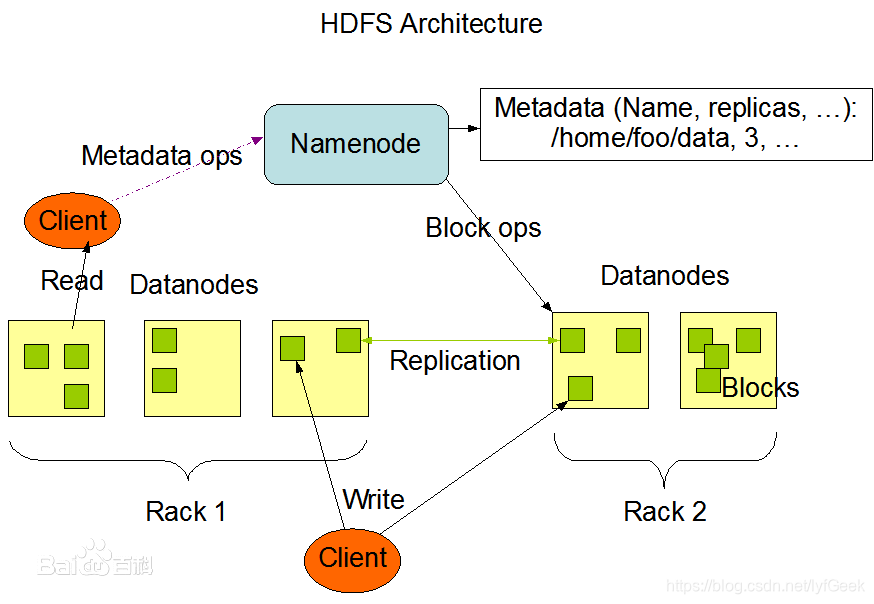
Hadoop 分布式文件系统(HDFS)是指被设计成适合运行在通用硬件(commodity hardware)上的分布式文件系统(Distributed File System)。它和现有的分布式文件系统有很多共同点。但同时,它和其他的分布式文件系统的区别也是很明显的。HDFS 是一个高度容错性的系统,适合部署在廉价的机器上。HDFS 能提供高吞吐量的数据访问,非常适合大规模数据集上的应用。HDFS 放宽了一部分 POSIX 约束,来实现流式读取文件系统数据的目的。HDFS 在最开始是作为 Apache Nutch 搜索引擎项目的基础架构而开发的。HDFS 是 Apache Hadoop Core项目的一部分。
HDFS 有着高容错性(fault-tolerant)的特点,并且设计用来部署在低廉的(low-cost)硬件上。而且它提供高吞吐量(high throughput)来访问应用程序的数据,适合那些有着超大数据集(large data set)的应用程序。HDFS 放宽了(relax)POSIX 的要求(requirements)这样可以实现流的形式访问(streaming access)文件系统中的数据。
OSS。
https://help.aliyun.com/product/31815.html?spm=5176.7933691.1309819.8.195e2a66Qz2Nhv
对象存储服务(Object Storage Service,OSS)是一种海量、安全、低成本、高可靠的云存储服务,适合存放任意类型的文件。容量和处理能力弹性扩展,多种存储类型供选择,全面优化存储成本。
七牛云。
百度云。
fastdfs。
https://www.oschina.net/p/fastdfs?hmsr=aladdin1e1
FastDFS 是一个开源的分布式文件系统,她对文件进行管理,功能包括:文件存储、文件同步、文件访问(文件上传、文件下载)等,解决了大容量存储和负载均衡的问题。特别适合以文件为载体的在线服务,如相册网站、视频网站等等。
FastDFS 服务端有两个角色:跟踪器(tracker)和存储节点(storage)。跟踪器主要做调度工作,在访问上起负载均衡的作用。
存储节点存储文件,完成文件管理的所有功能:存储、同步和提供存取接口,FastDFS 同时对文件的 meta data 进行管理。所谓文件的meta data就是文件的相关属性,以键值对(key value pair)方式表示,如:width=1024,其中的 key 为 width,value 为 1024。文件 meta data 是文件属性列表,可以包含多个键值对。
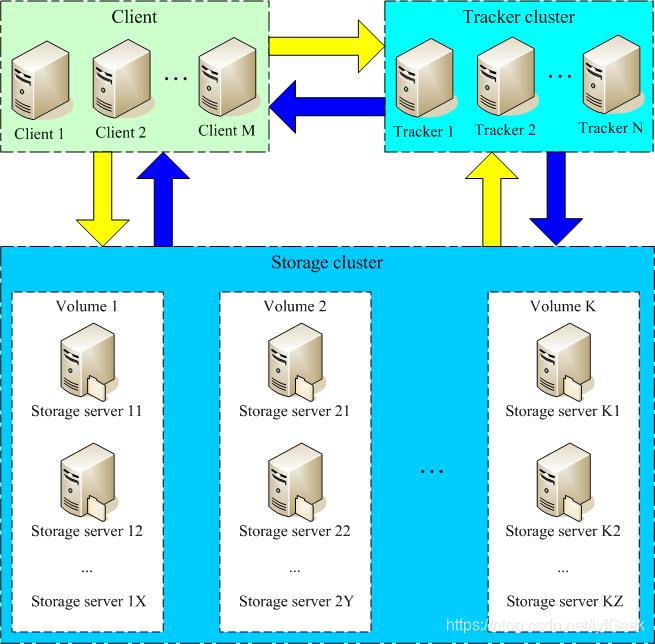
Tracker 服务器管理 Storage 服务器。
- client 询问 tracker 上传到的 storage,不需要附加参数;
- tracker 返回一台可用的 storage;
- client 直接和 storage 通讯完成文件上传。
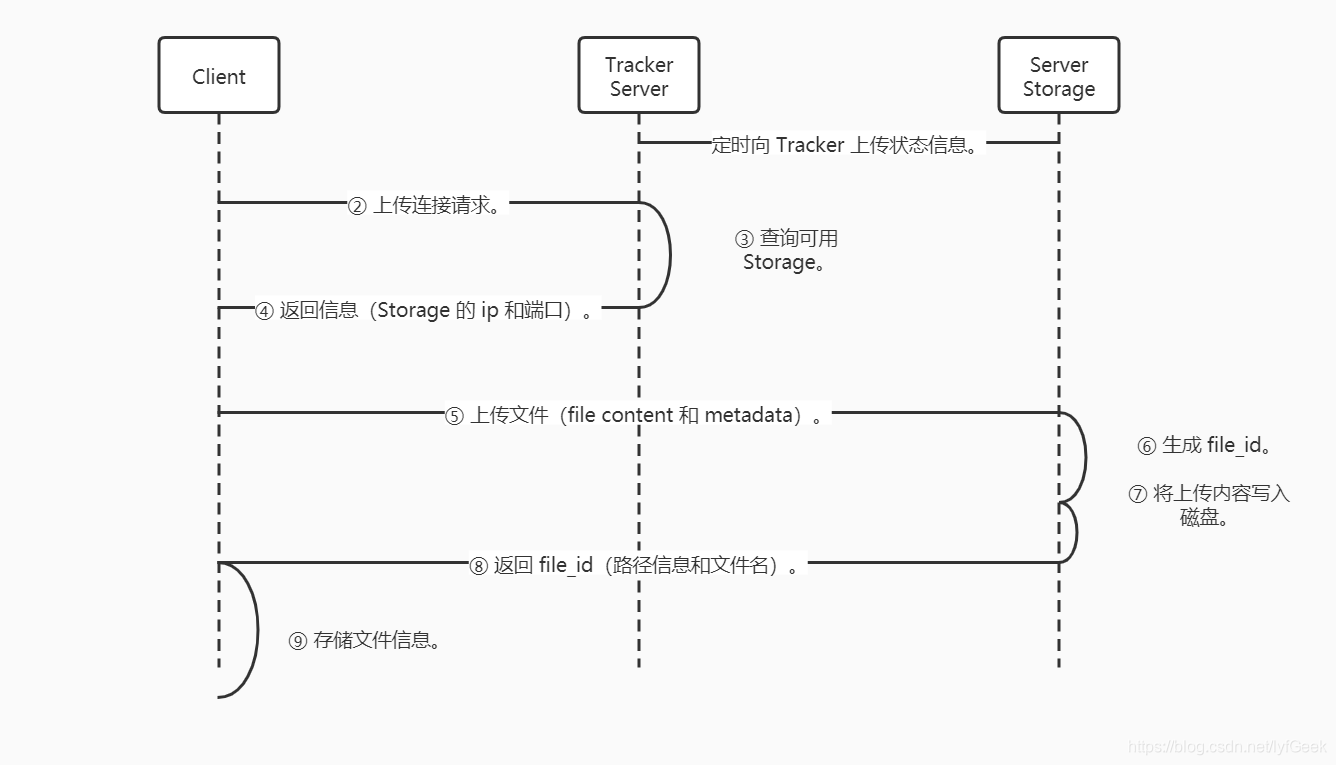
客户端上传文件后存储服务器返回文件 ID 给客户端,此文件 ID 用于以后访问该文件的索引信息。

-
组名。
文件上传后所丰的 storage 组名。在文件上传后由 storage 服务器。 -
虚拟磁盘路径。
storage 配置的虚拟路径。与磁盘选项 storage_path * 对应。如果配置了 storage_path0,则是 M00;如果配置了 storage_path1,则是 M01。 -
数据两级目录。
storage 服务器在每个虚拟机路径下创建的两级目录,用于存储数据文件。 -
文件名。
与文件上传时不同。是由存储服务器根据特定信息生成。(源存储服务器 IP 地址、文件创建时间戳、文件大小、随机数和文件拓展名等信息)。
安装。
https://github.com/happyfish100/fastdfs/releases/tag/V5.05
https://gitee.com/fastdfs100/fastdfs/wikis/Home?sort_id=1711583
- 编译环境。
yum install git gcc gcc-c++ make automake autoconf libtool pcre pcre-devel zlib zlib-devel openssl-devel wget vim -y
geek@geek-PC:~/Downloads$ scp fastdfs-5.05.tar.gz root@192.168.142.161:/root/geek/tools_my
- 磁盘目录
| 说明 | 位置 |
|---|---|
| 所有安装包 | /usr/local/src |
| 数据存储位置 | /home/dfs/ |
// 这里我为了方便把日志什么的都放到了 dfs。
mkdir /home/dfs # 创建数据存储目录。
cd /usr/local/src # 切换到安装目录准备下载安装包
- 安装 libfatscommon。
git clone https://github.com/happyfish100/libfastcommon.git --depth 1
cd libfastcommon/
./make.sh && ./make.sh install #编译安装
- 安装 FastDFS。
cd ../ #返回上一级目录
git clone https://github.com/happyfish100/fastdfs.git --depth 1
cd fastdfs/
./make.sh && ./make.sh install #编译安装
配置。
[root@192 fastdfs-5.05]# ll /etc/fdfs/
total 20
-rw-r--r--. 1 root root 1461 Jun 29 01:21 client.conf.sample
-rw-r--r--. 1 root root 7829 Jun 29 01:21 storage.conf.sample
-rw-r--r--. 1 root root 7102 Jun 29 01:21 tracker.conf.sample

[root@192 fastdfs-5.05]# mkdir /home/fastdfs
[root@192 fastdfs-5.05]# cp /etc/fdfs/tracker.conf.sample /etc/fdfs/tracker.conf
[root@192 fastdfs-5.05]# cp /etc/fdfs/storage.conf.sample /etc/fdfs/storage.conf

cp /usr/etc/fdfs/client.conf.sample /etc/fdfs/client.conf
# 客户端文件,测试用。
cp /usr/local/src/fastdfs/conf/http.conf /etc/fdfs/
# 供 nginx 访问使用。
cp /usr/local/src/fastdfs/conf/mime.types /etc/fdfs/
# 供 nginx 访问使用。
- tracker 配置。
# the tracker server port
port=22122

# the base path to store data and log files
base_path=/home/fastdfs
- storage 配置。
# the name of the group this storage server belongs to
#
# comment or remove this item for fetching from tracker server,
# in this case, use_storage_id must set to true in tracker.conf,
# and storage_ids.conf must be configed correctly.
group_name=group1

# the storage server port
port=23000

# connect timeout in seconds
# default value is 30s
connect_timeout=30

# the base path to store data and log files
base_path=/home/fastdfs

# store_path#, based 0, if store_path0 not exists, it's value is base_path
# the paths must be exist
store_path0=/home/fastdfs/fdfs_storage
#store_path1=/home/yuqing/fastdfs2

# 上报 tracker 地址。
# tracker_server can ocur more than once, and tracker_server format is
#  "host:port", host can be hostname or ip address
#tracker_server=192.168.209.121:22122
tracker_server=192.168.162.161:22122
启动。
[root@192 bin]# /usr/bin/fdfs_trackerd /etc/fdfs/tracker.conf restart
[root@192 bin]# /usr/bin/fdfs_storaged /etc/fdfs/storage.conf restart
[root@192 bin]# ps -ef | grep storage
root      10581   9777  0 01:51 pts/0    00:00:00 grep --color=auto storage
[root@192 bin]# ps -ef | grep tracker
root      10566      1  0 01:47 ?        00:00:00 /usr/bin/fdfs_trackerd /etc/fdfs/tracker.conf restart
root      10583   9777  0 01:51 pts/0    00:00:00 grep --color=auto tracker
[root@192 bin]# /usr/bin/fdfs_storaged /etc/fdfs/storage.conf start
^C
[root@192 bin]# vim /etc/fdfs/tracker.conf
[root@192 bin]# vim /etc/fdfs/storage.conf
[root@192 bin]# /usr/bin/fdfs_storaged /etc/fdfs/storage.conf start
[root@192 bin]# ps -ef | grep tracker
root      10566      1  0 01:47 ?        00:00:00 /usr/bin/fdfs_trackerd /etc/fdfs/tracker.conf restart
root      10601   9777  0 01:56 pts/0    00:00:00 grep --color=auto tracker
[root@192 bin]# ps -ef | grep storage
root      10591      1  0 01:56 ?        00:00:00 /usr/bin/fdfs_storaged /etc/fdfs/storage.conf start
root      10603   9777  0 01:57 pts/0    00:00:00 grep --color=auto storage
Java-client。
https://github.com/happyfish100/fastdfs-client-java
底层:Socket。
<?xml version="1.0" encoding="UTF-8"?>
<project xmlns="http://maven.apache.org/POM/4.0.0"
         xmlns:xsi="http://www.w3.org/2001/XMLSchema-instance"
         xsi:schemaLocation="http://maven.apache.org/POM/4.0.0 http://maven.apache.org/xsd/maven-4.0.0.xsd">
    <modelVersion>4.0.0</modelVersion>

    <groupId>com.geek</groupId>
    <artifactId>fastdfs_geek</artifactId>
    <version>1.0-SNAPSHOT</version>

    <parent>
        <groupId>org.springframework.boot</groupId>
        <artifactId>spring-boot-starter-parent</artifactId>
        <version>2.1.3.RELEASE</version>
    </parent>

    <dependencies>
        <dependency>
            <groupId>org.springframework.boot</groupId>
            <artifactId>spring-boot-starter-web</artifactId>
        </dependency>

        <!-- https://mvnrepository.com/artifact/net.oschina.zcx7878/fastdfs-client-java -->
        <dependency>
            <groupId>net.oschina.zcx7878</groupId>
            <artifactId>fastdfs-client-java</artifactId>
            <version>1.27.0.0</version>
        </dependency>

        <dependency>
            <groupId>org.springframework.boot</groupId>
            <artifactId>spring-boot-starter-test</artifactId>
            <scope>test</scope>
        </dependency>

        <dependency>
            <groupId>commons-io</groupId>
            <artifactId>commons-io</artifactId>
            <version>2.4</version>
        </dependency>
    </dependencies>

</project>
配置。
.conf 配置文件、所在目录、加载优先顺序。
配置文件名 fdfs_client.conf(或使用其它文件名xxx_yyy.conf)。
文件所在位置可以是项目 classpath(或 OS 文件系统目录比如 /opt/)。
/opt/fdfs_client.conf
C:\Users\James\config\fdfs_client.conf
优先按 OS 文件系统路径读取,没有找到才查找项目 classpath,尤其针对 Linux 环境下的相对路径比如。
fdfs_client.conf
config/fdfs_client.conf
.properties 配置文件、所在目录、加载优先顺序。
配置文件名 fastdfs-client.properties(或使用其它文件名 xxx-yyy.properties)。
文件所在位置可以是项目 classpath(或 OS 文件系统目录比如 /opt/)。
/opt/fastdfs-client.properties
C:\Users\James\config\fastdfs-client.properties
优先按 OS 文件系统路径读取,没有找到才查找项目 classpath,尤其针对 Linux 环境下的相对路径比如。
fastdfs-client.properties
config/fastdfs-client.properties
fastdfs.connect_timeout_in_seconds=5
fastdfs.network_timeout_in_seconds=30
fastdfs.charset=UTF-8
fastdfs.http_anti_steal_token=false
fastdfs.http_secret_key=FastDFS1234567890
fastdfs.http_tracker_http_port=80
fastdfs.tracker_servers=192.168.142.161:22122
fastdfs.connection_pool.enabled=true
fastdfs.connection_pool.max_count_per_entry=500
fastdfs.connection_pool.max_idle_time=3600
fastdfs.connection_pool.max_wait_time_in_ms=1000
上传文件。
package com.geek.fastdfs;

import org.csource.common.MyException;
import org.csource.common.NameValuePair;
import org.csource.fastdfs.*;
import org.junit.Test;

import java.io.IOException;

public class TestFastDfs {

    private String conf_filename = "config/fdfs-client.properties";

    @Test
    public void testUpload() {

        System.out.println("java.version=" + System.getProperty("java.version"));

        try {
            // 加载配置文件。
            ClientGlobal.initByProperties(conf_filename);

            System.out.println("network_timeout=" + ClientGlobal.g_network_timeout + "ms");
            System.out.println("charset=" + ClientGlobal.g_charset);

            // 创建 Tracker 客户端。
            TrackerClient tracker = new TrackerClient();
            TrackerServer trackerServer = tracker.getConnection();
            StorageServer storageServer = null;
            // 定义 Storage 客户端。
            StorageClient1 client = new StorageClient1(trackerServer, storageServer);

            // 文件元信息。
            NameValuePair[] metaList = new NameValuePair[1];
            metaList[0] = new NameValuePair("fileName", "hello.txt");
            // 执行上传。
            String fileId = client.upload_file1("C:\\Users\\geek\\Desktop\\hello.txt", "txt", metaList);
            System.out.println("upload success. file id is: " + fileId);

            int i = 0;
            while (i++ < 10) {
                byte[] result = client.download_file1(fileId);
                System.out.println(i + ", download result is: " + result.length);
            }
        } catch (IOException e) {
            e.printStackTrace();
        } catch (MyException e) {
            e.printStackTrace();
        }
    }
}


/*
java.version=1.8.0_241
network_timeout=30000ms
charset=UTF-8
upload success. file id is: group1/M00/00/00/wKiOoV74416Ab7YEAAAAETi0qDc272.txt
1, download result is: 17
2, download result is: 17
3, download result is: 17
4, download result is: 17
5, download result is: 17
6, download result is: 17
7, download result is: 17
8, download result is: 17
9, download result is: 17
10, download result is: 17

Process finished with exit code 0

 */
- 查看文件。
group1/M00/00/00/wKiOoV74416Ab7YEAAAAETi0qDc272.txt
[root@192 00]# pwd
/home/fastdfs/fdfs_storage/data/00/00
[root@192 00]# ll
total 8
-rw-r--r--. 1 root root 17 Jun 29 02:37 wKiOoV74416Ab7YEAAAAETi0qDc272.txt
-rw-r--r--. 1 root root 18 Jun 29 02:37 wKiOoV74416Ab7YEAAAAETi0qDc272.txt-m
查询文件。
    @Test
    public void testQuery() {

        System.out.println("java.version=" + System.getProperty("java.version"));

        try {
            // 加载配置文件。
            ClientGlobal.initByProperties(conf_filename);

            System.out.println("network_timeout=" + ClientGlobal.g_network_timeout + "ms");
            System.out.println("charset=" + ClientGlobal.g_charset);

            // 创建 Tracker 客户端。
            TrackerClient tracker = new TrackerClient();
            TrackerServer trackerServer = tracker.getConnection();
            StorageServer storageServer = null;
            // 定义 Storage 客户端。
            StorageClient1 client = new StorageClient1(trackerServer, storageServer);

            FileInfo fileInfo = client.query_file_info("group1", "M00/00/00/wKiOoV74416Ab7YEAAAAETi0qDc272.txt");
            System.out.println("fileInfo = " + fileInfo);
            // fileInfo = source_ip_addr = 192.168.142.161, file_size = 17, create_timestamp = 2020-06-29 02:37:18, crc32 = 951363639

            // 根据文件 id 查询。
            FileInfo fileInfo1 = client.query_file_info1("group1/M00/00/00/wKiOoV74416Ab7YEAAAAETi0qDc272.txt");
            System.out.println("fileInfo1 = " + fileInfo1);

            // 查询元信息。
            NameValuePair[] metadata1 = client.get_metadata1("group1/M00/00/00/wKiOoV74416Ab7YEAAAAETi0qDc272.txt");
            System.out.println("metadata1 = " + metadata1);

            // 关闭。
            trackerServer.close();
        } catch (IOException e) {
            e.printStackTrace();
        } catch (MyException e) {
            e.printStackTrace();
        }
    }
下载文件。
    @Test
    public void testDown() {

        System.out.println("java.version=" + System.getProperty("java.version"));

        try {
            // 加载配置文件。
            ClientGlobal.initByProperties(conf_filename);

            System.out.println("network_timeout=" + ClientGlobal.g_network_timeout + "ms");
            System.out.println("charset=" + ClientGlobal.g_charset);

            // 创建 Tracker 客户端。
            TrackerClient tracker = new TrackerClient();
            TrackerServer trackerServer = tracker.getConnection();
            StorageServer storageServer = null;
            // 定义 Storage 客户端。
            StorageClient1 client = new StorageClient1(trackerServer, storageServer);

            byte[] bytes = client.download_file1("group1/M00/00/00/wKiOoV74416Ab7YEAAAAETi0qDc272.txt");

            File file = new File("./a.txt");
            FileOutputStream fileOutputStream = new FileOutputStream(file);
            fileOutputStream.write(bytes);
            fileOutputStream.close();
            // 关闭。
            trackerServer.close();
        } catch (IOException e) {
            e.printStackTrace();
        } catch (MyException e) {
            e.printStackTrace();
        }
    }
文件服务实例。
↑
作用:通过 HTTP 方式访问访问 storage 中的文件。当 storage 本机没有要找的文件时向源 storage 主机代理请求文件。
Nginx 配置 fastdfs-nginx-module 插件。
https://github.com/happyfish100/fastdfs-nginx-module/releases
https://codeload.github.com/happyfish100/fastdfs-nginx-module/tar.gz/V1.22 (该版本安装失败)。
fastdfs-nginx-module_v1.16.tar.gz
- 将 fastdfs-nginx-module-1.16.tar.gz 传到
/usr/local下。
[root@192 local]# tar -zxvf fastdfs-nginx-module-1.20.tar.gz
[root@192 local]# cd fastdfs-nginx-module/src/
[root@192 src]# ls
common.c  common.h  config  mod_fastdfs.conf  ngx_http_fastdfs_module.c
- 修改 config 文件。将
/usr/local/改为/usr/。
[root@192 src]# cp config config.bak
[root@192 src]# vim config
ngx_addon_name=ngx_http_fastdfs_module
HTTP_MODULES="$HTTP_MODULES ngx_http_fastdfs_module"
NGX_ADDON_SRCS="$NGX_ADDON_SRCS $ngx_addon_dir/ngx_http_fastdfs_module.c"
CORE_INCS="$CORE_INCS /usr/include/fastdfs /usr/include/fastcommon/"
CORE_LIBS="$CORE_LIBS -L/usr/lib -lfastcommon -lfdfsclient"
CFLAGS="$CFLAGS -D_FILE_OFFSET_BITS=64 -DFDFS_OUTPUT_CHUNK_SIZE='256*1024' -DFDFS_MOD_CONF_FILENAME='\"/etc/fdfs/mod_fastdfs.conf\"'"
 15     CORE_INCS="$CORE_INCS /usr/include/fastdfs /usr/include/fastcommon"
 16     CORE_LIBS="$CORE_LIBS -L/usr/lib -libfastcommon -libfdfsclient"
这里可以根据 ls /usr/lib 中的库文件名设置。
[root@192 ~]# ls /usr/lib
binfmt.d   firmware  kdump             modprobe.d      polkit-1   systemd
cpp        games     kernel            modules         python2.7  tmpfiles.d
debug      gcc       libfastcommon.so  modules-load.d  rpm        tuned
dracut     grub      libfdfsclient.so  NetworkManager  sse2       udev
firewalld  kbd       locale            node_modules    sysctl.d   yum-plugins
- 将 FastDFS-nginx-module/src 下的 mod_FastDFS.conf 拷贝至 /etc/fdfs 下。
[root@192 src]# ls
common.c  common.h  config  config.bak  mod_fastdfs.conf  ngx_http_fastdfs_module.c
[root@192 src]# cp mod_fastdfs.conf /etc/fdfs/
并修改内容。
vim /etc/fdfs/mod_fastdfs.conf
# the base path to store log files
#base_path=/tmp
base_path=/home/fastdfs

# FastDFS tracker_server can ocur more than once, and tracker_server format is
#  "host:port", host can be hostname or ip address
# valid only when load_fdfs_parameters_from_tracker is true
#tracker_server=tracker:22122
tracker_server=192.168.142.161:22122
#tracker_server=192.168.142.162:22122

# if the url / uri including the group name
# set to false when uri like /M00/00/00/xxx
# set to true when uri like ${group_name}/M00/00/00/xxx, such as group1/M00/xxx
# default value is false
#url_have_group_name = false
url_have_group_name = true

# store_path#, based 0, if store_path0 not exists, it's value is base_path
# the paths must be exist
# must same as storage.conf
#store_path0=/home/yuqing/fastdfs
store_path0=/home/fastdfs/fdfs_storage
#store_path1=/home/yuqing/fastdfs1
- 将 libfdfsclient.so 文件拷贝至 /usr/lib/ 下。
[root@192 src]# cp /usr/lib64/libfdfsclient.so /usr/lib/
- 创建 nginx/client 目录。
[root@192 src]# mkdir -p /var/temp/nginx/client
- 进入 Nginx 目录,添加 fastdfs-nginx-module。
–add-module=path
enables an external module.
[root@192 nginx]# cd /usr/local/src/nginx-1.12.2

./configure --sbin-path=/usr/local/nginx/nginx \
--conf-path=/usr/local/nginx/nginx.conf \
--pid-path=/usr/local/nginx/nginx.pid \
--with-http_ssl_module \
--with-pcre=/usr/local/src/pcre-8.37 \
--with-zlib=/usr/local/src/zlib-1.2.11 \
--with-openssl=/usr/local/src/openssl-1.0.1t \
--add-module=/usr/local/fastdfs-nginx-module/src
看到 adding module。
adding module in /usr/local/fastdfs-nginx-module-1.22/src
 + ngx_http_fastdfs_module was configured
creating objs/Makefile

Configuration summary
  + using PCRE library: /usr/local/src/pcre-8.37
  + using OpenSSL library: /usr/local/src/openssl-1.0.1t
  + using zlib library: /usr/local/src/zlib-1.2.11

  nginx path prefix: "/usr/local/nginx"
  nginx binary file: "/usr/local/nginx/nginx"
  nginx modules path: "/usr/local/nginx/modules"
  nginx configuration prefix: "/usr/local/nginx"
  nginx configuration file: "/usr/local/nginx/nginx.conf"
  nginx pid file: "/usr/local/nginx/nginx.pid"
  nginx error log file: "/usr/local/nginx/logs/error.log"
  nginx http access log file: "/usr/local/nginx/logs/access.log"
  nginx http client request body temporary files: "client_body_temp"
  nginx http proxy temporary files: "proxy_temp"
  nginx http fastcgi temporary files: "fastcgi_temp"
  nginx http uwsgi temporary files: "uwsgi_temp"
  nginx http scgi temporary files: "scgi_temp"
make
make install
修改 Nginx 配置文件。
[root@192 conf]# cp nginx.conf nginx.conf.bak
[root@192 conf]# cp nginx.conf nginx-fdfs.conf
[root@192 conf]# vim nginx-fdfs.conf
在 http 块中添加。
http {

    upstream storage_server_group1 {
        server 192.168.142.161:80 weight=10;
        server 192.168.142.162:80 weight=10;
    }

    include       mime.types;
    default_type  application/octet-stream;

    #log_format  main  '$remote_addr - $remote_user [$time_local] "$request" '
    #                  '$status $body_bytes_sent "$http_referer" '
    #                  '"$http_user_agent" "$http_x_forwarded_for"';
在 server 块中配置。
    #keepalive_timeout  0;
    keepalive_timeout  65;

    #gzip  on;

    server {
        listen       80;
        server_name  localhost;

        #charset koi8-r;

        #access_log  logs/host.access.log  main;

        location / {
            root   html;
            index  index.html index.htm;
        }

        location /group1 {
                proxy_redirect off;
                proxy_set_header Host $host;
                proxy_set_header X-Real-IP $remote_addr;
                proxy_set_header X-Forwarded-For $proxy_add_x_forwarded_for;
                proxy_pass http://storage_server_group1;
        }

        location /group1/M00 {
                root /home/fastdfs/fdfs_storage/data;
                ngx_fastdfs_module;
        }

        #error_page  404              /404.html;

        # redirect server error pages to the static page /50x.html
        #
        error_page   500 502 503 504  /50x.html;
        location = /50x.html {
            root   html;
        }

        # proxy the PHP scripts to Apache listening on 127.0.0.1:80
        #
        #location ~ \.php$ {
        #    proxy_pass   http://127.0.0.1;
        #}
启动。
[root@192 conf]# /usr/local/nginx/nginx -c /usr/local/src/nginx-1.12.2/conf/nginx-fdfs.conf
- 访问。
http://192.168.142.161/group1/M00/00/00/wKiOoV74416Ab7YEAAAAETi0qDc272.txt
- 访问不成功。解决思路。
查看日志,发现缺少配置文件。
[2020-06-29 12:33:40] ERROR - file: shared_func.c, line: 1155, file /etc/fdfs/mime.types not exist
2020/06/29 12:33:40 [alert] 109683#0: worker process 109684 exited with fatal code 2 and cannot be respawned
[root@192 nginx]# find / -name mime.types
/root/geek/tools_my/fastdfs/fastdfs-5.05/conf/mime.types
/usr/local/src/nginx-1.12.2/conf/mime.types
/usr/local/nginx/mime.types
[root@192 nginx]# cp /root/geek/tools_my/fastdfs/fastdfs-5.05/conf/mime.types /etc/fdfs/mime.types
[root@192 nginx]# ./nginx -s stop
[root@192 nginx]# /usr/local/nginx/nginx -c /usr/local/src/nginx-1.12.2/conf/nginx-fdfs.conf
Spring Boot。
package com.geek.fastdfs.controller;

import com.geek.fastdfs.model.FileSystem;
import org.csource.common.MyException;
import org.csource.common.NameValuePair;
import org.csource.fastdfs.*;
import org.springframework.beans.factory.annotation.Value;
import org.springframework.web.bind.annotation.*;
import org.springframework.web.multipart.MultipartFile;

import java.io.File;
import java.io.IOException;
import java.util.UUID;

@RestController
@RequestMapping("/filesystem")
public class FileServerController {

    @Value("${geek-fastdfs.upload_location}")
    private String upload_location;

    @PostMapping("/upload")
    @ResponseBody
    public FileSystem upload(@RequestParam("file") MultipartFile multipartFile) {
        // 将文件存储在 web 服务器上,再调用 fastdfs 的 client 将文件上传到 fastdfs 服务器。
        FileSystem fileSystem = new FileSystem();
        // 文件原始名称。
        String originalFilename = multipartFile.getOriginalFilename();
        // 扩展名。
        String extension = originalFilename.substring(originalFilename.lastIndexOf("."));
        String fileNameNew = UUID.randomUUID() + extension;

        try {
            File file = new File(upload_location + fileNameNew);
            multipartFile.transferTo(file);
            // 获取新上传文件的物理路径。
            String newFilePath = file.getAbsolutePath();

            // 加载配置文件。
            ClientGlobal.initByProperties("config/fdfs-client.properties");

            System.out.println("network_timeout=" + ClientGlobal.g_network_timeout + "ms");
            System.out.println("charset=" + ClientGlobal.g_charset);

            // 创建 Tracker 客户端。
            TrackerClient tracker = new TrackerClient();
            TrackerServer trackerServer = tracker.getConnection();
            StorageServer storageServer = null;
            // 定义 Storage 客户端。
            StorageClient1 client = new StorageClient1(trackerServer, storageServer);

            // 文件元信息。
            NameValuePair[] metaList = new NameValuePair[1];
            metaList[0] = new NameValuePair("fileName", originalFilename);
            // 执行上传。
            String fileId = client.upload_file1(newFilePath, extension, metaList);
            System.out.println("upload success. file id is: " + fileId);

            fileSystem.setFileId(fileId);
            fileSystem.setFilePath(fileId);
            fileSystem.setFileName(originalFilename);

            // 通过调用 service 和 dao 将文件路径存储到数据库。
            // 。。。

            int i = 0;
            while (i++ < 10) {
                byte[] result = client.download_file1(fileId);
                System.out.println(i + ", download result is: " + result.length);
            }
        } catch (IOException e) {
            e.printStackTrace();
        } catch (MyException e) {
            e.printStackTrace();
        }

        return fileSystem;
    }

}
package com.geek.fastdfs.model;

import lombok.AllArgsConstructor;
import lombok.Data;
import lombok.NoArgsConstructor;

@Data
@AllArgsConstructor
@NoArgsConstructor
public class FileSystem {

    private String fileId;
    private String filePath;
    private long fileSize;
    private String fileName;
    private String fileType;

}
- application.yml。
server:
  port: 22100
geek-fastdfs:
  # 文件上传临时目录。
  upload_location: ./
package com.geek.fastdfs.controller;

import com.geek.fastdfs.model.FileSystem;
import org.csource.common.MyException;
import org.csource.common.NameValuePair;
import org.csource.fastdfs.*;
import org.springframework.beans.factory.annotation.Value;
import org.springframework.web.bind.annotation.*;
import org.springframework.web.multipart.MultipartFile;

import java.io.File;
import java.io.IOException;
import java.util.UUID;

@RestController
@RequestMapping("/filesystem")
@CrossOrigin
public class FileServerController {

    @Value("${geek-fastdfs.upload_location}")
    private String upload_location;

    @PostMapping("/upload")
    @ResponseBody
    public FileSystem upload(@RequestParam("file") MultipartFile multipartFile) {
        // 将文件存储在 web 服务器上,再调用 fastdfs 的 client 将文件上传到 fastdfs 服务器。
        FileSystem fileSystem = new FileSystem();
        // 文件原始名称。
        String originalFilename = multipartFile.getOriginalFilename();
        // 扩展名。
        String extension = originalFilename.substring(originalFilename.lastIndexOf("."));
        String fileNameNew = UUID.randomUUID() + extension;

        try {
            File file = new File("G:\\home\\upload\\" + fileNameNew);
            // 先上传到本地服务器。
            multipartFile.transferTo(file);
            // 获取新上传文件的物理路径。
            String newFilePath = file.getAbsolutePath();

            // 加载配置文件。
            ClientGlobal.initByProperties("config/fdfs-client.properties");

            System.out.println("network_timeout=" + ClientGlobal.g_network_timeout + "ms");
            System.out.println("charset=" + ClientGlobal.g_charset);

            // 创建 Tracker 客户端。
            TrackerClient tracker = new TrackerClient();
            TrackerServer trackerServer = tracker.getConnection();
            StorageServer storageServer = null;
            // 定义 Storage 客户端。
            StorageClient1 client = new StorageClient1(trackerServer, storageServer);

            // 文件元信息。
            NameValuePair[] metaList = new NameValuePair[1];
            metaList[0] = new NameValuePair("fileName", originalFilename);
            // 执行上传。
            System.out.println(newFilePath);
            String fileId = client.upload_file1(newFilePath, null, metaList);
            System.out.println("upload success. file id is: " + fileId);

            fileSystem.setFileId(fileId);
            fileSystem.setFilePath(fileId);
            fileSystem.setFileName(originalFilename);

            // 通过调用 service 和 dao 将文件路径存储到数据库。
            // 。。。

            int i = 0;
            while (i++ < 10) {
                byte[] result = client.download_file1(fileId);
                System.out.println(i + ", download result is: " + result.length);
            }
        } catch (IOException e) {
            e.printStackTrace();
        } catch (MyException e) {
            e.printStackTrace();
        }

        return fileSystem;
    }

}
前端。

<!DOCTYPE html>
<html lang="en">
<head>
    <meta charset="UTF-8">
    <title>Title</title>

    <!-- vue。-->
    <script src="js/vue.min.js"></script>
    <!--     element。-->
    <!-- 引入样式 -->
    <link rel="stylesheet" href="https://unpkg.com/element-ui/lib/theme-chalk/index.css">
    <!-- 引入组件库 -->
    <script src="https://unpkg.com/element-ui/lib/index.js"></script>

</head>
<body>

<div id="app">

    <el-upload
            action="http://192.168.0.104:22100/filesystem/upload"
            list-type="picture-card"
            :on-preview="handlePictureCardPreview"
    >
        <i class="el-icon-plus"></i>
    </el-upload>
    <el-dialog :visible.sync="dialogVisible">
        <img width="100%" :src="dialogImageUrl" alt="">
    </el-dialog>
</div>

<script>
    let vm = new Vue({
        el: '#app',
        data: {
            dialogVisible: false,
            dialogImageUrl: ''
        },
        methods: {
            handlePictureCardPreview: function (file) {
                console.log(file);
                this.dialogVisible = true;
            }
        }
    })
</script>


</body>
</html>
Spring Boot 解决跨域。
@RestController
@RequestMapping("/filesystem")
@CrossOrigin
public class FileServerController {
源配置文件。
[root@192 fastdfs-5.05]# cat /etc/fdfs/tracker.conf
# is this config file disabled
# false for enabled
# true for disabled
disabled=false

# bind an address of this host
# empty for bind all addresses of this host
bind_addr=

# the tracker server port
port=22122

# connect timeout in seconds
# default value is 30s
connect_timeout=30

# network timeout in seconds
# default value is 30s
network_timeout=60

# the base path to store data and log files
base_path=/home/yuqing/fastdfs

# max concurrent connections this server supported
max_connections=256

# accept thread count
# default value is 1
# since V4.07
accept_threads=1

# work thread count, should <= max_connections
# default value is 4
# since V2.00
work_threads=4

# the method of selecting group to upload files
# 0: round robin
# 1: specify group
# 2: load balance, select the max free space group to upload file
store_lookup=2

# which group to upload file
# when store_lookup set to 1, must set store_group to the group name
store_group=group2

# which storage server to upload file
# 0: round robin (default)
# 1: the first server order by ip address
# 2: the first server order by priority (the minimal)
store_server=0

# which path(means disk or mount point) of the storage server to upload file
# 0: round robin
# 2: load balance, select the max free space path to upload file
store_path=0

# which storage server to download file
# 0: round robin (default)
# 1: the source storage server which the current file uploaded to
download_server=0

# reserved storage space for system or other applications.
# if the free(available) space of any stoarge server in
# a group <= reserved_storage_space,
# no file can be uploaded to this group.
# bytes unit can be one of follows:
### G or g for gigabyte(GB)
### M or m for megabyte(MB)
### K or k for kilobyte(KB)
### no unit for byte(B)
### XX.XX% as ratio such as reserved_storage_space = 10%
reserved_storage_space = 10%

#standard log level as syslog, case insensitive, value list:
### emerg for emergency
### alert
### crit for critical
### error
### warn for warning
### notice
### info
### debug
log_level=info

#unix group name to run this program,
#not set (empty) means run by the group of current user
run_by_group=

#unix username to run this program,
#not set (empty) means run by current user
run_by_user=

# allow_hosts can ocur more than once, host can be hostname or ip address,
# "*" means match all ip addresses, can use range like this: 10.0.1.[1-15,20] or
# host[01-08,20-25].domain.com, for example:
# allow_hosts=10.0.1.[1-15,20]
# allow_hosts=host[01-08,20-25].domain.com
allow_hosts=*

# sync log buff to disk every interval seconds
# default value is 10 seconds
sync_log_buff_interval = 10

# check storage server alive interval seconds
check_active_interval = 120

# thread stack size, should >= 64KB
# default value is 64KB
thread_stack_size = 64KB

# auto adjust when the ip address of the storage server changed
# default value is true
storage_ip_changed_auto_adjust = true

# storage sync file max delay seconds
# default value is 86400 seconds (one day)
# since V2.00
storage_sync_file_max_delay = 86400

# the max time of storage sync a file
# default value is 300 seconds
# since V2.00
storage_sync_file_max_time = 300

# if use a trunk file to store several small files
# default value is false
# since V3.00
use_trunk_file = false

# the min slot size, should <= 4KB
# default value is 256 bytes
# since V3.00
slot_min_size = 256

# the max slot size, should > slot_min_size
# store the upload file to trunk file when it's size <=  this value
# default value is 16MB
# since V3.00
slot_max_size = 16MB

# the trunk file size, should >= 4MB
# default value is 64MB
# since V3.00
trunk_file_size = 64MB

# if create trunk file advancely
# default value is false
# since V3.06
trunk_create_file_advance = false

# the time base to create trunk file
# the time format: HH:MM
# default value is 02:00
# since V3.06
trunk_create_file_time_base = 02:00

# the interval of create trunk file, unit: second
# default value is 38400 (one day)
# since V3.06
trunk_create_file_interval = 86400

# the threshold to create trunk file
# when the free trunk file size less than the threshold, will create
# the trunk files
# default value is 0
# since V3.06
trunk_create_file_space_threshold = 20G

# if check trunk space occupying when loading trunk free spaces
# the occupied spaces will be ignored
# default value is false
# since V3.09
# NOTICE: set this parameter to true will slow the loading of trunk spaces
# when startup. you should set this parameter to true when neccessary.
trunk_init_check_occupying = false

# if ignore storage_trunk.dat, reload from trunk binlog
# default value is false
# since V3.10
# set to true once for version upgrade when your version less than V3.10
trunk_init_reload_from_binlog = false

# the min interval for compressing the trunk binlog file
# unit: second
# default value is 0, 0 means never compress
# FastDFS compress the trunk binlog when trunk init and trunk destroy
# recommand to set this parameter to 86400 (one day)
# since V5.01
trunk_compress_binlog_min_interval = 0

# if use storage ID instead of IP address
# default value is false
# since V4.00
use_storage_id = false

# specify storage ids filename, can use relative or absolute path
# since V4.00
storage_ids_filename = storage_ids.conf

# id type of the storage server in the filename, values are:
## ip: the ip address of the storage server
## id: the server id of the storage server
# this paramter is valid only when use_storage_id set to true
# default value is ip
# since V4.03
id_type_in_filename = ip

# if store slave file use symbol link
# default value is false
# since V4.01
store_slave_file_use_link = false

# if rotate the error log every day
# default value is false
# since V4.02
rotate_error_log = false

# rotate error log time base, time format: Hour:Minute
# Hour from 0 to 23, Minute from 0 to 59
# default value is 00:00
# since V4.02
error_log_rotate_time=00:00

# rotate error log when the log file exceeds this size
# 0 means never rotates log file by log file size
# default value is 0
# since V4.02
rotate_error_log_size = 0

# keep days of the log files
# 0 means do not delete old log files
# default value is 0
log_file_keep_days = 0

# if use connection pool
# default value is false
# since V4.05
use_connection_pool = false

# connections whose the idle time exceeds this time will be closed
# unit: second
# default value is 3600
# since V4.05
connection_pool_max_idle_time = 3600

# HTTP port on this tracker server
http.server_port=8080

# check storage HTTP server alive interval seconds
# <= 0 for never check
# default value is 30
http.check_alive_interval=30

# check storage HTTP server alive type, values are:
#   tcp : connect to the storge server with HTTP port only,
#        do not request and get response
#   http: storage check alive url must return http status 200
# default value is tcp
http.check_alive_type=tcp

# check storage HTTP server alive uri/url
# NOTE: storage embed HTTP server support uri: /status.html
http.check_alive_uri=/status.html
[root@192 fastdfs-5.05]# cat /etc/fdfs/storage.conf
# is this config file disabled
# false for enabled
# true for disabled
disabled=false

# the name of the group this storage server belongs to
#
# comment or remove this item for fetching from tracker server,
# in this case, use_storage_id must set to true in tracker.conf,
# and storage_ids.conf must be configed correctly.
group_name=group1

# bind an address of this host
# empty for bind all addresses of this host
bind_addr=

# if bind an address of this host when connect to other servers
# (this storage server as a client)
# true for binding the address configed by above parameter: "bind_addr"
# false for binding any address of this host
client_bind=true

# the storage server port
port=23000

# connect timeout in seconds
# default value is 30s
connect_timeout=30

# network timeout in seconds
# default value is 30s
network_timeout=60

# heart beat interval in seconds
heart_beat_interval=30

# disk usage report interval in seconds
stat_report_interval=60

# the base path to store data and log files
base_path=/home/yuqing/fastdfs

# max concurrent connections the server supported
# default value is 256
# more max_connections means more memory will be used
max_connections=256

# the buff size to recv / send data
# this parameter must more than 8KB
# default value is 64KB
# since V2.00
buff_size = 256KB

# accept thread count
# default value is 1
# since V4.07
accept_threads=1

# work thread count, should <= max_connections
# work thread deal network io
# default value is 4
# since V2.00
work_threads=4

# if disk read / write separated
##  false for mixed read and write
##  true for separated read and write
# default value is true
# since V2.00
disk_rw_separated = true

# disk reader thread count per store base path
# for mixed read / write, this parameter can be 0
# default value is 1
# since V2.00
disk_reader_threads = 1

# disk writer thread count per store base path
# for mixed read / write, this parameter can be 0
# default value is 1
# since V2.00
disk_writer_threads = 1

# when no entry to sync, try read binlog again after X milliseconds
# must > 0, default value is 200ms
sync_wait_msec=50

# after sync a file, usleep milliseconds
# 0 for sync successively (never call usleep)
sync_interval=0

# storage sync start time of a day, time format: Hour:Minute
# Hour from 0 to 23, Minute from 0 to 59
sync_start_time=00:00

# storage sync end time of a day, time format: Hour:Minute
# Hour from 0 to 23, Minute from 0 to 59
sync_end_time=23:59

# write to the mark file after sync N files
# default value is 500
write_mark_file_freq=500

# path(disk or mount point) count, default value is 1
store_path_count=1

# store_path#, based 0, if store_path0 not exists, it's value is base_path
# the paths must be exist
store_path0=/home/yuqing/fastdfs
#store_path1=/home/yuqing/fastdfs2

# subdir_count  * subdir_count directories will be auto created under each
# store_path (disk), value can be 1 to 256, default value is 256
subdir_count_per_path=256

# tracker_server can ocur more than once, and tracker_server format is
#  "host:port", host can be hostname or ip address
tracker_server=192.168.209.121:22122

#standard log level as syslog, case insensitive, value list:
### emerg for emergency
### alert
### crit for critical
### error
### warn for warning
### notice
### info
### debug
log_level=info

#unix group name to run this program,
#not set (empty) means run by the group of current user
run_by_group=

#unix username to run this program,
#not set (empty) means run by current user
run_by_user=

# allow_hosts can ocur more than once, host can be hostname or ip address,
# "*" means match all ip addresses, can use range like this: 10.0.1.[1-15,20] or
# host[01-08,20-25].domain.com, for example:
# allow_hosts=10.0.1.[1-15,20]
# allow_hosts=host[01-08,20-25].domain.com
allow_hosts=*

# the mode of the files distributed to the data path
# 0: round robin(default)
# 1: random, distributted by hash code
file_distribute_path_mode=0

# valid when file_distribute_to_path is set to 0 (round robin),
# when the written file count reaches this number, then rotate to next path
# default value is 100
file_distribute_rotate_count=100

# call fsync to disk when write big file
# 0: never call fsync
# other: call fsync when written bytes >= this bytes
# default value is 0 (never call fsync)
fsync_after_written_bytes=0

# sync log buff to disk every interval seconds
# must > 0, default value is 10 seconds
sync_log_buff_interval=10

# sync binlog buff / cache to disk every interval seconds
# default value is 60 seconds
sync_binlog_buff_interval=10

# sync storage stat info to disk every interval seconds
# default value is 300 seconds
sync_stat_file_interval=300

# thread stack size, should >= 512KB
# default value is 512KB
thread_stack_size=512KB

# the priority as a source server for uploading file.
# the lower this value, the higher its uploading priority.
# default value is 10
upload_priority=10

# the NIC alias prefix, such as eth in Linux, you can see it by ifconfig -a
# multi aliases split by comma. empty value means auto set by OS type
# default values is empty
if_alias_prefix=

# if check file duplicate, when set to true, use FastDHT to store file indexes
# 1 or yes: need check
# 0 or no: do not check
# default value is 0
check_file_duplicate=0

# file signature method for check file duplicate
## hash: four 32 bits hash code
## md5: MD5 signature
# default value is hash
# since V4.01
file_signature_method=hash

# namespace for storing file indexes (key-value pairs)
# this item must be set when check_file_duplicate is true / on
key_namespace=FastDFS

# set keep_alive to 1 to enable persistent connection with FastDHT servers
# default value is 0 (short connection)
keep_alive=0

# you can use "#include filename" (not include double quotes) directive to
# load FastDHT server list, when the filename is a relative path such as
# pure filename, the base path is the base path of current/this config file.
# must set FastDHT server list when check_file_duplicate is true / on
# please see INSTALL of FastDHT for detail
##include /home/yuqing/fastdht/conf/fdht_servers.conf

# if log to access log
# default value is false
# since V4.00
use_access_log = false

# if rotate the access log every day
# default value is false
# since V4.00
rotate_access_log = false

# rotate access log time base, time format: Hour:Minute
# Hour from 0 to 23, Minute from 0 to 59
# default value is 00:00
# since V4.00
access_log_rotate_time=00:00

# if rotate the error log every day
# default value is false
# since V4.02
rotate_error_log = false

# rotate error log time base, time format: Hour:Minute
# Hour from 0 to 23, Minute from 0 to 59
# default value is 00:00
# since V4.02
error_log_rotate_time=00:00

# rotate access log when the log file exceeds this size
# 0 means never rotates log file by log file size
# default value is 0
# since V4.02
rotate_access_log_size = 0

# rotate error log when the log file exceeds this size
# 0 means never rotates log file by log file size
# default value is 0
# since V4.02
rotate_error_log_size = 0

# keep days of the log files
# 0 means do not delete old log files
# default value is 0
log_file_keep_days = 0

# if skip the invalid record when sync file
# default value is false
# since V4.02
file_sync_skip_invalid_record=false

# if use connection pool
# default value is false
# since V4.05
use_connection_pool = false

# connections whose the idle time exceeds this time will be closed
# unit: second
# default value is 3600
# since V4.05
connection_pool_max_idle_time = 3600

# use the ip address of this storage server if domain_name is empty,
# else this domain name will ocur in the url redirected by the tracker server
http.domain_name=

# the port of the web server on this storage server
http.server_port=8888






 扫一扫
扫一扫


 678
678

 被折叠的 条评论
为什么被折叠?
被折叠的 条评论
为什么被折叠?
 到【灌水乐园】发言





