



 本文详细介绍了使用Java进行微信公众号开发的过程,包括开发环境搭建、内网穿透工具使用、Servlet配置与消息处理等内容。通过示例代码展示了如何实现微信消息的接收与回复,以及如何处理不同类型的微信事件。
Java ~ 微信公众号。
开发环境准备。
-
微信公众号。
-
内网穿透工具 ~ ngrok。
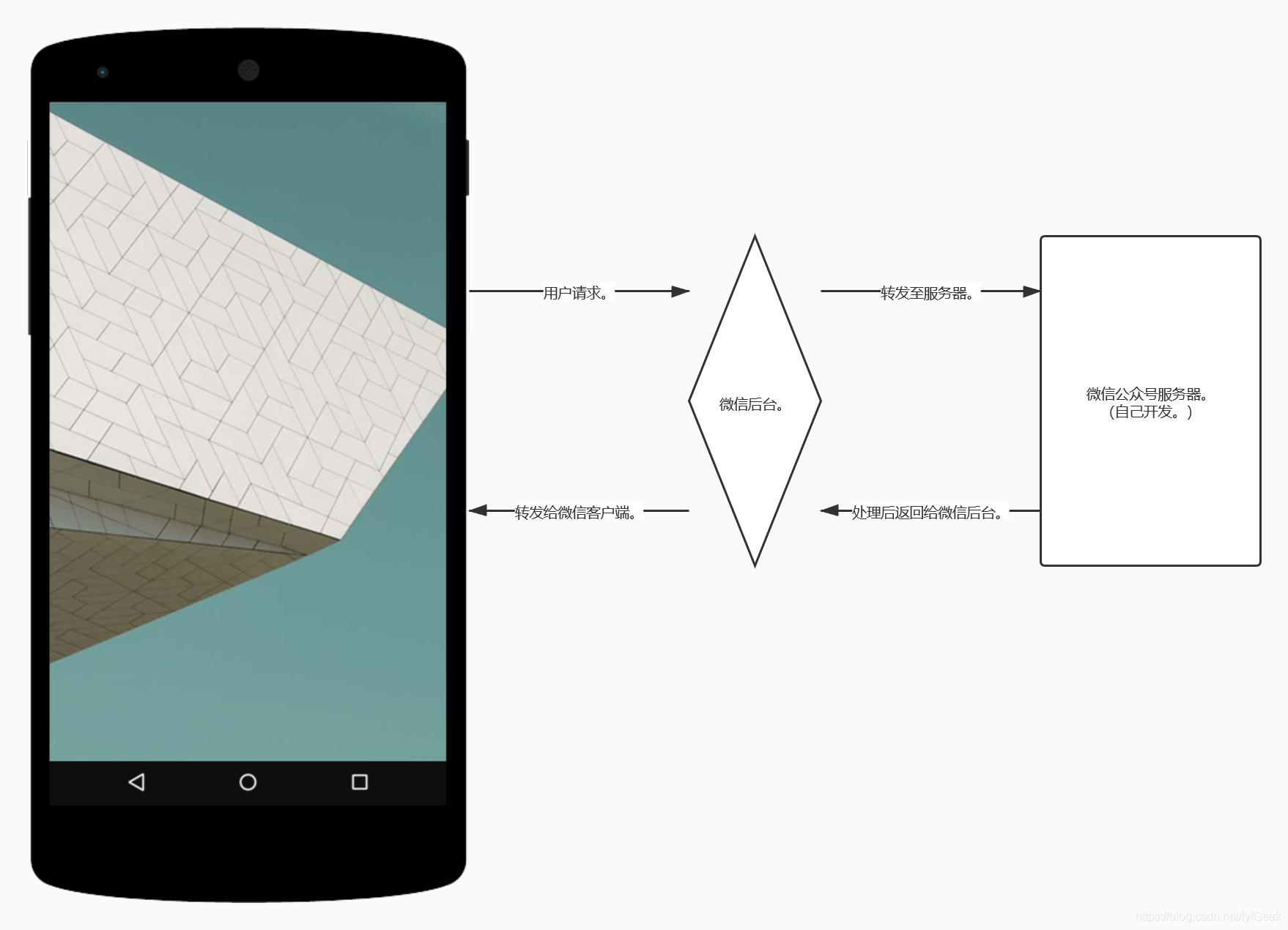
与微信对接的 url 要具备以下条件。
- 在公网上能够访问。
- 端口只支持 80 端口。
映射工具。
ngrok 可以将内网映射到公网上,这样就可以在公网访问你的本地网络服务。
http://www.ngrok.cc/
免费的服务器部署在国外,访问龟速。
国内 ~ Tunnel。
开发模式 & 编辑模式(自动回复、自定义菜单) ~ 两者互斥。
Java Servlet。
配置。校验。
package com.geek.servlet;

import com.geek.util.CheckUtil;
import com.geek.util.MessageUtil;
import org.dom4j.DocumentException;

import javax.servlet.ServletException;
import javax.servlet.annotation.WebServlet;
import javax.servlet.http.HttpServlet;
import javax.servlet.http.HttpServletRequest;
import javax.servlet.http.HttpServletResponse;
import java.io.IOException;
import java.io.PrintWriter;
import java.util.Map;

/**
 * @author geek
 */
@WebServlet("/wx.do")
public class WeixinServlet extends HttpServlet {

    @Override
    protected void doGet(HttpServletRequest req, HttpServletResponse resp) throws ServletException, IOException {
//        super.doGet(req, resp);
        // 微信加密签名,signature 结合了开发者填写的 token 参数和请求中的 timestamp 参数、nonce 参数。
        String signature = req.getParameter("signature");
        // 时间戳。
        String timestamp = req.getParameter("timestamp");
        // 随机数。
        String nonce = req.getParameter("nonce");
        // 随机字符串。
        String echostr = req.getParameter("echostr");

        PrintWriter printWriter = resp.getWriter();
        if (CheckUtil.checkSignature(signature, timestamp, nonce)) {
            printWriter.println(echostr);
        }
    }

}
- CheckUtils。
sha1 加密。
        <dependency>
            <groupId>commons-codec</groupId>
            <artifactId>commons-codec</artifactId>
            <version>1.14</version>
        </dependency>
package com.geek.util;

import org.apache.commons.codec.digest.DigestUtils;

import java.util.Arrays;

/**
 * @author geek
 */
public class CheckUtil {

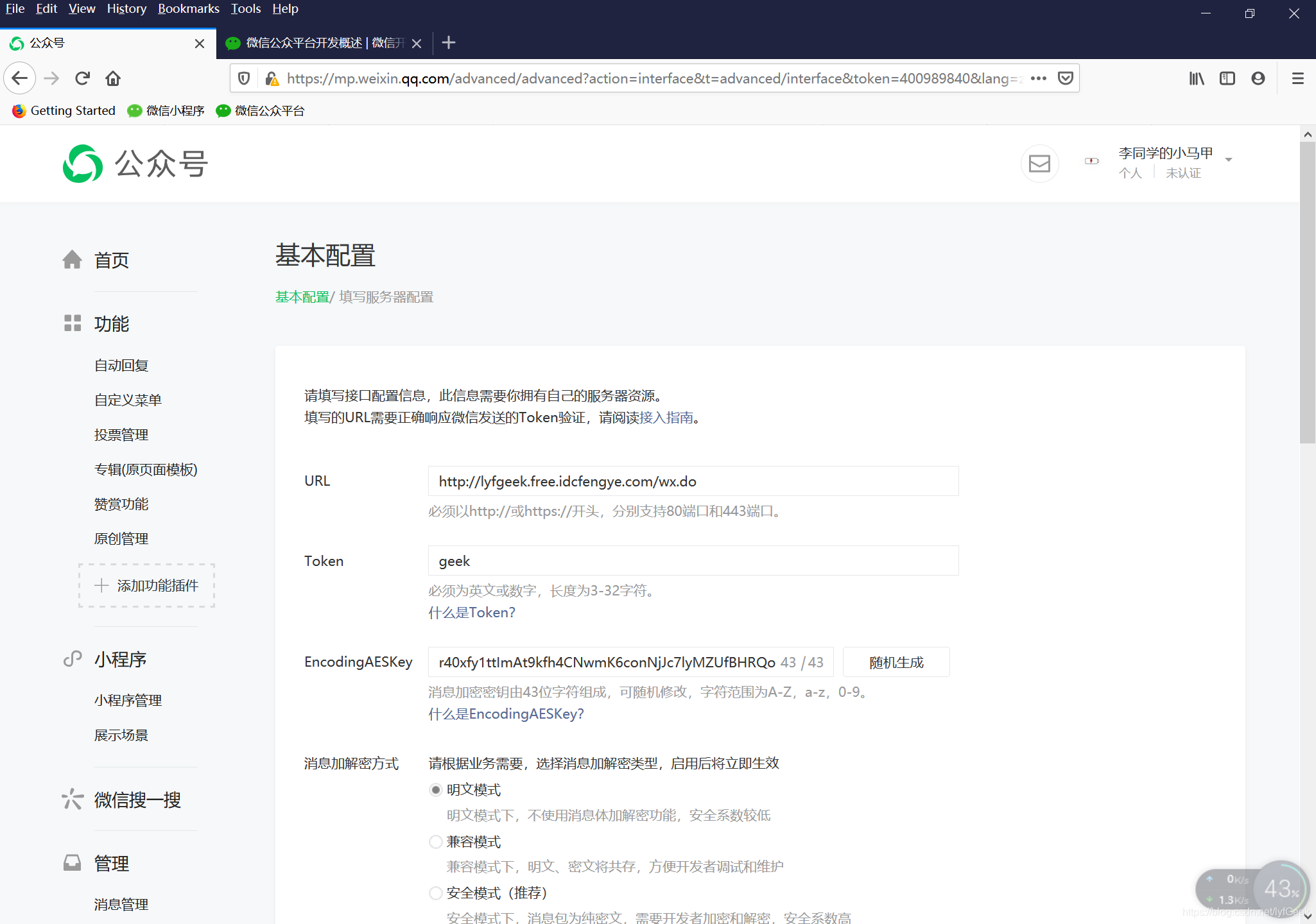
    // 登录微信公众平台官网后,在公众平台官网的开发-基本设置页面,勾选协议成为开发者,点击“修改配置”按钮,填写服务器地址(URL)、Token 和 EncodingAESKey,其中 URL 是开发者用来接收微信消息和事件的接口 URL。Token 可由开发者可以任意填写,用作生成签名(该 Token 会和接口 URL 中包含的 Token 进行比对,从而验证安全性)。EncodingAESKey 由开发者手动填写或随机生成,将用作消息体加解密密钥。
    //
    //同时,开发者可选择消息加解密方式:明文模式、兼容模式和安全模式。模式的选择与服务器配置在提交后都会立即生效,请开发者谨慎填写及选择。加解密方式的默认状态为明文模式,选择兼容模式和安全模式需要提前配置好相关加解密代码,详情请参考消息体签名及加解密部分的文档 。
    private static final String TOKEN = "geek";

    /**
     * 1)将 token、timestamp、nonce 三个参数进行字典序排序。
     * 2)将三个参数字符串拼接成一个字符串进行 sha1 加密。
     * 3)开发者获得加密后的字符串可与 signature 对比,标识该请求来源于微信。
     *
     * @param signature
     * @param timeStamp
     * @param nonce
     * @return
     */
    public static boolean checkSignature(String signature, String timeStamp, String nonce) {
        String[] arr = {TOKEN, timeStamp, nonce};
        // 排序。
        Arrays.sort(arr);

        // 生成字符串。
        StringBuilder content = new StringBuilder();
        for (String s : arr) {
            content.append(s);
        }

        // sha1 加密。
        String temp = DigestUtils.sha1Hex(content.toString());

        return temp.equals(signature);
    }

}
- 微信配置。
Token 自行设置。两边一致。
private static final String TOKEN = “geek”;
消息回复。
https://developers.weixin.qq.com/doc/offiaccount/Message_Management/Receiving_standard_messages.html
package com.geek.po;

import lombok.Data;

/**
 * @author geek
 */
@Data
public class TextMessage {

    /**
     * 开发者微信号。
     */
    private String toUserName;
    /**
     * 发送方帐号(一个 OpenID)。
     */
    private String fromUserName;
    /**
     * 消息创建时间(整型)。
     */
    private String createTime;
    /**
     * 消息类型,文本为 text。
     */
    private String msgType;
    /**
     * 文本消息内容。
     */
    private String content;
    /**
     * 消息 id,64 位整型。
     */
    private String msgId;

}
微信后台转发的数据是 xml 格式。
package com.geek.util;

import com.geek.po.TextMessage;
import com.thoughtworks.xstream.XStream;
import org.dom4j.Document;
import org.dom4j.DocumentException;
import org.dom4j.Element;
import org.dom4j.io.SAXReader;

import javax.servlet.ServletInputStream;
import javax.servlet.http.HttpServletRequest;
import java.io.IOException;
import java.util.Date;
import java.util.HashMap;
import java.util.List;
import java.util.Map;

/**
 * @author geek
 */
public class MessageUtil {

    // + MsgType 	消息类型,文本为 text
    public static final String MESSAGE_TEXT = "text";
    // + MsgType 	消息类型,图片为 image
    public static final String MESSAGE_IMAGE = "image";
    // + MsgType 	语音为 voice
    public static final String MESSAGE_VOICE = "voice";
    // + MsgType 	视频为 video
    public static final String MESSAGE_VIDEO = "video";
    // + MsgType 	小视频为 shortvideo
    public static final String MESSAGE_SHORTVIDEO = "shortvideo";
    // + MsgType 	消息类型,地理位置为 location
    public static final String MESSAGE_LOCATION = "location";
    // + MsgType 	消息类型,链接为 link
    public static final String MESSAGE_LINK = "link";
    // + MsgType 	消息类型,event
    public static final String MESSAGE_EVENT = "event";
    // > Event 	事件类型,subscribe(订阅)、unsubscribe(取消订阅)
    //Event 	事件类型,SCAN
    //Event 	事件类型,LOCATION
    //Event 	事件类型,CLICK
    //Event 	事件类型,VIEW
    public static final String MESSAGE_SUBSCRIBE_EVENT = "subscribe";
    public static final String MESSAGE_UNSUBSCRIBE_EVENT = "unsubscribe";
    public static final String MESSAGE_SCAN_EVENT = "SCAN";
    public static final String MESSAGE_LOCATION_EVENT = "LOCATION";
    public static final String MESSAGE_CLICK_EVENT = "CLICK";
    public static final String MESSAGE_VIEW_EVENT = "VIEW";

    /**
     * xml 转集合。
     *
     * @param request
     * @return
     * @throws IOException
     * @throws DocumentException
     */
    public static Map<String, String> xmlToMap(HttpServletRequest request) throws IOException, DocumentException {
        Map<String, String> map = new HashMap<>();
        SAXReader saxReader = new SAXReader();

        // 从 request 中获取输入流。
        ServletInputStream inputStream = request.getInputStream();
        Document document = saxReader.read(inputStream);

        // 获取 xml 根元素。
        Element rootElement = document.getRootElement();
        // 每一元素放入 list 中。
        List<Element> list = rootElement.elements();
        for (Element element : list) {
            map.put(element.getName(), element.getText());
        }

        inputStream.close();
        return map;
    }

    /**
     * 将文本消息转换为 xml。
     *
     * @param textMessage
     * @return
     */
    private static String textMessageToXml(TextMessage textMessage) {
        XStream xStream = new XStream();
        // 根节点名称不对应,替换。
        xStream.alias("xml", textMessage.getClass());
        return xStream.toXML(textMessage);
    }

    /**
     * 拼接消息。
     *
     * @param toUserName
     * @param fromUserName
     * @param content
     * @return
     */
    public static String initText(String toUserName, String fromUserName, String content) {
        TextMessage textMessage = new TextMessage();
        textMessage.setFromUserName(toUserName);
        textMessage.setToUserName(fromUserName);
        textMessage.setMsgType(MessageUtil.MESSAGE_TEXT);
        textMessage.setCreateTime(new Date().toString());
//        textMessage.setContent("您发送的消息是:" + content);
        textMessage.setContent(content);
        return textMessageToXml(textMessage);
    }

    /**
     * 主菜单。
     *
     * @return
     */
    public static String menuText() {
        StringBuilder stringBuffer = new StringBuilder();
        stringBuffer.append("欢迎您的关注,主按照菜单提示进行操作。\n\n");
        stringBuffer.append("1. 课程介绍\n");
        stringBuffer.append("2. About Me\n");
        stringBuffer.append("回复 ? 调出此菜单\n");
        return stringBuffer.toString();
    }

    public static String firstMenu() {
        StringBuilder stringBuffer = new StringBuilder();
        stringBuffer.append("Geek 课程。");
        return stringBuffer.toString();
    }

    public static String secondMenu() {
        StringBuilder stringBuffer = new StringBuilder();
        stringBuffer.append("second menu");
        return stringBuffer.toString();
    }

}
- 消息接收与响应。
package com.geek.servlet;

import com.geek.util.CheckUtil;
import com.geek.util.MessageUtil;
import org.dom4j.DocumentException;

import javax.servlet.ServletException;
import javax.servlet.annotation.WebServlet;
import javax.servlet.http.HttpServlet;
import javax.servlet.http.HttpServletRequest;
import javax.servlet.http.HttpServletResponse;
import java.io.IOException;
import java.io.PrintWriter;
import java.util.Map;

/**
 * @author geek
 */
@WebServlet("/wx.do")
public class WeixinServlet extends HttpServlet {

    @Override
    protected void doGet(HttpServletRequest req, HttpServletResponse resp) throws ServletException, IOException {
//        super.doGet(req, resp);
        // 微信加密签名,signature 结合了开发者填写的 token 参数和请求中的 timestamp 参数、nonce 参数。
        String signature = req.getParameter("signature");
        // 时间戳。
        String timestamp = req.getParameter("timestamp");
        // 随机数。
        String nonce = req.getParameter("nonce");
        // 随机字符串。
        String echostr = req.getParameter("echostr");

        PrintWriter printWriter = resp.getWriter();
        if (CheckUtil.checkSignature(signature, timestamp, nonce)) {
            printWriter.println(echostr);
        }
    }

    @Override
    protected void doPost(HttpServletRequest req, HttpServletResponse resp) throws ServletException, IOException {
//        super.doPost(req, resp);
        req.setCharacterEncoding("utf-8");
        resp.setCharacterEncoding("utf-8");
        // 传回给微信后台。
        PrintWriter printWriter = resp.getWriter();
        try {
            Map<String, String> map = MessageUtil.xmlToMap(req);
            String toUserName = map.get("ToUserName");
            String fromUserName = map.get("FromUserName");
            String createTime = map.get("CreateTime");
            String msgType = map.get("MsgType");
            String content = map.get("Content");
            String msgId = map.get("MsgId");

            String message = null;
//            if ("text".equals(msgType)) {
            // 普通消息:文本消息。
            if (MessageUtil.MESSAGE_TEXT.equals(msgType)) {
                if ("1".equals(content)) {
                    message = MessageUtil.initText(toUserName, fromUserName, MessageUtil.firstMenu());
                } else if ("2".equals(content)) {
                    message = MessageUtil.initText(toUserName, fromUserName, MessageUtil.secondMenu());
                } else if ("?".equals(content) || "?".equals(content)) {
                    message = MessageUtil.initText(toUserName, fromUserName, MessageUtil.menuText());
                }
            } else if (MessageUtil.MESSAGE_EVENT.equals(msgType)) {
                // 事件推送消息。
                String eventType = map.get("event");
                // 关注。
                if (MessageUtil.MESSAGE_SUBSCRIBE_EVENT.equals(eventType)) {
                    message = MessageUtil.initText(toUserName, fromUserName, MessageUtil.menuText());
                }
            }
            System.out.println(message);
            // 传回给微信后台。
            printWriter.println(message);
        } catch (DocumentException e) {
            e.printStackTrace();
        } finally {
            printWriter.close();
        }
    }

}
消息类型。
-
MsgType 消息类型,文本为 text
-
MsgType 消息类型,图片为 image
-
MsgType 语音为 voice
-
MsgType 视频为 video
-
MsgType 小视频为 shortvideo
-
MsgType 消息类型,地理位置为 location
-
MsgType 消息类型,链接为 link
-
MsgType 消息类型,event
Event 事件类型,subscribe(订阅)、unsubscribe(取消订阅)
Event 事件类型,SCAN
Event 事件类型,LOCATION
Event 事件类型,CLICK
Event 事件类型,VIEW
完善各种消息类型。
package com.geek.util;

import com.geek.po.TextMessage;
import com.thoughtworks.xstream.XStream;
import org.dom4j.Document;
import org.dom4j.DocumentException;
import org.dom4j.Element;
import org.dom4j.io.SAXReader;

import javax.servlet.ServletInputStream;
import javax.servlet.http.HttpServletRequest;
import java.io.IOException;
import java.util.Date;
import java.util.HashMap;
import java.util.List;
import java.util.Map;

public class MessageUtil {

    // - MsgType 	消息类型,文本为 text
    public static final String MESSAGE_TEXT = "text";
    // - MsgType 	消息类型,图片为 image
    public static final String MESSAGE_IMAGE = "image";
    // - MsgType 	语音为 voice
    public static final String MESSAGE_VOICE = "voice";
    // - MsgType 	视频为 video
    public static final String MESSAGE_VIDEO = "video";
    // - MsgType 	小视频为 shortvideo
    public static final String MESSAGE_SHORTVIDEO = "shortvideo";
    // - MsgType 	消息类型,地理位置为 location
    public static final String MESSAGE_LOCATION = "location";
    // - MsgType 	消息类型,链接为 link
    public static final String MESSAGE_LINK = "link";
    // - MsgType 	消息类型,event
    public static final String MESSAGE_EVENT = "event";
    // > Event 	事件类型,subscribe(订阅)、unsubscribe(取消订阅)
    //Event 	事件类型,SCAN
    //Event 	事件类型,LOCATION
    //Event 	事件类型,CLICK
    //Event 	事件类型,VIEW
    public static final String MESSAGE_SUBSCRIBE_EVENT = "subscribe";
    public static final String MESSAGE_UNSUBSCRIBE_EVENT = "unsubscribe";
    public static final String MESSAGE_SCAN_EVENT = "SCAN";
    public static final String MESSAGE_LOCATION_EVENT = "LOCATION";
    public static final String MESSAGE_CLICK_EVENT = "CLICK";
    public static final String MESSAGE_VIEW_EVENT = "VIEW";

    /**
     * xml 转集合。
     *
     * @param request
     * @return
     * @throws IOException
     * @throws DocumentException
     */
    public static Map<String, String> xmlToMap(HttpServletRequest request) throws IOException, DocumentException {
        Map<String, String> map = new HashMap<>();
        SAXReader saxReader = new SAXReader();

        // 从 request 中获取输入流。
        ServletInputStream inputStream = request.getInputStream();
        Document document = saxReader.read(inputStream);

        Element rootElement = document.getRootElement();
        List<Element> list = rootElement.elements();

        for (Element element : list) {
            map.put(element.getName(), element.getText());
        }

        inputStream.close();
        return map;
    }

    /**
     * 将文本消息转换为 xml。
     *
     * @param textMessage
     * @return
     */
    private static String textMessageToXml(TextMessage textMessage) {
        XStream xStream = new XStream();
        xStream.alias("xml", textMessage.getClass());
        return xStream.toXML(textMessage);
    }

    /**
     * 拼接消息。
     *
     * @param toUserName
     * @param fromUserName
     * @param content
     * @return
     */
    public static String initText(String toUserName, String fromUserName, String content) {
        TextMessage textMessage = new TextMessage();
        textMessage.setFromUserName(toUserName);
        textMessage.setToUserName(fromUserName);
        textMessage.setMsgType(MessageUtil.MESSAGE_TEXT);
        textMessage.setCreateTime(new Date().toString());
//        textMessage.setContent("您发送的消息是:" - content);
        textMessage.setContent(content);
        return textMessageToXml(textMessage);
    }

    /**
     * 主菜单。
     *
     * @return
     */
    public static String menuText() {
        StringBuilder stringBuffer = new StringBuilder();
        stringBuffer.append("欢迎您的关注,主按照菜单提示进行操作。\n\n");
        stringBuffer.append("1. 课程介绍\n");
        stringBuffer.append("2. About Me\n");
        stringBuffer.append("回复 ? 调出此菜单\n");
        return stringBuffer.toString();
    }

    public static String firstMenu() {
        StringBuilder stringBuffer = new StringBuilder();
        stringBuffer.append("Geek 课程。");
        return stringBuffer.toString();
    }

    public static String secondMenu() {
        StringBuilder stringBuffer = new StringBuilder();
        stringBuffer.append("second menu");
        return stringBuffer.toString();
    }

}
- Servlet。
package com.geek.servlet;

import com.geek.util.CheckUtil;
import com.geek.util.MessageUtil;
import org.dom4j.DocumentException;

import javax.servlet.ServletException;
import javax.servlet.annotation.WebServlet;
import javax.servlet.http.HttpServlet;
import javax.servlet.http.HttpServletRequest;
import javax.servlet.http.HttpServletResponse;
import java.io.IOException;
import java.io.PrintWriter;
import java.util.Map;

/**
 * @author geek
 */
@WebServlet("/wx.do")
public class WeixinServlet extends HttpServlet {

    @Override
    protected void doGet(HttpServletRequest req, HttpServletResponse resp) throws ServletException, IOException {
//        super.doGet(req, resp);
        // 微信加密签名,signature 结合了开发者填写的 token 参数和请求中的 timestamp 参数、nonce 参数。
        String signature = req.getParameter("signature");
        // 时间戳。
        String timestamp = req.getParameter("timestamp");
        // 随机数。
        String nonce = req.getParameter("nonce");
        // 随机字符串。
        String echostr = req.getParameter("echostr");

        PrintWriter printWriter = resp.getWriter();
        if (CheckUtil.checkSignature(signature, timestamp, nonce)) {
            printWriter.println(echostr);
        }
    }

    @Override
    protected void doPost(HttpServletRequest req, HttpServletResponse resp) throws ServletException, IOException {
//        super.doPost(req, resp);
        req.setCharacterEncoding("utf-8");
        resp.setCharacterEncoding("utf-8");
        // 传回给微信后台。
        PrintWriter printWriter = resp.getWriter();
        try {
            Map<String, String> map = MessageUtil.xmlToMap(req);
            String toUserName = map.get("ToUserName");
            String fromUserName = map.get("FromUserName");
            String createTime = map.get("CreateTime");
            String msgType = map.get("MsgType");
            String content = map.get("Content");
            String msgId = map.get("MsgId");

            String message = null;
//            if ("text".equals(msgType)) {
            // 普通消息:文本消息。
            if (MessageUtil.MESSAGE_TEXT.equals(msgType)) {
                if ("1".equals(content)) {
                    message = MessageUtil.initText(toUserName, fromUserName, MessageUtil.firstMenu());
                } else if ("2".equals(content)) {
                    message = MessageUtil.initText(toUserName, fromUserName, MessageUtil.secondMenu());
                } else if ("?".equals(content) || "?".equals(content)) {
                    message = MessageUtil.initText(toUserName, fromUserName, MessageUtil.menuText());
                }
                // 事件推送消息。
            } else if (MessageUtil.MESSAGE_EVENT.equals(msgType)) {
                String eventType = map.get("event");
                // 关注。
                if (MessageUtil.MESSAGE_SUBSCRIBE_EVENT.equals(eventType)) {
                    message = MessageUtil.initText(toUserName, fromUserName, MessageUtil.menuText());
                }
            }
            System.out.println(message);
            // 传回给微信后台。
            printWriter.println(message);
        } catch (DocumentException e) {
            e.printStackTrace();
        } finally {
            printWriter.close();
        }
    }

}






 扫一扫
扫一扫


 4880
4880

 被折叠的 条评论
为什么被折叠?
被折叠的 条评论
为什么被折叠?
 到【灌水乐园】发言





