



 本文介绍如何使用SwipeRefreshLayout实现下拉刷新功能,并结合RecyclerView实现上拉加载更多的功能。通过自定义适配器和监听器,文章提供了一个简洁高效的实现方案。
首先要先导入SwipeRefreshlayout,SwipeRefreshLayout以前在v4包里,现在改到了androidx
1、添加SwipeRefreshLayout
1、File -> Project Structure 打开Project Structure界面
2、Dependencies -> app -> +
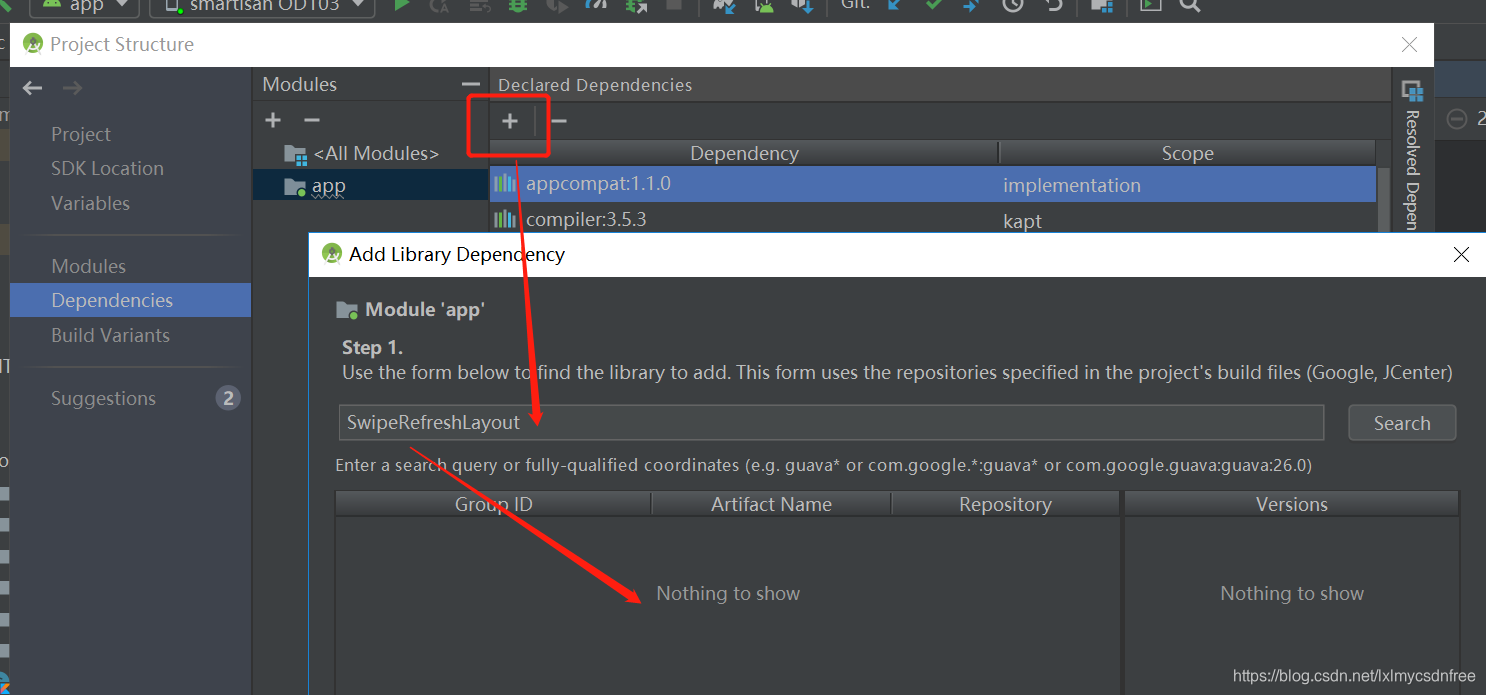
没找到?!
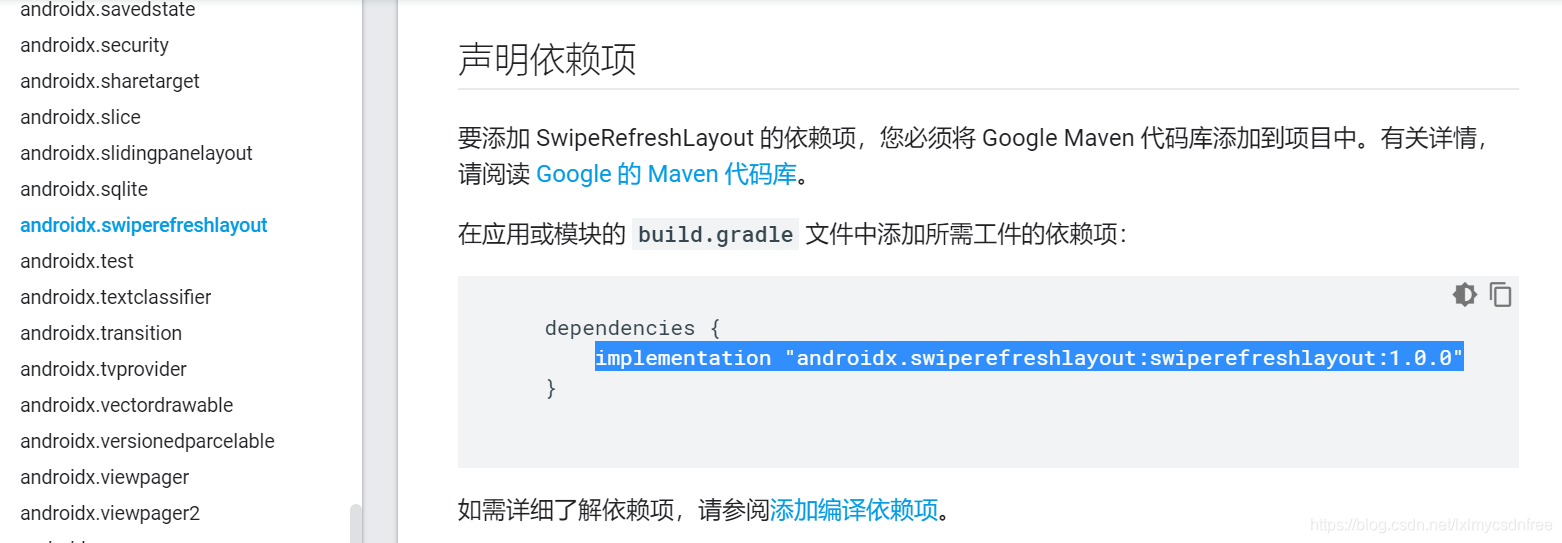
我使用androidx,直接到官方文档,里面已经有说明:
2.动手编码开发
首先是布局:
<?xml version="1.0" encoding="utf-8"?>
<layout xmlns:android="http://schemas.android.com/apk/res/android">
    <!--
    <data>
        <variable name="yaoCeAdapter" type="android.widget.BaseAdapter"/>
    </data>
    -->
    <LinearLayout
        android:orientation="vertical"
        android:layout_width="match_parent"
        android:layout_height="match_parent">

        <androidx.swiperefreshlayout.widget.SwipeRefreshLayout
            android:id="@+id/swipeRefreshLayout"
            android:layout_width="match_parent"
            android:layout_height="wrap_content">

            <androidx.recyclerview.widget.RecyclerView
                android:layout_width="match_parent"
                android:layout_height="wrap_content"
                android:id="@+id/recyclerView"/>

        </androidx.swiperefreshlayout.widget.SwipeRefreshLayout>

    </LinearLayout>
</layout>
item布局:
<?xml version="1.0" encoding="utf-8"?>
<layout xmlns:android="http://schemas.android.com/apk/res/android"
    xmlns:app="http://schemas.android.com/apk/res-auto">
    <data>
        <variable name="itemTwo" type="com.daobo.wand.data.viewbean.ItemTwoProperty"/>
    </data>
    <androidx.constraintlayout.widget.ConstraintLayout
        android:layout_width="match_parent"
        android:layout_height="45dp">

        <LinearLayout
            android:id="@+id/num"
            android:layout_width="0dp"
            android:layout_height="wrap_content"
            android:orientation="vertical"
            app:layout_constraintHorizontal_weight="0.8"
            app:layout_constraintRight_toLeftOf="@+id/textOne"
            app:layout_constraintLeft_toLeftOf="parent"
            app:layout_constraintTop_toTopOf="parent"
            app:layout_constraintBottom_toBottomOf="parent"
            android:gravity="center_horizontal"
            android:background="@drawable/item_text_backgroud">

            <TextView
                android:layout_width="match_parent"
                android:layout_height="wrap_content"
                android:gravity="center"
                android:text="@{itemTwo.indexNum}"
                android:textColor="@color/colorGray"
                android:textSize="16sp" />
        </LinearLayout>

        <LinearLayout
            android:id="@+id/textOne"
            android:layout_width="0dp"
            android:layout_height="wrap_content"
            android:orientation="vertical"
            app:layout_constraintHorizontal_weight="2"
            app:layout_constraintRight_toLeftOf="@+id/textTwo"
            app:layout_constraintLeft_toRightOf="@+id/num"
            app:layout_constraintTop_toTopOf="parent"
            app:layout_constraintBottom_toBottomOf="parent"
            android:gravity="center_horizontal"
            android:background="@drawable/item_text_backgroud">

            <TextView
                android:layout_width="match_parent"
                android:layout_height="wrap_content"
                android:gravity="center"
                android:text="@{itemTwo.strPropertyOne}"
                android:textColor="@color/colorGray"
                android:textSize="16sp" />
        </LinearLayout>

        <LinearLayout
            android:id="@+id/textTwo"
            android:layout_width="0dp"
            android:layout_height="wrap_content"
            android:orientation="vertical"
            app:layout_constraintHorizontal_weight="4"
            app:layout_constraintLeft_toRightOf="@+id/textOne"
            app:layout_constraintRight_toRightOf="parent"
            app:layout_constraintTop_toTopOf="parent"
            app:layout_constraintBottom_toBottomOf="parent"
            android:gravity="center_horizontal">

            <TextView
                android:layout_width="match_parent"
                android:layout_height="wrap_content"
                android:gravity="center"
                android:text="@{itemTwo.strPropertyTwo}"
                android:textColor="@color/colorGray"
                android:textSize="16sp" />
        </LinearLayout>

    </androidx.constraintlayout.widget.ConstraintLayout>
</layout>
SwipeRefreshlayout+RecyclerView;SwipeRefreshlayout在带有刷新接口和刷新动画封装,但是上拉加载更多RecyclerView没有
接口封装和动画处理,因此需要自己定义一个footview:
<?xml version="1.0" encoding="utf-8"?>
<layout xmlns:android="http://schemas.android.com/apk/res/android">
    <LinearLayout
        android:orientation="horizontal"
        android:layout_width="match_parent"
        android:layout_height="wrap_content">

        <ProgressBar
            android:id="@+id/pb_progress"
            style="?android:attr/progressBarStyle"
            android:layout_width="match_parent"
            android:layout_height="38dp"
            android:layout_gravity="center_horizontal"/>
    </LinearLayout>
</layout>
layout相关所有的布局都有了,接着就是写适配器,需要继承RecyclerView.Adapter,适配器统一使用T作为入参传入Bean,这样增加了适配器普适性,同时我们构造中传入 layoutid,那么你需要什么样的item布局都可以将layout id传入进来,对应viewdatabind 的bean id也是传入进来的。
package com.daobo.wand.adapter

import android.content.Context
import android.view.LayoutInflater
import android.view.ViewGroup
import androidx.databinding.DataBindingUtil
import androidx.databinding.ViewDataBinding
import androidx.recyclerview.widget.RecyclerView
import androidx.recyclerview.widget.RecyclerView.ViewHolder
import com.daobo.wand.R


class BaseRecyclerViewAdapter<T>(
    private val context: Context, private val listData: List<T>,
    private val layoutId: Int, private val variableId: Int) : RecyclerView.Adapter<ViewHolder>() {

    private val TYPE_CONTENT = 0//正常内容
    private val TYPE_FOOTER = 1//加载View

    override fun onCreateViewHolder(parent: ViewGroup, viewType: Int): ViewHolder {
        //TODO("not implemented")
        //To change body of created functions use File | Settings | File Templates.
        return if (viewType==TYPE_FOOTER){
            FootViewHolder(DataBindingUtil.inflate(LayoutInflater.from(context), R.layout.load_more_foot, parent, false))
        }else{
            BaseViewHolder(DataBindingUtil.inflate(LayoutInflater.from(context), layoutId, parent, false))
        }
    }

    override fun getItemCount(): Int {
        //TODO("not implemented")
        // To change body of created functions use File | Settings | File Templates.
        return listData.size + 1
    }

    override fun onBindViewHolder(holder: ViewHolder, position: Int) {
        //TODO("not implemented")
        // To change body of created functions use File | Settings | File Templates.
        //holder instanceof BaseViewHolder
        if (getItemViewType(position) == TYPE_CONTENT) {
            var binding : ViewDataBinding = DataBindingUtil.getBinding(holder.itemView)!!
            binding.setVariable(variableId, listData[position])
            binding.executePendingBindings()
        }
    }

    override fun getItemViewType(position: Int): Int {
        if (position == listData.size){
            return TYPE_FOOTER //判断滑到最底部时,返回的ViewType为TYPE_CONTENT。
        }
        return TYPE_CONTENT
    }

    open class BaseViewHolder(dataBinding: ViewDataBinding) : ViewHolder(dataBinding.root)

    open class FootViewHolder(dataBinding: ViewDataBinding) : ViewHolder(dataBinding.root)
}
由于RecyclerView没有上拉监听的处理,我们需要自定义一个监听类,类继承RecyclerView.OnScrollListener
package com.daobo.wand.childmenu.listener

import androidx.recyclerview.widget.RecyclerView
import androidx.recyclerview.widget.LinearLayoutManager
import androidx.recyclerview.widget.RecyclerView.*


abstract class onLoadMoreListener : OnScrollListener() {
    private var countItem: Int = 0
    private var lastItem: Int = 0
    private var isScolled = false//是否可以滑动
    private var layoutManager: RecyclerView.LayoutManager? = null

    /**
     * 加载回调方法
     * @param countItem 总数量
     * @param lastItem  最后显示的position
     */
    protected abstract fun onLoading(countItem: Int, lastItem: Int)

    override fun onScrollStateChanged(recyclerView: RecyclerView, newState: Int) {
        /* 测试这三个参数的作用
            if (newState==SCROLL_STATE_IDLE){
                //log:"SCROLL_STATE_IDLE,空闲"
            }
            else if (newState==SCROLL_STATE_DRAGGING){
                //log:"SCROLL_STATE_DRAGGING,拖拽"
            }
            else if (newState==SCROLL_STATE_SETTLING){
                //log:"test","SCROLL_STATE_SETTLING,固定"
            }
            else{//log:"其它"}  */
        //拖拽或者惯性滑动时isScolled设置为true
        isScolled = newState == SCROLL_STATE_DRAGGING || newState == SCROLL_STATE_SETTLING
    }

    override fun onScrolled(recyclerView: RecyclerView, dx: Int, dy: Int) {
        if (recyclerView.layoutManager is LinearLayoutManager) {
            layoutManager = recyclerView.layoutManager
            countItem = layoutManager!!.itemCount
            lastItem =
                (layoutManager as LinearLayoutManager).findLastCompletelyVisibleItemPosition()
        }
        if (isScolled && countItem != lastItem && lastItem == countItem - 1) {
            onLoading(countItem, lastItem)
        }
    }
}
然后就是我们的使用了,我是放在fragment中使用的:
package com.daobo.wand.childmenu.fragment

import android.content.Context
import android.os.Bundle
import android.os.Handler
import android.view.LayoutInflater
import android.view.View
import android.view.ViewGroup
import android.widget.Toast
import androidx.fragment.app.Fragment
import androidx.lifecycle.Observer
import androidx.lifecycle.ViewModelProviders
import androidx.recyclerview.widget.RecyclerView
import androidx.swiperefreshlayout.widget.SwipeRefreshLayout
import com.daobo.wand.BR
import com.daobo.wand.R
import com.daobo.wand.adapter.ListAdapter
import com.daobo.wand.data.YaoCeViewModel
import com.daobo.wand.data.bean.YaoCe
import com.daobo.wand.data.viewbean.ItemThreeProperty
import com.daobo.wand.databinding.FragmentYaoCeBinding
import com.daobo.wand.utils.DataBeanToViewUtil
import androidx.recyclerview.widget.LinearLayoutManager
import com.daobo.wand.adapter.BaseRecyclerViewAdapter
import com.daobo.wand.childmenu.listener.onLoadMoreListener


class YaoCeFragment constructor(context : Context) : Fragment() {

    var mContext : Context = context
    private var mSwipeRefreshLayout : SwipeRefreshLayout? = null
    private var mRecyclerView : RecyclerView? = null
    private var mLinearLayoutManager: LinearLayoutManager? = null
    private var recyclerViewAdapter : BaseRecyclerViewAdapter<ItemThreeProperty>? = null
    private var yaoCeViewModel : YaoCeViewModel? = null


    override fun onCreateView(
        inflater: LayoutInflater,
        container: ViewGroup?,
        savedInstanceState: Bundle?
    ): View? {

        var fragmentYaoCeBinding : FragmentYaoCeBinding = FragmentYaoCeBinding.inflate(inflater,
            container, false)
        //bind 组件
        mSwipeRefreshLayout = fragmentYaoCeBinding.swipeRefreshLayout
        mRecyclerView = fragmentYaoCeBinding.recyclerView

        //下拉刷新的圆圈是否显示
        mSwipeRefreshLayout!!.isRefreshing = false
        //设置下拉时圆圈的颜色(可以由多种颜色拼成)
        mSwipeRefreshLayout!!.setColorSchemeResources(android.R.color.holo_blue_light,
            android.R.color.holo_red_light,
            android.R.color.holo_orange_light);
        //设置下拉时圆圈的背景颜色(这里设置成白色)
        mSwipeRefreshLayout!!.setProgressBackgroundColorSchemeResource(android.R.color.white)

        //初始化 空list data
        var mListYaoCeData : List<YaoCe> = ArrayList<YaoCe>()
        //初始化 空的 属性展示 list
        var listViewProperty : MutableList<ItemThreeProperty> = ArrayList<ItemThreeProperty>()
        //添加title信息
        addListItemTitle(listViewProperty)

        recyclerViewAdapter = BaseRecyclerViewAdapter<ItemThreeProperty>(mContext, listViewProperty,
            R.layout.linear_text_three_item, BR.itemThree)

        yaoCeViewModel = ViewModelProviders.of(this)[YaoCeViewModel::class.java]
        //做数据绑定和监听
        yaoCeViewModel!!.getYaoCe().observe(this, Observer<List<YaoCe>>{ yaoceList ->
            // update UI, data change
            if (yaoceList != null && yaoceList.isNotEmpty()){
                mListYaoCeData = yaoceList
                var listProperty = DataBeanToViewUtil.ListYaoCeBean2View(mListYaoCeData)
                listViewProperty.clear()
                addListItemTitle(listViewProperty)
                for (property in listProperty) {
                    listViewProperty.add(property)
                }
                recyclerViewAdapter!!.notifyDataSetChanged()
            }
        })
        //设置adapter 变量
        initRecylerView()
        //设置监听
        initRefreshListener()
        //返回 view root
        return fragmentYaoCeBinding.root
    }

    fun initRecylerView () {
        mLinearLayoutManager = LinearLayoutManager(mContext, LinearLayoutManager.VERTICAL, false)
        mRecyclerView!!.layoutManager = mLinearLayoutManager
        mRecyclerView!!.adapter = recyclerViewAdapter
    }

    fun initRefreshListener () {

        mSwipeRefreshLayout!!.setOnRefreshListener {
            //TODO("not implemented")
            // refresh Data
            loadRefreshData()
        }

        mRecyclerView!!.addOnScrollListener(object : onLoadMoreListener(){
            override fun onLoading(countItem: Int, lastItem: Int) {
                //TODO("not implemented")
                // loadMoreData
                Handler().run {
                    postDelayed(Runnable(){
                        yaoCeViewModel!!.loadMoreData()
                        Toast.makeText(mContext, "加载完毕", Toast.LENGTH_SHORT).show()
                    }, 3000)
                }
            }
        })
    }

    fun addListItemTitle(listViewProperty : MutableList<ItemThreeProperty>) {
        //添加title信息
        var itemThreeProperty = ItemThreeProperty()
        itemThreeProperty.indexNum = "序号"
        itemThreeProperty.strPropertyOne = "数值"
        itemThreeProperty.strPropertyTwo = "代号描述"
        itemThreeProperty.strPropertyThree = "信息"
        listViewProperty.add(itemThreeProperty)
    }


    fun loadRefreshData () {
        //设置刷新结束
        yaoCeViewModel!!.refreshData()
        Handler().run {
            postDelayed(Runnable(){
                if (mSwipeRefreshLayout!!.isRefreshing) {
                    mSwipeRefreshLayout!!.isRefreshing = false
                    Toast.makeText(mContext, "刷新完毕", Toast.LENGTH_SHORT).show();
                }
            }, 3000)
        }
    }


}
yaoceModel+livedata封装:
package com.daobo.wand.data

import androidx.lifecycle.LiveData
import androidx.lifecycle.MutableLiveData
import androidx.lifecycle.ViewModel
import com.daobo.wand.data.bean.YaoCe
import kotlin.concurrent.thread

/**
 * 遥测
 * @author xiaolong.li
 * @time 2020-02-14
 */
class YaoCeViewModel : ViewModel() {
    var list : MutableList<YaoCe> = ArrayList<YaoCe>()
    //遥测信息
    private val listYaoCeData: MutableLiveData<List<YaoCe>> by lazy {
        MutableLiveData<List<YaoCe>>().also {
            loadData()
        }
    }

    /**
     *  获取数据
     */
    fun getYaoCe() : LiveData<List<YaoCe>> {
       return listYaoCeData
    }

    private fun loadData() {
        // Do an asynchronous operation to fetch data.
        //写死数据
        thread(start = true) {
            for(i in 1..30){
                val yaoCe = YaoCe()
                yaoCe.strMsg = "遥测 test"
                yaoCe.strValue = "10"
                yaoCe.numDesc = "点数"
                list.add(yaoCe)
            }
            listYaoCeData.postValue(list)
        }
    }

    fun refreshData() {
        thread(start = true) {
            list.clear()
            val yaoCe = YaoCe()
            yaoCe.strMsg = "遥测 fresh add"
            yaoCe.strValue = "10"
            yaoCe.numDesc = "点数"
            list.add(yaoCe)

            for(i in 1..20){
                val yaoCe = YaoCe()
                yaoCe.strMsg = "遥测 test"
                yaoCe.strValue = "10"
                yaoCe.numDesc = "点数"
                list.add(yaoCe)
            }
            listYaoCeData.postValue(list)
        }
    }

    fun loadMoreData () {
        thread(start = true) {
            for(i in 1..5){
                val yaoCe = YaoCe()
                yaoCe.strMsg = "遥测 loadmore add"
                yaoCe.strValue = "10"
                yaoCe.numDesc = "点数"
                list.add(yaoCe)
            }
            listYaoCeData.postValue(list)
        }
    }
}
希望可以指导大家开发上下拉数据处理,很简单,效果也很好!





 扫一扫
扫一扫


 1288
1288

 被折叠的 条评论
为什么被折叠?
被折叠的 条评论
为什么被折叠?
 到【灌水乐园】发言





