


 本文介绍了Java中使用字符流读取文件的两种方法,包括逐个字符读取和批量读取,并展示了如何使用FileWriter进行文件写出。此外,还讲解了字节流在复制图片等二进制文件时的重要性。通过FileInputStream和FileOutputStream实现了文件的字节流复制。
文件读入读取一般可以分为四个步骤
1.File类的实例化
2.FileReader流的实例化
3.读取的操作
4.资源关闭
1.字符流读入文件
用字符流读取hello.txt下的内容,文件有可能不存在,在创建FileReader的时候可能抛异常,下面释放资源要记得先判断存在与否
方法一:一个一个字符读取,效率慢。
import java.io.*;

public class Solution {
    public static void main(String[] args){
        FileReader fr = null;
        try {
            //File类的实例化
            File file = new File("hello.txt");
            //FileReader流的实例化
            fr = new FileReader(file);
            //读取操作
            int data;
            while ((data = fr.read()) != -1) {
                System.out.println((char) data);
            }

        } catch (IOException e) {
            e.printStackTrace();
        } finally {
            try {
                //关闭资源,先判断是否null,防止fr没有实例化成功
                if(fr != null) {
                    fr.close();
                }
            } catch (IOException e) {
                e.printStackTrace();
            }
        }
    }

}
方法二:创建一个buf一次性读取一批数据,read()返回读入buf的字符个数,到文件末尾返回-1
import java.io.*;

public class Solution {
    public static void main(String[] args){
        FileReader fr = null;
        try {
            File file = new File("hello.txt");
            fr = new FileReader(file);
            char[] buf = new char[5];
            int len = 0;
            while ((len = fr.read(buf)) != -1) {
                for(int i = 0; i < buf.length; i++) {
                    System.out.print(buf[i]);
                }
            }

        } catch (IOException e) {
            e.printStackTrace();
        } finally {
            try {
                //防止fr没有实例化成功
                if(fr != null) {
                    fr.close();
                }
            } catch (IOException e) {
                e.printStackTrace();
            }
        }
    }

}
2.字符流写出文件
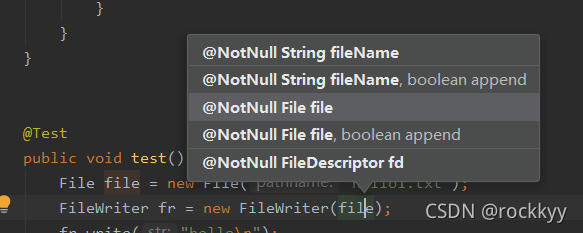
写出文件默认直接覆盖,文件不存在自动创建文件,fr构造函数加个参数可以实现追加文件
public void test() throws IOException {
        File file = new File("hello1.txt");
        FileWriter fr = new FileWriter(file);
        fr.write("hello\n");
        fr.write("hello1\n");
        fr.close();
    }
1.字节流复制图片
字符流适合处理文本文件,处理图片等文件会出错,拷贝图片视频等文件适合用字节流
import org.junit.Test;

import java.io.*;

public class Solution2 {
    @Test
    public void test1() {
        FileInputStream fis = null;
        FileOutputStream fos = null;
        try {
            File srcFile = new File("1.jpg");
            File destFile = new File("copy.jpg");
            fis = new FileInputStream(srcFile);
            fos = new FileOutputStream(destFile);

            int len = 0;
            byte[] buf = new byte[5];
            while ((len = fis.read(buf))!= -1) {
                fos.write(buf, 0, len);
            }
        } catch (IOException e) {
            e.printStackTrace();
        } finally {
            try {
                if(fis != null) fis.close();
            } catch (IOException e) {
                e.printStackTrace();
            }
            try {
                if(fos != null) fos.close();
            } catch (IOException e) {
                e.printStackTrace();
            }
        }
    }
}





 扫一扫
扫一扫


 666
666

 被折叠的 条评论
为什么被折叠?
被折叠的 条评论
为什么被折叠?
 到【灌水乐园】发言





