


 本文档介绍了如何使用Taro框架开发一个简单的问题询问列表。涵盖了Taro的方法和属性应用,包括在`index.jsx`中设置逻辑,样式处理,以及`addQuestion.jsx`组件的创建和封装的`dialog.jsx`组件及其样式文件。
这里是taro开发里的方法以及一些属性的使用:
https://taro-docs.jd.com/taro/docs/README.html
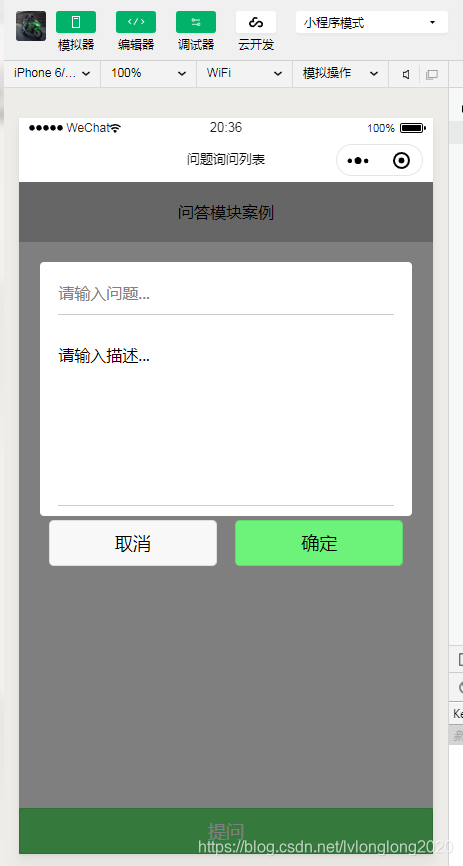
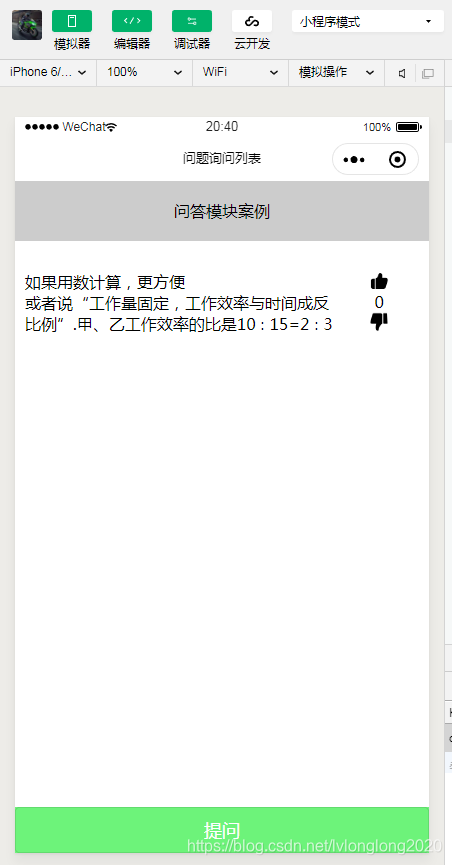
//index.jsx
import Taro, { Component } from '@tarojs/taro'
import { View, Text, Button,Image} from '@tarojs/components'
import './index.less'
import AddQuestion from "./addQuestion"
import Yes from "../../img/yes.png"
import No from "../../img/no.png"

function getStore(key){
  return Taro.getStorageSync(key)?JSON.parse(Taro.getStorageSync(key)):[]
}
function setStore(key,obj){
  Taro.setStorageSync(key,JSON.stringify(obj))
}
export default class Index extends Component {

  config = {
    navigationBarTitleText: '问题询问列表'
  }
  state = {
    showQuestionModel:false,  //用来控制模态框是否显示隐藏的变量,默认值是隐藏的
    questionList:getStore("question") //问题列表
  }

  //点击提问,弹出提问框
  addQuestion = ()=>{
    this.setState({showQuestionModel:true})
  }
  //关闭提问框的方法
  closeQuestion = ()=>{
    this.setState({showQuestionModel:false})
  }
  //接收传递来的问题和描述 希望外部传入进来的options是{title:11111,desc:"这是1111"}
  receiveQuestion = (options)=>{
    let {questionList} = this.state;
    questionList.push(options)
    this.setState({
      questionList
    },()=>{
      //进行本地存储的设置
      setStore("question",questionList)
      //关掉提问框
      this.closeQuestion()
    })
  }
  //点赞的方法
  addVote = (item)=>{
    let {questionList} = this.state  //questionList = [{id,title:1,desc:111},{id,title:2,desc:222}]
    item.vote = item.vote?item.vote+1:1
    let newList = questionList.map(itemQuestion=>{
      if(itemQuestion.id === item.id){
        itemQuestion = {...item} //itemQuestion={id,title,desc,vote}
      }
      return itemQuestion
    })
    this.setState({
      questionList:newList
    },()=>{
      setStore("question",newList)
    })
  }
  //取消赞的方法
  cancelVote = item=>{
    let {questionList} = this.state
    item.vote = item.vote?((item.vote-1)>0?(item.vote-1):0):0
    let newList = questionList.map(itemQuestion=>{
      if(itemQuestion.id === item.id){
        itemQuestion = {...item}
      }
      return itemQuestion
    })
    this.setState({
      questionList:newList
    },()=>{
      setStore("question",newList)
    })
  }

  render () { //当属性或者自身状态发生变化,render函数会重新渲染
    let  {showQuestionModel,questionList} = this.state;
    questionList = questionList.sort((a,b)=>{
      return b.vote - a.vote
    })
    return (
      <View className='index'>
        <View className="title">问答模块案例</View>
        {
          questionList.map((item,index)=>{
            return (
              <View className="question" key={index}>
                <View className="question-left">
                  <View className="question-title">{item.title}</View>
                  <View className="question-desc">{item.desc}</View>
                </View>
                <View className="question-right">
                  <Image onClick={this.addVote.bind(this,item)} className="img" src={Yes}></Image>
                  <Text>{item.vote?item.vote:0}</Text>
                  <Image onClick={this.cancelVote.bind(this,item)} className="img" src={No}></Image>
                </View>
              </View>
            )
          })
        }
        {showQuestionModel?<AddQuestion receiveQuestion={this.receiveQuestion}  closeQuestion={this.closeQuestion}/>:null}
        <Button onClick={this.addQuestion} className="btn-question">提问</Button>
      </View>
    )
  }
}
//index.jsx样式
.index{
    .title{
        width:100%;
        background: #ccc;
        height:60PX;
        line-height: 60PX;
        text-align: center;
    }
    .btn-question{
        position: fixed;
        left:0;
        bottom:0;
        width:100%;
        background: #6df37a;
        color:#fff;
        border-radius: 0;
    }
    .question{
        margin:20PX 0;
        padding:10PX;
        display: flex;
        justify-content: space-between;
        .question-left{
            width:100%;
        }
        .question-right{
            width:100PX;
            display: flex;
            flex-direction: column;
            align-items: center;
            .img{
                width:20PX;
                height:20PX;
            }
        }
    }
}
//组件addQuestion.jsx
import Taro,{Component, render} from "@tarojs/taro"
import {View,Input,Textarea,Button} from "@tarojs/components"
import Dialog from "./dialog"
import "./addQuestion.less"
export default class AddQuestion extends Component{
    state = {
        title:"",
        desc:""
    }
    //更改标题
    changeTitle = (e)=>{
        this.setState({title:e.target.value})
    }
    //更改描述
    changeDesc = (e)=>{
        this.setState({desc:e.target.value})
    }
    //点击OK
    btnOk = ()=>{
        if(this.state.title && this.state.desc){
            //调用父组件传递来的receiveQuestion
            this.state = {id:parseInt(Math.random()*10000),...this.state}
            this.props.receiveQuestion(this.state)
        }else{
            Taro.showToast({
                title: '请输入问题标题或者描述!',
                icon: 'none'
            })
        }
    }
    render(){
        return (
            <Dialog>
                <View className="add-question">
                    <View className="question-body">
                        <Input value={this.state.title}  onInput={this.changeTitle}  placeholder="请输入问题..." className="question-title"></Input>
                        <Textarea value={this.state.desc} onInput={this.changeDesc}  placeholder="请输入描述..." className="question-des"></Textarea>
                    </View>
                    <View className="btn-group">
                        <Button onClick={this.props.closeQuestion} className="btn-questions cancel">取消</Button>
                        <Button onClick={this.btnOk} className="btn-questions ok">确定</Button>
                    </View>
                </View>
            </Dialog>
        )
    }
}
//组件样式
.add-question{
    width:100%;
    height: 100%;
    display: flex;
    flex-direction: column;
    align-items: center;
    .question-body{
        background: #fff;
        margin-top: 80PX;
        display: flex;
        flex-direction: column;
        align-items: center;
        border-radius: 4PX;
        width:90%;
        .question-title,.question-des{
            width:90%;
            padding: 10PX 0;
            margin:10PX 0;
            border-bottom: 1PX solid #ccc;
        }
    }
    .btn-group{
        width:90%;
        display: flex;
        justify-content: space-around;
        margin-top:4PX;
        margin-bottom: 20PX;
        .btn-questions{
            width:45%;
        }
        .ok{
            background: #6df37a;
        }
    }
}
//封装 dialog.jsx
import Taro,{Component, render} from "@tarojs/taro"
import {View} from "@tarojs/components"
import "./dialog.less"
export default class Dialog extends Component{
    render(){
        return (
            <View className="dialog">{this.props.children}</View>
        )
    }
}
//封装 dialog 样式
.dialog{
    width:100%;
    height:100%;
    position: fixed;
    left:0;
    top:0;
    z-index:2;
    background: rgba(0,0,0,.5);
}





 扫一扫
扫一扫


 2084
2084

 被折叠的 条评论
为什么被折叠?
被折叠的 条评论
为什么被折叠?
 到【灌水乐园】发言





