



1、禁用防火墙
1.1、查看防火墙状态
[root@Docker ~]# systemctl status firewalld
● firewalld.service - firewalld - dynamic firewall daemon
   Loaded: loaded (/usr/lib/systemd/system/firewalld.service; enabled; vendor preset: enabled)
   Active: active (running) since 五 2019-07-19 09:12:40 CST; 3min 41s ago
 Main PID: 750 (firewalld)
   CGroup: /system.slice/firewalld.service
           └─750 /usr/bin/python -Es /usr/sbin/firewalld --nofork --nopid

7月 19 09:12:40 Docker systemd[1]: Starting firewalld - dynamic firewall daemon...
7月 19 09:12:40 Docker systemd[1]: Started firewalld - dynamic firewall daemon.
1.2、关闭防火墙
[root@Docker ~]# systemctl stop firewalld && systemctl disable firewalld
Removed symlink /etc/systemd/system/dbus-org.fedoraproject.FirewallD1.service.
Removed symlink /etc/systemd/system/basic.target.wants/firewalld.service.
1.3、再次查看防火墙状态
[root@Docker ~]# systemctl status firewalld
● firewalld.service - firewalld - dynamic firewall daemon
   Loaded: loaded (/usr/lib/systemd/system/firewalld.service; disabled; vendor preset: enabled)
   Active: inactive (dead)

7月 19 09:12:40 Docker systemd[1]: Starting firewalld - dynamic firewall daemon...
7月 19 09:12:40 Docker systemd[1]: Started firewalld - dynamic firewall daemon.
7月 19 09:18:18 Docker systemd[1]: Stopping firewalld - dynamic firewall daemon...
7月 19 09:18:19 Docker systemd[1]: Stopped firewalld - dynamic firewall daemon.2、禁用selinux
[root@Docker ~]# sed -i 's/\=enforcing/\=permissive/g' /etc/selinux/config && setenforce=0
[root@Docker ~]# cat /etc/selinux/config

# This file controls the state of SELinux on the system.
# SELINUX= can take one of these three values:
#     enforcing - SELinux security policy is enforced.
#     permissive - SELinux prints warnings instead of enforcing.
#     disabled - No SELinux policy is loaded.
SELINUX=permissive
# SELINUXTYPE= can take one of three two values:
#     targeted - Targeted processes are protected,
#     minimum - Modification of targeted policy. Only selected processes are protected.
#     mls - Multi Level Security protection.
SELINUXTYPE=targeted
3、安装Docker仓库源文件
[root@Docker ~]# yum install -y yum-utils
已加载插件:fastestmirror
base | 3.6 kB 00:00:00
extras | 3.4 kB 00:00:00
updates | 3.4 kB 00:00:00
(1/4): extras/7/x86_64/primary_db | 205 kB 00:00:00
(2/4): base/7/x86_64/group_gz | 166 kB 00:00:00
(3/4): updates/7/x86_64/primary_db | 6.5 MB 00:00:14
(4/4): base/7/x86_64/primary_db | 6.0 MB 00:00:15
Determining fastest mirrors
* base: mirrors.tuna.tsinghua.edu.cn
* extras: mirrors.tuna.tsinghua.edu.cn
* updates: mirrors.tuna.tsinghua.edu.cn
正在解决依赖关系
--> 正在检查事务
---> 软件包 yum-utils.noarch.0.1.1.31-50.el7 将被 安装
--> 正在处理依赖关系 yum >= 3.4.3-143,它被软件包 yum-utils-1.1.31-50.el7.noarch 需要
--> 正在处理依赖关系 python-kitchen,它被软件包 yum-utils-1.1.31-50.el7.noarch 需要
--> 正在处理依赖关系 libxml2-python,它被软件包 yum-utils-1.1.31-50.el7.noarch 需要
--> 正在检查事务
---> 软件包 libxml2-python.x86_64.0.2.9.1-6.el7_2.3 将被 安装
--> 正在处理依赖关系 libxml2 = 2.9.1-6.el7_2.3,它被软件包 libxml2-python-2.9.1-6.el7_2.3.x86_64 需要
---> 软件包 python-kitchen.noarch.0.1.1.1-5.el7 将被 安装
--> 正在处理依赖关系 python-chardet,它被软件包 python-kitchen-1.1.1-5.el7.noarch 需要
---> 软件包 yum.noarch.0.3.4.3-132.el7.centos.0.1 将被 升级
---> 软件包 yum.noarch.0.3.4.3-161.el7.centos 将被 更新
--> 正在处理依赖关系 rpm >= 4.11.3-22,它被软件包 yum-3.4.3-161.el7.centos.noarch 需要
--> 正在处理依赖关系 python-urlgrabber >= 3.10-8,它被软件包 yum-3.4.3-161.el7.centos.noarch 需要
--> 正在检查事务
---> 软件包 libxml2.x86_64.0.2.9.1-5.el7_1.2 将被 升级
---> 软件包 libxml2.x86_64.0.2.9.1-6.el7_2.3 将被 更新
---> 软件包 python-chardet.noarch.0.2.2.1-1.el7_1 将被 安装
---> 软件包 python-urlgrabber.noarch.0.3.10-7.el7 将被 升级
---> 软件包 python-urlgrabber.noarch.0.3.10-9.el7 将被 更新
---> 软件包 rpm.x86_64.0.4.11.3-17.el7 将被 升级
--> 正在处理依赖关系 rpm = 4.11.3-17.el7,它被软件包 rpm-libs-4.11.3-17.el7.x86_64 需要
--> 正在处理依赖关系 rpm = 4.11.3-17.el7,它被软件包 rpm-python-4.11.3-17.el7.x86_64 需要
---> 软件包 rpm.x86_64.0.4.11.3-35.el7 将被 更新
--> 正在检查事务
---> 软件包 rpm-libs.x86_64.0.4.11.3-17.el7 将被 升级
--> 正在处理依赖关系 rpm-libs(x86-64) = 4.11.3-17.el7,它被软件包 rpm-build-libs-4.11.3-17.el7.x86_64 需要
---> 软件包 rpm-libs.x86_64.0.4.11.3-35.el7 将被 更新
---> 软件包 rpm-python.x86_64.0.4.11.3-17.el7 将被 升级
---> 软件包 rpm-python.x86_64.0.4.11.3-35.el7 将被 更新
--> 正在检查事务
---> 软件包 rpm-build-libs.x86_64.0.4.11.3-17.el7 将被 升级
---> 软件包 rpm-build-libs.x86_64.0.4.11.3-35.el7 将被 更新
--> 解决依赖关系完成
依赖关系解决
=========================================================================================================================================================================
Package 架构 版本 源 大小
=========================================================================================================================================================================
正在安装:
yum-utils noarch 1.1.31-50.el7 base 121 k
为依赖而安装:
libxml2-python x86_64 2.9.1-6.el7_2.3 base 247 k
python-chardet noarch 2.2.1-1.el7_1 base 227 k
python-kitchen noarch 1.1.1-5.el7 base 267 k
为依赖而更新:
libxml2 x86_64 2.9.1-6.el7_2.3 base 668 k
python-urlgrabber noarch 3.10-9.el7 base 108 k
rpm x86_64 4.11.3-35.el7 base 1.2 M
rpm-build-libs x86_64 4.11.3-35.el7 base 106 k
rpm-libs x86_64 4.11.3-35.el7 base 277 k
rpm-python x86_64 4.11.3-35.el7 base 83 k
yum noarch 3.4.3-161.el7.centos base 1.2 M
事务概要
=========================================================================================================================================================================
安装 1 软件包 (+3 依赖软件包)
升级 ( 7 依赖软件包)
总下载量:4.5 M
Downloading packages:
Delta RPMs disabled because /usr/bin/applydeltarpm not installed.
警告:/var/cache/yum/x86_64/7/base/packages/python-chardet-2.2.1-1.el7_1.noarch.rpm: 头V3 RSA/SHA256 Signature, 密钥 ID f4a80eb5: NOKEY] 0.0 B/s | 0 B --:--:-- ETA
python-chardet-2.2.1-1.el7_1.noarch.rpm 的公钥尚未安装
(1/11): python-chardet-2.2.1-1.el7_1.noarch.rpm | 227 kB 00:00:00
(2/11): python-kitchen-1.1.1-5.el7.noarch.rpm | 267 kB 00:00:00
(3/11): python-urlgrabber-3.10-9.el7.noarch.rpm | 108 kB 00:00:00
(4/11): libxml2-2.9.1-6.el7_2.3.x86_64.rpm | 668 kB 00:00:01
(5/11): rpm-python-4.11.3-35.el7.x86_64.rpm | 83 kB 00:00:00
(6/11): rpm-build-libs-4.11.3-35.el7.x86_64.rpm | 106 kB 00:00:01
(7/11): yum-utils-1.1.31-50.el7.noarch.rpm | 121 kB 00:00:00
(8/11): libxml2-python-2.9.1-6.el7_2.3.x86_64.rpm | 247 kB 00:00:03
(9/11): yum-3.4.3-161.el7.centos.noarch.rpm | 1.2 MB 00:00:03
(10/11): rpm-4.11.3-35.el7.x86_64.rpm | 1.2 MB 00:00:04
rpm-libs-4.11.3-35.el7.x86_64. FAILED ====================================================- ] 611 B/s | 4.2 MB 00:06:46 ETA
http://mirror.lzu.edu.cn/centos/7.6.1810/os/x86_64/Packages/rpm-libs-4.11.3-35.el7.x86_64.rpm: [Errno 12] Timeout on http://mirror.lzu.edu.cn/centos/7.6.1810/os/x86_64/Packages/rpm-libs-4.11.3-35.el7.x86_64.rpm: (28, 'Operation too slow. Less than 1000 bytes/sec transferred the last 30 seconds')
正在尝试其它镜像。
rpm-libs-4.11.3-35.el7.x86_64. FAILED 94% [==========================================================================================- ] 0.9 B/s | 4.2 MB 75:04:16 ETA
http://mirrors.zju.edu.cn/centos/7.6.1810/os/x86_64/Packages/rpm-libs-4.11.3-35.el7.x86_64.rpm: [Errno 12] Timeout on http://mirrors.zju.edu.cn/centos/7.6.1810/os/x86_64/Packages/rpm-libs-4.11.3-35.el7.x86_64.rpm: (28, 'Operation too slow. Less than 1000 bytes/sec transferred the last 30 seconds')
正在尝试其它镜像。
rpm-libs-4.11.3-35.el7.x86_64. FAILED
http://mirrors.nju.edu.cn/centos/7.6.1810/os/x86_64/Packages/rpm-libs-4.11.3-35.el7.x86_64.rpm: [Errno 12] Timeout on http://mirrors.nju.edu.cn/centos/7.6.1810/os/x86_64/Packages/rpm-libs-4.11.3-35.el7.x86_64.rpm: (28, 'Operation too slow. Less than 1000 bytes/sec transferred the last 30 seconds')
正在尝试其它镜像。
(11/11): rpm-libs-4.11.3-35.el7.x86_64.rpm | 277 kB 00:00:03
-------------------------------------------------------------------------------------------------------------------------------------------------------------------------------------------------------------------------------------------------
总计 45 kB/s | 4.5 MB 00:01:41
从 file:///etc/pki/rpm-gpg/RPM-GPG-KEY-CentOS-7 检索密钥
导入 GPG key 0xF4A80EB5:
用户ID : "CentOS-7 Key (CentOS 7 Official Signing Key) <security@centos.org>"
指纹 : 6341 ab27 53d7 8a78 a7c2 7bb1 24c6 a8a7 f4a8 0eb5
软件包 : centos-release-7-2.1511.el7.centos.2.10.x86_64 (@anaconda)
来自 : /etc/pki/rpm-gpg/RPM-GPG-KEY-CentOS-7
Running transaction check
Running transaction test
Transaction test succeeded
Running transaction
正在更新 : rpm-4.11.3-35.el7.x86_64 1/18
正在更新 : rpm-libs-4.11.3-35.el7.x86_64 2/18
正在更新 : rpm-build-libs-4.11.3-35.el7.x86_64 3/18
正在更新 : rpm-python-4.11.3-35.el7.x86_64 4/18
正在安装 : python-chardet-2.2.1-1.el7_1.noarch 5/18
正在安装 : python-kitchen-1.1.1-5.el7.noarch 6/18
正在更新 : libxml2-2.9.1-6.el7_2.3.x86_64 7/18
正在安装 : libxml2-python-2.9.1-6.el7_2.3.x86_64 8/18
正在更新 : python-urlgrabber-3.10-9.el7.noarch 9/18
正在更新 : yum-3.4.3-161.el7.centos.noarch 10/18
正在安装 : yum-utils-1.1.31-50.el7.noarch 11/18
清理 : yum-3.4.3-132.el7.centos.0.1.noarch 12/18
清理 : rpm-python-4.11.3-17.el7.x86_64 13/18
清理 : python-urlgrabber-3.10-7.el7.noarch 14/18
清理 : rpm-build-libs-4.11.3-17.el7.x86_64 15/18
清理 : rpm-libs-4.11.3-17.el7.x86_64 16/18
清理 : rpm-4.11.3-17.el7.x86_64 17/18
清理 : libxml2-2.9.1-5.el7_1.2.x86_64 18/18
验证中 : python-urlgrabber-3.10-9.el7.noarch 1/18
验证中 : rpm-python-4.11.3-35.el7.x86_64 2/18
验证中 : rpm-libs-4.11.3-35.el7.x86_64 3/18
验证中 : yum-utils-1.1.31-50.el7.noarch 4/18
验证中 : rpm-4.11.3-35.el7.x86_64 5/18
验证中 : libxml2-2.9.1-6.el7_2.3.x86_64 6/18
验证中 : libxml2-python-2.9.1-6.el7_2.3.x86_64 7/18
验证中 : python-chardet-2.2.1-1.el7_1.noarch 8/18
验证中 : python-kitchen-1.1.1-5.el7.noarch 9/18
验证中 : yum-3.4.3-161.el7.centos.noarch 10/18
验证中 : rpm-build-libs-4.11.3-35.el7.x86_64 11/18
验证中 : rpm-libs-4.11.3-17.el7.x86_64 12/18
验证中 : libxml2-2.9.1-5.el7_1.2.x86_64 13/18
验证中 : rpm-4.11.3-17.el7.x86_64 14/18
验证中 : rpm-build-libs-4.11.3-17.el7.x86_64 15/18
验证中 : yum-3.4.3-132.el7.centos.0.1.noarch 16/18
验证中 : rpm-python-4.11.3-17.el7.x86_64 17/18
验证中 : python-urlgrabber-3.10-7.el7.noarch 18/18
已安装:
yum-utils.noarch 0:1.1.31-50.el7
作为依赖被安装:
libxml2-python.x86_64 0:2.9.1-6.el7_2.3 python-chardet.noarch 0:2.2.1-1.el7_1 python-kitchen.noarch 0:1.1.1-5.el7
作为依赖被升级:
libxml2.x86_64 0:2.9.1-6.el7_2.3 python-urlgrabber.noarch 0:3.10-9.el7 rpm.x86_64 0:4.11.3-35.el7 rpm-build-libs.x86_64 0:4.11.3-35.el7 rpm-libs.x86_64 0:4.11.3-35.el7 rpm-python.x86_64 0:4.11.3-35.el7 yum.noarch 0:3.4.3-161.el7.centos
完毕!
[root@Docker ~]# yum-config-manager --add-repo https://mirrors.aliyun.com/docker-ce/linux/centos/docker-ce.repo
已加载插件:fastestmirror
adding repo from: https://mirrors.aliyun.com/docker-ce/linux/centos/docker-ce.repo
grabbing file https://mirrors.aliyun.com/docker-ce/linux/centos/docker-ce.repo to /etc/yum.repos.d/docker-ce.repo
repo saved to /etc/yum.repos.d/docker-ce.repo
[root@Docker ~]# yum clean all && yum makecache fast
已加载插件:fastestmirror
正在清理软件源: base docker-ce-stable extras updates
已加载插件:fastestmirror
base | 3.6 kB 00:00:00
docker-ce-stable | 3.5 kB 00:00:00
extras | 3.4 kB 00:00:00
updates | 3.4 kB 00:00:00
(1/6): docker-ce-stable/x86_64/updateinfo | 55 B 00:00:00
(2/6): base/7/x86_64/group_gz | 166 kB 00:00:00
(3/6): docker-ce-stable/x86_64/primary_db | 30 kB 00:00:00
(4/6): extras/7/x86_64/primary_db | 205 kB 00:00:00
(5/6): updates/7/x86_64/primary_db | 6.5 MB 00:00:08
(6/6): base/7/x86_64/primary_db | 6.0 MB 00:00:15
Determining fastest mirrors
* base: mirrors.cn99.com
* extras: mirrors.cn99.com
* updates: mirrors.aliyun.com
元数据缓存已建立4、安装Docker容器引擎
4.1、安装docker
[root@Docker ~]# yum -y install docker-ce
已加载插件:fastestmirror
Loading mirror speeds from cached hostfile
* base: mirrors.cn99.com
* extras: mirrors.cn99.com
* updates: mirrors.aliyun.com
正在解决依赖关系
--> 正在检查事务
---> 软件包 docker-ce.x86_64.3.18.09.8-3.el7 将被 安装
--> 正在处理依赖关系 container-selinux >= 2:2.74,它被软件包 3:docker-ce-18.09.8-3.el7.x86_64 需要
--> 正在处理依赖关系 containerd.io >= 1.2.2-3,它被软件包 3:docker-ce-18.09.8-3.el7.x86_64 需要
--> 正在处理依赖关系 libseccomp >= 2.3,它被软件包 3:docker-ce-18.09.8-3.el7.x86_64 需要
--> 正在处理依赖关系 docker-ce-cli,它被软件包 3:docker-ce-18.09.8-3.el7.x86_64 需要
--> 正在处理依赖关系 libcgroup,它被软件包 3:docker-ce-18.09.8-3.el7.x86_64 需要
--> 正在处理依赖关系 libseccomp.so.2()(64bit),它被软件包 3:docker-ce-18.09.8-3.el7.x86_64 需要
--> 正在检查事务
---> 软件包 container-selinux.noarch.2.2.99-1.el7_6 将被 安装
--> 正在处理依赖关系 selinux-policy-targeted >= 3.13.1-216.el7,它被软件包 2:container-selinux-2.99-1.el7_6.noarch 需要
--> 正在处理依赖关系 selinux-policy-base >= 3.13.1-216.el7,它被软件包 2:container-selinux-2.99-1.el7_6.noarch 需要
--> 正在处理依赖关系 selinux-policy >= 3.13.1-216.el7,它被软件包 2:container-selinux-2.99-1.el7_6.noarch 需要
--> 正在处理依赖关系 policycoreutils >= 2.5-11,它被软件包 2:container-selinux-2.99-1.el7_6.noarch 需要
--> 正在处理依赖关系 policycoreutils-python,它被软件包 2:container-selinux-2.99-1.el7_6.noarch 需要
---> 软件包 containerd.io.x86_64.0.1.2.6-3.3.el7 将被 安装
---> 软件包 docker-ce-cli.x86_64.1.18.09.8-3.el7 将被 安装
---> 软件包 libcgroup.x86_64.0.0.41-20.el7 将被 安装
---> 软件包 libseccomp.x86_64.0.2.3.1-3.el7 将被 安装
--> 正在检查事务
---> 软件包 policycoreutils.x86_64.0.2.2.5-20.el7 将被 升级
---> 软件包 policycoreutils.x86_64.0.2.5-29.el7_6.1 将被 更新
--> 正在处理依赖关系 libsepol >= 2.5-10,它被软件包 policycoreutils-2.5-29.el7_6.1.x86_64 需要
--> 正在处理依赖关系 libsemanage >= 2.5-14,它被软件包 policycoreutils-2.5-29.el7_6.1.x86_64 需要
--> 正在处理依赖关系 libselinux-utils >= 2.5-14,它被软件包 policycoreutils-2.5-29.el7_6.1.x86_64 需要
--> 正在处理依赖关系 libsepol.so.1(LIBSEPOL_1.1)(64bit),它被软件包 policycoreutils-2.5-29.el7_6.1.x86_64 需要
--> 正在处理依赖关系 libsepol.so.1(LIBSEPOL_1.0)(64bit),它被软件包 policycoreutils-2.5-29.el7_6.1.x86_64 需要
--> 正在处理依赖关系 libsemanage.so.1(LIBSEMANAGE_1.1)(64bit),它被软件包 policycoreutils-2.5-29.el7_6.1.x86_64 需要
---> 软件包 policycoreutils-python.x86_64.0.2.5-29.el7_6.1 将被 安装
--> 正在处理依赖关系 setools-libs >= 3.3.8-4,它被软件包 policycoreutils-python-2.5-29.el7_6.1.x86_64 需要
--> 正在处理依赖关系 libsemanage-python >= 2.5-14,它被软件包 policycoreutils-python-2.5-29.el7_6.1.x86_64 需要
--> 正在处理依赖关系 audit-libs-python >= 2.1.3-4,它被软件包 policycoreutils-python-2.5-29.el7_6.1.x86_64 需要
--> 正在处理依赖关系 python-IPy,它被软件包 policycoreutils-python-2.5-29.el7_6.1.x86_64 需要
--> 正在处理依赖关系 libqpol.so.1(VERS_1.4)(64bit),它被软件包 policycoreutils-python-2.5-29.el7_6.1.x86_64 需要
--> 正在处理依赖关系 libqpol.so.1(VERS_1.2)(64bit),它被软件包 policycoreutils-python-2.5-29.el7_6.1.x86_64 需要
--> 正在处理依赖关系 libapol.so.4(VERS_4.0)(64bit),它被软件包 policycoreutils-python-2.5-29.el7_6.1.x86_64 需要
--> 正在处理依赖关系 checkpolicy,它被软件包 policycoreutils-python-2.5-29.el7_6.1.x86_64 需要
--> 正在处理依赖关系 libqpol.so.1()(64bit),它被软件包 policycoreutils-python-2.5-29.el7_6.1.x86_64 需要
--> 正在处理依赖关系 libapol.so.4()(64bit),它被软件包 policycoreutils-python-2.5-29.el7_6.1.x86_64 需要
---> 软件包 selinux-policy.noarch.0.3.13.1-60.el7 将被 升级
---> 软件包 selinux-policy.noarch.0.3.13.1-229.el7_6.12 将被 更新
---> 软件包 selinux-policy-targeted.noarch.0.3.13.1-60.el7 将被 升级
---> 软件包 selinux-policy-targeted.noarch.0.3.13.1-229.el7_6.12 将被 更新
--> 正在检查事务
---> 软件包 audit-libs-python.x86_64.0.2.8.4-4.el7 将被 安装
--> 正在处理依赖关系 audit-libs(x86-64) = 2.8.4-4.el7,它被软件包 audit-libs-python-2.8.4-4.el7.x86_64 需要
---> 软件包 checkpolicy.x86_64.0.2.5-8.el7 将被 安装
---> 软件包 libselinux-utils.x86_64.0.2.2.2-6.el7 将被 升级
---> 软件包 libselinux-utils.x86_64.0.2.5-14.1.el7 将被 更新
--> 正在处理依赖关系 libselinux(x86-64) = 2.5-14.1.el7,它被软件包 libselinux-utils-2.5-14.1.el7.x86_64 需要
---> 软件包 libsemanage.x86_64.0.2.1.10-18.el7 将被 升级
---> 软件包 libsemanage.x86_64.0.2.5-14.el7 将被 更新
---> 软件包 libsemanage-python.x86_64.0.2.5-14.el7 将被 安装
---> 软件包 libsepol.x86_64.0.2.1.9-3.el7 将被 升级
---> 软件包 libsepol.x86_64.0.2.5-10.el7 将被 更新
---> 软件包 python-IPy.noarch.0.0.75-6.el7 将被 安装
---> 软件包 setools-libs.x86_64.0.3.3.8-4.el7 将被 安装
--> 正在检查事务
---> 软件包 audit-libs.x86_64.0.2.4.1-5.el7 将被 升级
--> 正在处理依赖关系 audit-libs = 2.4.1-5.el7,它被软件包 audit-2.4.1-5.el7.x86_64 需要
---> 软件包 audit-libs.x86_64.0.2.8.4-4.el7 将被 更新
---> 软件包 libselinux.x86_64.0.2.2.2-6.el7 将被 升级
--> 正在处理依赖关系 libselinux = 2.2.2-6.el7,它被软件包 libselinux-python-2.2.2-6.el7.x86_64 需要
---> 软件包 libselinux.x86_64.0.2.5-14.1.el7 将被 更新
--> 正在检查事务
---> 软件包 audit.x86_64.0.2.4.1-5.el7 将被 升级
---> 软件包 audit.x86_64.0.2.8.4-4.el7 将被 更新
---> 软件包 libselinux-python.x86_64.0.2.2.2-6.el7 将被 升级
---> 软件包 libselinux-python.x86_64.0.2.5-14.1.el7 将被 更新
--> 处理 libselinux-2.5-14.1.el7.x86_64 与 systemd < 219-20 的冲突
--> 正在使用新的信息重新解决依赖关系
--> 正在检查事务
---> 软件包 systemd.x86_64.0.219-19.el7 将被 升级
--> 正在处理依赖关系 systemd = 219-19.el7,它被软件包 systemd-sysv-219-19.el7.x86_64 需要
---> 软件包 systemd.x86_64.0.219-62.el7_6.7 将被 更新
--> 正在处理依赖关系 systemd-libs = 219-62.el7_6.7,它被软件包 systemd-219-62.el7_6.7.x86_64 需要
--> 正在处理依赖关系 libcryptsetup.so.12(CRYPTSETUP_2.0)(64bit),它被软件包 systemd-219-62.el7_6.7.x86_64 需要
--> 正在处理依赖关系 liblz4.so.1()(64bit),它被软件包 systemd-219-62.el7_6.7.x86_64 需要
--> 正在处理依赖关系 libcryptsetup.so.12()(64bit),它被软件包 systemd-219-62.el7_6.7.x86_64 需要
--> 正在检查事务
---> 软件包 cryptsetup-libs.x86_64.0.1.6.7-1.el7 将被 升级
---> 软件包 cryptsetup-libs.x86_64.0.2.0.3-3.el7 将被 更新
---> 软件包 lz4.x86_64.0.1.7.5-2.el7 将被 安装
---> 软件包 systemd-libs.x86_64.0.219-19.el7 将被 升级
--> 正在处理依赖关系 systemd-libs = 219-19.el7,它被软件包 libgudev1-219-19.el7.x86_64 需要
---> 软件包 systemd-libs.x86_64.0.219-62.el7_6.7 将被 更新
---> 软件包 systemd-sysv.x86_64.0.219-19.el7 将被 升级
---> 软件包 systemd-sysv.x86_64.0.219-62.el7_6.7 将被 更新
--> 正在检查事务
---> 软件包 libgudev1.x86_64.0.219-19.el7 将被 升级
---> 软件包 libgudev1.x86_64.0.219-62.el7_6.7 将被 更新
--> 解决依赖关系完成
依赖关系解决
=================================================================================================================================================================================================================================================
Package 架构 版本 源 大小
=================================================================================================================================================================================================================================================
正在安装:
docker-ce x86_64 3:18.09.8-3.el7 docker-ce-stable 19 M
正在更新:
systemd x86_64 219-62.el7_6.7 updates 5.1 M
为依赖而安装:
audit-libs-python x86_64 2.8.4-4.el7 base 76 k
checkpolicy x86_64 2.5-8.el7 base 295 k
container-selinux noarch 2:2.99-1.el7_6 extras 39 k
containerd.io x86_64 1.2.6-3.3.el7 docker-ce-stable 26 M
docker-ce-cli x86_64 1:18.09.8-3.el7 docker-ce-stable 14 M
libcgroup x86_64 0.41-20.el7 base 66 k
libseccomp x86_64 2.3.1-3.el7 base 56 k
libsemanage-python x86_64 2.5-14.el7 base 113 k
lz4 x86_64 1.7.5-2.el7 base 98 k
policycoreutils-python x86_64 2.5-29.el7_6.1 updates 456 k
python-IPy noarch 0.75-6.el7 base 32 k
setools-libs x86_64 3.3.8-4.el7 base 620 k
为依赖而更新:
audit x86_64 2.8.4-4.el7 base 250 k
audit-libs x86_64 2.8.4-4.el7 base 100 k
cryptsetup-libs x86_64 2.0.3-3.el7 base 338 k
libgudev1 x86_64 219-62.el7_6.7 updates 97 k
libselinux x86_64 2.5-14.1.el7 base 162 k
libselinux-python x86_64 2.5-14.1.el7 base 235 k
libselinux-utils x86_64 2.5-14.1.el7 base 151 k
libsemanage x86_64 2.5-14.el7 base 151 k
libsepol x86_64 2.5-10.el7 base 297 k
policycoreutils x86_64 2.5-29.el7_6.1 updates 916 k
selinux-policy noarch 3.13.1-229.el7_6.12 updates 484 k
selinux-policy-targeted noarch 3.13.1-229.el7_6.12 updates 6.9 M
systemd-libs x86_64 219-62.el7_6.7 updates 407 k
systemd-sysv x86_64 219-62.el7_6.7 updates 84 k
事务概要
=================================================================================================================================================================================================================================================
安装 1 软件包 (+12 依赖软件包)
升级 1 软件包 (+14 依赖软件包)
总下载量:76 M
Downloading packages:
Delta RPMs disabled because /usr/bin/applydeltarpm not installed.
(1/28): container-selinux-2.99-1.el7_6.noarch.rpm | 39 kB 00:00:00
(2/28): audit-libs-python-2.8.4-4.el7.x86_64.rpm | 76 kB 00:00:00
(3/28): audit-2.8.4-4.el7.x86_64.rpm | 250 kB 00:00:00
(4/28): cryptsetup-libs-2.0.3-3.el7.x86_64.rpm | 338 kB 00:00:00
(5/28): checkpolicy-2.5-8.el7.x86_64.rpm | 295 kB 00:00:00
(6/28): audit-libs-2.8.4-4.el7.x86_64.rpm | 100 kB 00:00:03
warning: /var/cache/yum/x86_64/7/docker-ce-stable/packages/docker-ce-18.09.8-3.el7.x86_64.rpm: Header V4 RSA/SHA512 Signature, key ID 621e9f35: NOKEY ] 797 kB/s | 24 MB 00:01:06 ETA
docker-ce-18.09.8-3.el7.x86_64.rpm 的公钥尚未安装
(7/28): docker-ce-18.09.8-3.el7.x86_64.rpm | 19 MB 00:00:29
(8/28): libcgroup-0.41-20.el7.x86_64.rpm | 66 kB 00:00:00
(9/28): libgudev1-219-62.el7_6.7.x86_64.rpm | 97 kB 00:00:00
(10/28): libselinux-2.5-14.1.el7.x86_64.rpm | 162 kB 00:00:00
(11/28): libseccomp-2.3.1-3.el7.x86_64.rpm | 56 kB 00:00:01
(12/28): libselinux-utils-2.5-14.1.el7.x86_64.rpm | 151 kB 00:00:00
(13/28): libsemanage-python-2.5-14.el7.x86_64.rpm | 113 kB 00:00:00
(14/28): libsemanage-2.5-14.el7.x86_64.rpm | 151 kB 00:00:00
(15/28): libsepol-2.5-10.el7.x86_64.rpm | 297 kB 00:00:00
(16/28): libselinux-python-2.5-14.1.el7.x86_64.rpm | 235 kB 00:00:03
(17/28): policycoreutils-2.5-29.el7_6.1.x86_64.rpm | 916 kB 00:00:03
(18/28): python-IPy-0.75-6.el7.noarch.rpm | 32 kB 00:00:00
(19/28): lz4-1.7.5-2.el7.x86_64.rpm | 98 kB 00:00:04
(20/28): policycoreutils-python-2.5-29.el7_6.1.x86_64.rpm | 456 kB 00:00:03
(21/28): selinux-policy-3.13.1-229.el7_6.12.noarch.rpm | 484 kB 00:00:02
(22/28): setools-libs-3.3.8-4.el7.x86_64.rpm | 620 kB 00:00:10
(23/28): systemd-libs-219-62.el7_6.7.x86_64.rpm | 407 kB 00:00:02
(24/28): systemd-sysv-219-62.el7_6.7.x86_64.rpm | 84 kB 00:00:00
(25/28): systemd-219-62.el7_6.7.x86_64.rpm | 5.1 MB 00:00:13
(26/28): selinux-policy-targeted-3.13.1-229.el7_6.12.noarch.rpm | 6.9 MB 00:00:18
(27/28): docker-ce-cli-18.09.8-3.el7.x86_64.rpm | 14 MB 00:00:42
(28/28): containerd.io-1.2.6-3.3.el7.x86_64.rpm | 26 MB 00:01:35
-------------------------------------------------------------------------------------------------------------------------------------------------------------------------------------------------------------------------------------------------
总计 813 kB/s | 76 MB 00:01:35
从 https://mirrors.aliyun.com/docker-ce/linux/centos/gpg 检索密钥
导入 GPG key 0x621E9F35:
用户ID : "Docker Release (CE rpm) <docker@docker.com>"
指纹 : 060a 61c5 1b55 8a7f 742b 77aa c52f eb6b 621e 9f35
来自 : https://mirrors.aliyun.com/docker-ce/linux/centos/gpg
Running transaction check
Running transaction test
Transaction test succeeded
Running transaction
正在更新 : libsepol-2.5-10.el7.x86_64 1/43
正在更新 : libselinux-2.5-14.1.el7.x86_64 2/43
正在更新 : audit-libs-2.8.4-4.el7.x86_64 3/43
正在更新 : libsemanage-2.5-14.el7.x86_64 4/43
正在更新 : libselinux-utils-2.5-14.1.el7.x86_64 5/43
正在更新 : policycoreutils-2.5-29.el7_6.1.x86_64 6/43
正在更新 : selinux-policy-3.13.1-229.el7_6.12.noarch 7/43
正在安装 : lz4-1.7.5-2.el7.x86_64 8/43
正在更新 : systemd-libs-219-62.el7_6.7.x86_64 9/43
正在更新 : selinux-policy-targeted-3.13.1-229.el7_6.12.noarch 10/43
正在安装 : libsemanage-python-2.5-14.el7.x86_64 11/43
正在安装 : audit-libs-python-2.8.4-4.el7.x86_64 12/43
正在安装 : setools-libs-3.3.8-4.el7.x86_64 13/43
正在更新 : libselinux-python-2.5-14.1.el7.x86_64 14/43
正在安装 : checkpolicy-2.5-8.el7.x86_64 15/43
正在安装 : 1:docker-ce-cli-18.09.8-3.el7.x86_64 16/43
正在安装 : python-IPy-0.75-6.el7.noarch 17/43
正在更新 : cryptsetup-libs-2.0.3-3.el7.x86_64 18/43
正在更新 : systemd-219-62.el7_6.7.x86_64 19/43
正在安装 : libcgroup-0.41-20.el7.x86_64 20/43
正在安装 : policycoreutils-python-2.5-29.el7_6.1.x86_64 21/43
正在安装 : 2:container-selinux-2.99-1.el7_6.noarch 22/43
正在安装 : containerd.io-1.2.6-3.3.el7.x86_64 23/43
正在更新 : systemd-sysv-219-62.el7_6.7.x86_64 24/43
正在安装 : libseccomp-2.3.1-3.el7.x86_64 25/43
正在安装 : 3:docker-ce-18.09.8-3.el7.x86_64 26/43
正在更新 : audit-2.8.4-4.el7.x86_64 27/43
正在更新 : libgudev1-219-62.el7_6.7.x86_64 28/43
清理 : audit-2.4.1-5.el7.x86_64 29/43
清理 : selinux-policy-targeted-3.13.1-60.el7.noarch 30/43
清理 : selinux-policy-3.13.1-60.el7.noarch 31/43
清理 : systemd-sysv-219-19.el7.x86_64 32/43
清理 : policycoreutils-2.2.5-20.el7.x86_64 33/43
清理 : systemd-219-19.el7.x86_64 34/43
清理 : libsemanage-2.1.10-18.el7.x86_64 35/43
清理 : libselinux-utils-2.2.2-6.el7.x86_64 36/43
清理 : libgudev1-219-19.el7.x86_64 37/43
清理 : systemd-libs-219-19.el7.x86_64 38/43
清理 : libselinux-python-2.2.2-6.el7.x86_64 39/43
清理 : libselinux-2.2.2-6.el7.x86_64 40/43
清理 : libsepol-2.1.9-3.el7.x86_64 41/43
清理 : audit-libs-2.4.1-5.el7.x86_64 42/43
清理 : cryptsetup-libs-1.6.7-1.el7.x86_64 43/43
验证中 : libcgroup-0.41-20.el7.x86_64 1/43
验证中 : libseccomp-2.3.1-3.el7.x86_64 2/43
验证中 : policycoreutils-2.5-29.el7_6.1.x86_64 3/43
验证中 : cryptsetup-libs-2.0.3-3.el7.x86_64 4/43
验证中 : audit-libs-2.8.4-4.el7.x86_64 5/43
验证中 : systemd-libs-219-62.el7_6.7.x86_64 6/43
验证中 : audit-2.8.4-4.el7.x86_64 7/43
验证中 : systemd-219-62.el7_6.7.x86_64 8/43
验证中 : python-IPy-0.75-6.el7.noarch 9/43
验证中 : 1:docker-ce-cli-18.09.8-3.el7.x86_64 10/43
验证中 : selinux-policy-targeted-3.13.1-229.el7_6.12.noarch 11/43
验证中 : selinux-policy-3.13.1-229.el7_6.12.noarch 12/43
验证中 : setools-libs-3.3.8-4.el7.x86_64 13/43
验证中 : policycoreutils-python-2.5-29.el7_6.1.x86_64 14/43
验证中 : libsemanage-python-2.5-14.el7.x86_64 15/43
验证中 : libsemanage-2.5-14.el7.x86_64 16/43
验证中 : lz4-1.7.5-2.el7.x86_64 17/43
验证中 : libsepol-2.5-10.el7.x86_64 18/43
验证中 : checkpolicy-2.5-8.el7.x86_64 19/43
验证中 : containerd.io-1.2.6-3.3.el7.x86_64 20/43
验证中 : libselinux-python-2.5-14.1.el7.x86_64 21/43
验证中 : audit-libs-python-2.8.4-4.el7.x86_64 22/43
验证中 : 3:docker-ce-18.09.8-3.el7.x86_64 23/43
验证中 : libselinux-utils-2.5-14.1.el7.x86_64 24/43
验证中 : libgudev1-219-62.el7_6.7.x86_64 25/43
验证中 : systemd-sysv-219-62.el7_6.7.x86_64 26/43
验证中 : 2:container-selinux-2.99-1.el7_6.noarch 27/43
验证中 : libselinux-2.5-14.1.el7.x86_64 28/43
验证中 : systemd-sysv-219-19.el7.x86_64 29/43
验证中 : selinux-policy-targeted-3.13.1-60.el7.noarch 30/43
验证中 : libgudev1-219-19.el7.x86_64 31/43
验证中 : libsemanage-2.1.10-18.el7.x86_64 32/43
验证中 : systemd-219-19.el7.x86_64 33/43
验证中 : selinux-policy-3.13.1-60.el7.noarch 34/43
验证中 : systemd-libs-219-19.el7.x86_64 35/43
验证中 : libselinux-utils-2.2.2-6.el7.x86_64 36/43
验证中 : cryptsetup-libs-1.6.7-1.el7.x86_64 37/43
验证中 : libsepol-2.1.9-3.el7.x86_64 38/43
验证中 : audit-libs-2.4.1-5.el7.x86_64 39/43
验证中 : libselinux-python-2.2.2-6.el7.x86_64 40/43
验证中 : policycoreutils-2.2.5-20.el7.x86_64 41/43
验证中 : audit-2.4.1-5.el7.x86_64 42/43
验证中 : libselinux-2.2.2-6.el7.x86_64 43/43
已安装:
docker-ce.x86_64 3:18.09.8-3.el7
作为依赖被安装:
audit-libs-python.x86_64 0:2.8.4-4.el7 checkpolicy.x86_64 0:2.5-8.el7 container-selinux.noarch 2:2.99-1.el7_6 containerd.io.x86_64 0:1.2.6-3.3.el7 docker-ce-cli.x86_64 1:18.09.8-3.el7 libcgroup.x86_64 0:0.41-20.el7
libseccomp.x86_64 0:2.3.1-3.el7 libsemanage-python.x86_64 0:2.5-14.el7 lz4.x86_64 0:1.7.5-2.el7 policycoreutils-python.x86_64 0:2.5-29.el7_6.1 python-IPy.noarch 0:0.75-6.el7 setools-libs.x86_64 0:3.3.8-4.el7
更新完毕:
systemd.x86_64 0:219-62.el7_6.7
作为依赖被升级:
audit.x86_64 0:2.8.4-4.el7 audit-libs.x86_64 0:2.8.4-4.el7 cryptsetup-libs.x86_64 0:2.0.3-3.el7 libgudev1.x86_64 0:219-62.el7_6.7 libselinux.x86_64 0:2.5-14.1.el7
libselinux-python.x86_64 0:2.5-14.1.el7 libselinux-utils.x86_64 0:2.5-14.1.el7 libsemanage.x86_64 0:2.5-14.el7 libsepol.x86_64 0:2.5-10.el7 policycoreutils.x86_64 0:2.5-29.el7_6.1
selinux-policy.noarch 0:3.13.1-229.el7_6.12 selinux-policy-targeted.noarch 0:3.13.1-229.el7_6.12 systemd-libs.x86_64 0:219-62.el7_6.7 systemd-sysv.x86_64 0:219-62.el7_6.7
完毕!4.2、docker加速器
[root@Docker ~]# curl -sSL https://get.daocloud.io/daotools/set_mirror.sh | sh -s http://f1361db2.m.daocloud.io
docker version >= 1.12
{"registry-mirrors": ["http://f1361db2.m.daocloud.io"]}
Success.
You need to restart docker to take effect: sudo systemctl restart docker
4.3、查看docker加速器
[root@Docker ~]# cat /etc/docker/daemon.json
{"registry-mirrors": ["http://f1361db2.m.daocloud.io"]}
5、启动Docker
[root@Docker ~]# systemctl enable docker && systemctl restart docker
Created symlink from /etc/systemd/system/multi-user.target.wants/docker.service to /usr/lib/systemd/system/docker.service.
[root@Docker ~]# systemctl status docker
● docker.service - Docker Application Container Engine
   Loaded: loaded (/usr/lib/systemd/system/docker.service; enabled; vendor preset: disabled)
   Active: active (running) since 五 2019-07-19 09:44:15 CST; 20s ago
     Docs: https://docs.docker.com
 Main PID: 20927 (dockerd)
   Memory: 31.2M
   CGroup: /system.slice/docker.service
           └─20927 /usr/bin/dockerd -H fd:// --containerd=/run/containerd/containerd.sock

7月 19 09:44:15 Docker dockerd[20927]: time="2019-07-19T09:44:15.350822439+08:00" level=warning msg="[graphdriver] WARNING: the devicemapper storage-driver is deprecated, and will be removed in a future release"
7月 19 09:44:15 Docker dockerd[20927]: time="2019-07-19T09:44:15.370101482+08:00" level=info msg="Graph migration to content-addressability took 0.00 seconds"
7月 19 09:44:15 Docker dockerd[20927]: time="2019-07-19T09:44:15.371834245+08:00" level=warning msg="mountpoint for pids not found"
7月 19 09:44:15 Docker dockerd[20927]: time="2019-07-19T09:44:15.371997622+08:00" level=info msg="Loading containers: start."
7月 19 09:44:15 Docker dockerd[20927]: time="2019-07-19T09:44:15.444583192+08:00" level=info msg="Default bridge (docker0) is assigned with an IP address 172.17.0.0/16. Daemon option --bip can be used to set a preferred IP address"
7月 19 09:44:15 Docker dockerd[20927]: time="2019-07-19T09:44:15.511097696+08:00" level=info msg="Loading containers: done."
7月 19 09:44:15 Docker dockerd[20927]: time="2019-07-19T09:44:15.540849198+08:00" level=info msg="Docker daemon" commit=0dd43dd graphdriver(s)=devicemapper version=18.09.8
7月 19 09:44:15 Docker dockerd[20927]: time="2019-07-19T09:44:15.541294484+08:00" level=info msg="Daemon has completed initialization"
7月 19 09:44:15 Docker dockerd[20927]: time="2019-07-19T09:44:15.550014919+08:00" level=info msg="API listen on /var/run/docker.sock"
7月 19 09:44:15 Docker systemd[1]: Started Docker Application Container Engine.
6、安装可视化工具Portainer
6.1、下载镜像
[root@Docker ~]# docker pull portainer/portainer
Using default tag: latest
latest: Pulling from portainer/portainer
d1e017099d17: Pull complete
fac26901c311: Pull complete
Digest: sha256:2af4b3f657f6e6f01993d66c890abb73430fe4cb97b2e63622905b0d266a584e
Status: Downloaded newer image for portainer/portainer:latest
6.2、运行
[root@Docker ~]# docker volume create portainer_data
portainer_data
[root@Docker ~]# docker run -d -p 9000:9000 -v /var/run/docker.sock:/var/run/docker.sock -v portainer_data:/data portainer/portainer
9cffc50268a93c7aa5d383adb22065787a9ffd97b4f6f703d9e3f703b364ee45
[root@Docker ~]# docker ps -l
CONTAINER ID        IMAGE                 COMMAND             CREATED              STATUS              PORTS                    NAMES
9cffc50268a9        portainer/portainer   "/portainer"        About a minute ago   Up About a minute   0.0.0.0:9000->9000/tcp   vibrant_einstein
docker run参数说明:
-d:容器在后台运行;
-p 9000:9000 :宿主机9000端口映射容器中的9000端口
-v /var/run/docker.sock:/var/run/docker.sock :把宿主机的Docker守护进程(Docker daemon)默认监听的Unix域套接字挂载到容器中;
-v portainer_data:/data :把宿主机portainer_data数据卷挂载到容器/data目录;
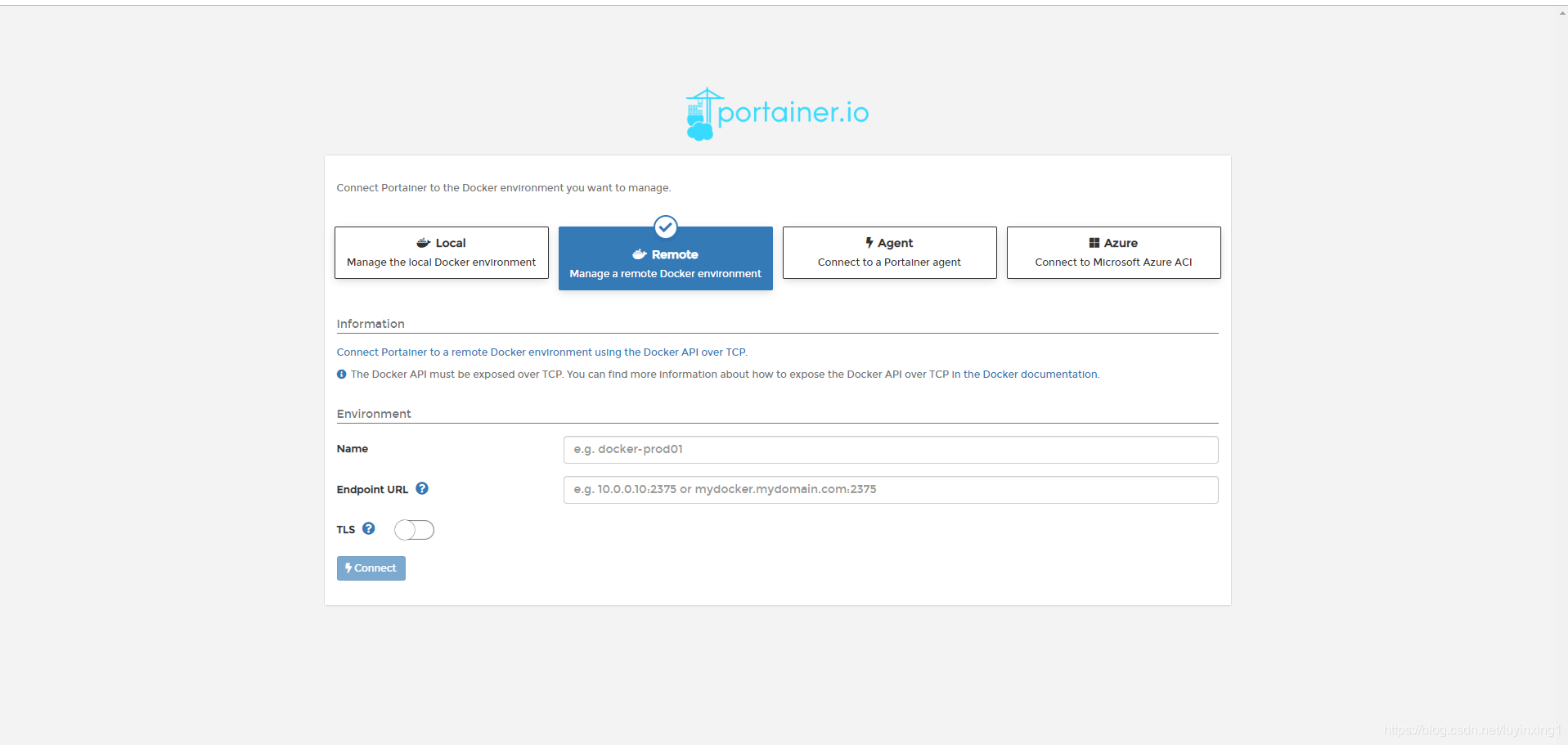
6.3、访问服务
访问方式:http://IP:9000 ,先注册再登录,成功之后,如下图所示:





 扫一扫
扫一扫


 1002
1002

 被折叠的 条评论
为什么被折叠?
被折叠的 条评论
为什么被折叠?
 到【灌水乐园】发言





