关于iOS11、iPhone X、Xcode9 适配详解

Transformer在BEV感知中的统治地位 Transformer在BEV感知中的统治地位 ,人工智能,计算机视觉,大模型,AI,本文围绕 Transformer 在 BEV 感知中的统治地位展开,介绍了 Transformer 的基础原理,如自注意力、多头注意力机制等,以及 BEV 感知的概念、任务与挑战。阐述了 Transformer 在 BEV 感知中的技术优势,包括全局建模、灵活特征融合和长距离依赖捕捉能力,还介绍了典型架构、代码示例及在自动驾驶目标检测等领域的应用案例。同时,评估了其性能,提及优化方法,并展望了与其他技术融合、端到端系统等… 阅读详情

更新iOS11后,发现有些地方需要做适配,整理后按照优先级分为以下三类:

  • 单纯升级iOS11后造成的变化;
  • Xcode9 打包后造成的变化;
  • iPhoneX的适配

一、单纯升级iOS11后造成的变化

升级后,发现某个拥有tableView的界面错乱,组间距和contentInset错乱,因为iOS11中 UIViewController 的 automaticallyAdjustsScrollViewInsets 属性被废弃了,因此当tableView超出安全区域时,系统自动会调整SafeAreaInsets值,进而影响adjustedContentInset值

?
1
2
3
4
5
6
7
8
9
10
11
12
13
14
15
16
17
18
19
20
21
22
23
24
// 有些界面以下使用代理方法来设置,发现并没有生效
- (CGFloat)tableView:(UITableView *)tableView heightForHeaderInSection:(NSInteger)section;
- (CGFloat)tableView:(UITableView *)tableView heightForFooterInSection:(NSInteger)section;
 
// 这样的原理是因为之前只是实现了高度的代理方法,却没有实现View的代理方法,iOS10及以前这么写是没问题的,iOS11开启了行高估算机制引起的bug,因此有以下几种解决方法:
 
// 解决方法一:添加实现View的代理方法
- (UIView *)tableView:(UITableView *)tableView viewForFooterInSection:(NSInteger)section {
   return nil;
}
- (UIView *)tableView:(UITableView *)tableView viewForHeaderInSection:(NSInteger)section {
   return nil;
}
 
// 解决方法二:直接使用tableView属性进行设置,修复该UI错乱
self.tableView.sectionHeaderHeight = 0;
self.tableView.sectionFooterHeight = 5;
 
[_optionTableView setContentInset:UIEdgeInsetsMake(-35, 0, 0, 0)];
 
// 解决方法三:添加以下代码关闭估算行高
self.tableView.estimatedRowHeight = 0;
self.tableView.estimatedSectionHeaderHeight = 0;
self.tableView.estimatedSectionFooterHeight = 0;

四、使用Xcode9 编译后发现的问题

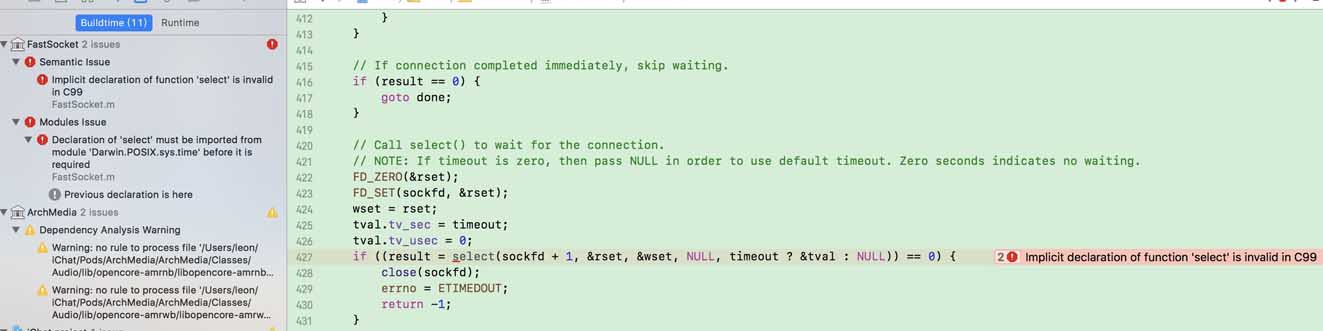
1. 发现“fastSocket”第三方报错,具体原因是缺少C99的头文件,引入“#include <sys/time.h>”即可


2. 导航栏的新特性

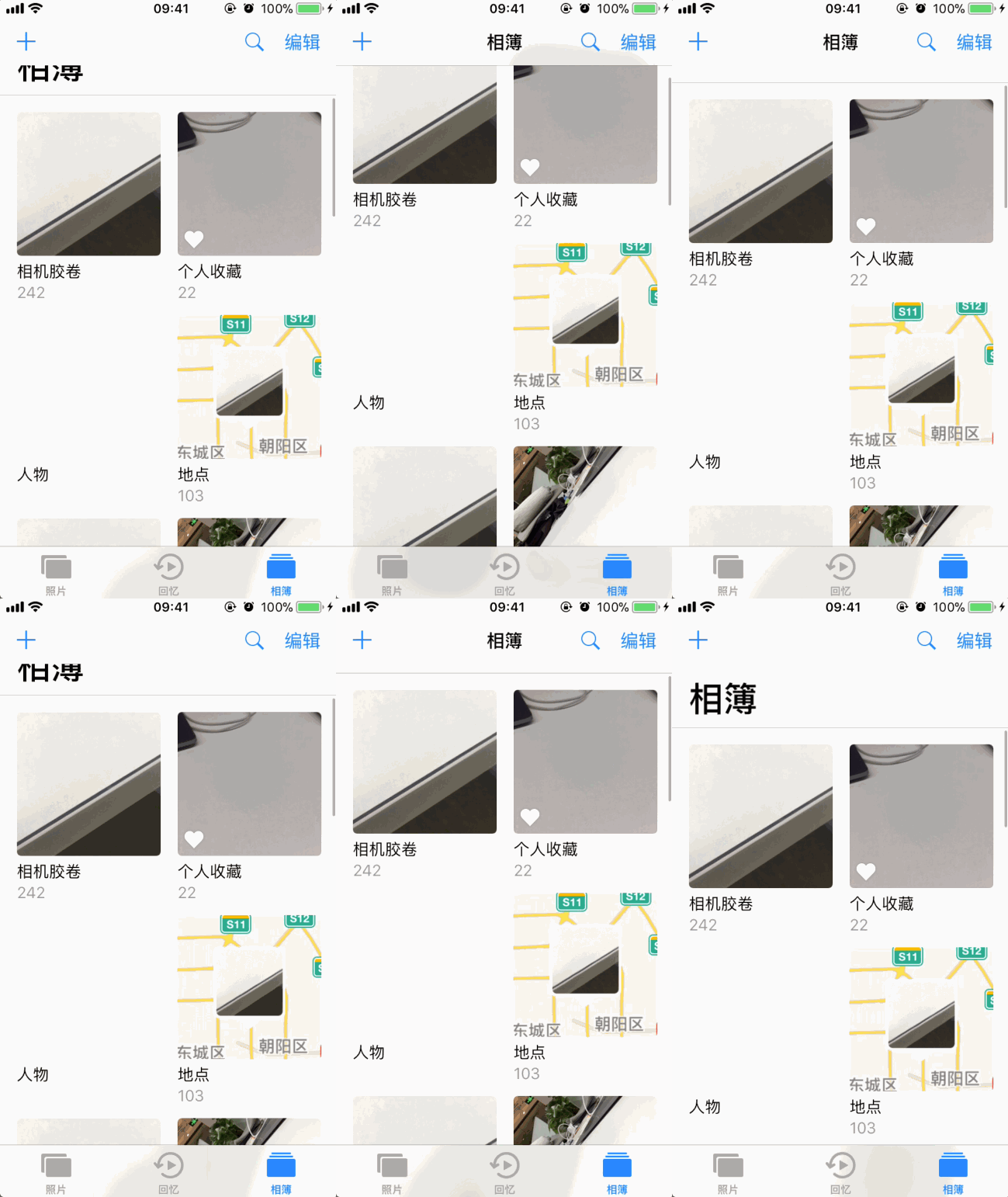
原生的搜索栏样式发生改变


右边为iOS11样式,搜索区域高度变大,字体变大

查看 API 后发现,iOS11后将 searchController 赋值给了 NavigationItem,通过属性 hidesSearchBarWhenScrolling 可以控制搜索栏是否在滑动的时候进行隐藏和显示

?
1
2
3
4
// A view controller that will be shown inside of a navigation controller can assign a UISearchController to this property to display the search controller's search bar in its containing navigation controller's navigation bar.
@property (nonatomic, retain, nullable) UISearchController *searchController API_AVAILABLE(ios(11.0)) API_UNAVAILABLE(tvos);
 
// If this property is true (the default), the searchController's search bar will hide as the user scrolls in the top view controller's scroll view. If false, the search bar will remain visible and pinned underneath the navigation bar.

另外,UINavigationBar 新增属性 BOOL值 prefersLargeTitles 来实现下面的效果,并可以通过 largeTitleTextAttributes 来设置大标题的文本样式

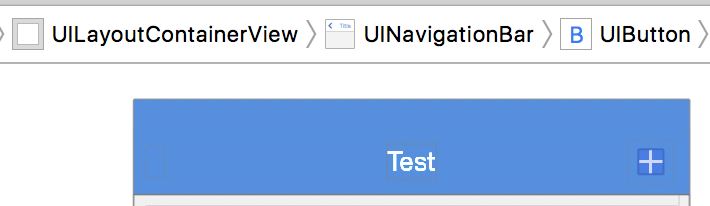
有个界面使用到了导航栏按钮相关的frame,也发生了UI错乱,查看UI层级关系后发现,iOS11以前是直接把按钮加到了UINavigationBar上面,而iOS11则是先将按钮加到了_UITAMICAdaptorView,再加到_UIButtonBarStackView、_UINavigationBarContentView,接着才是UINavigationBar。因此如果需要获取导航栏按钮 frame 或者 superView,这里需要专门做下适配


iOS10及以下版本导航栏按钮层级关系图


iOS11导航栏按钮层级关系图

三、iPhone X的适配

下载完Xcode9之后,第一件事自然是在 iPhone X(模拟器)上过把瘾,然后编译后就发现报错了

由于iPhone X的状态栏是和其他版本手机差异比较大的,因此api 变化也比较大

先后做了以下适配

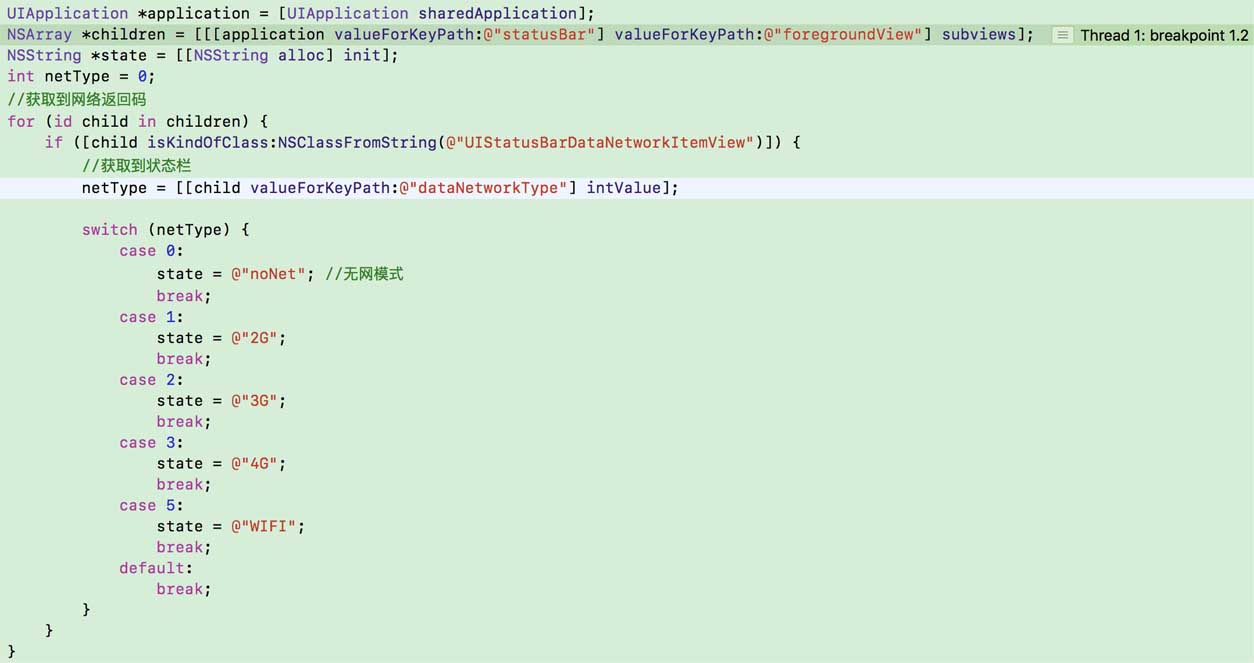
适配点一:项目中使用状态栏中图标判断当前网络的具体状态


出错代码

打印的 Log 报出以下错误: Trapped uncaught exception 'NSUnknownKeyException', reason: '[<UIStatusBar_Modern 0x7fcdb0805770> valueForUndefinedKey:]: this class is not key value coding-compliant for the key foregroundView.'


iPhone X


其他手机

使用 runtime 打印其所有属性,发现以下差异

?
1
2
3
4
5
6
7
8
9
10
11
12
13
14
15
16
17
// 测试代码
#import <objc/runtime.h>
NSMutableString *resultStr = [NSMutableString string];
//获取指定类的Ivar列表及Ivar个数
unsigned int count = 0;
Ivar *member = class_copyIvarList([[application valueForKeyPath:@ "_statusBar" ] class ], &count);
   
for ( int i = 0; i < count; i++){
   Ivar var = member[i];
   //获取Ivar的名称
   const char *memberAddress = ivar_getName(var);
   //获取Ivar的类型
   const char *memberType = ivar_getTypeEncoding(var);
   NSString *str = [NSString stringWithFormat:@ "key = %s       type = %s \n" ,memberAddress,memberType];
    [resultStr appendString:str];
}
NSLog(@ "%@" , resultStr);
?
1
2
3
4
5
6
7
8
9
10
11
12
13
14
15
16
17
18
19
20
21
22
23
24
25
26
27
28
29
30
31
32
33
34
35
36
37
// 其他版本的手机
key = _inProcessProvider      type = @ "<UIStatusBarStateProvider>"
key = _showsForeground       type = B
key = _backgroundView        type = @ "UIStatusBarBackgroundView"
key = _doubleHeightLabel      type = @ "UILabel"
key = _doubleHeightLabelContainer  type = @ "UIView"
key = _currentDoubleHeightText   type = @ "NSString"
key = _currentRawData        type = {超长。。}
key = _interruptedAnimationCompositeViews type = @ "NSMutableArray"
key = _newStyleBackgroundView    type = @ "UIStatusBarBackgroundView"
key = _newStyleForegroundView    type = @ "UIStatusBarForegroundView"
key = _slidingStatusBar       type = @ "UIStatusBar"
key = _styleAttributes       type = @ "UIStatusBarStyleAttributes"
key = _waitingOnCallbackAfterChangingStyleOverridesLocally type = B
key = _suppressGlow         type = B
key = _translucentBackgroundAlpha  type = d
key = _showOnlyCenterItems     type = B
key = _foregroundViewShouldIgnoreStatusBarDataDuringAnimation type = B
key = _tintColor          type = @ "UIColor"
key = _lastUsedBackgroundColor   type = @ "UIColor"
key = _nextTintTransition      type = @ "UIStatusBarStyleAnimationParameters"
key = _overrideHeight        type = @ "NSNumber"
key = _disableRasterizationReasons type = @ "NSMutableSet"
key = _timeHidden          type = B
key = _statusBarWindow       type = @ "UIStatusBarWindow"
 
// iPhone X
key = _statusBar ; type = @ "_UIStatusBar"
 
// 因此可见iPhone X的状态栏是多嵌套了一层,多取一次即可,最终适配代码为:
NSArray *children;
// 不能用 [[self deviceVersion] isEqualToString:@"iPhone X"] 来判断,因为模拟器不会返回 iPhone X
   if ([[application valueForKeyPath:@ "_statusBar" ] isKindOfClass:NSClassFromString(@ "UIStatusBar_Modern" )]) {
     children = [[[[application valueForKeyPath:@ "_statusBar" ] valueForKeyPath:@ "_statusBar" ] valueForKeyPath:@ "foregroundView" ] subviews];
   } else {
     children = [[[application valueForKeyPath:@ "_statusBar" ] valueForKeyPath:@ "foregroundView" ] subviews];
   }

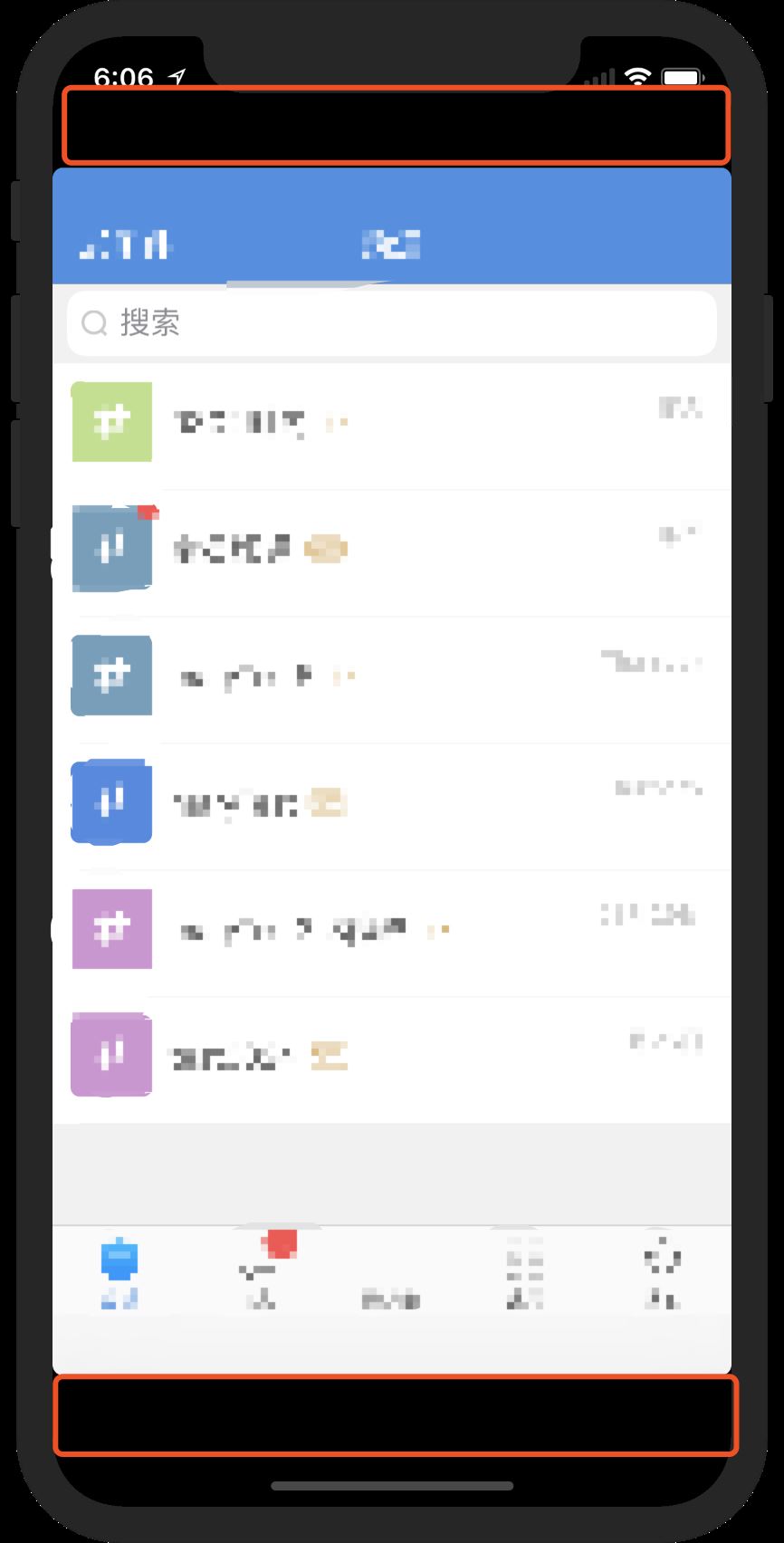
适配点二:解决这个问题后项目跑起来发现,整个app界面上下各空出大概40pt的高度


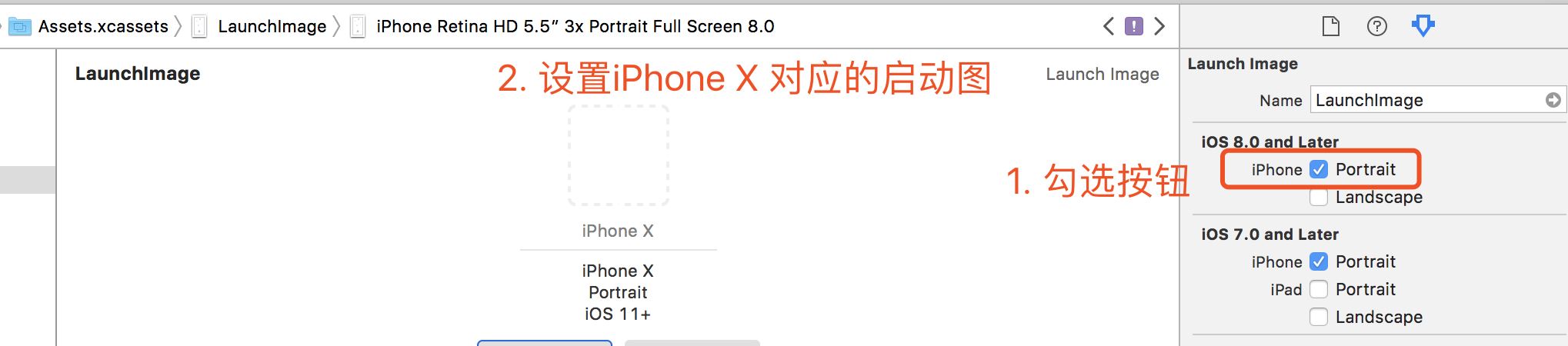
经常从 Github 上下载项目把玩的老司机们都知道,有些老项目在模拟器上跑起来之后也会只有 iPhone 4(320*480)的布局空间,造成这个的原因是启动图使用 Launch Images Source 设置的时候没有勾选并设置对应的图片,解决方法如下


然而iPhone X更大的坑是屏幕的适配

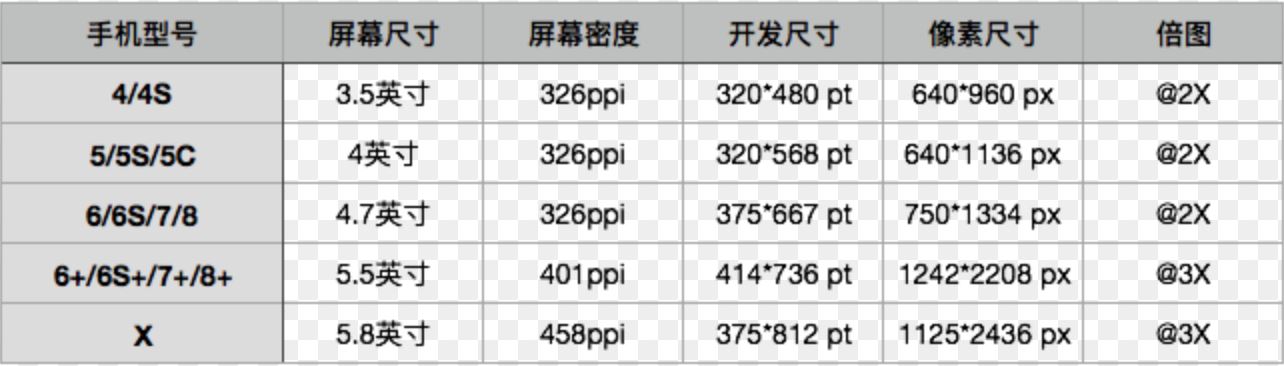
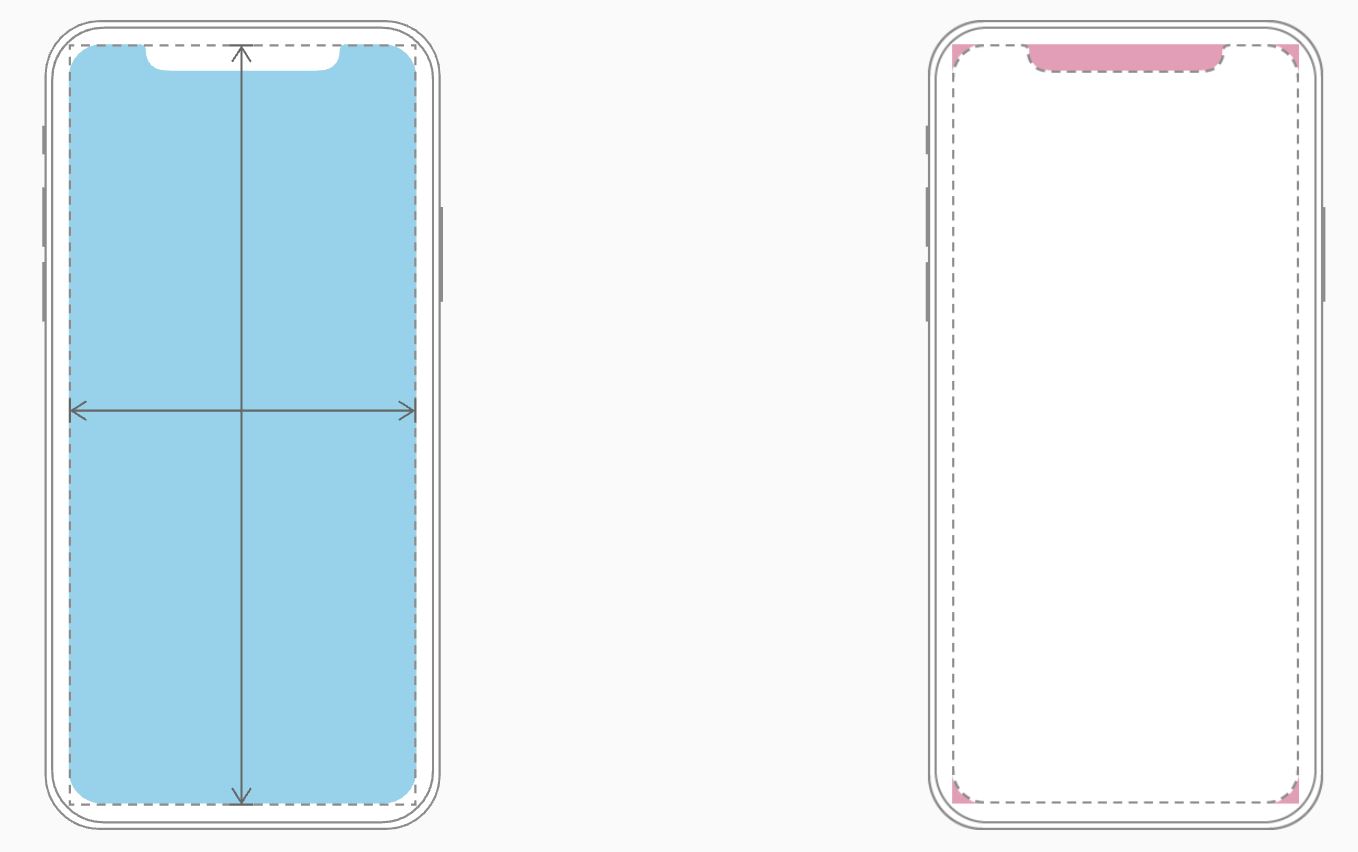
首先看下屏幕尺寸


这张图反映出不少信息:

  • iPhone X的宽度虽然和7是一样的,但是高度多出145pt
  • 使用三倍图是重点,而且一般认为肉眼所能所能识别的最高的屏幕密度是300ppi,iPhone X已达到458ppi(查证发现三星galaxy系列的屏幕密度是522ppi)

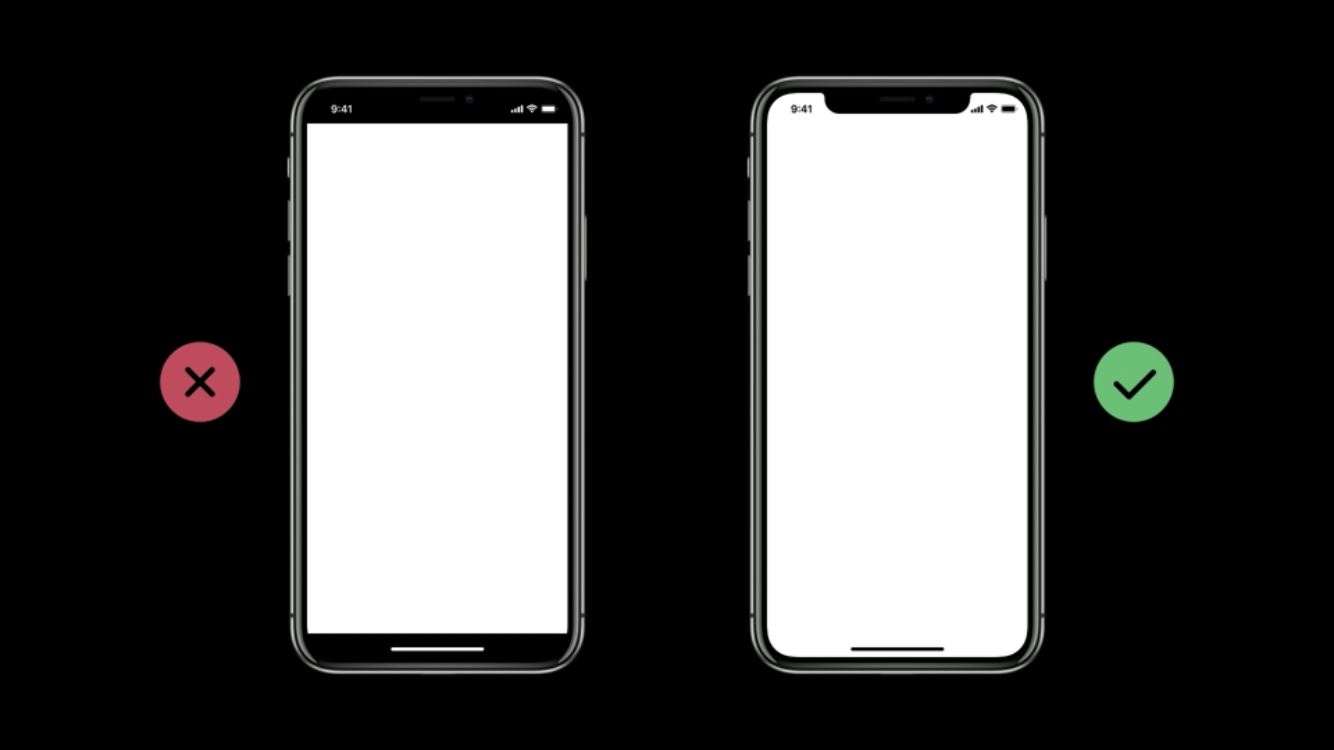
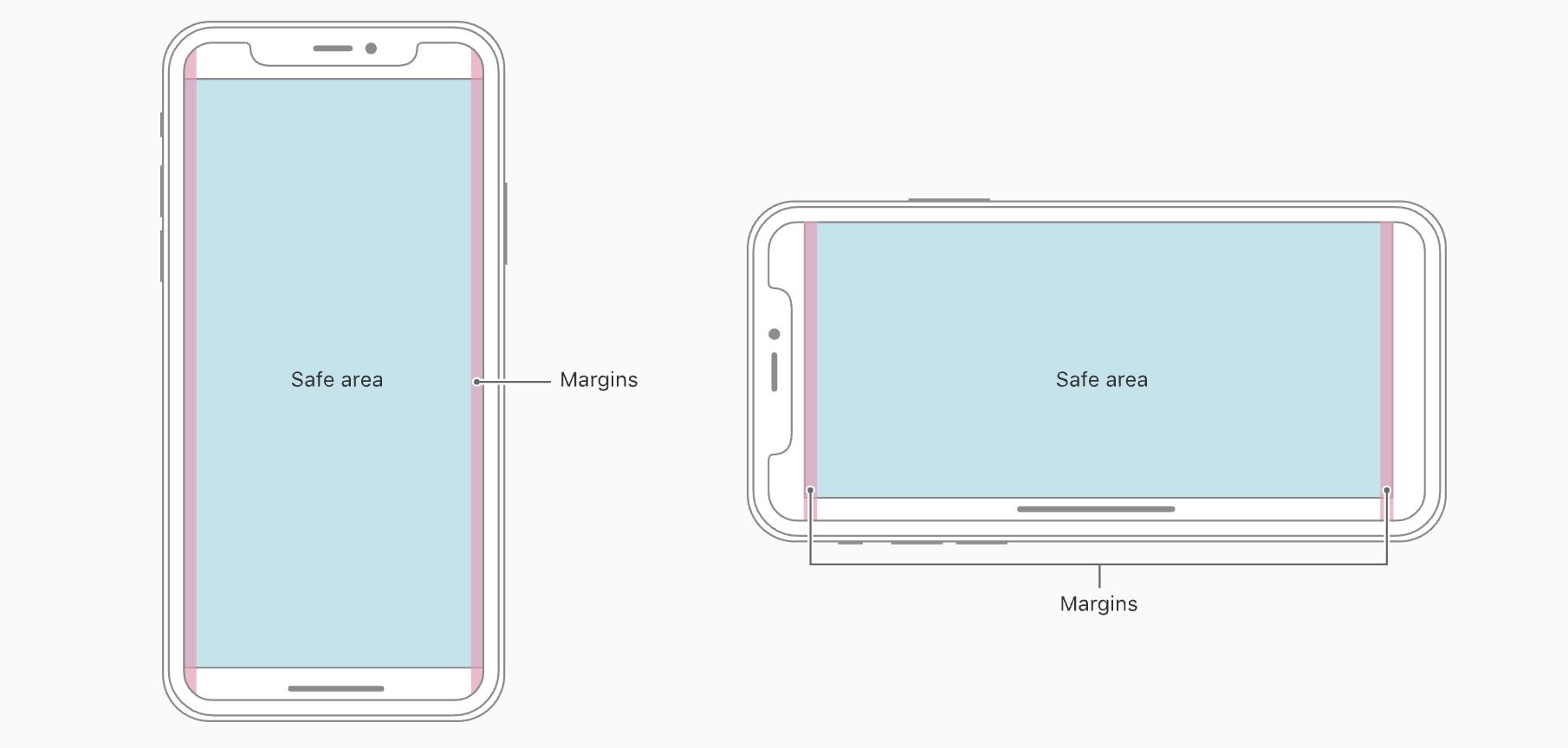
在设计方面,苹果官方文档human-interface-guidelines有明确要求,下面结合图例进行说明:


展示出来的设计布局要求填满整个屏幕

填满的同时要注意控件不要被大圆角和传感器部分所遮挡


安全区域以外的部分不允许有任何与用户交互的控件

上面这张图内含信息略多

头部导航栏不予许进行用户交互的,意味着下面这两种情况 Apple 官方是不允许的


  • 底部虚拟区是替代了传统home键,高度为34pt,通过上滑可呼起多任务管理,考虑到手势冲突,这部分也是不允许有任何可交互的控件
  • 状态栏在非安全区域,文档中也提到,除非可以通过隐藏状态栏给用户带来额外的价值,否则最好把状态栏还给用户

以上就是本文的全部内容,希望对大家的学习有所帮助,也希望大家多多支持脚本之家。

原文链接:http://www.jianshu.com/p/f5ee206c7df0

半导体材料仿真:二维材料仿真_(1).二维材料的基本概念 在半导体材料仿真领域,二维材料因其独特的物理和化学性质而受到广泛关注。二维材料,也称为二维纳米材料,是指在二维空间(通常是平面)上具有原子级厚度的材料。这些材料的厚度通常在几个纳米甚至单个原子层的范围内,使得它们在电子、光学、热学和机械性能上表现出与传统三维材料显著不同的特性。本节将详细介绍二维材料的基本概念,包括它们的分类、结构、性质以及在半导体材料仿真中的应用。 阅读详情

相关推荐

通过arcmap制作的第一张流域图

需要知道,识别河流依次需要填洼,流向,流量,栅格计算器,河流链接,河网分级.通过卫星图确定河流入口,在入口处画一个点,注意不要与其他河流相交。随后是进行对河流的筛选使用con函数,筛选流量大于100的河流。我们使用镶嵌工具-->镶嵌至新栅格 将两个数据合并。填洼后如图,随后进行流向的获得.使用流向工具。首先导入准备好的数据,可见两张图片并非一体。教程参考b站up:爱画地图的boney。惊醒栅格河网矢量化,进行河流分级。输入表面栅格数据,等待后如图。本次制作的是双峰县的流域图。输入流向数据,输出后如图。

pianmian1的博客 2229

Xcode 对应的 macOS、SDK 版本

本表截取于 2024-05-04,更多更新可见:2024-05-04。

AI工程化、开源分享、文档翻译、代码笔记 1万+

OI 生涯回忆录 《Pilgrimage》

前言 于 NOI2020 后写下本文。 本文简单提及了在写作时尚能回忆起来的,在我的 OI 生涯中对我的影响重大的人、事、比赛等。 写作本文,旨在在回忆允许的范围内,对 OI 生涯进行一定程度上的梳理,总结。 开端 入门 我最早接触计算机程序设计,是在小学。 那时候,我的数学成绩不错,就被老师推荐去学习编程。 就这样,我在局前街小学的何静老师的指导下,走上了编程的道路。 小学时的编程,与其说是 “竞赛” ,不如说是 “兴趣班” 。 当时,包括我在内,很多小孩子天性是浮躁的。支撑我对着无聊的代码学下去的,并不

cz_xuyixuan的博客 1万+

iOS Bug---iPhone X闪退(UIStatusBar_Modern 0x7fb8eee05a00)

在iPhone X手机 wifi情况下,启动时候闪退,在4G网络时候不闪退。这是项目中使用状态栏中图标判断当前网络的具体状态,而 iPhone X手机状态栏和其他版本手机存在差异,状态栏是多嵌套了一层,所以在读取时候需要注意。可以在代码里面搜索 foregroundView 这个关键字,找到位置进行必要修改。Error:[&lt;UIStatusBar_Modern 0x7fb8eee05a00&...

iOS技术分享与学习博客 3102

CCS TMSC6748 报错Error connecting to the target: (Error -600 @ 0x0)

CCS TMSC6748 报错Error connecting to the target:(Error -600@ 0x0)

AS_the_deer1717的博客 6636

ChatGPT高效制作PPT:从内容生成到设计优化全流程

人工智能技术正在改变传统办公文档的创作方式,其中自然语言处理(NLP)与生成式AI的结合为内容创作带来了革命性突破。以ChatGPT为代表的大语言模型(LLM)能够理解复杂指令并生成结构化内容,其核心原理是通过海量数据训练获得的语义理解和文本生成能力。在办公自动化场景中,这种技术特别适合解决PPT制作中的两大痛点:内容创作耗时和逻辑架构困难。通过精心设计的提示词工程,AI可以快速输出包含核心要点、数据支撑的完整内容框架,甚至直接生成Markdown格式的代码以便快速转换为PPT。对于商业计划、项目汇报等高频

weixin_42613018的博客 494

iPhone X (XS XR XSMAX)如何根据状态栏上的图标 获取设备的联网状态(不是单个应用的)

在iPhone X 上通过状态栏获取联网状态使用下面的代码直接闪退   - (BOOL)networkingStatesFromStatebar { UIApplication *app = [UIApplication sharedApplication]; NSArray *children = nil; children = [[[app valueForKey...

qq_15509071的博客 4375

SAP CKMLCP 月结7大常见报错:从“未找到成本核算运行”到“物料占用”的完整解决方案

本文深入解析SAP CKMLCP月结过程中的7大常见报错,从权限问题到数据一致性错误,提供系统化的解决方案。重点解决'未找到成本核算运行'和'物料占用'等典型问题,帮助财务人员高效完成成本核算月结,确保数据准确性。

weixin_30299709的博客 416

iOS【开发 iOS11、iPhone X、Xcode9 适配指南】

不断完善中。。。(接下来会添加UITabBar和 WKWebView)更新iOS11后,发现有些地方需要做适配,整理后按照优先级分为以下三类: 单纯升级iOS11后造成的变化;Xcode9 打包后造成的变化;iPhoneX的适配 一、单纯升级iOS11后造成的变化 升级后,发现某个拥有tableView的界面错乱,组间距和contentInset错乱,因为iOS11中 UIViewCo

阿俊的博客 3689

Unity Sprite Editor切片功能详解:如何快速将一张大图拆分成多个小图(附常见问题解决)

本文详细解析了Unity Sprite Editor的切片功能,指导开发者如何高效地将一张大图拆分为多个独立小图。文章涵盖了自动与手动切片操作步骤、轴心点设置、子精灵命名管理等核心技巧,并针对切片错位、性能优化等常见问题提供了实用解决方案,帮助提升2D游戏资源处理效率。

i0j1k2l3m的博客 647

2025年5月架构设计师论文真题回顾,附写作技巧、所涉知识点及参考范文(三)

本文主要回顾2025年上半年(2025-5-24)系统架构设计师考试下午论文的题目,同时附带写作技巧、所涉知识点及参考范文。试题三:多模型数据库及应用。

一几文的编程学习笔记。 630

iPhont X适配

iphontX若不设置启动图片相当于iPhone8的放大模式(375*667) ,若设置了启动图片才是他的实际像素,实际像素点: 5.8英寸屏(1125*2436) 768*1024 矢量图的图片倍率 iphontX3倍图 iphone4,iphone5,iphoneX无放大模式。iphone6,7,8的放大模式屏幕像素是:(320*568)。iphone6 plus,7 plus,

jia12216的专栏 1107

【八股】JUC并发编程篇

👉抽象队列同步器,就是一种锁,内部维护的是一个先进先出的双向队列,队列中存储的是排队的线程,用state来标识是否有线程获得锁【0是无锁状态】👉流程:当一个线程拿到锁后会修改state = 1,这时如果有其他线程访问则会进入队列进行排序,直到state变成0后,队头线程才会拿到锁。在对state进行修改时,用的是CAS操作,所以可以保证原子性。👉它可以实现公平锁或非公平锁【默认】,上述是一个公平锁。如果新线程和队头线程抢锁资源就是非公平锁。

qq_44768318的博客 552

iOS11、iPhone X、Xcode9 适配指南

更新iOS11后,发现有些地方需要做适配,整理后按照优先级分为以下三类: 1.单纯升级iOS11后造成的变化; 2.Xcode9 打包后造成的变化; 3.iPhoneX的适配 一、单纯升级iOS11后造成的变化 1. 升级后,发现某个拥有tableView的界面错乱,组间距和contentInset错乱,因为iOS11中 UIViewController 的 automatic...

derekgao2013的博客 223

Outlook Express 6 (OE6) for Win7/Win8/Win10

英文版 Outlook Express6.0, 兼容Win7/Win10/WinXP,解压就可用。

ssm框架搭建

这个是一个在idea上成功跑起来的ssm框架项目,保存在这里方便以后使用直接下载

iOS11-sdk11-xcode9-iphone8/8+/x适配

原文地址:https://github.com/easyui/blog/blob/master/iOS/2017-09-27-iOS11-sdk11-xcode9-iphone8:8%2B:x%E9%80%82%E9%85%8D/2017-09-27-iOS11-sdk11-xcode9-iphone8:8%2B:x%E9%80%82%E9%85%8D.md     :smile:《Hu...

不积跬步 无以至千里 不积小流 无以成江海 4866

lwip-2.0.3

lwip是瑞典计算机科学院(SICS)的Adam Dunkels 开发的一个小型开源的TCP/IP协议栈。实现的重点是在保持TCP协议主要功能的基础上减少对RAM 的占用。

iOS11、iPhone X、Xcode9 适配

一、单纯升级iOS11后造成的变化1. 升级后,发现某个拥有tableView的界面错乱,组间距和contentInset错乱,因为iOS11中 UIViewController 的 automaticallyAdjustsScrollViewInsets 属性被废弃了,因此当tableView超出安全区域时,系统自动会调整SafeAreaInsets值,进而影响adjustedContentIns

liukaili_666888999的博客 1184

深度学习工具包 DeepLearningToolbox

深度学习工具包Deprecation notice.-----This toolbox is outdated and no longer maintained.There are much better tools available for deep learning than this toolbox, e.g. [Theano](http://deeplearning.net/software/theano/), [torch](http://torch.ch/) or [tensorflow](http://www.tensorflow.org/)I would suggest you use one of the tools mentioned above rather than use this toolbox.Best, Rasmus.DeepLearnToolbox================A Matlab toolbox for Deep Learning.Deep Learning is a new subfield of machine learning that focuses on learning deep hierarchical models of data.It is inspired by the human brain&#39;s apparent deep (layered, hierarchical) architecture.A good overview of the theory of Deep Learning theory is[Learning Deep Architectures for AI](http://www.iro.umontreal.ca/~bengioy/papers/ftml_book.pdf)For a more informal introduction, see the following videos by Geoffrey Hinton and Andrew Ng.* [The Next Generation of Neural Networks](http://www.youtube.com/watch?v=AyzOUbkUf3M) (Hinton, 2007)* [Recent Developments in Deep Learning](http://www.youtube.com/watch?v=VdIURAu1-aU) (Hinton, 2010)* [Unsupervised Feature Learning and Deep Learning](http://www.youtube.com/watch?v=ZmNOAtZIgIk) (Ng, 2011)If you use this toolbox in your research please cite [Prediction as a candidate for learning deep hierarchical models of data](http://www2.imm.dtu.dk/pubdb/views/publication_details.php?id=6284)```@MASTERSTHESIS\{IMM2012-06284, author = "R. B. Palm", title = "Prediction as a candidate for learning deep hierarchical models of data", year = "2012",}```Contact: rasmusbergpalm at gmail dot comDirectories included in the toolbox-----------------------------------`NN/` - A library for Feedforward Backpropagation Neural Networks`CNN/` - A library for Convolutional Neural Networks`DBN/` - A library for Deep Belief Networks`SAE/` - A library for Stacked Auto-Encoders`CAE/` - A library for Convolutional Auto-Encoders`util/` - Utility functions used by the libraries`data/` - Data used by the examples`tests/` - unit tests to verify toolbox is workingFor references on each library check REFS.mdSetup-----1. Download.2. addpath(genpath(&#39;DeepLearnToolbox&#39;));Example: Deep Belief Network---------------------```matlabfunction test_example_DBNload mnist_uint8;train_x = double(train_x) / 255;test_x = double(test_x) / 255;train_y = double(train_y);test_y = double(test_y);%% ex1 train a 100 hidden unit RBM and visualize its weightsrand(&#39;state&#39;,0)dbn.sizes = [100];opts.numepochs = 1;opts.batchsize = 100;opts.momentum = 0;opts.alpha = 1;dbn = dbnsetup(dbn, train_x, opts);dbn = dbntrain(dbn, train_x, opts);figure; visualize(dbn.rbm{1}.W&#39;); % Visualize the RBM weights%% ex2 train a 100-100 hidden unit DBN and use its weights to initialize a NNrand(&#39;state&#39;,0)%train dbndbn.sizes = [100 100];opts.numepochs = 1;opts.batchsize = 100;opts.momentum = 0;opts.alpha = 1;dbn = dbnsetup(dbn, train_x, opts);dbn = dbntrain(dbn, train_x, opts);%unfold dbn to nnnn = dbnunfoldtonn(dbn, 10);nn.activation_function = &#39;sigm&#39;;%train nnopts.numepochs = 1;opts.batchsize = 100;nn = nntrain(nn, train_x, train_y, opts);[er, bad] = nntest(nn, test_x, test_y);assert(er < 0.10, &#39;Too big error&#39;);```Example: Stacked Auto-Encoders---------------------```matlabfunction test_example_SAEload mnist_uint8;train_x = double(train_x)/255;test_x = double(test_x)/255;train_y = double(train_y);test_y = double(test_y);%% ex1 train a 100 hidden unit SDAE and use it to initialize a FFNN% Setup and train a stacked denoising autoencoder (SDAE)rand(&#39;state&#39;,0)sae = saesetup([784 100]);sae.ae{1}.activation_function = &#39;sigm&#39;;sae.ae{1}.learningRate = 1;sae.ae{1}.inputZeroMaskedFraction = 0.5;opts.numepochs = 1;opts.batchsize = 100;sae = saetrain(sae, train_x, opts);visualize(sae.ae{1}.W{1}(:,2:end)&#39;)% Use the SDAE to initialize a FFNNnn = nnsetup([784 100 10]);nn.activation_function = &#39;sigm&#39;;nn.learningRate = 1;nn.W{1} = sae.ae{1}.W{1};% Train the FFNNopts.numepochs = 1;opts.batchsize = 100;nn = nntrain(nn, train_x, train_y, opts);[er, bad] = nntest(nn, test_x, test_y);assert(er < 0.16, &#39;Too big error&#39;);```Example: Convolutional Neural Nets---------------------```matlabfunction test_example_CNNload mnist_uint8;train_x = double(reshape(train_x&#39;,28,28,60000))/255;test_x = double(reshape(test_x&#39;,28,28,10000))/255;train_y = double(train_y&#39;);test_y = double(test_y&#39;);%% ex1 Train a 6c-2s-12c-2s Convolutional neural network %will run 1 epoch in about 200 second and get around 11% error. %With 100 epochs you&#39;ll get around 1.2% errorrand(&#39;state&#39;,0)cnn.layers = { struct(&#39;type&#39;, &#39;i&#39;) %input layer struct(&#39;type&#39;, &#39;c&#39;, &#39;outputmaps&#39;, 6, &#39;kernelsize&#39;, 5) %convolution layer struct(&#39;type&#39;, &#39;s&#39;, &#39;scale&#39;, 2) %sub sampling layer struct(&#39;type&#39;, &#39;c&#39;, &#39;outputmaps&#39;, 12, &#39;kernelsize&#39;, 5) %convolution layer struct(&#39;type&#39;, &#39;s&#39;, &#39;scale&#39;, 2) %subsampling layer};cnn = cnnsetup(cnn, train_x, train_y);opts.alpha = 1;opts.batchsize = 50;opts.numepochs = 1;cnn = cnntrain(cnn, train_x, train_y, opts);[er, bad] = cnntest(cnn, test_x, test_y);%plot mean squared errorfigure; plot(cnn.rL);assert(er<0.12, &#39;Too big error&#39;);```Example: Neural Networks---------------------```matlabfunction test_example_NNload mnist_uint8;train_x = double(train_x) / 255;test_x = double(test_x) / 255;train_y = double(train_y);test_y = double(test_y);% normalize[train_x, mu, sigma] = zscore(train_x);test_x = normalize(test_x, mu, sigma);%% ex1 vanilla neural netrand(&#39;state&#39;,0)nn = nnsetup([784 100 10]);opts.numepochs = 1; % Number of full sweeps through dataopts.batchsize = 100; % Take a mean gradient step over this many samples[nn, L] = nntrain(nn, train_x, train_y, opts);[er, bad] = nntest(nn, test_x, test_y);assert(er < 0.08, &#39;Too big error&#39;);%% ex2 neural net with L2 weight decayrand(&#39;state&#39;,0)nn = nnsetup([784 100 10]);nn.weightPenaltyL2 = 1e-4; % L2 weight decayopts.numepochs = 1; % Number of full sweeps through dataopts.batchsize = 100; % Take a mean gradient step over this many samplesnn = nntrain(nn, train_x, train_y, opts);[er, bad] = nntest(nn, test_x, test_y);assert(er < 0.1, &#39;Too big error&#39;);%% ex3 neural net with dropoutrand(&#39;state&#39;,0)nn = nnsetup([784 100 10]);nn.dropoutFraction = 0.5; % Dropout fraction opts.numepochs = 1; % Number of full sweeps through dataopts.batchsize = 100; % Take a mean gradient step over this many samplesnn = nntrain(nn, train_x, train_y, opts);[er, bad] = nntest(nn, test_x, test_y);assert(er < 0.1, &#39;Too big error&#39;);%% ex4 neural net with sigmoid activation functionrand(&#39;state&#39;,0)nn = nnsetup([784 100 10]);nn.activation_function = &#39;sigm&#39;; % Sigmoid activation functionnn.learningRate = 1; % Sigm require a lower learning rateopts.numepochs = 1; % Number of full sweeps through dataopts.batchsize = 100; % Take a mean gradient step over this many samplesnn = nntrain(nn, train_x, train_y, opts);[er, bad] = nntest(nn, test_x, test_y);assert(er < 0.1, &#39;Too big error&#39;);%% ex5 plotting functionalityrand(&#39;state&#39;,0)nn = nnsetup([784 20 10]);opts.numepochs = 5; % Number of full sweeps through datann.output = &#39;softmax&#39;; % use softmax outputopts.batchsize = 1000; % Take a mean gradient step over this many samplesopts.plot = 1; % enable plottingnn = nntrain(nn, train_x, train_y, opts);[er, bad] = nntest(nn, test_x, test_y);assert(er < 0.1, &#39;Too big error&#39;);%% ex6 neural net with sigmoid activation and plotting of validation and training error% split training data into training and validation datavx = train_x(1:10000,:);tx = train_x(10001:end,:);vy = train_y(1:10000,:);ty = train_y(10001:end,:);rand(&#39;state&#39;,0)nn = nnsetup([784 20 10]); nn.output = &#39;softmax&#39;; % use softmax outputopts.numepochs = 5; % Number of full sweeps through dataopts.batchsize = 1000; % Take a mean gradient step over this many samplesopts.plot = 1; % enable plottingnn = nntrain(nn, tx, ty, opts, vx, vy); % nntrain takes validation set as last two arguments (optionally)[er, bad] = nntest(nn, test_x, test_y);assert(er < 0.1, &#39;Too big error&#39;);```[![Bitdeli Badge](https://d2weczhvl823v0.cloudfront.net/rasmusbergpalm/deeplearntoolbox/trend.png)](https://bitdeli.com/free "Bitdeli Badge")

iOS开发之iOS11、iPhone X、Xcode9 适配指南

更新iOS11后,发现有些地方需要做适配,整理后按照优先级分为以下三类: 1.单纯升级iOS11后造成的变化; 2.Xcode9 打包后造成的变化; 3.iPhoneX的适配 一、单纯升级iOS11后造成的变化 1. 升级后,发现某个拥有tableView的界面错乱,组间距和contentInset错乱,因为iOS11中 UIViewController 的 automaticallyA

坤宇的博客 2503

详解iOS11、iPhone X、Xcode9 适配指南

更新iOS11后,发现有些地方需要做适配,整理后按照优先级分为以下三类: 单纯升级iOS11后造成的变化; Xcode9 打包后造成的变化; iPhoneX的适配 一、单纯升级iOS11后造成的变化 1. 升级后,发现某个拥有tableView的界面错乱,组间距和contentInset错乱,因为iOS11中 UIViewControl

iOS_PING的专栏 1784

iPhone X、iOS 11 、Xcode9,适配,布局,API

关于iPhone X、iOS 11 、Xcode9,我们应该知道这些 1.iPhone X 上运行有黑色区域问题 解决方案: 使用LaunchScreen来当做入场页 或者 修改Assets中的LaunchImage,添加iPhoneX的Launch图1125*2436(竖屏),注意这边的图片像素必须按要求来 2.navigationBar适配 iOS11前导

YCM1101743158的博客 3597

针对Xcode 9 + iOS11 的修改,及iPhone X的适配

1,UIScrollView的automaticallyAdjustsScrollViewInsets 失效了。 automaticallyAdjustsScrollViewInsets,当设置为YES时(默认YES),如果视图里面存在唯一一个UIScrollView或其子类View,那么它会自动设置相应的内边距,这样可以让scroll占据整个视图,又不会让导航栏遮盖。 iOS11这...

dazhi121812的博客 146

iOS之iOS11、iPhone X、Xcode9 适配指南

更新iOS11后,发现有些地方需要做适配,整理后按照优先级分为以下三类: 1.单纯升级iOS11后造成的变化; 2.Xcode9 打包后造成的变化; 3.iPhoneX的适配 一、单纯升级iOS11后造成的变化 1. 升级后,发现某个拥有tableView的界面错乱,组间距和contentInset错乱,因为iOS11中 UIViewController 的 automatic...

weixin_30352645的博客 114

iOS11 & iPhone X 适配 & Xcode 9打包注意事项

1.适配UITableView if #available(iOS11.0, *) { self.contentInsetAdjustmentBehavior= .never self.estimatedRowHeight=0 self.estimatedSectionHeaderHeight=0 self.estimatedSectionFooterHeight=0 }...

diuhong8758的博客 200
上一篇: iOS 自己封装的SDK 打包与合并,新手教程!!!
下一篇: 升级Xcode 10 编译工程遇到的坑
评论
成就一亿技术人!
拼手气红包6.0元
还能输入1000个字符
 
 条评论被折叠 查看
添加红包

请填写红包祝福语或标题

个

红包个数最小为10个

元

红包金额最低5元

当前余额3.43元 前往充值 >
需支付:10.00元
成就一亿技术人!
领取后你会自动成为博主和红包主的粉丝 规则
hope_wisdom
发出的红包
实付元
使用余额支付
点击重新获取
扫码支付
钱包余额 0

抵扣说明:

1.余额是钱包充值的虚拟货币,按照1:1的比例进行支付金额的抵扣。
2.余额无法直接购买下载,可以购买VIP、付费专栏及课程。

余额充值