


- icon竖直居中: align-items: center;(display:flex 下)
align: 规定 div 元素中的内容的水平对齐方式。<div align="center"><input type="text" /></div>
text-align:center 规定“元素中”的文本的水平对齐方式。<div><input type="text" style="text-align:center" /></div> - transform: translate(50%,50%) 对自身,line-height 的百分比是相对于自身的字体大小,position: fixed 元素(如宽高等)的百分比是相对于视口的
- 透明度:
[1] 背景和附在上面的文字都透明 opacity: 0-1
[2] 只背景透明 rgba方式: 例如 rgba(0, 0, 0, 0.4) - 超过一行省略
overflow: hidden;
	text-overflow: ellipsis;
	display: -webkit-box;
	-webkit-line-clamp: 1;
	-webkit-box-orient: vertical;
- 图片文字竖直水平居中:text-align:center;line-height:100px; image标签设置display: inline-block;
vertical-align: middle; - 伪元素—first-child或者nth-child(1) 不起作用的原因:选择器匹配属于其父元素的第 N 个子元素,不论元素的类型。
此时first-child不起作用,是因为.tap_con的父元素win的第一个子元素是.top,此时找到第一个子元素,但是其并不是.tab_con*/
  <div id="win">
        <div class="top">
        </div>
        <div class="tab_con">
        </div>
        <div class="tab_con">
        </div>
   </div>

.tab_con:first-child{
    background:#090 !important;
}
.tab_con:nth-child(1){
    background:#090 !important;
}
- text-align-last:justify; (文字两端对齐)
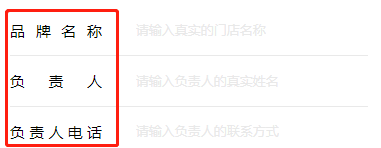
- 分割省市区
 let addressTemp = res.address;
	let p = addressTemp.indexOf("省");
	let newProvince = addressTemp.substring(0, p);
	let c = addressTemp.indexOf("市");
	let newCity = addressTemp.substring(p + 1, c);
	let r = addressTemp.indexOf("区");
	let newRegion = addressTemp.substring(c+1, r);
	let newDetail = addressTemp.substring(r);
	_this.province = newProvince;
	_this.city = newCity;
	_this.region = newRegion;
	_this.detail = newDetail;
- 元素置灰
html {
  -webkit-filter: grayscale(100%);
  -moz-filter: grayscale(100%);
  -ms-filter: grayscale(100%);
  -o-filter: grayscale(100%);
  filter: grayscale(100%);
  filter: gray;
  filter: progid:DXImageTransform.Microsoft.BasicImage(grayscale=1);
}
- 字符串转数组对象 : JSON.parse
数组对象转字符串 : JSON.stringify - 优惠券样式:
  <view class="coupon-cover">
		<view class="coupon-cover-item" v-for="(item1,index1) in couponList" :index="index1" :key="index1">
			<view class="coupon-shop-name">{{item1.sName}}</view>
			<view class="coupon-shop-price">{{item1.sPrice}}</view>
			<view class="coupon-shop-rule">{{item1.sRule}}</view>
		</view>
	</view>
data里值 couponList: [{
					sName: "xxx",
					sPrice: 30,
					sRule: "满100减30"
				},{
					sName: "xxx",
					sPrice: 60,
					sRule: "满100减60"
				},{
					sName: "xxx",
					sPrice: 90,
					sRule: "满100减90"
				}
				],
<style lang="scss" scoped>
.coupon-cover {
	display: flex;
}
.coupon-cover-item {
	flex: 1;
	margin: 0 1%;
	background-image: linear-gradient(#FF6347,#FF0000,#B22222);
	color: $masa-color_white;
	height: 267rpx;
	border-radius: $masa-border-radius-lg;
}
.coupon-shop-name {
	height: 80rpx;
	line-height: 80rpx;
	text-align: center;
	background-color: #FF6347;
	font-size: 35rpx;
	border-radius: 20rpx 20rpx 100% 100%;
}
.coupon-shop-price {
	height: 116rpx;
	line-height: 116rpx;
	text-align: center;
	font-size: 88rpx;
}
.coupon-shop-rule {
	height: 71rpx;
	line-height: 71rpx;
	font-size: 35rpx;
	text-align: center;
}
</style>
- vw(Viewport Width) vh(Viewport Height) [相对于网页视口的单位,系统会将视口的宽度高度分为100份,1vw就是视口宽度的百分之一]
vw,vh和百分比的区别: 百分比永远以父级元素作为参考,而vw和vh永远以视口作为参考,也就是说:vw,vh会随着视口的大小变化而变化。
vmin: vw和vh中较小的那个,vmax: vw和vh中较大的那个
使用场景:保证移动端开发中屏幕旋转之后尺寸不变。
一行4列从左往右依次排序,超过1行换行
.function {
display: flex;
flex-wrap: wrap;
align-items: center;
}
.function-icon {
text-align: center;
width: calc(100vw/4);
}
.function-icon:nth-child(4n){
margin-right: 0;
}
// 5的倍数个元素开始不使用margin-bottom
.function-icon:nth-child(n + 5){
margin-bottom: 0;
}
- 上下行中间有线(伪元素方式):
.some {
	padding: 30rpx 0;
	position: relative;
}
.some:first-child::after {
  display: none;
}
.som::after {
  content: " ";
  position: absolute;
  height: 1rpx;
  right: 0;
  top: 0;
  left:0;
  background-color: $gray;
}
- 伪元素查看物流消息
<!-- 显示物流信息 START -->
		<view v-if="showExpressInfo">
			<view class="drawerModal"></view>
			<view class="drawerBox">
				<view @click="closeExpressInfo()" style="padding-bottom: 50rpx;">
					<view class="float__right">
						<uni-icons :size="30" class="uni-icon-wrapper" color="#bbb" type="close" />
					</view>
				</view>
				<view v-if="expressInfo!=null && expressInfo.list.length>0" class="font-size_5">
					<view class="expressInfoStep" v-for="(item,index) in expressInfo.list">
						<view v-if="index==0" style="color: #FF8286;display: inline-block;">{{item.node_time}}</view>
						<view v-if="index==0" style="color: #FF8286;">{{item.node_desc}}</view>
						<view v-if="index!=0" style="display: inline-block;">{{item.node_time}}</view>
						<view v-if="index!=0">{{item.node_desc}}</view>
					</view>
				</view>
				<view v-else>
					<text>暂无物流消息</text>
				</view>
			</view>
		</view>
		<!-- 显示物流信息 END -->
//底部遮罩层
.drawerModal {
  width: 100%;
  height: 100%;
  position: fixed;
  top: 0;
  left: 0;
  z-index: 1000;
  background: #000;
  opacity: 0.5;
  overflow: hidden;
}
//物流消息提示框
.drawerBox {
  position:absolute;
  width: 560rpx;
  padding: 30rpx 30rpx;
  overflow: auto;
  position: fixed;
  top: 200rpx;
  bottom: 200rpx;
  left: 80rpx;
  right: 80rpx;
  z-index: 1001;
  background-color: #fff;
  border-radius: 15rpx;
}
// 物流步骤条
.expressInfoStep {
	padding: 0 30rpx 30rpx 30rpx;
	border-left: 2rpx solid $masa-color_gray;
}
.expressInfoStep:first-child::before {
	border: 3rpx solid $color_pink !important;
	background-color: $color_pink !important;
}
.expressInfoStep:nth-child(n)::before {
	border: 3rpx solid $color_gray;
	background-color: $color_gray;
	content: '';
	display: inline-block;
	width: 10rpx;
	height: 10rpx;
	border-radius: 50rpx;
	margin-left: -38rpx;
	margin-right: 30rpx;
	vertical-align: middle;
}
图片按照固定高度,宽度截取中间部分:(对元素设置背景图)
background-size: cover;
-webkit-background-size: cover;
background-position:center center;
background-repeat: no-repeat;
background-image: url(xxx.jpg);






 扫一扫
扫一扫


 229
229

 被折叠的 条评论
为什么被折叠?
被折叠的 条评论
为什么被折叠?
 到【灌水乐园】发言





