


复盘小助手
V1
涨停功能
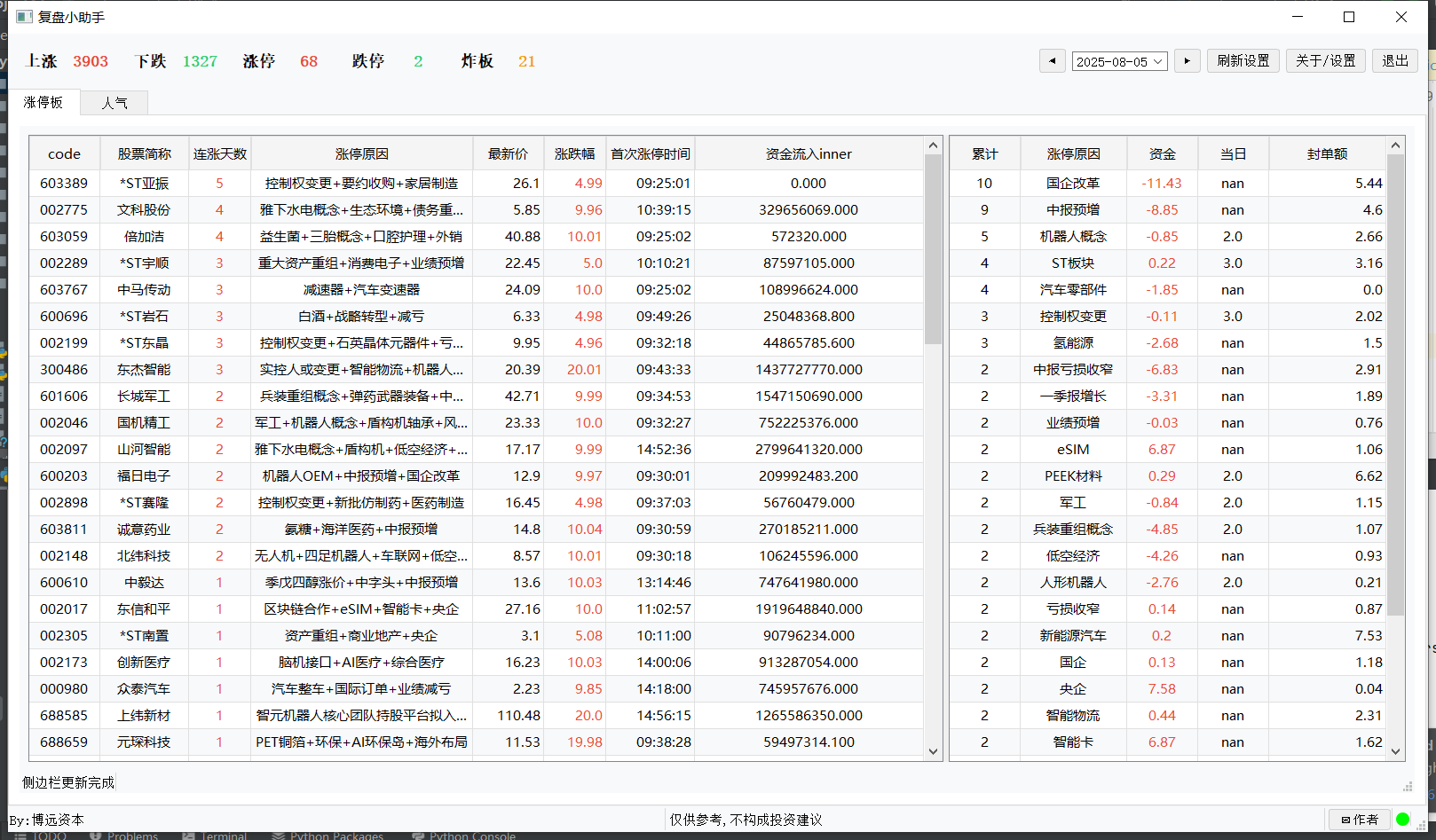
功能1:市场概览模块:显示上涨家数、下跌家数、涨停家数、跌停家数.采用卡片式布局展示关键指标:上涨/下跌家数、涨停/跌停家数
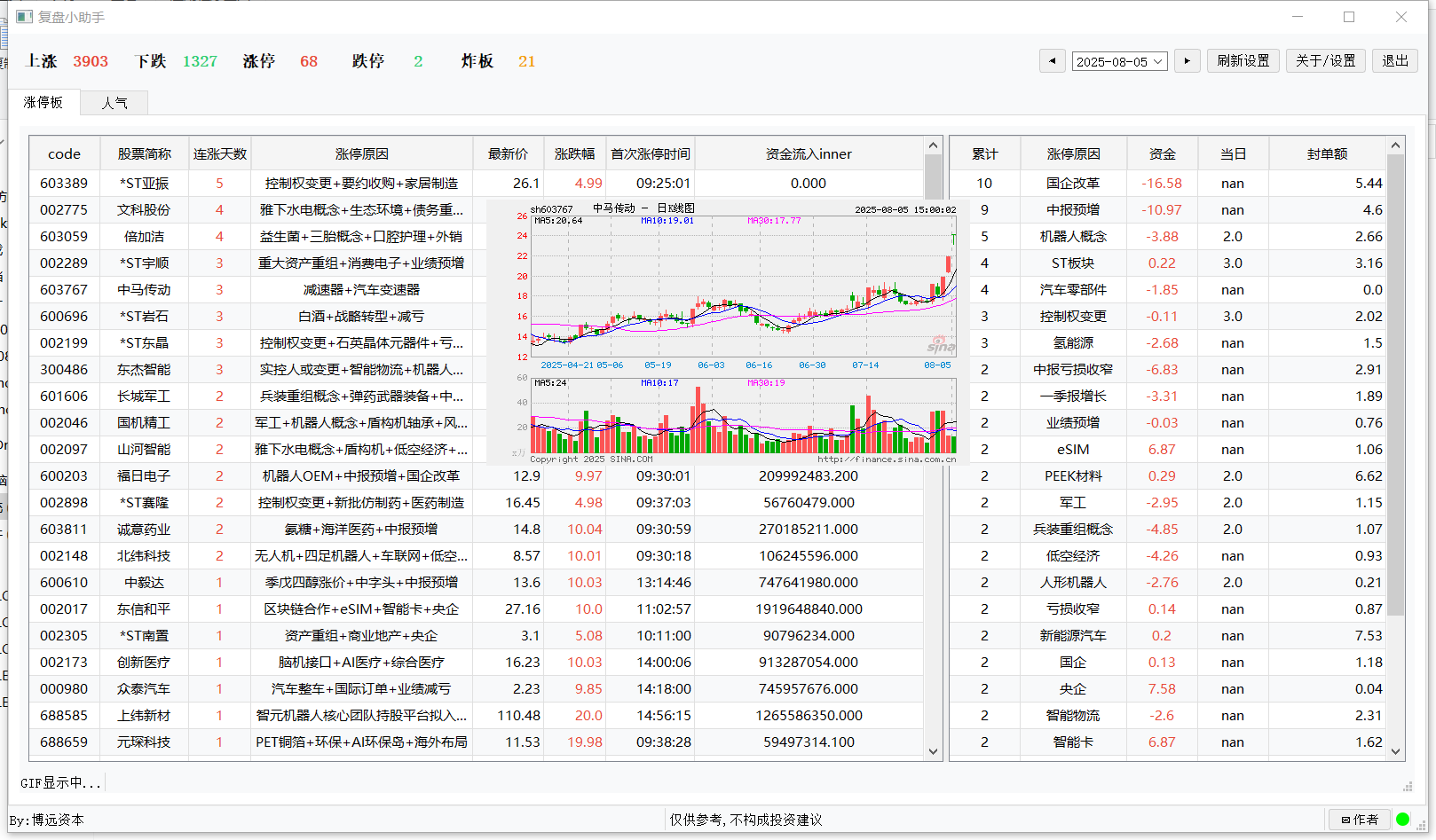
功能2:涨停明细模块:显示每日涨停原因及明细、鼠标悬停显示个股近期走势缩略图
功能3:统计分析模块:统计涨停原因及资金量
等待优化的项目:
1.开始启动有点卡,使用多线程
2.增加人气等功能
3.后续算法研发。
界面代码如下:
class StockMonitor(QMainWindow):
    def __init__(self):
        super().__init__()
        self.time=''
        self.setWindowTitle("复盘小助手")
        self.setGeometry(100, 50, 1600, 900)
        self.initUI()
        # self.float_window_state = update_or_create_user()
        self.start_threads()

    def initUI(self):
        # 1. 创建顶部状态栏
        self.createTopBar()

        #2. 创建中央表格
        #self.createCentralTable()

        # 3. 创建左侧标签导航
        self.createLeftTabs()

        # 4. 创建右侧信息面板
        #self.createRightDock()

        # 5. 创建底部状态栏
        self.createBottomBar()

        # 6. 设置窗口置顶和透明度
        self.setWindowFlags(self.windowFlags() | Qt.WindowStaysOnTopHint)
        self.setWindowOpacity(1)  # 95%透明度

        # # 7. 定时刷新数据
        # self.refresh_timer = QTimer(self)
        # self.refresh_timer.timeout.connect(self.refresh_data)
        # self.refresh_timer.start(5000)  # 5秒刷新一次

        # 7. 启动所有子线程
        self.startAllThreads()

    def createTopBar(self):
        """创建顶部状态栏"""
        top_widget = QWidget()
        layout = QHBoxLayout()

        # 日期显示
        # date_label = QLabel("2025/7/27")
        self.date_label = DateSelector()
        self.date_label.dateChanged.connect(self.handle_date_change)
        self.time = self.date_label.current_date.toString('yyyyMMdd')

        # 市场数据
        # self.market_data = QLabel("{}".format(self.time))
        self.market_data=StockDataWidget()
        self.market_data.setStyleSheet("font-weight: bold; color: #333;")

        # 功能按钮
        # btn_st = QPushButton("不看ST股")
        btn_refresh = QPushButton("刷新设置")
        btn_settings = QPushButton("关于/设置")
        btn_exit = QPushButton("退出")
        btn_exit.clicked.connect(self.close)


        #位置摆放
        layout.addWidget(self.market_data)
        # layout.addWidget(btn_st)
        layout.addStretch()
        layout.addWidget(self.date_label)
        layout.addWidget(btn_refresh)
        layout.addWidget(btn_settings)
        layout.addWidget(btn_exit)

        top_widget.setLayout(layout)
        self.setMenuWidget(top_widget)

    # def createCentralTable(self):
    #     """创建中央数据表格"""
    #     self.zt_table =StockTableApp()
    #     self.setCentralWidget(self.zt_table)

    def createLeftTabs(self):
        """创建左侧标签导航"""
        tab_widget = QTabWidget()
        tab_widget.setTabPosition(QTabWidget.North)
        tab_widget.setStyleSheet("QTabBar::tab { height: 30px; width: 80px; }")

        # 添加标签页
        tabs = ["涨停板", "人气"]

        for tab in tabs:
            tab_content = QWidget()
            layout = QVBoxLayout()
            # layout.addWidget(QLabel(f"{tab}内容区域"))
            if tab == "涨停板":
                self.zt_table = StockTableApp()
                layout.addWidget(self.zt_table)

            tab_content.setLayout(layout)
            tab_widget.addTab(tab_content, tab)
        # 停靠在左侧
        left_dock = QDockWidget(self)
        # left_dock.setWindowTitle("")  # 设置窗口标题为空,虽然标题栏隐藏了,但为了保险可以设置
        left_dock.setWidget(tab_widget)
        left_dock.setFeatures(QDockWidget.DockWidgetMovable)  # 设置可移动
        # 设置空标题栏以完全隐藏标题区域
        left_dock.setTitleBarWidget(QWidget())  # 关键修改:隐藏标题栏
        self.addDockWidget(Qt.LeftDockWidgetArea, left_dock)

    def createBottomBar(self):
        """创建底部状态栏"""
        status_bar = QStatusBar()

        # 提示信息
        tips = QLabel("By:博远资本")
        #tips.setStyleSheet("color: #888;")
        # 版权信息
        copyright = QLabel("仅供参考,不构成投资建议")
        author_button = QPushButton("✉作者")
        author_button.setFixedWidth(70)  # 设置固定宽度使按钮更小
        author_button.setFixedHeight(24)  # 设置固定高度
        author_button.clicked.connect(self.contact_author)

        #warning = QLabel("连接")
        self.status_light = StatusLight(color=Qt.red)  # 默认红色

        status_bar.addWidget(tips, 1)
        status_bar.addWidget(copyright, 1)
        # 添加伸缩空间,使右侧内容靠右
        #status_bar.addStretch(1)
        status_bar.addWidget(author_button, 1)
        status_bar.addPermanentWidget(self.status_light)
        self.setStatusBar(status_bar)
    # __________时间组件,很重要
    def handle_date_change(self, date):
        """日期变更处理"""
        self.time = date.toString('yyyyMMdd')
        self.start_market_thread(self.time)  # 重启线程使用新日期
        self.start_zt_thread(self.time)  # 重启线程使用新日期

    def start_market_thread(self, time_):
        self.market_data.setText(self.time)
        #     """启动市场数据线程"""
        #     # 如果已有线程在运行,先停止它
        #     # if hasattr(self, 'market_thread') and self.market_thread.isRunning():
        #     #     self.market_thread.stop()
        #     #
        #     # # 创建并启动新线程
        #     # self.market_thread = StockDataWidget(time_)
        #     # self.market_thread.data_ready.connect(self.update_market_ui)
        #     # self.market_thread.start()

    # __________启动所有子线程,,涨停数量组件
    def startAllThreads(self):
        """启动所有子线程"""
        # 启动市场数据线程
        print('时间',self.time)
        if not self.is_trading_time():#非交易时间,取昨天时间
            print('停盘时间')
            a=timeBeginAndEnd(his_time=self.time)
            self.time=a[2][-2]
            self.start_market_thread(self.time)
        if self.is_trading_time():
            print('正常时间')
            self.start_market_thread(self.time)

        # # 启动股票实时数据线程
        self.start_zt_thread(self.time)

        #
        # # 启动新闻推送线程
        # self.news_thread = NewsThread()
        # self.news_thread.news_ready.connect(self.update_news)
        # self.news_thread.start()
        # 更新状态
        # self.status_label.setText("所有线程已启动")

    # ___________________启动所有子线程,涨停个数
    def start_market_thread(self, time_):
        """启动市场数据线程"""
        # 如果已有线程在运行,先停止它
        if hasattr(self, 'market_thread') and self.market_thread.isRunning():
            self.market_thread.stop()

        # 创建并启动新线程
        self.market_thread = MarketDataThread(time_)
        self.market_thread.data_ready.connect(self.update_market_ui)
        self.market_thread.start()
    def update_market_ui(self, data):
        """更新市场数据UI(主线程执行)"""
        self.market_data.update_data(data)

    # ___________________启动所有子线程,涨停明细组件
    """1.启动数据库线程线程
       2.更新数据库状态显示
    """
    def start_zt_thread(self, time_):
        """启动市场数据线程"""
        # 如果已有线程在运行,先停止它
        if hasattr(self, 'zt_thread') and self.zt_thread.isRunning():
            self.zt_thread.stop()

        # 创建并启动新线程
        print('子线程',time_)
        self.zt_thread =ZtDataThread(time_)
        self.zt_thread.data_ready.connect(self.update_zt_ui)
        self.zt_thread.data_ready_sidebar.connect(self.update_zt_ui_sidebar)
        self.zt_thread.start()
    def update_zt_ui(self, data):
        """更新市场数据UI(主线程执行)"""
        self.zt_table.update_table_data(data)
    def update_zt_ui_sidebar(self, data):
        """更新市场数据UI(主线程执行)"""
        self.zt_table.update_sidebar_data(data)

    # ___________________启动所有子线程,涨停明细组件
    def start_threads(self):
        """启动后台线程"""
        # 启动数据库检查线程
        self.db_check_thread = DatabaseCheckThread()
        self.db_check_thread.connection_status.connect(self.update_db_status)
        self.db_check_thread.start()

    def update_db_status(self, is_connected):
        """更新数据库连接状态显示"""
        if is_connected:
            #print('11')
            self.status_light.set_color(Qt.green)
            # self.status_text.setText("数据库已连接")
            # self.connection_status.setText("已连接")
        else:
            self.status_light.set_color(Qt.red)
            #print('22')
            # self.status_text.setText("数据库未连接")
            # self.connection_status.setText("未连接")
    # __________启动所有子线程,,涨停明细组件

    # def refresh_data(self):
    #     """刷新数据 - 模拟实时更新"""
    #     # 随机更新几个股票的涨幅
    #     for i in range(5):
    #         row = random.randint(0, self.table.rowCount() - 1)
    #         col = 5  # 涨幅列
    #
    #         if self.table.item(row, col):
    #             current_value = self.table.item(row, col).text()
    #             if current_value:
    #                 try:
    #                     # 解析当前涨幅值
    #                     change = float(current_value.strip('+').strip('%'))
    #                     # 随机生成新的涨幅 (-2% 到 +5%)
    #                     new_change = change + random.uniform(-0.5, 1.0)
    #                     new_change = round(new_change, 2)
    #
    #                     # 设置新值并更新颜色
    #                     new_value = f"{'+' if new_change >= 0 else ''}{new_change}%"
    #                     self.table.item(row, col).setText(new_value)
    #
    #                     if new_change > 0:
    #                         self.table.item(row, col).setForeground(QColor(255, 0, 0))
    #                     else:
    #                         self.table.item(row, col).setForeground(QColor(0, 255, 0))
    #
    #                     # 检查是否达到提醒条件
    #                     self.check_price_alert(row, new_change)
    #
    #                 except ValueError:
    #                     pass
    #
    # def check_price_alert(self, row, change):
    #     """检查是否达到价格提醒条件"""
    #     # 这里可以添加自定义的提醒逻辑
    #     # 例如:当涨幅超过5%时进行提醒
    #     if change > 5:
    #         stock_code = self.table.item(row, 0).text()
    #         stock_name = self.table.item(row, 1).text()
    #         print(f"提醒: {stock_name}({stock_code}) 涨幅超过5%!")
    #         # 实际应用中这里可以添加弹窗、声音提醒等

    def keyPressEvent(self, event):
        """快捷键处理"""
        if event.key() == Qt.Key_F12:
            # F12切换显示/隐藏
            if self.isVisible():
                self.hide()
            else:
                self.show()
        elif event.key() == Qt.Key_Escape:
            self.close()
        else:
            super().keyPressEvent(event)

    def contact_author(self):
        """显示联系作者窗口(置顶在主窗口之上)"""
        # 检查窗口是否已存在且可见
        # 创建新窗口实例
        self.contact_author= TextEditWidgetV1()

        # 设置窗口属性
        self.contact_author.setWindowFlags(
            self.contact_author.windowFlags() |
            Qt.WindowStaysOnTopHint |
            Qt.WindowCloseButtonHint
        )
        self.contact_author.show()

    def is_trading_time(self):
        """检查当前时间是否在交易时段内"""
        now = datetime.now()
        weekday = now.weekday()  # 0-6表示周一到周日
        hour = now.hour
        minute = now.minute
        # 检查是否为工作日(周一到周五)
        if weekday >= 5:  # 5=周六, 6=周日
            return False

        # 检查是否在上午交易时段 (9:30-11:30)
        if hour == 9 and minute >= 30:
            return True
        if hour >=10:
            return True
        return False
注意:
1.先安装node-v20.12.1-x64.msi,一路点击下一步
2.cmd中,输入node -v,如果安装成功,会显示v20.12.1
3.点击replay_assistant_V1_1.exe 畅享软件
最后,有需要的小伙伴私,可直接下载,免费使用。
下载地址:
https://www.123912.com/s/xr5cjv-wKq8 提取码:1234
有任何疑问,可发邮箱:ltsjim@163.com





 扫一扫
扫一扫


 1740
1740

 被折叠的 条评论
为什么被折叠?
被折叠的 条评论
为什么被折叠?
 到【灌水乐园】发言





