



 在SpringBoot2.6.x版本中集成Swagger时遇到Failed to start bean 'documentationPluginsBootstrapper'的空指针异常。问题主要由SpringBoot更新的PathPatternMatcher与Swagger的AntPathMatcher不兼容引起。解决办法是在配置文件中设置spring.mvc.pathmatch.matching-strategy=ANT_PATH_MATCHER,或者创建一个配置类并使用BeanPostProcessor来定制Springfox的HandlerMappings。如果问题依然存在,可以参考相关文章获取更多集成步骤和问题解决方法。
在使用SpringBoot2.6.x集成swagger的时候,启动的时候出现了:Failed to start bean 'documentationPluginsBootstrapper 的空指针异常。
在网上查询解决方案,有的说是guava的版本过低导致的,升级了一下guava版本问题依旧存在。还有的说是添加一个注解 @EnableWebMvc的,这个注解确实管用,但是要注意,尽量不要使用这个注解,这个注解会导致SpringMVC的自动化配置失效,有可能出现其他的问题。
这个问题的主要原因确实是SpringBoot版本过高导致。如果你用的是SpringBoot2.5.x及之前版本是没有问题的。
Spring Boot 2.6.X使用PathPatternMatcher匹配路径,Swagger引用的Springfox使用的路径匹配是基于AntPathMatcher的。
所以要想解决,添加配置,将springBoot MVC的路劲匹配模式修改一下即可。
在springBoot配置文件中添加配置:
spring.mvc.pathmatch.matching-strategy=ANT_PATH_MATCHER
如果是yml格式的配置文件,则需要修改一下格式:
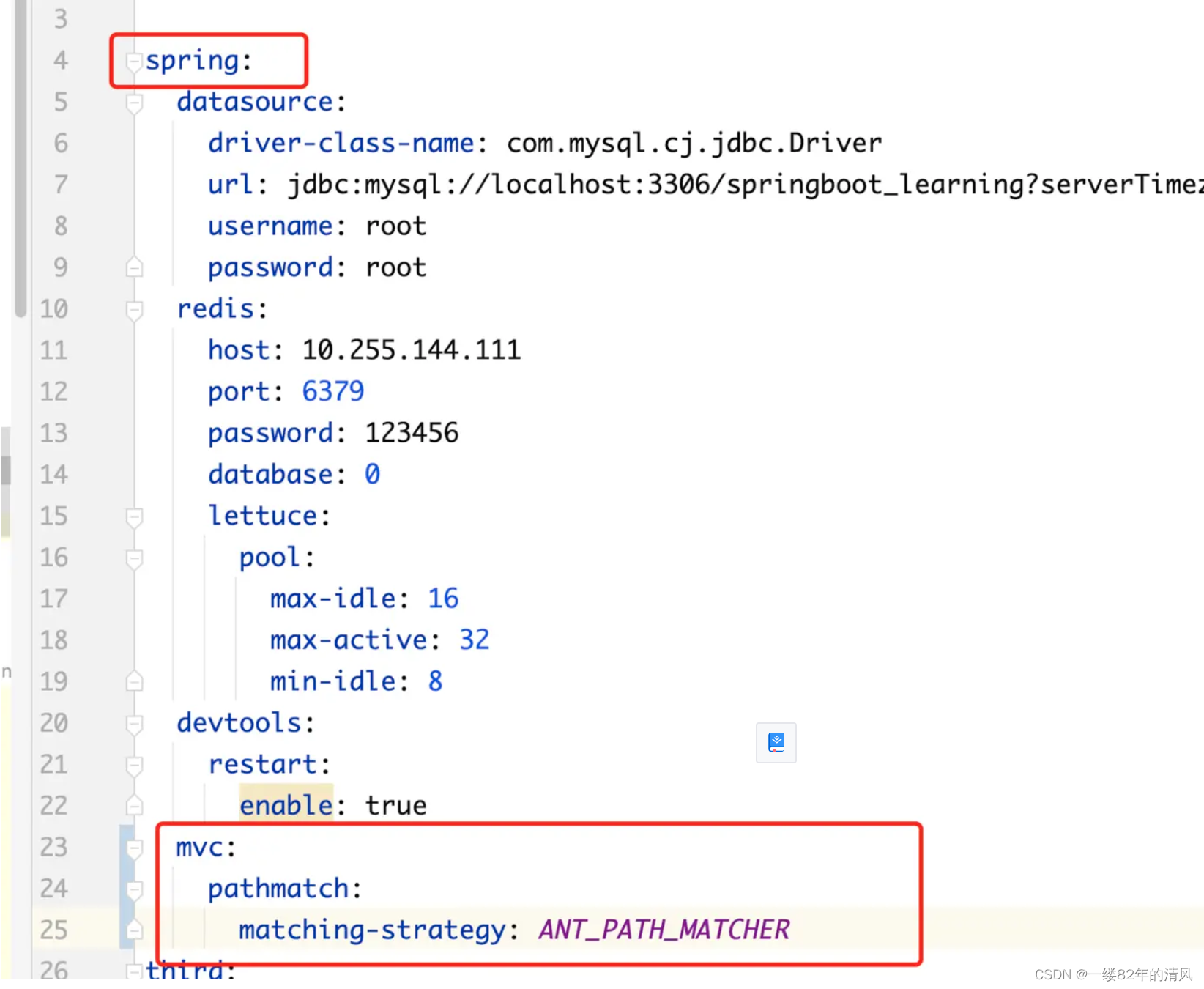
如果在集成过程中出现了其他的问题,可以参考一下我之前写过的文章,里边介绍了集成的详细步骤及问题解决。
如果加了上述代码还是不管用,那么再添加一个配置 类。
package cn.xxx.config;

import org.springframework.beans.BeansException;
import org.springframework.beans.factory.config.BeanPostProcessor;
import org.springframework.context.annotation.Bean;
import org.springframework.context.annotation.Configuration;
import org.springframework.util.ReflectionUtils;
import org.springframework.web.servlet.mvc.method.RequestMappingInfoHandlerMapping;
import springfox.documentation.spring.web.plugins.WebMvcRequestHandlerProvider;
import springfox.documentation.swagger2.annotations.EnableSwagger2WebMvc;

import java.lang.reflect.Field;
import java.util.List;
import java.util.stream.Collectors;

/**
 * @author qingf
 * @title KnifeConfig
 * @description
 * @create 2024/4/22
 */

@Configuration
@EnableSwagger2WebMvc
public class KnifeConfig {


    @Bean
    public static BeanPostProcessor springfoxHandlerProviderBeanPostProcessor() {
        return new BeanPostProcessor() {

            @Override
            public Object postProcessAfterInitialization(Object bean, String beanName) throws BeansException {
                if (bean instanceof WebMvcRequestHandlerProvider) {
                    customizeSpringfoxHandlerMappings(getHandlerMappings(bean));
                }
                return bean;
            }

            private <T extends RequestMappingInfoHandlerMapping> void customizeSpringfoxHandlerMappings(List<T> mappings) {
                List<T> copy = mappings.stream()
                        .filter(mapping -> mapping.getPatternParser() == null)
                        .collect(Collectors.toList());
                mappings.clear();
                mappings.addAll(copy);
            }

            @SuppressWarnings("unchecked")
            private List<RequestMappingInfoHandlerMapping> getHandlerMappings(Object bean) {
                try {
                    Field field = ReflectionUtils.findField(bean.getClass(), "handlerMappings");
                    field.setAccessible(true);
                    return (List<RequestMappingInfoHandlerMapping>) field.get(bean);
                } catch (IllegalArgumentException | IllegalAccessException e) {
                    throw new IllegalStateException(e);
                }
            }
        };
    }
}
 https://blog.youkuaiyun.com/lsqingfeng/article/details/123678701?spm=1001.2014.3001.5501





 扫一扫
扫一扫


 1903
1903


 到【灌水乐园】发言



