



 针对高通7.1系统在开机时出现不明联网和定位的现象,通过ADB工具发现com.qualcomm.location.XT进程是问题源头。解决方法包括不编译xtra_t_app.apk,配置CTA相关属性,加入WAPI证书,以及通过LocationManagerService.java的调试开关分析定位进程。此外,使用tcpdump和DDMS辅助排查和验证,连接手机热点进行测试。
问题描述:
高通7.1系统开机过程中会莫名的联网,或者定位。由于不知道实验室的测试手法,也没有相关的log,看到这个问题只能一脸蒙B。
解决方法:
用adb shell ps命令查看系统进程,发现有com.qualcomm.location.XT进程,这个进程会进行联网定位。而这个进行其它就是xtra_t_app.apk。这个apk在国内是不会起作用的,我们只要不编译这个apk就可以了。修改如下:
diff --git a/vendor/qcom/proprietary/common/config/device-vendor.mk b/vendor/qcom/proprietary/common/config/device-vendor.mk
index 16b6d0f..e9f4547 100755
--- a/vendor/qcom/proprietary/common/config/device-vendor.mk
+++ b/vendor/qcom/proprietary/common/config/device-vendor.mk
@@ -423,7 +423,7 @@ GPS += izat.conf
 GPS += sap.conf
 GPS += com.qualcomm.location.vzw_library.xml
 GPS += libloc_ext
-GPS += xtra_t_app
+#GPS += xtra_t_app
 GPS += com.qualcomm.location.vzw_library
 GPS += libgeofence
 GPS += libflp
@@ -465,9 +465,9 @@ GPS += libasn1cper
 GPS += libasn1crtx
 GPS += location-mq
 GPS += xtra_root_cert.pem
-GPS += xtwifi-client
+#GPS += xtwifi-client
 GPS += xtwifi.conf
-GPS += xtwifi-inet-agent
+#GPS += xtwifi-inet-agent
 GPS += xtwifi-upload-test
 GPS += test-fake-ap
 GPS += test-pos-tx
在这里记录下CTA认证的修改配置。
1.高通7.1的代码是有相关CTA的配置的,在代码中我们只要预装CSM应用并且配置如下属性:
persist.sys.strict_op_enable=true
persist.radio.phone.matchnum=11
2.加入WAPI认证证书
diff --git a/device/qcom/sepolicy/common/file.te b/device/qcom/sepolicy/common/file.te
index 15e2e2f..71103e8 100755
--- a/device/qcom/sepolicy/common/file.te
+++ b/device/qcom/sepolicy/common/file.te
@@ -200,6 +200,9 @@ type wififtmd_socket, file_type;

 type persist_alarm_file, file_type;

+#WAPI
+type wapi_data_file, file_type, data_file_type;
+
 type persist_time_file, file_type;

 # Type for Goodix fingerprint template file.
diff --git a/device/qcom/sepolicy/common/file_contexts b/device/qcom/sepolicy/common/file_contexts
index e2b7551..8de8f8f 100755
--- a/device/qcom/sepolicy/common/file_contexts
+++ b/device/qcom/sepolicy/common/file_contexts
@@ -347,6 +347,7 @@
 /data/system/swap(/.*)?                                             u:object_r:swap_data_file:s0
 /data/misc/wifi/wigig_sockets(/.*)?                                 u:object_r:wpa_socket:s0
 /data/misc/wifi/wigig_sockets/wpa_ctrl.*                            u:object_r:system_wpa_socket:s0
+/data/misc/wapi_certificate                                         u:object_r:wapi_data_file:s0
 /data/app-regional(/.*)?                                            u:object_r:regionalization_data_file:s0
 ###################################
 # persist files
3.删除掉vendor\qcom\proprietary\qrdplus\China\CTA\config\exclude.list文件中的apk就可以了。
解决方案:
打开LocationManagerService.java的调试开关,重新编译,重启开机看看到低是哪个进程在定位!
以下是未打开位置开关重启的log:
06-27 21:17:53.154  2415  2415 I SystemServer: StartLocationManagerService
06-27 21:17:53.158  2415  2415 D LocationManagerService: Constructed
06-27 21:17:54.699  2415  2415 D LocationManagerService: systemRunning()
06-27 21:17:54.750  2415  2415 D LocationManagerService: certificates for location providers pulled from: [com.android.location.fused]
06-27 21:17:54.751  2415  2415 D LocationManagerService: Found fallback provider: com.android.location.fused
06-27 21:17:54.757  2415  2415 E LocationManagerService: no geocoder provider found
06-27 21:17:54.781  2415  2415 D LocationManagerService: request 71951f2 passive Request[POWER_NONE passive fastest=0] from android(1000)
06-27 21:17:54.784  2415  2415 D LocationManagerService: provider request: passive ProviderRequest[ON interval=0]
06-27 21:17:54.794  2415  2415 D LocationManagerService: Unable to bind FusedProxy.
06-27 21:17:54.798  2415  2415 D LocationManagerService: Unable to bind FLP Geofence proxy.
06-27 21:17:54.811  2415  2415 D LocationManagerService: Unable to bind ActivityRecognitionProxy.
以下是打开位置开关重启的有关location的log:
06-27 21:17:53.154  2415  2415 I SystemServer: StartLocationManagerService
06-27 21:17:53.158  2415  2415 D LocationManagerService: Constructed
06-27 21:17:54.699  2415  2415 D LocationManagerService: systemRunning()
06-27 21:17:54.750  2415  2415 D LocationManagerService: certificates for location providers pulled from: [com.android.location.fused]
06-27 21:17:54.751  2415  2415 D LocationManagerService: Found fallback provider: com.android.location.fused
06-27 21:17:54.757  2415  2415 E LocationManagerService: no geocoder provider found
06-27 21:17:54.781  2415  2415 D LocationManagerService: request 71951f2 passive Request[POWER_NONE passive fastest=0] from android(1000)
06-27 21:17:54.784  2415  2415 D LocationManagerService: provider request: passive ProviderRequest[ON interval=0]
06-27 21:17:54.794  2415  2415 D LocationManagerService: Unable to bind FusedProxy.
06-27 21:17:54.798  2415  2415 D LocationManagerService: Unable to bind FLP Geofence proxy.
06-27 21:17:54.811  2415  2415 D LocationManagerService: Unable to bind ActivityRecognitionProxy.
06-27 21:15:02.888  2358  2358 I SystemServer: StartLocationManagerService
06-27 21:15:02.893  2358  2358 D LocationManagerService: Constructed
06-27 21:15:04.668  2358  2358 D LocationManagerService: systemRunning()
06-27 21:15:04.738  2358  2358 D LocationManagerService: certificates for location providers pulled from: [com.android.location.fused]
06-27 21:15:04.740  2358  2358 D LocationManagerService: Found fallback provider: com.android.location.fused
06-27 21:15:04.749  2358  2358 E LocationManagerService: no geocoder provider found
06-27 21:15:04.785  2358  2358 D LocationManagerService: request 4084e21 passive Request[POWER_NONE passive fastest=0] from android(1000)
06-27 21:15:04.787  2358  2358 D LocationManagerService: provider request: passive ProviderRequest[ON interval=0]
06-27 21:15:04.798  2358  2358 D LocationManagerService: Unable to bind FusedProxy.
06-27 21:15:04.801  2358  2358 D LocationManagerService: Unable to bind FLP Geofence proxy.
06-27 21:15:04.826  2358  2358 D LocationManagerService: Unable to bind ActivityRecognitionProxy.
06-27 21:15:11.994  2358  2590 D LocationManagerService: incoming location: Location[fused 30.000000,104.000000 acc=1751198 et=+41s13ms alt=0.0 vel=0.0 bear=81.0 {Bundle[{networkLocationType=cell, com.qualcomm.location.nlp:ready=true}]}]
06-27 21:15:12.020  2358  2590 D LocationManagerService: incoming location: Location[fused 30.000000,104.000000 acc=1751198 et=+41s13ms alt=0.0 vel=0.0 bear=81.0 {Bundle[{networkLocationType=cell, com.qualcomm.location.nlp:ready=true}]}]
06-27 21:15:12.025  2358  2590 D LocationManagerService: This location is marked as ready for broadcast
06-27 21:15:12.038  2358  2590 D LocationManagerService: incoming location: Location[network 30.000000,104.000000 acc=1751198 et=+41s13ms alt=0.0 vel=0.0 bear=81.0 {Bundle[{networkLocationType=cell, com.qualcomm.location.nlp:ready=true}]}]
06-27 21:15:12.039  2358  2590 D LocationManagerService: incoming location: Location[network 30.000000,104.000000 acc=1751198 et=+41s13ms alt=0.0 vel=0.0 bear=81.0 {Bundle[{networkLocationType=cell, com.qualcomm.location.nlp:ready=true}]}]
从log我们就知道它的一种解决方法就是默认关闭位置开关:
diff --git a/frameworks/base/packages/SettingsProvider/res/values/defaults.xml b/frameworks/base/packages/SettingsProvider/res/values/defaults.xml
index d9515e9..2aa7947 100755
--- a/frameworks/base/packages/SettingsProvider/res/values/defaults.xml
+++ b/frameworks/base/packages/SettingsProvider/res/values/defaults.xml
@@ -44,7 +44,7 @@
          Network location is off by default because it requires
          user opt-in via Setup Wizard or Settings.
     -->
-    <string name="def_location_providers_allowed" translatable="false">gps</string>
+    <string name="def_location_providers_allowed" translatable="false"></string>
     <bool name="assisted_gps_enabled">true</bool>
     <bool name="def_netstats_enabled">true</bool>
     <bool name="def_usb_mass_storage_enabled">true</bool>
system_process联网未明示的问题,我们需要tcpdump来分析平板具体访问了什么网络,根据访问的网址来查找修改相关的代码,验证这个问题的时候我们可以使用DDMS来测试我们的修改是否起作用。
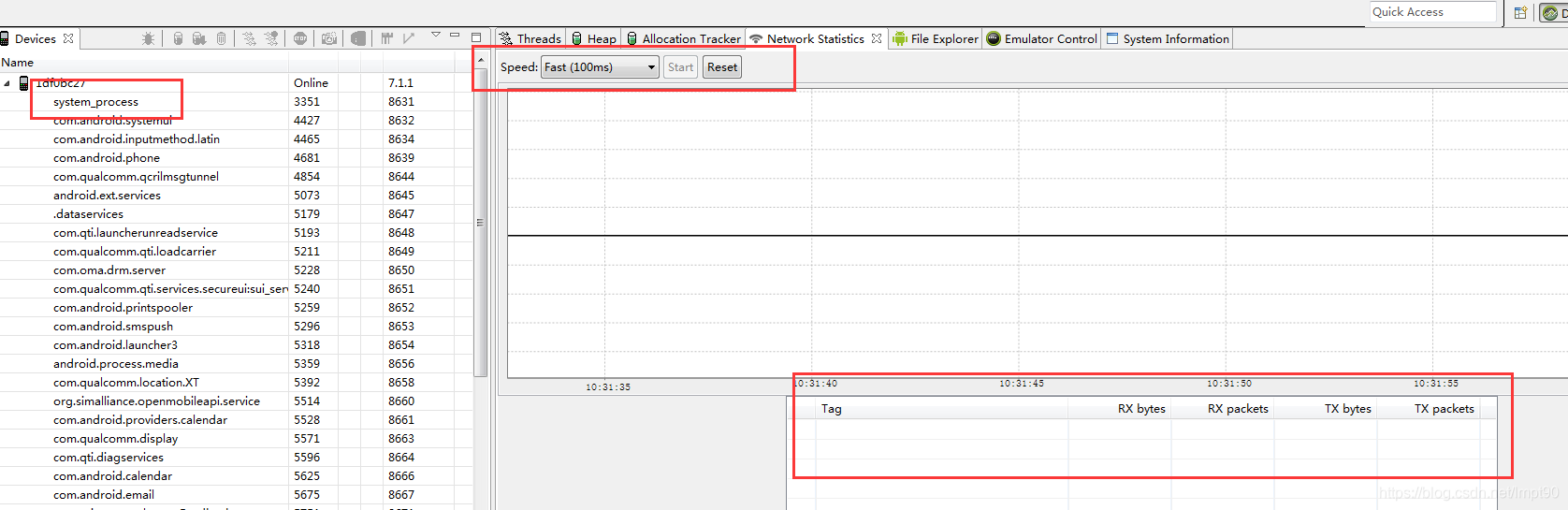
还有就是链接我们自己的手机热点
adb shell cat /proc/net/xt_qtaguid/stats





 扫一扫
扫一扫


 8702
8702


 到【灌水乐园】发言



