



 本文介绍如何在Mac上使用Tunnelblick时更新已保存的用户名和密码。首先需要从Mac Keychain中删除原有的OpenVPN或Tunnelblick条目,之后重新输入新的认证信息。
更多内容: http://ramonblog.cloudfoundry.com
(原文https://my-private-network.co.uk/knowledge-base/apple-related-questions/osxtbchangeuser.html)
Tunnelblick gives you the option to save your username and password in the Mac Keychain, a secure storage facility that is built into your Mac computer.
In order to update the saved username or password you need to first remove them from the Mac Keychain.
Go to Applications - Utilities and KeyChain Access, this will display all your saved usernames and passwords.
Remove any entries for OpenVPN or Tunnelblick.
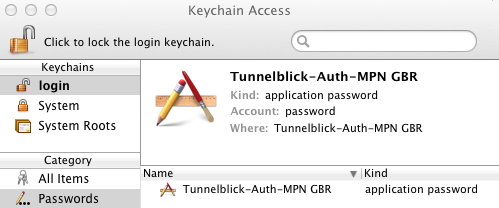
The next time you try and connect, you will be prompted to enter your details again.
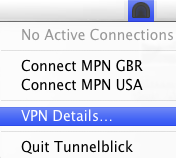
Note: If you’re using Tunnelblick version 3.2 and above, you can remove your saved credentials via the Tunnelblick application itself. To do so, please click on the Tunnelblick icon in the taskbar and choose VPN Details.
On the configuration window, select your appropriate configuration and then click on the Gear icon at the bottom of the list, and select Delete Configuration's Credentials in Keychain.
Please note that if you have more than one configuration stored in the configuration Window, i:e you’re on our Global plan, you will need to select each configuration one at the time and delete the credentials.
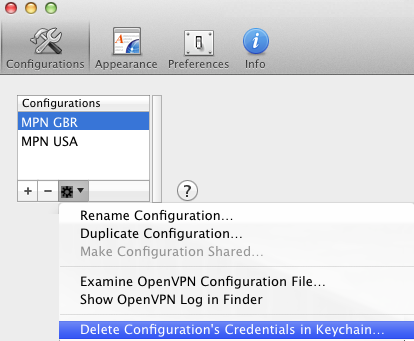
The next time you try and connect, you will be prompted to enter your details again.






 扫一扫
扫一扫


 1086
1086

 被折叠的 条评论
为什么被折叠?
被折叠的 条评论
为什么被折叠?
 到【灌水乐园】发言





