


 本文介绍在Win10 64位环境下使用VS2015和Python 3.7进行项目打包的过程,包括目录结构设计、依赖包安装、代码规范、编译为动态链接库及最终生成exe文件的方法。
win10 64位
vs2015
py3.7
目录结构
demo
|–my_lib.py
|–read.txt
|–run.py
|–to_pyd.py
文件介绍
保证代码的规范性,禁止导入未使用的包
my_lib.py
import pandas as pd


def fun1():
    print('\nthis is my_lib.fun1')
    data = {'a': [1, 2, 3], 'b': ['a', 'b', 'c']}
    df = pd.DataFrame(data)
    print(df)

    with open('read.txt')as f:
        a = f.readlines()
    print('read file:', a)
    return True
read.txt
a
b
c
run.py
from my_lib import fun1

fun1()
input('按任意键退出!')  # 防止程序结束后自动退出
to_pyd.py
from distutils.core import setup
from Cython.Build import cythonize


if __name__ == '__main__':
    # name随便写,py文件为要编译的文件
    setup(name='api_sign', ext_modules=cythonize('my_lib.py', compiler_directives={'language_level': 3}))
安装依赖包
pip install pyinstaller  # 4.4(3.6支持py2的最后版本)
pip install pyinstaller-versionfile
pip install cython
pip install pandas
pip install pywin32  # 打包时报错,ModuleNotFoundError: No module named 'win32com'
pip install setuptools==44.0.0  # 执行exe报错,no module named 'pkg_resources.py2_warn'
编译打包
编译(可跳过)
# 编译为动态链接库,在当前目录生成pyd文件,防止破解
# 动态链接库.pyd(windows)、.so(linux)
python to_pyd.py build_ext --inplace  # 报错Unable to find vcvarsall.bat,安装py3.7对应的VS2015
Unable to find vcvarsall.bat:安装py3.7对应的VS2015,先解压下载的iso文件运行安装文件。
vs2015安装包:链接: https://pan.baidu.com/s/13YcVP-Qi1149dRYi9sa34Q 提取码: hi9c
设置详细信息(可选)
示例
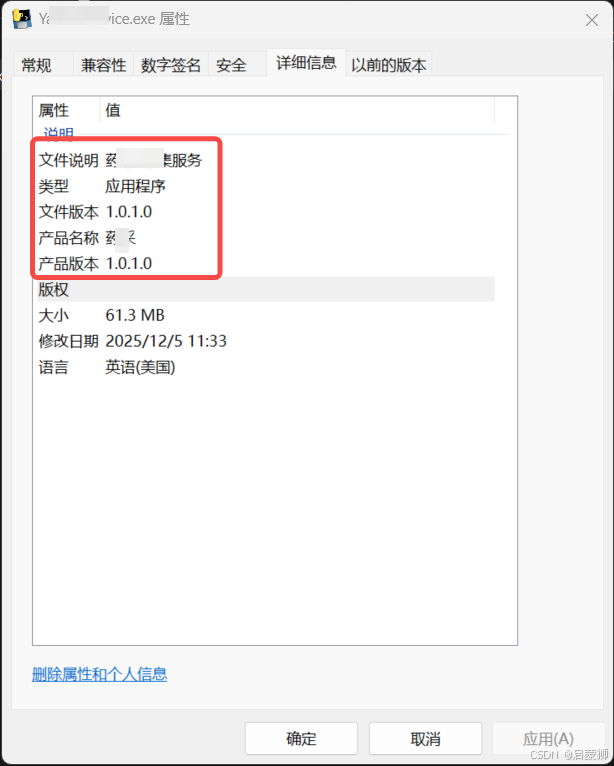
- 创建配置文件
# metadata.yml
Version: 1.0.1
CompanyName: 今日***科技有限公司
FileDescription: 药***服务
ProductName: ***
- 生成配置
create-version-file metadata.yml --outfile version_info.txt
打包
pyinstaller --collect-data  --onefile "run.py"
#pyinstaller --collect-data certifi --noconfirm --onefile --console --version-file=version_info.txt --name "YaoCaiService" --clean --runtime-tmpdir "C:/Users/Public/yaocai_spider_tmp"  --add-data "./resources;resources/" "run.py"
--hidden-import: 命名一个在脚本代码中不可见的导入。这个选项可以多次使用。文档
-–clean:在本次编译开始时,清空上一次编译生成的各种文件。





 扫一扫
扫一扫


 525
525

 被折叠的 条评论
为什么被折叠?
被折叠的 条评论
为什么被折叠?
 到【灌水乐园】发言





