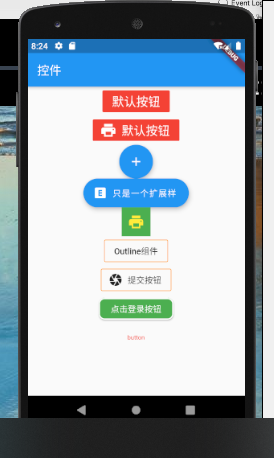
class FlatButtonDemo extends StatelessWidget {
  @override
  Widget build(BuildContext context) {
    return Center(
      child: Column(
        children: [
          // FlatButton
          // 不带图标
          FlatButton(
              color: Colors.red,
              onPressed: () {},
              child: Text('默认按钮', style: TextStyle(color: Colors.white, fontSize: 20),)
          ),
          // 带图标按钮
          FlatButton.icon(
              color: Colors.red,
              onPressed: () {

              },
              icon: Icon(Icons.print, color: Colors.white, size: 28,),
              label: Text('默认按钮', style: TextStyle(color: Colors.white, fontSize: 20),)
          ),
          // FloatingActionButton
          // 普通的悬浮按钮
          FloatingActionButton(
            onPressed: () {},
            child: Icon(Icons.add),
          ),
          // 可做登录按钮使用
          FloatingActionButton.extended(
              onPressed: () {

              },
              label: Text('只是一个扩展样'),
              icon: Icon(Icons.explicit),
          ),
          // IconButton
          Container(
            decoration: BoxDecoration(
              color: Colors.green
            ),
            child: IconButton(
              // 根据父容器来决定图标的位置
              alignment: AlignmentDirectional.center,
              color: Colors.yellow,
              // 图标大小
              iconSize: 28,
              onPressed: () {

              },
              icon: Icon(Icons.print),
              // 提示文本
              tooltip: '一个图标',
            ),
          ),
          // OutlineButton
          OutlineButton(
              child: Text('Outline组件'),
              borderSide: BorderSide(color: Colors.orange),
              onPressed: () {

              }
          ),
          OutlineButton.icon(
              onPressed: () {},
              borderSide: BorderSide(color: Colors.orange),
              icon: Icon(Icons.camera),
              label: Text('提交按钮')
          ),
          // RaisedButton
          RaisedButton(
            child: Text('点击登录按钮'),
            color: Colors.green,
            colorBrightness: Brightness.dark,
            disabledColor: Colors.grey,
            textColor: Colors.white,
            disabledTextColor: Colors.grey,
            textTheme: ButtonTextTheme.normal,
            splashColor: Colors.red,
            // 抗锯齿能力
            clipBehavior: Clip.antiAlias,
            padding: EdgeInsets.only(bottom: 5.0, top: 5.0, left: 20.0, right: 20.0),
            // shape: Border.all(
            //   width: 2.0,
            //   color: Colors.red,
            //   style: BorderStyle.solid
            // ),
            shape: RoundedRectangleBorder(
              side: BorderSide(
                  width: 2,
                  color: Colors.white,
                  style: BorderStyle.solid,
              ),
              borderRadius: BorderRadius.all(Radius.circular(10))
            ),
            onPressed: () {

            },
          ),
          // RawMaterialButton
          RawMaterialButton(
              child: Text('button'),
              onPressed: () {},
              textStyle: TextStyle(fontSize: 10, color: Colors.red),
              highlightColor: Colors.red,
              splashColor: Colors.blue,
          )
      ],
      )
    );
  }
}



 博客围绕Flutter常用按钮组件展开,虽未给出具体内容,但可知聚焦于Flutter开发中按钮组件相关信息技术知识。





 扫一扫
扫一扫


 2504
2504

 被折叠的 条评论
为什么被折叠?
被折叠的 条评论
为什么被折叠?
 到【灌水乐园】发言





