


Gradle?
构建项目用,基于Groovy的领域特定语言(DSL)来声明项目设置。
build.gradle文件
在项目中有两个build.gradle文件一个在最外层目录下,一个在app目录下。都有至关重要的作用。
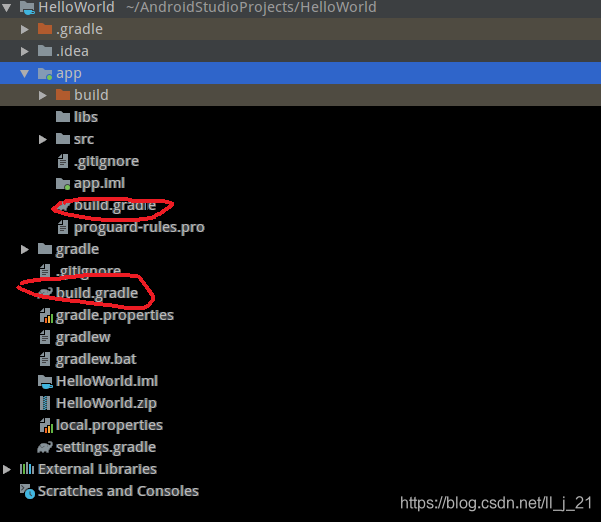
- 外层
buildscript {
    repositories {
        maven { url 'http://maven.aliyun.com/nexus/content/groups/public/' }
        maven { url 'http://maven.aliyun.com/nexus/content/repositories/jcenter' }
        maven { url 'http://maven.aliyun.com/nexus/content/repositories/google' }
        maven { url 'http://maven.aliyun.com/nexus/content/repositories/gradle-plugin' }
        google()
        jcenter()

    }
    dependencies {
        classpath 'com.android.tools.build:gradle:3.5.2'

        // NOTE: Do not place your application dependencies here; they belong
        // in the individual module build.gradle files
    }
}

allprojects {
    repositories {
        maven { url 'http://maven.aliyun.com/nexus/content/groups/public/' }
        maven { url 'http://maven.aliyun.com/nexus/content/repositories/jcenter' }
        maven { url 'http://maven.aliyun.com/nexus/content/repositories/google' }
        maven { url 'http://maven.aliyun.com/nexus/content/repositories/gradle-plugin' }
        google()
        jcenter()

    }
}

task clean(type: Delete) {
    delete rootProject.buildDir
}
maven:下载镜像
reposiories闭包中jcenter():代码托管仓库,很多Android开源项目都会选择将代码托管到jcenter上,可以在项目中轻松引用任何jcenter上的开源项目。
dependencies中classpath:声明一个Gradle插件,因为Gradle并不是专门用来构建Android项目而开发的,Java,c++都可以使用Gradle来构建。因此构建Android需要声明com.android.tools.build:gradle:3.5.2这个插件,最后面是插件版本号。
- app下
apply plugin: 'com.android.application'

android {
    compileSdkVersion 30
    buildToolsVersion "30.0.3"
    defaultConfig {
        applicationId "com.example.helloworld"
        minSdkVersion 15
        targetSdkVersion 30
        versionCode 1
        versionName "1.0"
        testInstrumentationRunner "androidx.test.runner.AndroidJUnitRunner"
    }
    buildTypes {
        release {
            minifyEnabled false
            proguardFiles getDefaultProguardFile('proguard-android-optimize.txt'), 'proguard-rules.pro'
        }
    }
}

dependencies {
    implementation fileTree(dir: 'libs', include: ['*.jar'])
    implementation 'androidx.appcompat:appcompat:1.2.0'
    implementation 'androidx.constraintlayout:constraintlayout:2.0.4'
    testImplementation 'junit:junit:4.12'
    androidTestImplementation 'androidx.test.ext:junit:1.1.2'
    androidTestImplementation 'androidx.test.espresso:espresso-core:3.3.0'
}
apply plugin:应用一种插件;有两种值可选:com.android.application这是一个应用程序模块;com.android.library:表示这是一个库模块。两者的区别在于应用程序模块是可以直接运行的,库模块依附于别的应用程序来运行。
android闭包:配置项目构建的各种属性;
- compileSdkVersion:指定项目的编译版本
- buildToolsVersion :指定项目构建工具的版本。
android闭包嵌套defaultConfig闭包:对项目的更多细节进行配置
- applicationId:指定项目的包名,修改也在这里。
- minSdkVersion :指定项目最低兼容的Android系统版本。
- targetSdkVersion:表示在该目标版本上已经做过充分的测试,系统会将你的应用程序启用一些最新的功能和特性。
- versionCode:指定项目的版本号。
- versionName :指定项目的版本名。
buildTypes闭包 :用于指定生成安装文件的相关配置。两个子闭包debug和releas。
- debug闭包:指定生成测试版本安装文件的配置,可以忽略不写
- release闭包:用于指定生成正式版安装文件的配置。在他下面:
minifyEnabled :指定是否对项目的代码进行混淆。布尔型
proguardFiles:指定混淆时使用的规则文件。第一个proguard-android-optimize.txt是在Android SDK目录下的里面是所有项目的通用混淆规则。第二个proguard-rules.pro是在当前项目的根目录下,特有的混响规则。
dependencies闭包:指定当前项目的所有依赖关系。一共有三种依赖关系:本地依赖,库依赖,远程依赖。
- 本地依赖:对本地的jar包或目录添加依赖关系;
- 库依赖:可以对项目中的库模块添加依赖关系;
- 远程依赖:可以对jcenter库上的开源项目添加依赖关系。





 扫一扫
扫一扫


 1635
1635

 被折叠的 条评论
为什么被折叠?
被折叠的 条评论
为什么被折叠?
 到【灌水乐园】发言





