



Map迭代输出
- 使用Map接口中的entrySet()方法,将Map集合变为Set集合
- 取得了Set接口实例之后就可以利用iterator()方法取得Iterator的实例化对象
- 使用Iterator迭代找到每一个Map.Entry对象,并进行key和value的分离
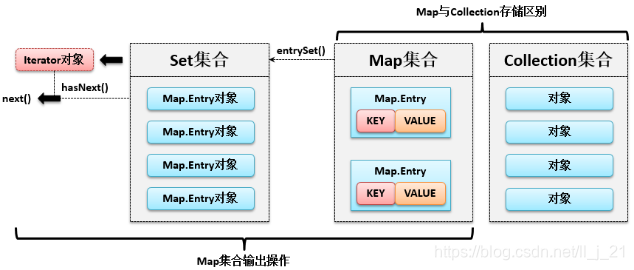
范例:使用Iterator输出Map集合
import java.util.HashMap;
import java.util.Iterator;
import java.util.Map;
import java.util.Set;
public class JavaCollectDemo {
	public static void main(String[] args) {
		Map<String, Integer> map = new HashMap<String, Integer>(); // 获取Map接口实例
		map.put("one", 1); // 保存数据
		map.put("two", 2);// 保存数据
		Set<Map.Entry<String, Integer>> set = map.entrySet(); 	// Map变为Set集合
		Iterator<Map.Entry<String, Integer>> iter = set.iterator();// 获取Iterator
		while (iter.hasNext()) {	// 迭代输出
			Map.Entry<String, Integer> me = iter.next();// 获取Map.Entry
			System.out.println(me.getKey() + " = " + me.getValue());	// 输出数据
		}
	}
}
执行结果
one=1
two=2
范例:通过foreach循环输出Map集合
import java.util.HashMap;
import java.util.Map;
import java.util.Set;
public class JavaCollectDemo {
	public static void main(String[] args) {
		Map<String, Integer> map = new HashMap<String, Integer>(); // 获取Map接口实例
		map.put("one", 1); 	// 保存数据
		map.put("two", 2); 	// 保存数据
		Set<Map.Entry<String, Integer>> set = map.entrySet(); // Map变为Set
		for (Map.Entry<String, Integer> entry : set) {// foreach迭代
			System.out.println(entry.getKey() + " = " + entry.getValue());// 分离key、value
		}
	}
}
执行结果
one=1
two=2





 扫一扫
扫一扫


 466
466

 被折叠的 条评论
为什么被折叠?
被折叠的 条评论
为什么被折叠?
 到【灌水乐园】发言





