



 本文深入探讨CSS中的各种布局和定位技术,包括background-size、background-attachment、position属性的使用,以及清除浮动、overflow属性的实战应用。通过具体案例解析,如淘宝商品栏的设计实现,帮助读者掌握网页布局的核心技巧。
background-size :背景尺寸
background-size :cover 等比例满屏展示
background-attachment:fixed; 背景不懂 内容变
position:
在css中position是定位使用的
absolute 表示绝对定位
relative 表示相对定位
static 默认的静态定位
fixed 浮动定位
left:50px
top:50px 绝对定位 在页面中,如果标签绝对定位了而父级没有相对定位或绝对定位,那么标签就会相对于HTML标签定位 父相子绝
清除浮动:加一个段落标签 clear:left(both)
overflow:hidden 突破div部分隐藏,不会影响后面位置
overflow:scroll ;隐藏部分滚动
overflow-x:scroll
overflow-y:scroll
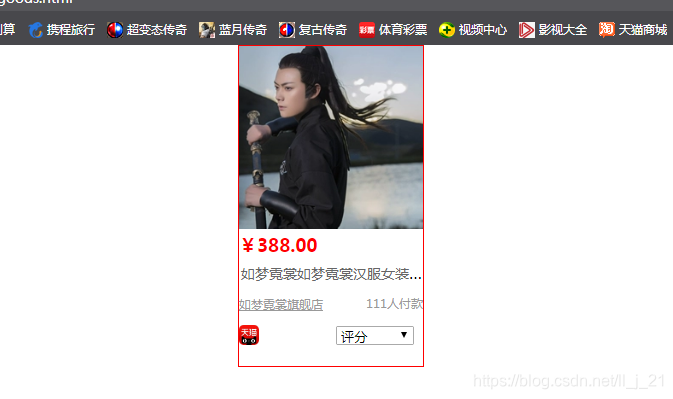
案例:淘宝商品栏
<!DOCTYPE html>
<html>
<head>
	<title>淘宝商品</title>
	<meta charset="utf-8">
	<link rel="stylesheet" type="text/css" href="./css/taobao.css">
</head>
<body>
	<div class="sum">
     <div  class="show">

          	  <img  src="./img/3.png" alt="明朝">

          <p>
          	   <a id="a9" href="https://detail.tmall.com/item.htm?id=579476123516&ali_refid=a3_430673_1006:1176640056:N:Z9ZlCRwRXMXyyM5bTmQ47w==:bcc87b62bf050ce6ef8a44689d21189e&ali_trackid=1_bcc87b62bf050ce6ef8a44689d21189e&spm=a2e15.8261149.07626516002.44"> <span class="a1">¥388.00</span></a>
          		<a id="a8" href="https://detail.tmall.com/item.htm?id=579476123516&ali_refid=a3_430673_1006:1176640056:N:Z9ZlCRwRXMXyyM5bTmQ47w==:bcc87b62bf050ce6ef8a44689d21189e&ali_trackid=1_bcc87b62bf050ce6ef8a44689d21189e&spm=a2e15.8261149.07626516002.44"><span class="a2">包邮</span> </a>
          </p>
              <div class="info"><a id="a3" href="https://detail.tmall.com/item.htm?id=579476123516&ali_refid=a3_430673_1006:1176640056:N:Z9ZlCRwRXMXyyM5bTmQ47w==:b5bc0c558cbb0e19d5236481f0de3041&ali_trackid=1_b5bc0c558cbb0e19d5236481f0de3041&spm=a2e15.8261149.07626516002.43">
              如梦霓裳如梦霓裳汉服女装直身[江城子]六龙纹刺绣射箭装配飞鱼服</a></div>
              <p>
                 <a id="a7" href="https://detail.tmall.com/item.htm?id=579476123516&ali_refid=a3_430673_1006:1176640056:N:Z9ZlCRwRXMXyyM5bTmQ47w==:76aa7d62ba9db6d0d86f0e23b63ba8d5&ali_trackid=1_76aa7d62ba9db6d0d86f0e23b63ba8d5&spm=a2e15.8261149.07626516002.43"><span>
                  如梦霓裳旗舰店</span></a>
                  <span id="a4">111人付款</span>
              </p>
              <div id="tm">
              	<img src="./img/1.jpg">
                <form  id="pp" action="#">
                	<select >
                		<option value="如实描述">评分</option>
                		<option value="如实描述">如实描述</option>
                		<option value="如实描述">服务描述</option>
                		<option value="如实描述">物流描述</option>
                	</select>
                </form>
              </div>
              </div>


     </div>
</body>
</html>
*{
	margin: 0;
	padding: 0;
}
.show{
	width: 184px;
	height: 320px;
    border: 1px solid red;
    margin: auto;
}
.poat{
    width: 190px;
    height: 185px;
}
.a1{
	color:red;
	font-weight: bold;
	font-size: 18px;
}
#a9{
     text-decoration: none;
}
.a2{
    width: 30px;
    height:16px;
    color:white;
}
#a8{
	text-decoration: none;
}
.info{
	width: 187px;
	height: 30px;
	overflow: hidden;
	text-overflow: ellipsis;
	white-space: nowrap;
	margin-top: 5px;
}
#a3{
	color: #666666;
	font-size: 14px;
	text-decoration: none;
	margin-right: 2px;
	margin-left: 2px;
}
#a3:hover{
	color: red;
	text-decoration: underline;
}
#a7{
	color: #999999;
	font-size: 12px;
}
#a4{
	color: #999999;
	font-size: 12px;
	float: right;
	margin-top: 3px;
}
#tm{
	width: 190px;
	height: 20px;
	margin-top: 12px;
}
#tm>img{
	width: 20px;
	height: 20px;
}
#pp{
	float: right;
	margin-right: 15px;
}
.sum{
    width: 100%;
}





 扫一扫
扫一扫


 3419
3419

 被折叠的 条评论
为什么被折叠?
被折叠的 条评论
为什么被折叠?
 到【灌水乐园】发言





