


push/pop 和 present/dismiss
文章目录
前言
之前曾经在网易云仿写总结中,使用过present制作抽屉视图的展示,在这里再次详细对比一下push和present的区别
想象一下你正在看一本书,随着你读书的进度不断增加,你的页数也越来越多,这就是导航栏带来的逐层深入。
突然,你需要查一个重要的词语解释。你会从桌上拿起一本字典,把它放在你正在看的书页上,然后开始查找。这本字典就是你的模态视图,它暂时遮住了你正在看的书页(在iOS13之后,present出的页面的模态样式变为了UIModelPresentationAutomatic,新的页面将不再完全覆盖之前的页面,而只会部分遮挡,并且允许你向下拖动关闭)
push / pop
push的操作必须在一个UINavigationController的上下文中进行,导航控制器会维护一个栈,当push后,一个新的view会被压入到栈顶,同时导航控制器会自动添加一个按钮用于返回
因为push的弹出新界面是由于视图栈的顶部有更换,所以你对视图的添加和删除要完全符合栈的操作
你可以pop到指定视图,苹果也提供了相关方法(实际上用户只要长按返回按钮就可以返回到之前的指定页面)
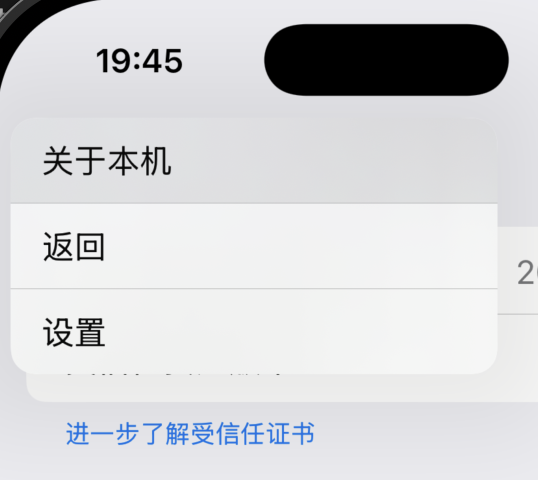
popToViewController:animated: pop到指定的界面
popToRootViewControllerAnimated: 一直pop到根视图停止
但是你无法只删除栈中的某一页面
在pop时,对应的新视图会先调用viewDidLoad 方法,然后是viewWillAppear 最后是viewDidAppear
present
普通的present
从iOS13开始,present为了适配卡片风格展示,模态默认样式变为UIModelpresentationAutomatic 新的视图为部分覆盖
present本质是在新的视图上重新呈现了一个视图,当前的视图只能通过自己dismiss来返回原来的视图,同时,新旧视图之间是有层级关系的
源码:
// The view controller that was presented by this view controller or its nearest ancestor.
@property(nullable, nonatomic,readonly) UIViewController *presentedViewController  API_AVAILABLE(ios(5.0));

// The view controller that presented this view controller (or its farthest ancestor.)
@property(nullable, nonatomic,readonly) UIViewController *presentingViewController API_AVAILABLE(ios(5.0));
可以看出,两个属性都没有加入内存类的属性关键字,所以都为strong强引用
所以在present视图之后,父视图和子视图会形成循环强引用,只有在新的视图被dismiss之后,才会断开循环引用
- (void)presentBlueBlackThenRed {


    UIViewController *vcBlue = [[UIViewController alloc] init];
    vcBlue.view.backgroundColor = [UIColor systemBlueColor];

    NSLog(@"准备呈现蓝色视图...");
    [self presentViewController:vcBlue animated:YES completion:^{


        UIViewController *vcBlack = [[UIViewController alloc] init];
        vcBlack.view.backgroundColor = [UIColor blackColor];

        [vcBlue presentViewController:vcBlack animated:YES completion:^{


            UIViewController *vcRed = [[UIViewController alloc] init];
            vcRed.view.backgroundColor = [UIColor systemRedColor];
            [vcBlack presentViewController:vcRed animated:YES completion:nil];
        }];

    }];

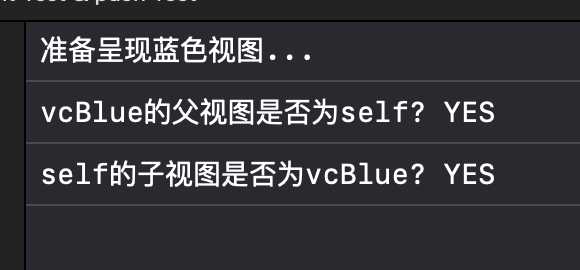
    NSLog(@"vcBlue的父视图是否为self? %@", [vcBlue.presentingViewController isEqual:self] ? @"YES" : @"NO");
    NSLog(@"self的子视图是否为vcBlue? %@", [self.presentedViewController isEqual:vcBlue] ? @"YES" : @"NO");
}
控制台输出!:
多层present
在一个已经被present的视图中再次present一个视图,是多层的present
之前我们也讲过,present的主视图和新的视图是强引用,所以如果过多的present视图,可能会导致内存泄露等等问题
present出的视图,是模态视图,在什么时候使用模态视图会在后面讲
但是不管是什么情况,都不建议使用多层的present
多层present后的父子关系问题

注意看,这张图里,VCA present了 VCB,VCB present了 VCC
并且A带有了导航控制器
- (void)presentBlueBlackThenRed {
UIViewController *vcBlue = [[UIViewController alloc] init];
vcBlue.view.backgroundColor = [UIColor systemBlueColor];
UINavigationController* blueNavi = [[UINavigationController alloc] initWithRootViewController:vcBlue];
NSLog(@"准备呈现蓝色视图...");
[self presentViewController:blueNavi animated:YES completion:^{
NSLog(@"vcBlue的父视图是否为self? %@", [vcBlue.presentingViewController isEqual:self] ? @"YES" : @"NO");
NSLog(@"self的子视图是否为vcBlue? %@", [self.presentedViewController isEqual:vcBlue] ?  最低0.47元/天 解锁文章






 扫一扫
扫一扫


 1315
1315

 被折叠的 条评论
为什么被折叠?
被折叠的 条评论
为什么被折叠?
 到【灌水乐园】发言





