



问题
{
	"Message": "An error has occurred.",
	"ExceptionMessage": "无法加载计数器名称数据,因为从注册表读取的索引“”无效。",
	"ExceptionType": "System.InvalidOperationException",
	"StackTrace": "   在 System.Diagnostics.PerformanceCounterLib.GetStringTable(Boolean isHelp)\r\n   在 System.Diagnostics.PerformanceCounterLib.get_NameTable()\r\n   在 System.Diagnostics.PerformanceCounterLib.get_CategoryTable()\r\n   在 System.Diagnostics.PerformanceCounterLib.CounterExists(String category, String counter, Boolean& categoryExists)\r\n   在 System.Diagnostics.PerformanceCounterLib.CounterExists(String machine, String category, String counter)\r\n   在 System.Diagnostics.PerformanceCounter.InitializeImpl()\r\n   在 System.Diagnostics.PerformanceCounter..ctor(String categoryName, String counterName, String instanceName, Boolean readOnly)\r\n   在 System.Diagnostics.PerformanceCounter..ctor(String categoryName, String counterName, String instanceName)"
}
原因
Windows性能监视问题。
分析
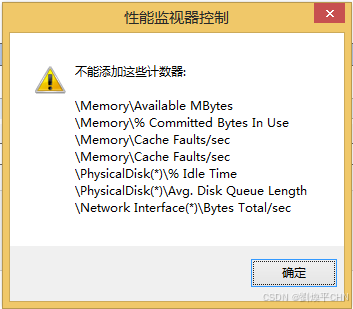
输入 Win + R 在弹出的控制台命令中输入 perfmon,这个时候会弹出来"性能监视器控制"这个窗口,显示不能添加这些设计器。
解决办法
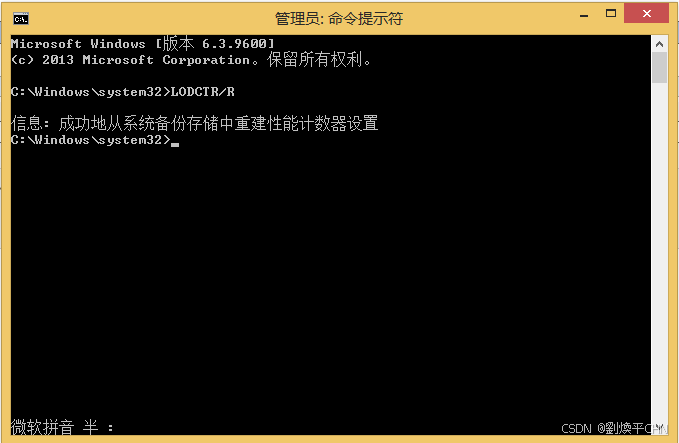
输入 Win + R (打开的时候以管理员身份运行) ,输入 lodctr /r,然后稍等几秒钟即可。显示下面 成功地从系统备份存储中重建性能计数器设置后,说明修复成功。






 扫一扫
扫一扫


 1074
1074

 被折叠的 条评论
为什么被折叠?
被折叠的 条评论
为什么被折叠?
 到【灌水乐园】发言





