


📚往期学习笔录📝:
📝 鸿蒙应用开发与鸿蒙系统开发哪个更有前景?
📝 嵌入式开发适不适合做鸿蒙南向开发?看完这篇你就了解了~
📝 对于大前端开发来说,转鸿蒙开发究竟是福还是祸?
📝 鸿蒙岗位需求突增!移动端、PC端、IoT到底该怎么选?
📝 记录一场鸿蒙开发岗位面试经历~
📝 持续更新中……
Speexdsp
提到Speexdsp不得不先提到开源语音编解码器 Speex

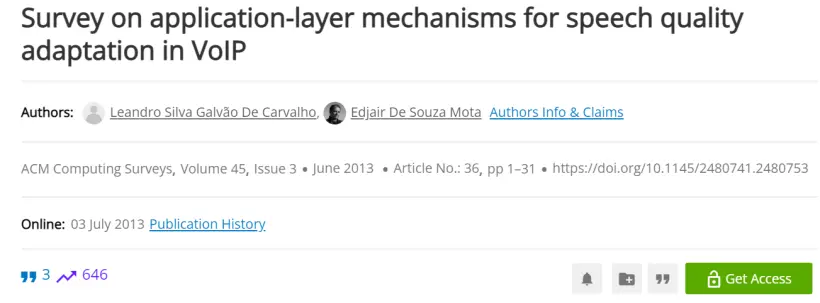
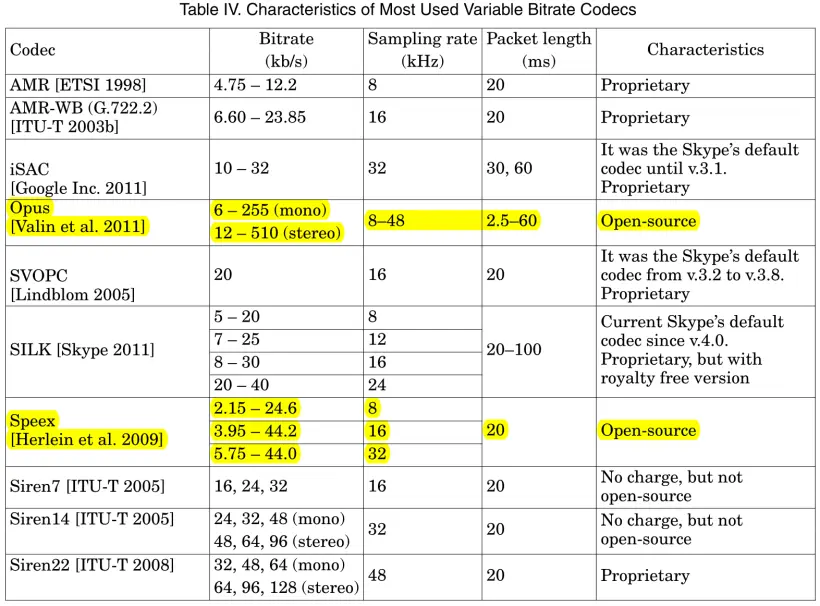
如下是ACM Surveys中收录的标题为《Survey on Application-Layer Mechanisms for Speech Quality Adaptation in VoIP》综述中的一张图表。
- 它总结了一些常用的可变比特率编解码器,并且做了性能方面的比较。
- 其中唯一Open-source开源的两个编解码器之一就是speex。
- 2007年12月11日Speex1.2beta3中首次将Speex中所有非编解码器组件(预处理器、回声消除、抖动缓冲区)都已移至新的libspeexdsp中。
- 2014年12月6日推出的Speex 1.2rc2和SpeexDSP1.2rc2正式将speex编解码器库和speexDSP库拆分为单独的源代码。
Speexdsp功能
预处理器
预处理器被设计为在运行编码器之前在音频上使用。预处理器提供三个主要功能:
-
噪声抑制
-
自动增益控制(AGC)
-
语音活动检测(VAD)
自适应抖动缓冲区
-
当通过UDP或RTP传输语音(或任何相关内容)时,包可能会丢失,以不同的延迟到达,甚至乱序。
-
抖动缓冲区的目的是重新排序数据包,并缓冲足够长的时间,以便它们可以被发送以进行解码。
声学回声消除器
回声消除是为了提高远端质量
- 在任何免提通信系统中,远端语音通过本地扬声器播放。音频在房间内传播,并被麦克风捕获。如果从麦克风捕获的音频被直接发送到远程端,那么用户就会听到远端语音的回声。声学回声消除器设计用于在声学回声发送到远端之前消除它。
重采样器
这个重采样器可以用于在任意两个速率之间进行转换(比率必须是有理数),并且可以控制质量/复杂性的权衡。
-
重采样器在某些情况下将音频从一个采样率转换到另一个采样率。
-
它可以用于混合具有不同采样率的流、用于支持声卡不支持的采样率、用于转码等。
Speexdsp移植到OpenHarmony标准系统
OpenHarmony三方库主要是基于标准 Linux 系统的 c/c++ 开源库,所以三方库的移植工作,首先是在标准 Linux 系统搭建环境、编译与验证,然后将三方库的编译加入到 OpenHarmony 工程的构建中。
三方库移植的主要开发步骤如下:
-
在标准Linux系统下载三方库源码,搭建开发环境,编译整个源码工程;
-
分析在标准Linux系统的编译过程文件,提取编译需要的源文件、编译依赖等信息;
-
根据上一步分析结果,编写gn文件,将三方库加入到OpenHarmony的编译体系;
-
验证编译结果,在OpenHarmony的out目录是否生成目标库;
-
测试demo/测试单元用例执行。
一、下载源码
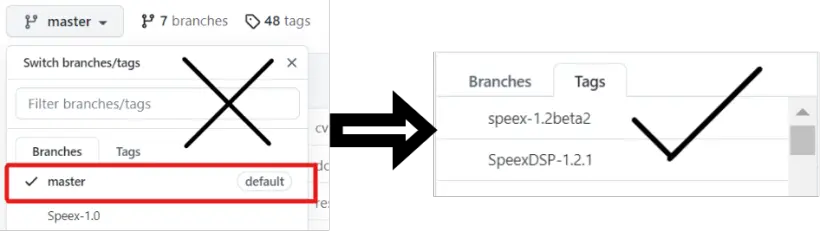
- 下载三方库源码时,优先使用最新版,不要下载master分支,下载最新的版本分支。
移植speexdsp下载的是1.2.1版本。
Speexdsp源码下载地址:https://github.com/xiph/speexdsp
二、搭建开发环境,生成Makefile编译构建speexdsp。
(笔者使用的linux环境是Ubuntu18.04,不推荐Ubuntu22.04下编译因为编译不了)
- 不同的原生三方库提供的编译方式不相同,根据原生三方库的readme文件或者manual用户手册可以知道该如何编译
Speexdsp在linux下的编译安装,在linux终端输入如下语句:
- 安装make工具。
sudo apt-get install make
- 安装autoAutotools工具
sudo apt-get install autoconf automake libtool
GNU Autotools框架包括三个主要的包:Autoconf,Automake,和Libtool。GNU Autotools构建过程如下
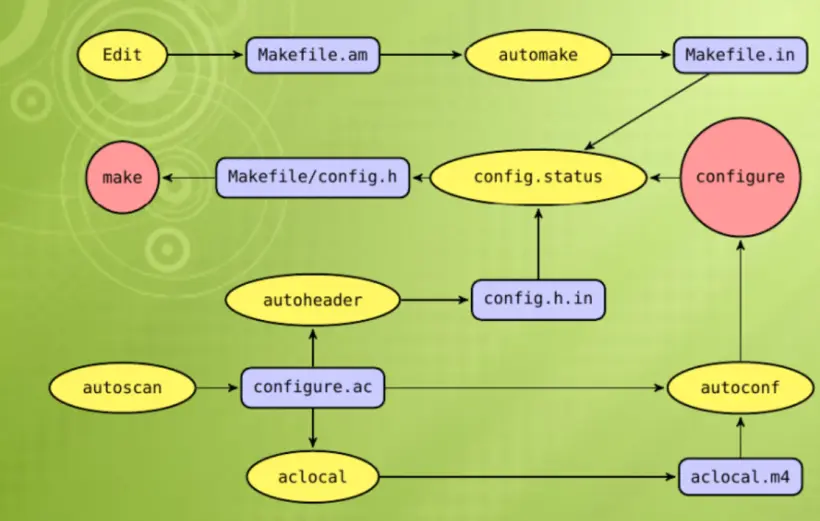
GNU软件的构建过程,一般来说, 包含三个步骤:
tar xfv xxx.tar.gz
./configure
make
make install
该过程一般依赖两个文件, configure和Makefile文件。
-
Autoconf/Automake就是一套用于自动构建configure脚本和Makefile文件的工具。
-
一般使用Makefile.am构建的三方库,原生库中存在autogen.sh,configure.ac文件。由makefile.am自动生成makefile。
./autogen.sh
- ./autogen.sh之后我们可以运行./configure --help查看configure配置
./configure --help
jiajiahao@ubuntu:~/Desktop/SpeexDSP-1.2.1$ ./configure --help
`configure' configures speexdsp 1.2.1 to adapt to many kinds of systems.

Usage: ./configure [OPTION]... [VAR=VALUE]...

To assign environment variables (e.g., CC, CFLAGS...), specify them as
VAR=VALUE.  See below for descriptions of some of the useful variables.

Defaults for the options are specified in brackets.

Configuration:
  -h, --help              display this help and exit
      --help=short        display options specific to this package
      --help=recursive    display the short help of all the included packages
  -V, --version           display version information and exit
  -q, --quiet, --silent   do not print `checking ...' messages
      --cache-file=FILE   cache test results in FILE [disabled]
  -C, --config-cache      alias for `--cache-file=config.cache'
  -n, --no-create         do not create output files
      --srcdir=DIR        find the sources in DIR [configure dir or `..']

Installation directories:
  --prefix=PREFIX         install architecture-independent files in PREFIX
                          [/usr/local]
  --exec-prefix=EPREFIX   install architecture-dependent files in EPREFIX
                          [PREFIX]

By default, `make install' will install all the files in
`/usr/local/bin', `/usr/local/lib' etc.  You can specify
an installation prefix other than `/usr/local' using `--prefix',
for instance `--prefix=$HOME'.

For better control, use the options below.

Fine tuning of the installation directories:
  --bindir=DIR            user executables [EPREFIX/bin]
  --sbindir=DIR           system admin executables [EPREFIX/sbin]
  --libexecdir=DIR        program executables [EPREFIX/libexec]
  --sysconfdir=DIR        read-only single-machine data [PREFIX/etc]
  --sharedstatedir=DIR    modifiable architecture-independent data [PREFIX/com]
  --localstatedir=DIR     modifiable single-machine data [PREFIX/var]
  --runstatedir=DIR       modifiable per-process data [LOCALSTATEDIR/run]
  --libdir=DIR            object code libraries [EPREFIX/lib]
  --includedir=DIR        C header files [PREFIX/include]
  --oldincludedir=DIR     C header files for non-gcc [/usr/include]
  --datarootdir=DIR       read-only arch.-independent data root [PREFIX/share]
  --datadir=DIR           read-only architecture-independent data [DATAROOTDIR]
  --infodir=DIR           info documentation [DATAROOTDIR/info]
  --localedir=DIR         locale-dependent data [DATAROOTDIR/locale]
  --mandir=DIR            man documentation [DATAROOTDIR/man]
  --docdir=DIR            documentation root [DATAROOTDIR/doc/speexdsp]
  --htmldir=DIR           html documentation [DOCDIR]
  --dvidir=DIR            dvi documentation [DOCDIR]
  --pdfdir=DIR            pdf documentation [DOCDIR]
  --psdir=DIR             ps documentation [DOCDIR]
 最低0.47元/天 解锁文章






 扫一扫
扫一扫


 820
820

 被折叠的 条评论
为什么被折叠?
被折叠的 条评论
为什么被折叠?
 到【灌水乐园】发言





