





 本文详细介绍如何在Ubuntu上配置SBCL(Steel Bank Common Lisp)和SLIME(Superior Lisp Interaction Mode for Emacs),包括安装SBCL、Quicklisp、SLIME的过程,以及如何在Emacs中设置这些工具以进行Lisp编程。
https://www.jianshu.com/p/9dc6b3a548c4
https://blog.youkuaiyun.com/wild46cat/article/details/78167862
1) emacs ok!
2) sbcl
安装SBCL。
这个可以直接apt-get安装,没有问题。
查看是否安装成功,执行sbcl命令:
apt-get install sbcl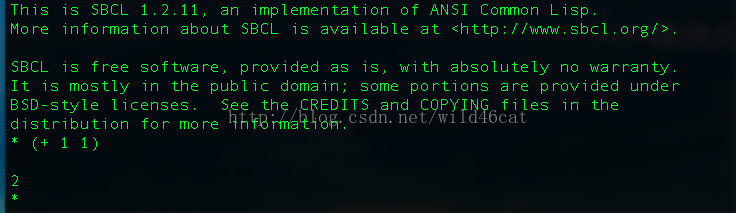
3)安装quicklisp,参考这里:http://www.jonathanfischer.net/modern-common-lisp-on-osx/
Installation
To install Quicklisp, download quicklisp.lisp and load it.
To verify the integrity of quicklisp.lisp, you can download its detached PGP signature file and verify it against the Quicklisp release signing key, which has a fingerprint of D7A3 489D DEFE 32B7 D0E7 CC61 3079 65AB 028B 5FF7, an id of 028B5FF7, and an email of release@quicklisp.org.
You only need to load quicklisp.lisp once to install Quicklisp. See Loading After Installation for how to load the installed Quicklisp into your Lisp session after the initial installation.
Here's an example installation session on MacOS X with SBCL. In this example, $ is the shell prompt and * is the Lisp REPL prompt.
sbcl --load quicklisp.lisp
(quicklisp-quickstart:install)
(ql:system-apropos "vecto")
(ql:quickload "vecto")
(ql:add-to-init-file)
(quit)
4)
安装SLIME
slime也可以从apt安装,但是用debian提供的slime,不能正常加载
既然有这种bug,干脆直接下载slime好了,首先删除原来安装的slime:
sudo apt-get remove slime --pruge
-----
http://melpa.org/#/getting-started
(require 'package)
(let* ((no-ssl (and (memq system-type '(windows-nt ms-dos))
                    (not (gnutls-available-p))))
       (proto (if no-ssl "http" "https")))
  ;; Comment/uncomment these two lines to enable/disable MELPA and MELPA Stable as desired
  (add-to-list 'package-archives (cons "melpa" (concat proto "://melpa.org/packages/")) t)
  ;;(add-to-list 'package-archives (cons "melpa-stable" (concat proto "://stable.melpa.org/packages/")) t)
  (when (< emacs-major-version 24)
    ;; For important compatibility libraries like cl-lib
    (add-to-list 'package-archives (cons "gnu" (concat proto "://elpa.gnu.org/packages/")))))
(package-initialize)
Note that you'll need to run M-x package-refresh-contents or M-x package-list-packages to ensure that Emacs has fetched the MELPA package list before you can install packages with M-x package-install or similar
5)安装完成后,需要把这三个关联到一起,修改emacs的启动文件:
;;;;slime configure
(setq inferior-lisp-program "/usr/bin/sbcl");设置优先使用哪种Common Lisp实现
(add-to-list 'load-path "~/.emacs.d/slime");设置Slime路径
; ~/.emacs.d/elpa/slime-20181112.1346
(require 'slime)
(slime-setup)
(require 'slime-autoloads)
(slime-setup '(slime-fancy slime-banner))
;;显示行号
(global-linum-mode t)
6) vi test.lisp
(write-line "Hello World") ; greet the world
; tell them your whereabouts
(write-line "I am at 'Tutorials Yiibai'! Learning LISP")
7) emacs ---> Alt -x slime---> (load “~/test.lisp")
8) result
; SLIME 2.22
CL-USER> (load "~/test.lisp")
Hello World
I am at 'Tutorials Yiibai'! Learning LISP
T
CL-USER>
(setq flymake-log-level 5)
(defadvice flymake-post-syntax-check (before flymake-force-check-was-interrupted)
(setq flymake-check-was-interrupted t))
(ad-activate 'flymake-post-syntax-check)





 扫一扫
扫一扫


 1573
1573

 被折叠的 条评论
为什么被折叠?
被折叠的 条评论
为什么被折叠?
 到【灌水乐园】发言





