



 本文探讨了Hadoop中数据压缩的原理、内置编码器对比、压缩格式选择及其对性能的影响。通过实例演示了如何在MapReduce任务中启用和配置压缩,以及针对不同场景(如Mapper和Reducer输出)的压缩设置。
Hadoop数据压缩
1、概述
1)压缩的好处和坏处
压缩的优点:以减少磁盘IO、减少磁盘存储空间。
压缩的缺点:增加CPU开销。
2)压缩原则
(1)运算密集型的Job,少用压缩
(2)IO密集型的Job,多用压缩
2、MR支持的压缩编码
1)压缩算法对比介绍
| 压缩格式 | Hadoop自带? | 算法 | 文件扩展名 | 是否可切片 | 换成压缩格式后,原来的程序是否需要修改 |
|---|---|---|---|---|---|
| DEFLATE | 是,直接使用 | DEFLATE | .deflate | 否 | 和文本处理一样,不需要修改 |
| Gzip | 是,直接使用 | DEFLATE | .gz | 否 | 和文本处理一样,不需要修改 |
| bzip2 | 是,直接使用 | bzip2 | .bz2 | 是 | 和文本处理一样,不需要修改 |
| LZO | 否,需要安装 | LZO | .lzo | 是 | 需要建索引,还需要指定输入格式 |
| Snappy | 是,直接使用 | Snappy | .snappy | 否 | 和文本处理一样,不需要修改 |
2)压缩性能的比较
| 压缩算法 | 原始文件大小 | 压缩文件大小 | 压缩速度 | 解压速度 |
|---|---|---|---|---|
| gzip | 8.3GB | 1.8GB | 17.5MB/s | 58MB/s |
| bzip2 | 8.3GB | 1.1GB | 2.4MB/s | 9.5MB/s |
| LZO | 8.3GB | 2.9GB | 49.3MB/s | 74.6MB/s |
3、压缩方式的选择
压缩方式选择时重点考虑:压缩/解压缩速度、压缩率(压缩后存储大小)、压缩后是否可以支持切片。
3.1 Gzip 压缩
优点:压缩率比较高;
缺点:不支持Split;压缩/解压速度一般;
3.2 Bzip2压缩
优点:压缩率高;支持Split;
缺点:压缩/解压速度慢。
3.3 Lzo压缩
优点:压缩/解压速度比较快;支持Split;
缺点:压缩率一般;想支持切片需要额外创建索引。
3.4 Snappy压缩
优点:压缩和解压缩速度快;
缺点:不支持Split;压缩率一般;
3.5 压缩位置选择
压缩可以在MapReduce作用的任意阶段启用
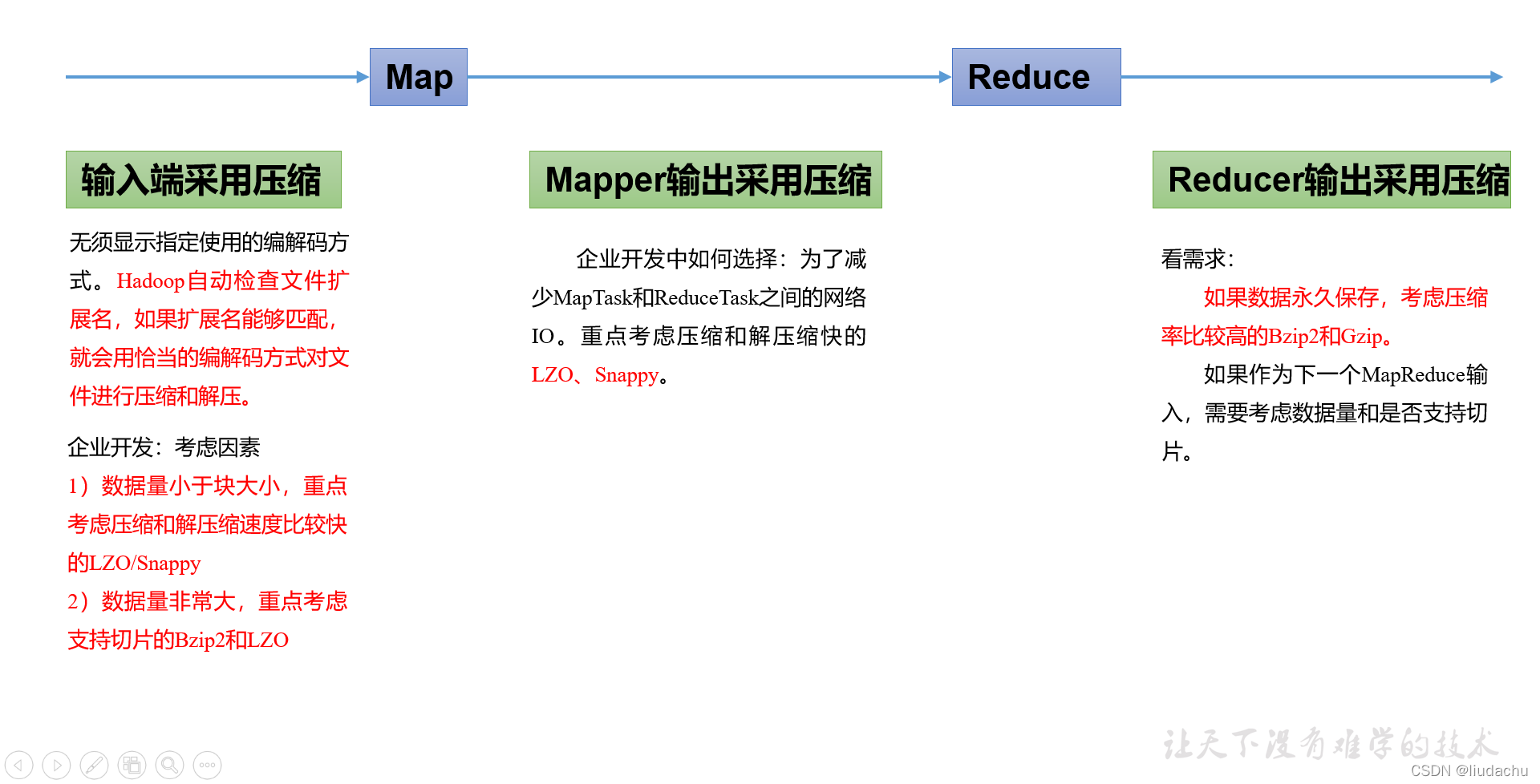
4、压缩参数配置
1)为了支持多种压缩/解压缩算法,Hadoop引入了编码/解码器
| 压缩格式 | 对应的编码/解码器 |
|---|---|
| DEFLATE | org.apache.hadoop.io.compress.DefaultCodec |
| gzip | org.apache.hadoop.io.compress.GzipCodec |
| bzip2 | org.apache.hadoop.io.compress.BZip2Codec |
| LZO | com.hadoop.compression.lzo.LzopCodec |
| Snappy | org.apache.hadoop.io.compress.SnappyCodec |
2)要在Hadoop中启用压缩,可以配置如下参数
| 参数 | 默认值 | 阶段 | 建议 |
|---|---|---|---|
io.compression.codecs (在core-site.xml中配置) | 无,这个需要在命令行输入hadoop checknative查看 | 输入压缩 | Hadoop使用文件扩展名判断是否支持某种编解码器 |
mapreduce.map.output.compress(在mapred-site.xml中配置) | false | mapper输出 | 这个参数设为true启用压缩 |
mapreduce.map.output.compress.codec(在mapred-site.xml中配置) | org.apache.hadoop.io.compress.DefaultCodec | mapper输出 | 企业多使用LZO或Snappy编解码器在此阶段压缩数据 |
mapreduce.output.fileoutputformat.compress(在mapred-site.xml中配置) | false | reducer输出 | 这个参数设为true启用压缩 |
mapreduce.output.fileoutputformat.compress.codec(在mapred-site.xml中配置) | org.apache.hadoop.io.compress.DefaultCodec | reducer输出 | 使用标准工具或者编解码器,如gzip和bzip2 |
5、压缩实操案例
5.1 Map输出端采用压缩
即使你的MapReduce的输入输出文件都是未压缩的文件,你仍然可以对Map任务的中间结果输出做压缩,因为它要写在硬盘并且通过网络传输到Reduce节点,对其压缩可以提高很多性能,这些工作只要设置两个属性即可,我们来看下代码怎么设置。
1)给大家提供的Hadoop源码支持的压缩格式有:BZip2Codec、DefaultCodec
package com.chif.mapreduce.compress;

import org.apache.hadoop.conf.Configuration;
import org.apache.hadoop.fs.Path;
import org.apache.hadoop.io.IntWritable;
import org.apache.hadoop.io.Text;
import org.apache.hadoop.io.compress.BZip2Codec;
import org.apache.hadoop.io.compress.CompressionCodec;
import org.apache.hadoop.mapreduce.Job;
import org.apache.hadoop.mapreduce.lib.input.FileInputFormat;
import org.apache.hadoop.mapreduce.lib.output.FileOutputFormat;

import java.io.IOException;


public class WordCountDriver {

    public static void main(String[] args) throws IOException, ClassNotFoundException, InterruptedException {

        //1 获取配置信息以及获取job对象
        Configuration conf = new Configuration();
        //指定hadoop运行时在本地的临时工作目录
        conf.set("hadoop.tmp.dir", "D:/tmp/mapreduce_tmp_cache");

        //开启map端输出压缩
        conf.setBoolean("mapreduce.map.output.compress",true);

        //设置map端输出压缩方式
        conf.setClass("mapreduce.map.output.compress.codec", BZip2Codec.class, CompressionCodec.class);

        Job job = Job.getInstance(conf);

        //2 关联本Driver程序的jar
        job.setJarByClass(WordCountDriver.class);

        //3 关联Mapper和Reduce的class
        job.setMapperClass(WordCountMapper.class);
        job.setReducerClass(WordCountReducer.class);

        //4 设置Mapper输出的kv类型
        job.setMapOutputKeyClass(Text.class);
        job.setMapOutputValueClass(IntWritable.class);

        // 5 设置最终输出kv类型
        job.setOutputKeyClass(Text.class);
        job.setOutputValueClass(IntWritable.class);


        //6 设置输入和输出路径
        FileInputFormat.setInputPaths(job,new Path("C:\\Users\\Chef Liu\\Desktop\\Big\\hadoop\\input4"));
        FileOutputFormat.setOutputPath(job,new Path("C:\\Users\\Chef Liu\\Desktop\\Big\\hadoop\\output"));

        //设置reduce端输出压缩开启
        FileOutputFormat.setCompressOutput(job,true);

        //设置压缩的方式
        FileOutputFormat.setOutputCompressorClass(job, BZip2Codec.class);

        //7 提交job
        boolean result = job.waitForCompletion(true);

        System.exit(result ? 0 : 1);
    }
}
2)Mapper保持不变
package com.chif.mapreduce.compress;

import org.apache.hadoop.io.IntWritable;
import org.apache.hadoop.io.LongWritable;
import org.apache.hadoop.io.Text;
import org.apache.hadoop.mapreduce.Mapper;

import java.io.IOException;

public class WordCountMapper extends Mapper<LongWritable, Text,Text, IntWritable> {

    //懒汉式
    Text k = new Text();
    IntWritable v = new IntWritable(1);

    /**
     * map()方法(MapTask进程)对每一个<K,V>调用一次
     * @param key
     * @param value
     * @param context
     * @throws IOException
     * @throws InterruptedException
     */
    @Override
    protected void map(LongWritable key, Text value, Context context) throws IOException, InterruptedException {

        //1 获取一行
        String line = value.toString();

        //2 切割
        String[] words = line.split(" ");

        //3 输出
        for (String word : words) {
            k.set(word);
            context.write(k,v);
        }

    }
}
3)Reducer保持不变
package com.chif.mapreduce.compress;

import org.apache.hadoop.io.IntWritable;
import org.apache.hadoop.io.Text;
import org.apache.hadoop.mapreduce.Reducer;

import java.io.IOException;

public class WordCountReducer extends Reducer<Text, IntWritable,Text,IntWritable> {

    //懒汉式
    int sum;
    IntWritable v=new IntWritable();

    /**
     * ReduceTask进程对每一组相同k的<k,v>调用一次reduce()方法
     * @param key
     * @param values
     * @param context
     * @throws IOException
     * @throws InterruptedException
     */
    @Override
    protected void reduce(Text key, Iterable<IntWritable> values, Context context) throws IOException, InterruptedException {

        //1 累加求和
        sum=0;
        for (IntWritable count : values) {
            sum+=count.get();
        }

        //2 输出
        v.set(sum);
        context.write(key,v);
    }
}
5.2 Reduce输出端采用压缩
基于WordCount案例处理。
1)修改驱动
package com.chif.mapreduce.compress;

import org.apache.hadoop.conf.Configuration;
import org.apache.hadoop.fs.Path;
import org.apache.hadoop.io.IntWritable;
import org.apache.hadoop.io.Text;
import org.apache.hadoop.io.compress.BZip2Codec;
import org.apache.hadoop.io.compress.CompressionCodec;
import org.apache.hadoop.mapreduce.Job;
import org.apache.hadoop.mapreduce.lib.input.FileInputFormat;
import org.apache.hadoop.mapreduce.lib.output.FileOutputFormat;

import java.io.IOException;


public class WordCountDriver {

    public static void main(String[] args) throws IOException, ClassNotFoundException, InterruptedException {

        //1 获取配置信息以及获取job对象
        Configuration conf = new Configuration();
        //指定hadoop运行时在本地的临时工作目录
        conf.set("hadoop.tmp.dir", "D:/tmp/mapreduce_tmp_cache");

        //开启map端输出压缩
        conf.setBoolean("mapreduce.map.output.compress",true);

        //设置map端输出压缩方式
        conf.setClass("mapreduce.map.output.compress.codec", BZip2Codec.class, CompressionCodec.class);

        Job job = Job.getInstance(conf);

        //2 关联本Driver程序的jar
        job.setJarByClass(WordCountDriver.class);

        //3 关联Mapper和Reduce的class
        job.setMapperClass(WordCountMapper.class);
        job.setReducerClass(WordCountReducer.class);

        //4 设置Mapper输出的kv类型
        job.setMapOutputKeyClass(Text.class);
        job.setMapOutputValueClass(IntWritable.class);

        // 5 设置最终输出kv类型
        job.setOutputKeyClass(Text.class);
        job.setOutputValueClass(IntWritable.class);


        //6 设置输入和输出路径
        FileInputFormat.setInputPaths(job,new Path("C:\\Users\\Chef Liu\\Desktop\\Big\\hadoop\\input4"));
        FileOutputFormat.setOutputPath(job,new Path("C:\\Users\\Chef Liu\\Desktop\\Big\\hadoop\\output"));

        //设置reduce端输出压缩开启
        FileOutputFormat.setCompressOutput(job,true);

        //设置压缩的方式
        FileOutputFormat.setOutputCompressorClass(job, BZip2Codec.class);

        //7 提交job
        boolean result = job.waitForCompletion(true);

        System.exit(result ? 0 : 1);
    }
}
2)Mapper和Reducer保持不变





 扫一扫
扫一扫


 778
778

 被折叠的 条评论
为什么被折叠?
被折叠的 条评论
为什么被折叠?
 到【灌水乐园】发言





