



 本文深入讲解Spring框架中的依赖注入(DI)概念,包括构造函数注入和Set方式注入,详细介绍了如何在XML配置文件中实现不同类型的数据注入,如普通值、Bean、数组、List、Map、Set、null和Properties,同时探讨了p命名空间和c命名空间的使用,以及bean的作用域。
6、DI依赖注入
概念
- 依赖注入(Dependency Injection,DI)。
- 依赖 : 指Bean对象的创建依赖于容器 . Bean对象的依赖资源 .
- 注入 : 指Bean对象所依赖的资源 , 由容器来设置和装配 .
6.1、构造函数注入
就是IoC容器创建对象的方式
6.2、Set方式注入【重点】
环境搭建
1.复杂类型
public class Address {
    private String address;

    public String getAddress() {
        return address;
    }

    public void setAddress(String address) {
        this.address = address;
    }

}
2.真实对象
public class Student {
    private String name;
    private Address address;
    private String[] book;
    private List<String> hobbys;
    private Map<String,String> card;
    private Set<String> games;
    private String wife;
    private Properties info;
}
3.beans.xml
<?xml version="1.0" encoding="UTF-8"?>
<beans xmlns="http://www.springframework.org/schema/beans"
       xmlns:xsi="http://www.w3.org/2001/XMLSchema-instance"
       xsi:schemaLocation="http://www.springframework.org/schema/beans
        https://www.springframework.org/schema/beans/spring-beans.xsd">
	<!--普通值set注入-->
    <bean id="student" class="com.chif.pojo.Student">
        <property name="name" value="chif"/>
    </bean>
</beans>
4.测试类
public class Mytest {
    public static void main(String[] args) {
        ApplicationContext context = new ClassPathXmlApplicationContext("beans.xml");
        Student student = (Student) context.getBean("student");
        System.out.println(student.getName());
    }
}
完善注入信息
<?xml version="1.0" encoding="UTF-8"?>
<beans xmlns="http://www.springframework.org/schema/beans"
       xmlns:xsi="http://www.w3.org/2001/XMLSchema-instance"
       xsi:schemaLocation="http://www.springframework.org/schema/beans
        https://www.springframework.org/schema/beans/spring-beans.xsd">


    <bean id="address" class="com.chif.pojo.Address">
        <property name="address" value="西安"/>
    </bean>

    <bean id="student" class="com.chif.pojo.Student">
        <!--1.普通值注入-->
        <property name="name" value="chif"/>
        <!--2.Bean注入  ref-->
        <property name="address" ref="address"/>
        <!--3.数组注入-->
        <property name="books">
            <array>
                <value>红楼梦</value>
                <value>西游记</value>
                <value>水浒传</value>
                <value>三国演义</value>
            </array>
        </property>
        <!--list-->
        <property name="hobbys">
            <list>
                <value>听歌</value>
                <value>敲代码</value>
                <value>看电影</value>
            </list>
        </property>
        <!--map-->
        <property name="card">
            <map>
                <entry key="身份证" value="0000000000000000001"/>
                <entry key="银行卡" value="0000000000000000002"/>
            </map>
        </property>
        <!--set-->
        <property name="games">
            <set>
                <value>LOL</value>
                <value>CF</value>
            </set>
        </property>
        <!--null-->
        <property name="wife">
            <null/>
        </property>
        <!--properties
           key=value
           key=value
           key=value
        -->
        <property name="info">
            <props>
                <prop key="driver">111111111111</prop>
                <prop key="url">2222222222222</prop>
                <prop key="username">root</prop>
                <prop key="password">222</prop>
            </props>
        </property>
    </bean>

</beans>
6.3、拓展方式
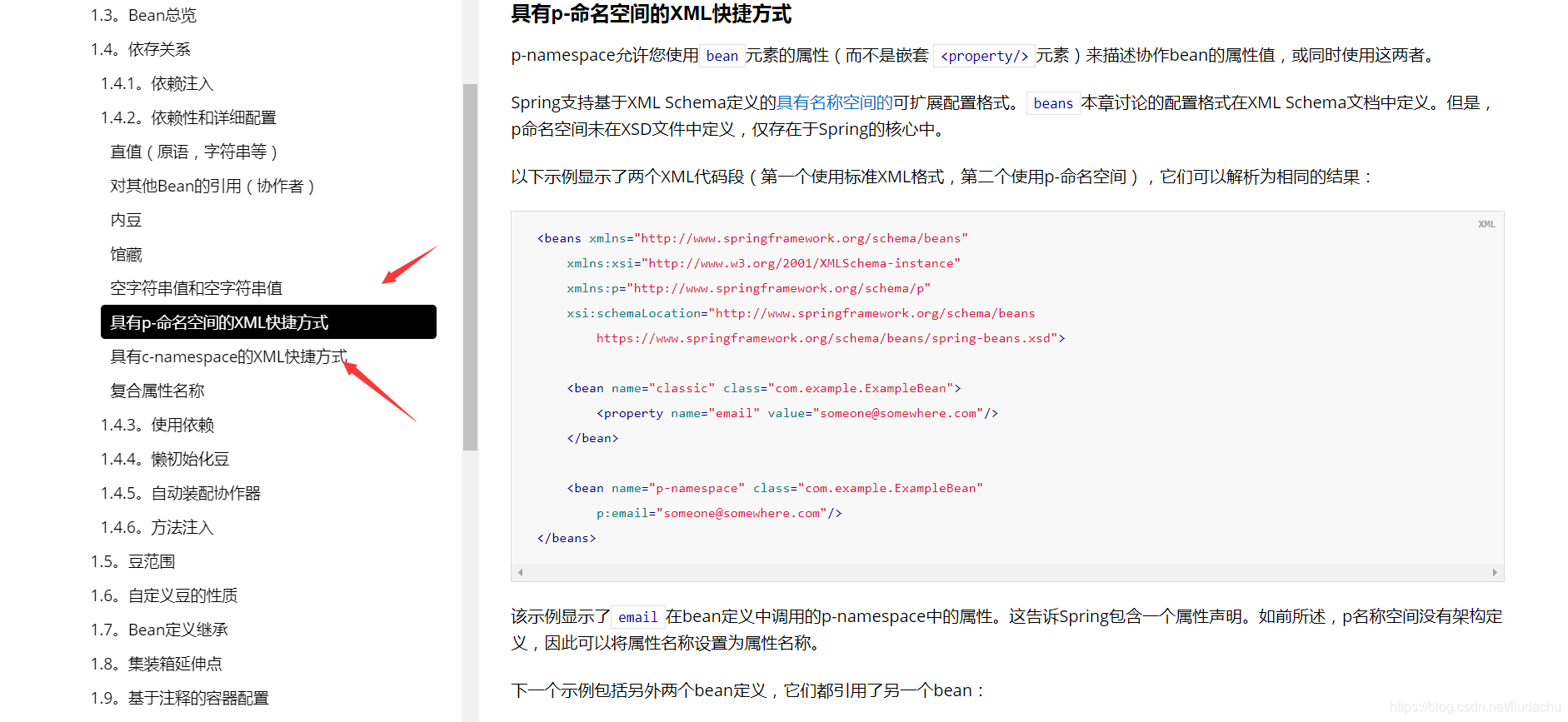
我们可以使用p命名空间和c命令空间进行注入
官方解释:
使用
<beans xmlns="http://www.springframework.org/schema/beans"
       xmlns:xsi="http://www.w3.org/2001/XMLSchema-instance"
       xmlns:p="http://www.springframework.org/schema/p"
       xmlns:c="http://www.springframework.org/schema/c"
       xsi:schemaLocation="http://www.springframework.org/schema/beans
        https://www.springframework.org/schema/beans/spring-beans.xsd">

    <!--p 命名空间注入xml快捷方式,可以直接注入属性值 properties -->
    <bean id="user" class="com.chif.pojo.User" p:name="chif" p:age="20"/>

    <!--c 命名空间注入,通过构造器注入,construct-args -->
    <bean id="user2" class="com.chif.pojo.User" c:age="18" c:name="666"/>


</beans>
测试:
  @Test
    public void test(){
        ApplicationContext context = new ClassPathXmlApplicationContext("userbean.xml");

        User user = context.getBean("user",User.class);

        System.out.println(user);
    }
注意点:p命名和c命名空间不能直接使用,需要导入xml约束!
 xmlns:p="http://www.springframework.org/schema/p"
 xmlns:c="http://www.springframework.org/schema/c"
6.4、bean的作用域
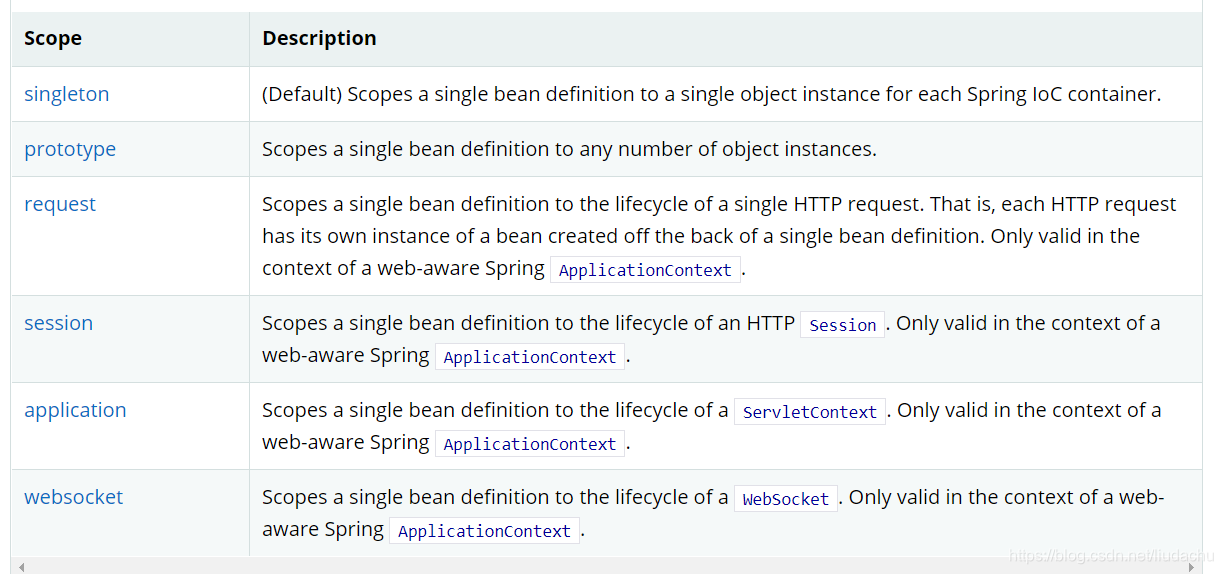
1.单例设计模式(Spring默认机制)
<bean id="accountService" class="com.something.DefaultAccountService" scope="singleton"/>
2.原型模式:每次从容器中get的时候,都会产生一个新的对象!
<bean id="accountService" class="com.something.DefaultAccountService" scope="prototype"/>
3.其余的request、session、application、这些个只能在web开发中使用到!





 扫一扫
扫一扫


 1848
1848

 被折叠的 条评论
为什么被折叠?
被折叠的 条评论
为什么被折叠?
 到【灌水乐园】发言





