



 本文深入探讨了Java类加载器的原理与类型,包括Bootstrap、Extension和SystemClassLoader的工作机制。文章详细解释了类加载器如何根据请求加载不同类型的类,并讨论了类加载的委托、可见性和唯一性原则。
Class loaders are responsible for loading Java classes during runtime dynamically to the JVM (Java Virtual Machine). Also, they are part of the JRE (Java Runtime Environment). Hence, the JVM doesn’t need to know about the underlying files or file systems in order to run Java programs thanks to class loaders.
Also, these Java classes aren’t loaded into memory all at once, but when required by an application. This is where class loaders come into the picture. They are responsible for loading classes into memory.
Types of ClassLoaders in Java
Not all classes are loaded by a single ClassLoader. Depending on the type of class and the path of class, the ClassLoader that loads that particular class is decided. To know the ClassLoader that loads a class the getClassLoader() method is used. All classes are loaded based on their names and if any of these classes are not found then it returns a NoClassDefFoundError or ClassNotFoundException.
A Java Classloader is of three types:
- BootStrap ClassLoader: A Bootstrap Classloader is a Machine code
which kickstarts the operation when the JVM calls it. It is not a
java class. Its job is to load the first pure Java ClassLoader.
Bootstrap ClassLoader loads classes from the location rt.jar.
Bootstrap ClassLoader doesn’t have any parent ClassLoaders. It is
also called as the Primodial ClassLoader. - Extension ClassLoader: The Extension ClassLoader is a child of
Bootstrap ClassLoader and loads the extensions of core java classes
from the respective JDK Extension library. It loads files from
jre/lib/ext directory or any other directory pointed by the system
property java.ext.dirs. - System ClassLoader: An Application ClassLoader is also known as a
System ClassLoader. It loads the Application type classes found in
the environment variable CLASSPATH, -classpath or -cp command line
option. The Application ClassLoader is a child class of Extension
ClassLoader.
Let’s start by learning how different classes are loaded using various class loaders using a simple example:
public void printClassLoaders() throws ClassNotFoundException {

    System.out.println("Classloader of this class:"
        + PrintClassLoader.class.getClassLoader());

    System.out.println("Classloader of Logging:"
        + Logging.class.getClassLoader());

    System.out.println("Classloader of ArrayList:"
        + ArrayList.class.getClassLoader());
}
When executed the above method prints:
Class loader of this class:sun.misc.Launcher$AppClassLoader@18b4aac2
Class loader of Logging:sun.misc.Launcher$ExtClassLoader@3caeaf62
Class loader of ArrayList:null
As we can see, there are three different class loaders here; application, extension, and bootstrap (displayed as null).
The application class loader loads the class where the example method is contained. An application or system class loader loads our own files in the classpath.
Next, the extension one loads the Logging class. Extension class loaders load classes that are an extension of the standard core Java classes.
Finally, the bootstrap one loads the ArrayList class. A bootstrap or primordial class loader is the parent of all the others.
However, we can see that the last out, for the ArrayList it displays null in the output. This is because the bootstrap class loader is written in native code, not Java – so it doesn’t show up as a Java class. Due to this reason, the behavior of the bootstrap class loader will differ across JVMs.
Let’s now discuss more in detail about each of these class loaders.
Principles of functionality of a Java ClassLoader
- Delegation principle: It forwards the request for class loading to
parent class loader. It only loads the class if the parent does not
find or load the class. - Visibility principle: It allows child class loader to see all the
classes loaded by parent ClassLoader. But the parent class loader
cannot see classes loaded by the child class loader. - Uniqueness principle: It allows to load a class once. It is achieved
by delegation principle. It ensures that child ClassLoader doesn’t
reload the class, which is already loaded by the parent.
How ClassLoader works in Java
Suppose that we have an application specific class Demo.class. The request for loading of this class files transfers to Application ClassLoader. It delegates to its parent Extension ClassLoader. Further, it delegates to Bootstrap ClassLoader. Bootstrap search that class in rt.jar and since that class is not there. Now request transfer to Extension ClassLoader which searches for the directory jre/lib/ext and tries to locate this class there. If the class is found there, Extension ClassLoader loads that class. Application ClassLoader never loads that class. When the extension ClassLoader does not load it, then Application ClaasLoader loads it from CLASSPATH in Java.
Visibility principle states that child ClassLoader can see the class loaded by the parent ClassLoader, but vice versa is not true. It means if Application ClassLoader loads Demo.class, in such case, trying to load Demo.class explicitly using Extension ClassLoader throws java.lang.ClassNotFoundException.
According to the uniqueness principle, a class loaded by the parent should not be loaded by Child ClassLoader again. So, it is possible to write class loader which violates delegation and uniqueness principles and loads class by itself.
The following diagram shows how ClassLoader loads class in Java using delegation.
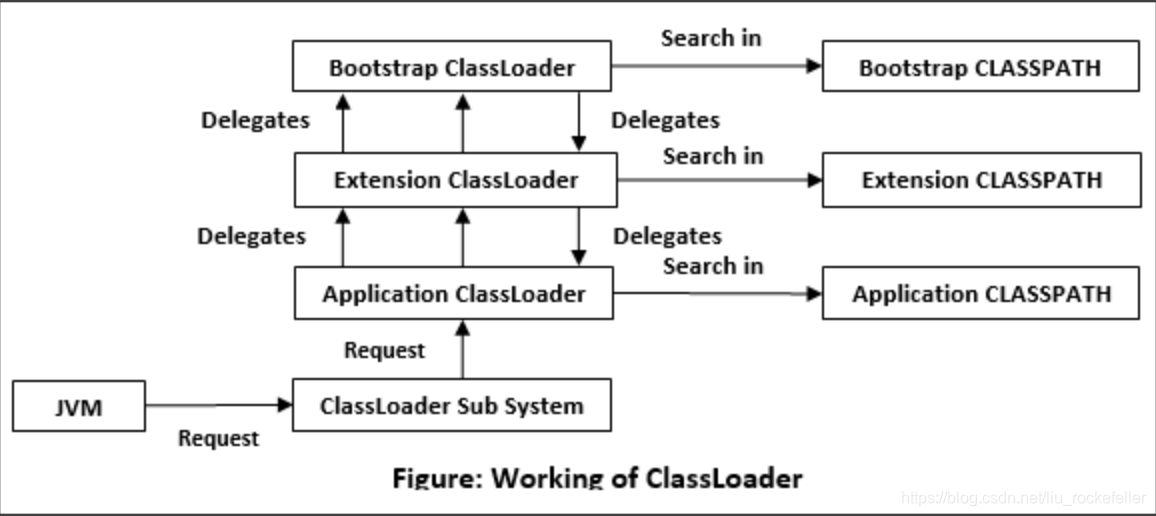
参考:
《ClassLoader in Java》
《ClassLoader in Java》
《Class Loaders in Java》





 扫一扫
扫一扫


 33万+
33万+

 被折叠的 条评论
为什么被折叠?
被折叠的 条评论
为什么被折叠?
 到【灌水乐园】发言





