



 博主分享了HanLP库在公司商品图片推荐中的应用实践。HanLP是NLP工具包,具备多种特点。博主主要使用其分词及词性分析功能,介绍了自定义词库的方法,包括打包到jar包、配置文件、转换bin文件等,还提及可借鉴搜狗词典,最后表示HanLP还有很多强大功能。
博主已经使用hanlp库在公司的商品图片推荐中应用到了,效果还不错,可以看一下博主之前写的博客https://blog.youkuaiyun.com/linlongdeng/article/details/93342691。现在专门做一下这个hanlp库的技术实践总结。hanlp是什么呢,下面简单贴一下官网的介绍。
HanLP是一系列模型与算法组成的NLP工具包,由大快搜索主导并完全开源,目标是普及自然语言处理在生产环境中的应用。HanLP具备功能完善、性能高效、架构清晰、语料时新、可自定义的特点。
我主要用到它的分词及他的词性分析,下面讲一下自己的实践。首页是自定义词库,最好是打包到jar包里头,可以减少一点大小。这就有点坑了,官方文档没写清楚,我看了代码,发现要使用ResourceIOAdapter,不然在jar里头找不到自定义字典
hanlp.properties配置文件,就要用ResourceIOAdapter适配器
IOAdapter=com.hankcs.hanlp.corpus.io.ResourceIOAdapter
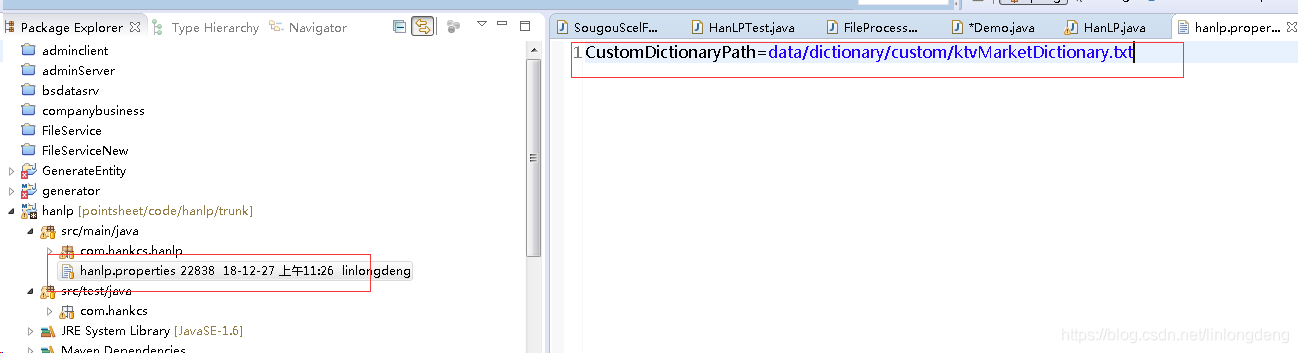
CustomDictionaryPath=data/dictionary/custom/ktvMarketDictionary.txt;
目录结构如下:
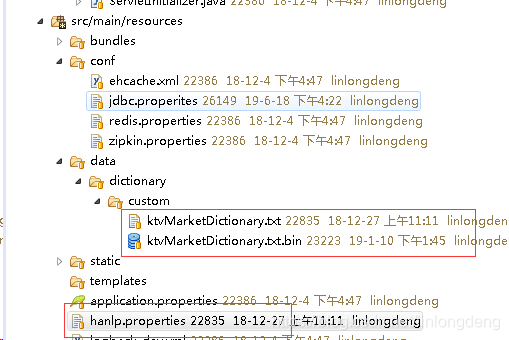
ReourceIOAdapter其实就是从Jar包里头找自定义自定义字典,代码如下,很简单
/**
 * 从jar包资源读取文件的适配器
 * @author hankcs
 */
public class ResourceIOAdapter implements IIOAdapter
{
    @Override
    public InputStream open(String path) throws IOException
    {
        return IOUtil.isResource(path) ? IOUtil.getResourceAsStream("/" + path) : new FileInputStream(path);
    }

    @Override
    public OutputStream create(String path) throws IOException
    {
        if (IOUtil.isResource(path)) throw new IllegalArgumentException("不支持写入jar包资源路径" + path);
        return new FileOutputStream(path);
    }
}
里头就是用了 IOUtil.class.getResourceAsStream,也没什么。
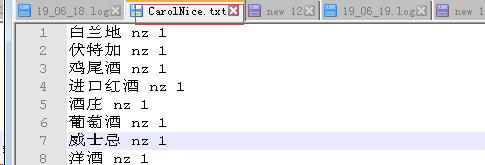
下面说怎么做自定义词典。hanlp的自定义词典格式是
洋酒 nz 1
就是单词 词性 词频
下面截图就是我作了自定义词典的截图,很简单。
这其实还不够,主要是这种txt格式的,在jar包是不能写文件的,所以要转换成hanlp最后用的的bin文件,怎么办,这就要下载他的源代码,https://github.com/hankcs/HanLP,把自定义词典配置在hanl.properties文件,
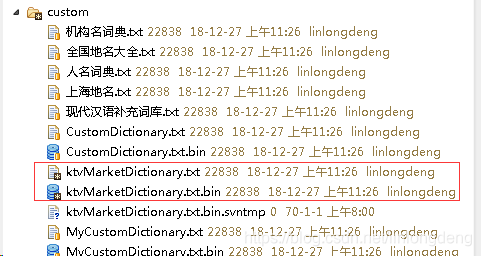
然后找到test目录中demo文件,随便跑一个测试类,系统就会自动自定义词典的bin词典,如
/**
 * 第一个Demo,惊鸿一瞥
 *
 * @author hankcs
 */
public class DemoAtFirstSight
{
    public static void main(String[] args)
    {
        System.out.println("");
        HanLP.Config.enableDebug();         // 为了避免你等得无聊,开启调试模式说点什么:-)
        System.out.println(HanLP.segment("意大利贝蒂亚摩洛娜酒庄"));
    }
}
效果:
写到这里,自定义词典算是完了,但是自己做词典,多数人是搞不来,何不抄搜狗词典,转换成hanlp能识别的词典呢。网上还真有解密搜狗词库的方法。
搜狗词典是scel格式的,加密过的。可以从官网下载https://pinyin.sogou.com/dict/
解密搜狗词典不是本文内容,因为不是我写的,这里主要贴一下,把目录下的scel文件生成一个hanlp的txt文件
private Map<String, Integer> repeatMap = new HashMap<>();
    /**
     * 将搜狗scel文件解析后的内容写入txt文件
     *
     * @param models
     * @param targetFilePath
     * @param isAppend
     * @throws IOException
     */
    private void writeToTargetFile(List<SougouScelModel> models, String targetFilePath, boolean isAppend)
            throws IOException {
        createParentDir(targetFilePath);
        FileOutputStream out = new FileOutputStream(targetFilePath, isAppend);
        int count = 0;
        for (int k = 0; k < models.size(); k++) {
            Map<String, List<String>> words = models.get(k).getWordMap(); // 词<拼音,词>
            Set<Entry<String, List<String>>> set = words.entrySet();
            Iterator<Entry<String, List<String>>> iter = set.iterator();
            if (isAppend) {
                out.write("\r\n".getBytes());
            }
            while (iter.hasNext()) {
                Entry<String, List<String>> entry = iter.next();
                List<String> list = entry.getValue();

                int size = list.size();
                for (int i = 0; i < size; i++) {
                    String word = list.get(i).trim();
                    // 拼音不用写
                    // out.write((entry.getKey() + " ").getBytes());
                    if (!repeatMap.containsKey(word)) {
                        out.write((word + " nz 1\n").getBytes());// 写入txt文件
                        count++;
                        repeatMap.put(word, 1);
                    }

                }
            }

        }
        out.close();
        log.info("生成" + targetFilePath.substring(targetFilePath.lastIndexOf("/") + 1) + "成功!,总计写入: " + count + " 条数据!");

    }
这里头主要用了hashmap来过滤重复的词汇
调用方法
public class Demo {
    public static void main(String[] args) throws IOException {
        //单个scel文件转化
        FileProcessing scel=new SougouScelFileProcessing();
        //多个scel文件转化为多个txt文件
       // scel.setTargetDir("F:/项目/视易K米智慧点单/分词/txt/");//转化后文件的存储位置
        //scel.parseFiles("F:/项目/视易K米智慧点单/分词","F:/项目/视易K米智慧点单/分词/txt/ktvMarketDictionary.txt", false);
        scel.parseFiles("F:/项目/视易K米智慧点单/搜狗词库","F:/项目/视易K米智慧点单/搜狗词库/txt/ktvMarketDictionary.txt",false);

    }

}
具体代码详见链接:https://pan.baidu.com/s/1h2-uasZ86HrEyamYyb3-7A
提取码:hxje 。
目前我用到的就是hanlp的分词算法,他还有很多牛逼功能,这里只是抛砖引玉了。





 扫一扫
扫一扫


 1484
1484

 被折叠的 条评论
为什么被折叠?
被折叠的 条评论
为什么被折叠?
 到【灌水乐园】发言





