



 本文介绍了两个用于webpack优化的插件:hard-source-webpack-plugin,它提供模块的中间缓存,加速二次构建;以及style-resources-loader,用于注入全局样式资源。详细介绍了它们的功能、使用方法及在vue项目中的配置。
1 hard-source-webpack-plugin
- 功能:HardSourceWebpackPlugin是webpack的插件,为模块提供中间缓存步骤。为了查看结果,您需要使用此插件运行webpack两次:第一次构建将花费正常的时间。第二次构建将显着加快 。
- 使用:
npm install hard-source-webpack-plugin
地址:
https://developer.aliyun.com/mirror/npm/package/hard-source-webpack-plugin
效果

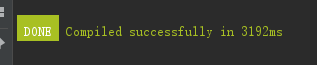
使用
在vue中,vue.config.js
const HardSourceWebpackPlugin = require('hard-source-webpack-plugin');

module.exports = {
  	.....
  	configureWebpack: {
 		......
	    plugins: [
	      new HardSourceWebpackPlugin()
	    ],
    }
};
2 style-resources-loader
- 功能:增加全局的style文件
function addStyleResource(rule){
	rule.use('style-resource')
			.loader('style-resources-loader')
			.options({
				patterns:[
					path.resolve(__dirname, '../src/styles/import.scss')
				]
			})
}
module.export = {
	chainWebpack: config => {
		const types = ['vue-modules', 'vue', 'normal-modules', 'normal']
		types.forEach(type => addStyleResource(config.module.rule('scss').oneOf(typez)))
	}
}





 扫一扫
扫一扫


 1万+
1万+


 到【灌水乐园】发言



