


Java集合
集合: 对象的容器,定义了对多个对象进行操作的常用方法。可实现数组的功能。
- 和数组的区别
- 数组长度固定,集合长度不固定
- 数组可以存储基本类型和引用类型,集合只能存储引用类型
Collection集合
Collection集合由List和Set组成。Collection,List,Set都是接口,具体方法由ArrayList,HashSet等实现类实现。
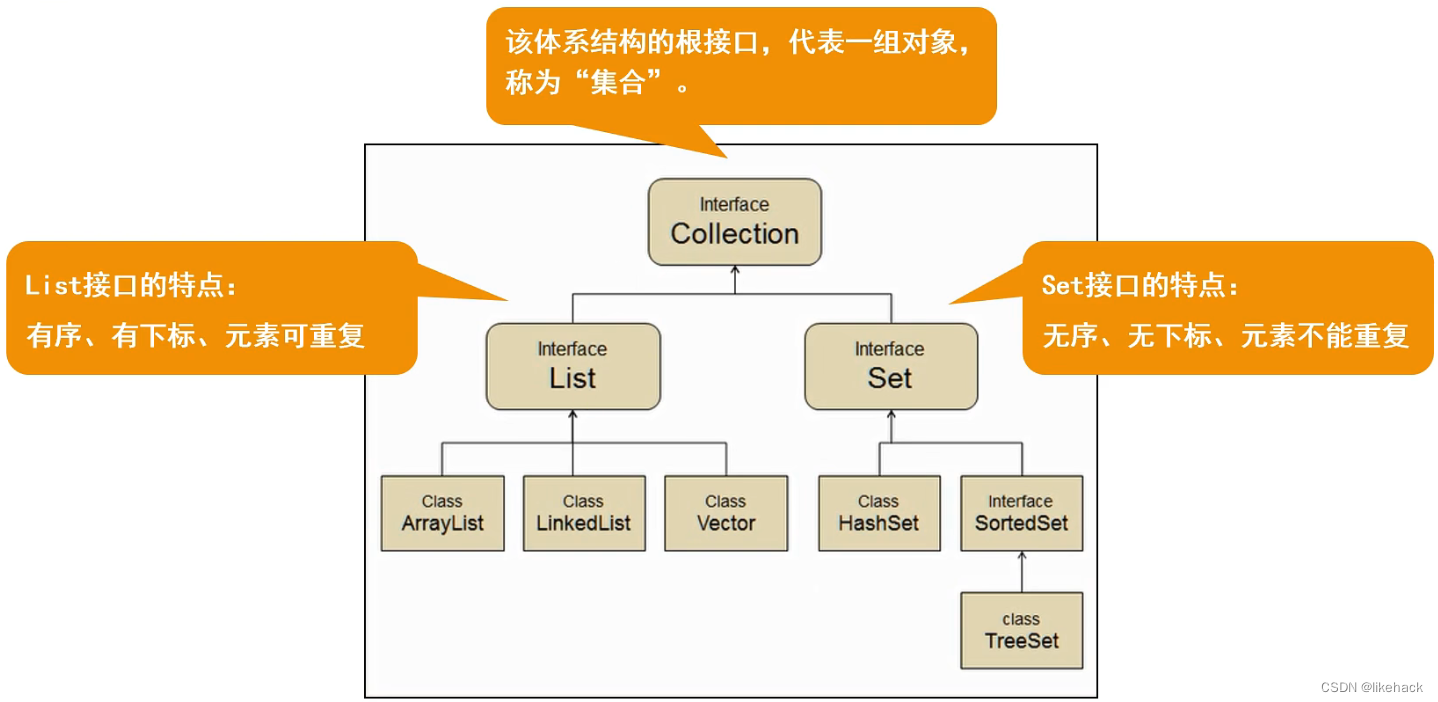
Collection接口:
常用方法:
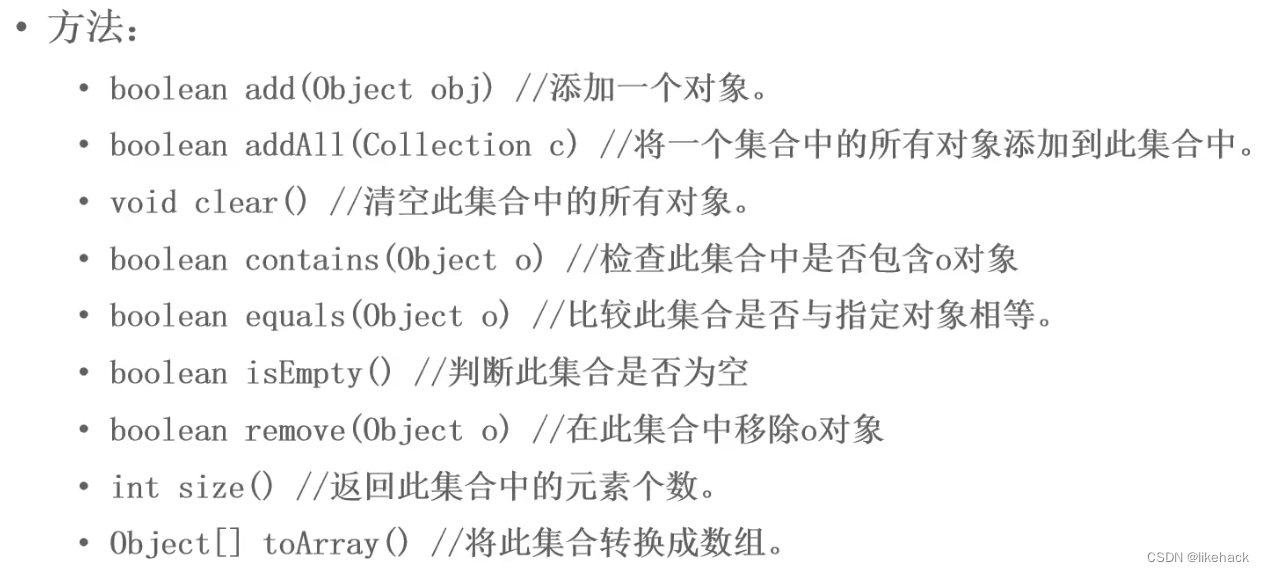
案例
使用ArrayList实现Colleciton接口,存储String类型数据
public class testCollectionSet {
    public static void main(String[] args) {
        //创建集合
        Collection collection=new ArrayList();
        addElement(collection);
        traverseElement(collection);
        judgeElement(collection);
        deleteElement(collection);

    }

    //判断
    private static void judgeElement(Collection collection) {
        System.out.println(collection.contains("西瓜"));
        System.out.println(collection.isEmpty());
        System.out.println("----------判断元素结束-------------");

    }

    //删除元素
    private static void deleteElement(Collection collection) {
        collection.remove("香蕉");
        System.out.println(collection);
        collection.clear();
        System.out.println("clear后元素个数:"+collection.size());
        System.out.println("----------删除元素结束-------------");

    }

    //遍历元素
    private static void traverseElement(Collection collection) {

        //增强for
        /*for (Object object:collection) {
            System.out.println(object);
        }*/
        //使用迭代器
        Iterator iterator=collection.iterator();
        while(iterator.hasNext()){
            System.out.println(iterator.next());
            //使用迭代器删除集合中的元素
            iterator.remove();
        }
        System.out.println(collection.size());
        System.out.println("----------遍历元素结束-------------");

    }

    //添加元素
    private static void addElement(Collection collection) {
        collection.add("西瓜");
        collection.add("火龙果");
        collection.add("香蕉");
        System.out.println(collection);
        System.out.println("元素个数:"+collection.size());
        System.out.println("----------添加元素结束-------------");
    }
}
使用ArrayList实现Colleciton接口,存储自定义类对象
Student类(后面的测试实现类所使用的都是该类)
public class Student{
	private String name;
    private int age;
    public Student(){}

    public Student(String name, int age) {
        this.name = name;
        this.age = age;
    }

    public String getName() {
        return name;
    }

    public void setName(String name) {
        this.name = name;
    }

    public int getAge() {
        return age;
    }

    public void setAge(int age) {
        this.age = age;
    }
    //alt+insert自动重写toString方法
    @Override
    public String toString() {
        return "Student{" +
                "name='" + name + '\'' +
                ", age=" + age +
                '}';
    }
    @Override
    public boolean equals(Object o) {
        if (this == o) return true;
        if (o == null || getClass() != o.getClass()) return false;
        Student student = (Student) o;
        return age == student.age &&
                Objects.equals(name, student.name);
    }

    @Override
    public int hashCode() {
        return Objects.hash(name, age);
    }

    //先按姓名比较再按年龄比较
    @Override
    public int compareTo(Student o) {
        int n1=this.getName().compareTo(o.getName());
        int n2=this.age-o.age;
        return n1==0?n2:n1;
    }
}
实现方法
public class testCollectionSetForStudent {
    public static void main(String[] args) {
        Collection collection=new ArrayList();
        Student s1=new Student("木头人",18);
        Student s2=new Student("java",20);
        Student s3=new Student("python",21);
        addElement(collection, s1, s2, s3);
        traverseElement(collection);
        judgeElement(collection, s1);
        deleteElement(collection, s3);
    }

    //删除
    private static void deleteElement(Collection collection, Student s3) {
        System.out.println("-------------删除----------");
        collection.remove(s3);
        System.out.println(collection);
        System.out.println("元素个数:"+collection.size());
        collection.clear();
        System.out.println("clear后元素个数:"+collection.size());
    }

    //判断
    private static void judgeElement(Collection collection, Student s1) {
        System.out.println("----------判断-------------");
        System.out.println(collection.contains(s1));
        System.out.println(collection.isEmpty());
    }

    //遍历
    private static void traverseElement(Collection collection) {
        System.out.println("-------------遍历----------");
        //增强for
        /*for (Object object:collection) {
            Student s=(Student) object;
            System.out.println(s.toString());
        }*/
        //迭代器
        Iterator iterator=collection.iterator();
        while (iterator.hasNext()){
            System.out.println(iterator.next());
//            iterator.remove();
        }
    }

    //添加
    private static void addElement(Collection collection, Student s1, Student s2, Student s3) {
        System.out.println("----------添加-----------");
        collection.add(s1);
        collection.add(s2);
        collection.add(s3);
        //List接口实现类,可重复添加元素
        collection.add(s3);
        System.out.println(collection);
        System.out.println("元素个数:"+collection.size());
    }
}
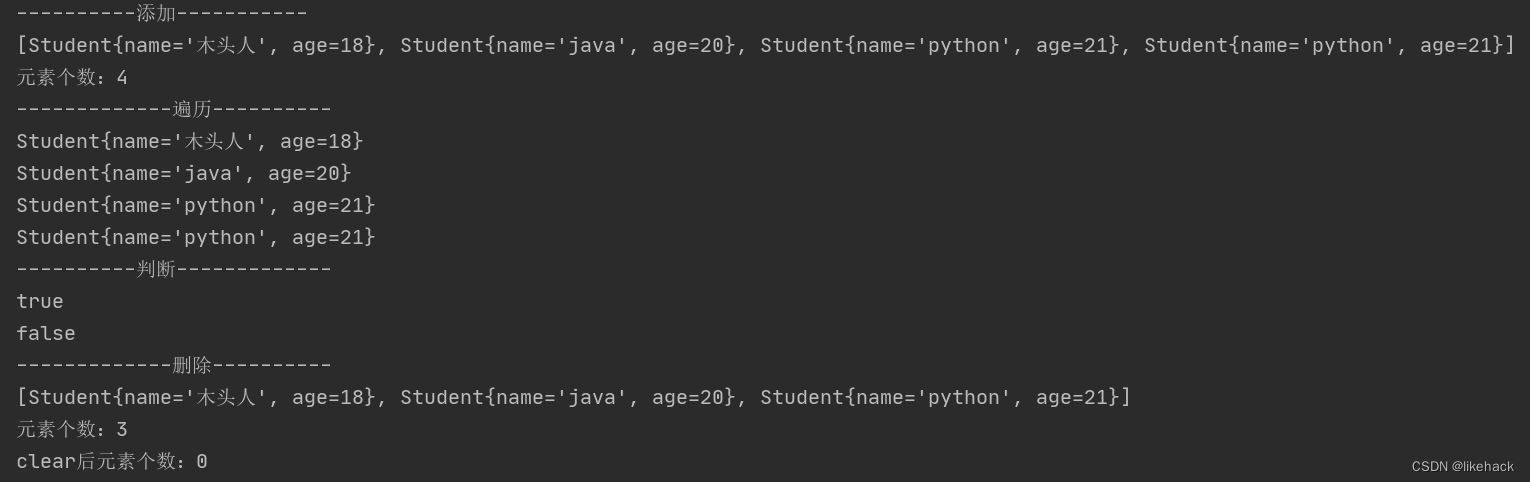
代码执行结果:
List接口
常用方法
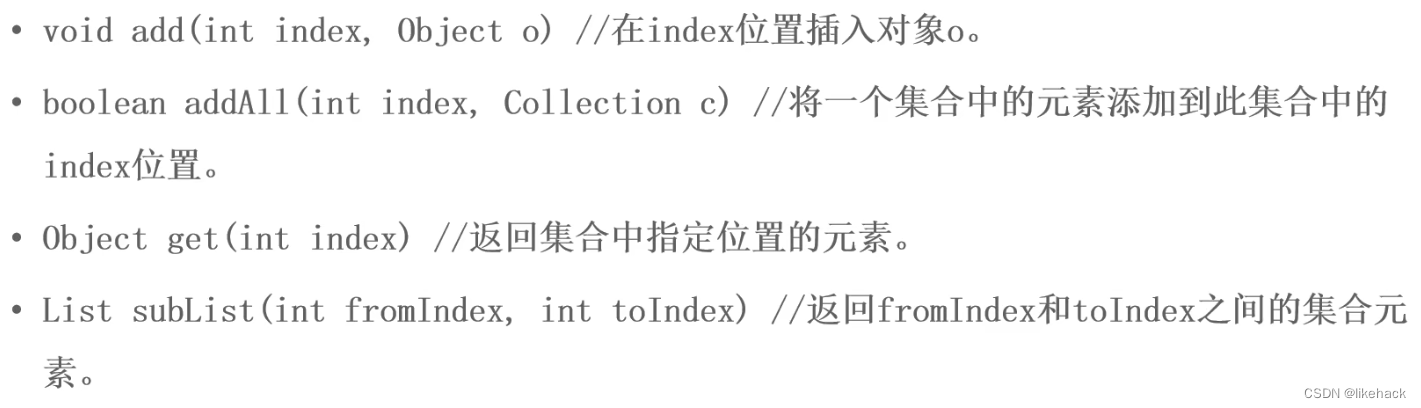
特点: 有序,有下标,元素可重复。
实现类: ArrayList,LinkList,Vector(不常用,了解即可)
案例
List接口添加基本数据类型时会包含一个自动装箱(包装类)的操作。
public class testListInterface {
    public static void main(String[] args) {
        //创建集合
        List list=new ArrayList();
        addElement(list);
//        traverseElement(list);

        judgeElement(list);

        //subList
        System.out.println("----------子列表-------------");
        List subList=list.subList(0,2);
        System.out.println(subList);

        deleteElement(list);
        //获取元素位置
        System.out.println("----------获取元素位置-------------");
        System.out.println(list.indexOf("火龙果"));

    }

    //判断
    private static void judgeElement(List list) {
        System.out.println("----------判断-------------");
        System.out.println(list.contains("西瓜"));
        System.out.println(list.contains(20));
        System.out.println(list.isEmpty());

    }

    //删除元素
    private static void deleteElement(List list) {
        System.out.println("----------删除-------------");
        list.remove("香蕉");
        list.remove(0);
        //删除基本类型元素时,需要类型转换
//        list.remove(20);会下标越界
//        list.remove((Object) 20);
        list.remove(new Integer(20));
        System.out.println(list);
        list.clear();
        System.out.println("clear后元素个数:"+list.size());

    }

    //遍历元素
    private static void traverseElement(List list) {
        System.out.println("----------遍历-------------");
        //增强for
        System.out.println("------增强for------");
        for (Object object:list) {
            System.out.println(object);
        }
        //for循环
        System.out.println("------for循环------");
        for (int i=0;i<list.size();i++) {
            System.out.println(list.get(i));
        }
        //使用迭代器
        System.out.println("------迭代器------");
        Iterator iterator=list.iterator();
        while(iterator.hasNext()){
            System.out.println(iterator.next());
            //使用迭代器删除集合中的元素
//            iterator.remove();
        }
        System.out.println(list.size());
        //使用列表迭代器
        System.out.println("------列表迭代器------");
        //ListIterator可以从前或者从后开始遍历,添加,删除,修改元素
        ListIterator listIterator=list.listIterator();
        System.out.println("------从前往后------");
        while (listIterator.hasNext()){
            System.out.println(listIterator.nextIndex()+":"+listIterator.next());
        }
        System.out.println("------从后往前------");
        while (listIterator.hasPrevious()){
            System.out.println(listIterator.previousIndex()+":"+listIterator.previous());
        }


    }

    //添加元素
    private static void addElement(List list) {
        System.out.println("----------添加-------------");
        list.add("西瓜");
        list.add("火龙果");
        list.add(20);
        list.add(0,"香蕉");
        System.out.println(list);
        System.out.println("元素个数:"+list.size());
    }
}
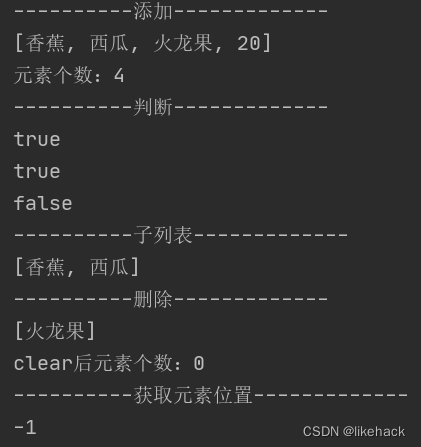
代码执行结果
ArrayList
特点
- 数组结构实现,需要开辟连续的空间,查询快,增删慢
- jdk1.2版本引入,运行效率快,线程不安全
- 默认容量大小:DEFAULT_CAPACITY=10
- 没有添加元素时容量为0,size为0,添加元素以后,容量变为10,size等于实际添加的元素个数
- 存放元素的数组:Object[] elementData
案例
public class testArrayList {
    public static void main(String[] args) {
        ArrayList arrayList=new ArrayList();
        Student s1=new Student("木头人",18);
        Student s2=new Student("张学友",20);
        Student s3=new Student("周杰伦",21);

        //增加元素
        addElement(arrayList, s1, s2, s3);

        //遍历元素
        traverseElement(arrayList);

        //判断元素
        judgeElement(arrayList, s1);

        //查找元素
        System.out.println("-------------查找----------");
        System.out.println(arrayList.indexOf(new Student("张学友",20)));
        //删除元素
//        deleteElement(arrayList, s3);

    }
    //删除
    private static void deleteElement(ArrayList arrayList, Student s3) {
        System.out.println("-------------删除----------");
        arrayList.remove(s3);
        System.out.println(arrayList);
        System.out.println("元素个数:"+arrayList.size());
        arrayList.clear();
        System.out.println("clear后元素个数:"+arrayList.size());
    }

    //判断
    private static void judgeElement(ArrayList arrayList, Student s1) {
        System.out.println("----------判断-------------");
        System.out.println(arrayList.contains(s1));
        System.out.println(arrayList.isEmpty());
    }

    //遍历
    private static void traverseElement(ArrayList arrayList) {
        System.out.println("-------------遍历----------");
        //增强for
        /*for (Object object:arrayList) {
            Student s=(Student) object;
            System.out.println(s.toString());
        }*/
        //迭代器
        System.out.println("------迭代器--------");
        Iterator iterator=arrayList.iterator();
        while (iterator.hasNext()){
            System.out.println(iterator.next());
//            iterator.remove();
        }
        //使用列表迭代器
        System.out.println("------列表迭代器--------");
        //ListIterator可以从前或者从后开始遍历,添加,删除,修改元素
        ListIterator listIterator=arrayList.listIterator();
        System.out.println("------从前往后------");
        while (listIterator.hasNext()){
            System.out.println(listIterator.nextIndex()+":"+listIterator.next());
        }
        System.out.println("------从后往前------");
        while (listIterator.hasPrevious()){
            System.out.println(listIterator.previousIndex()+":"+listIterator.previous());
        }
    }

    //添加
    private static void addElement(ArrayList arrayList, Student s1, Student s2, Student s3) {
        System.out.println("----------添加-----------");
        arrayList.add(s1);
        arrayList.add(s2);
        arrayList.add(s3);
        //List接口实现类,可重复添加元素
        arrayList.add(s3);
        System.out.println(arrayList);
        System.out.println("元素个数:"+arrayList.size());
    }

}
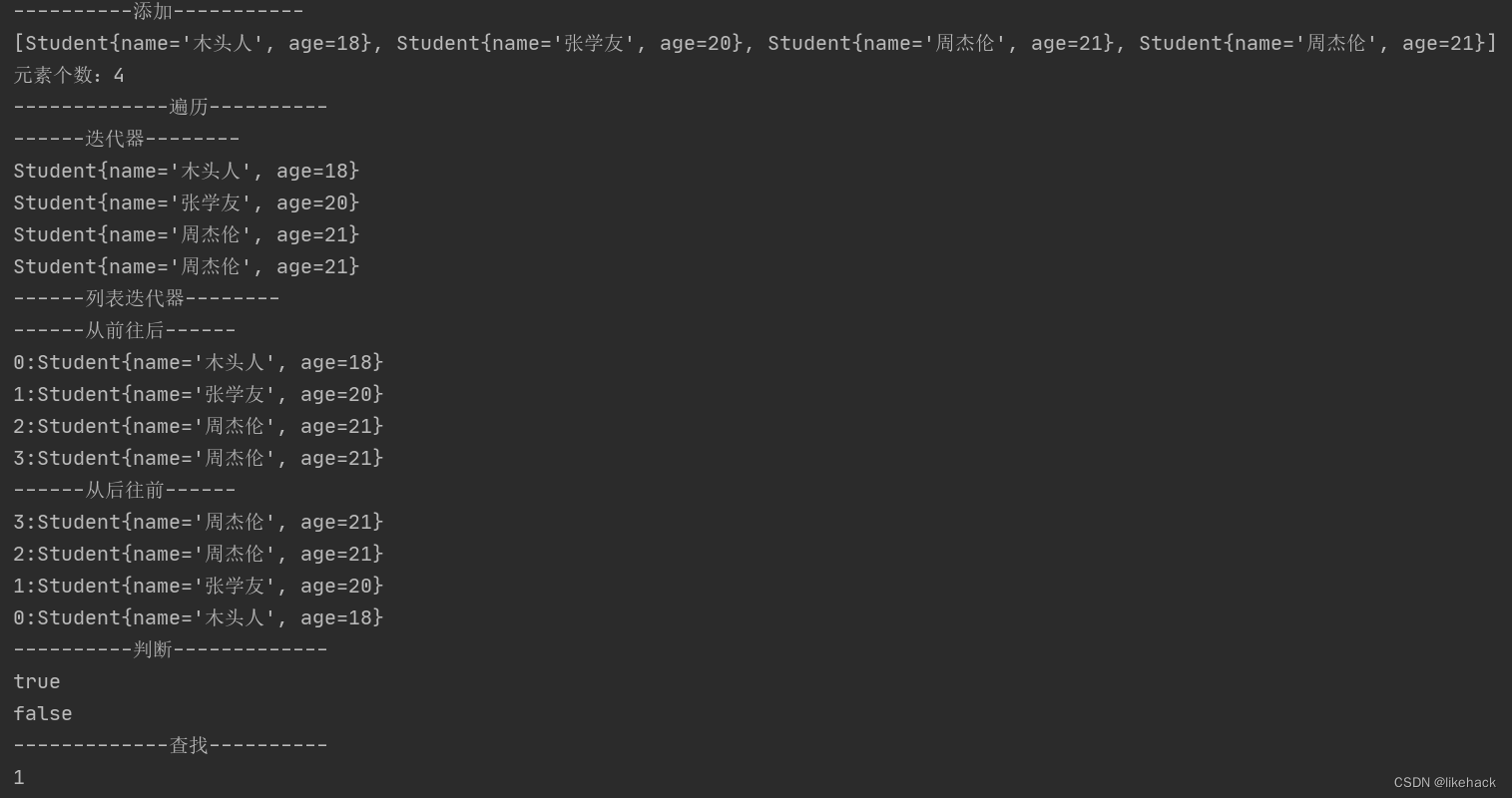
代码执行结果
LinkList
特点
- 链表结构实现,不需要连续的空间,增删快,查询慢
案例
public class testLinkList {
    public static void main(String[] args) {
        LinkedList linkedList=new LinkedList();
        Student s1=new Student("木头人",18);
        Student s2=new Student("张学友",20);
        Student s3=new Student("周杰伦",21);
        //增加元素
        addElement(linkedList, s1, s2, s3);

        //遍历元素
        traverseElement(linkedList);

        //判断元素
        judgeElement(linkedList, s1);

        //查找元素
        System.out.println("-------------查找----------");
        //如果想要使用这中方法进行查找或者删除的话,需要重写Student的equals方法
        System.out.println(linkedList.indexOf(new Student("张学友",20)));
        //删除元素
        deleteElement(linkedList, s3);

    }
    //删除
    private static void deleteElement(LinkedList linkedList, Student s3) {
        System.out.println("-------------删除----------");
        linkedList.remove(s3);
        System.out.println(linkedList);
        System.out.println("元素个数:"+linkedList.size());
        linkedList.clear();
        System.out.println("clear后元素个数:"+linkedList.size());
    }

    //判断
    private static void judgeElement(LinkedList linkedList, Student s1) {
        System.out.println("----------判断-------------");
        System.out.println(linkedList.contains(s1));
        System.out.println(linkedList.isEmpty());
    }

    //遍历
    private static void traverseElement(LinkedList linkedList) {
        System.out.println("-------------遍历----------");
        //增强for
//        System.out.println("------增强for-------");
//        for (Object object:linkedList) {
//            System.out.println(object);
//        }
        //for循环
        System.out.println("------for循环------");
        for (int i=0;i<linkedList.size();i++) {
            System.out.println(linkedList.get(i));
        }
        //迭代器
        System.out.println("------迭代器---------");
        Iterator it=linkedList.iterator();
        while (it.hasNext()){
            System.out.println(it.next());
//            iterator.remove();
        }
        //使用列表迭代器
        System.out.println("------列表迭代器--------");
        //ListIterator可以从前或者从后开始遍历,添加,删除,修改元素
        ListIterator listIterator=linkedList.listIterator();
        System.out.println("------从前往后------");
        while (listIterator.hasNext()){
            System.out.println(listIterator.nextIndex()+":"+listIterator.next());
        }
//        System.out.println("------从后往前------");
//        while (listIterator.hasPrevious()){
//            System.out.println(listIterator.previousIndex()+":"+listIterator.previous());
//        }
        }
    }

    //添加
    private static void addElement(LinkedList linkedList, Student s1, Student s2, Student s3) {
        System.out.println("----------添加-----------");
        linkedList.add(s1);
        linkedList.add(s2);
        linkedList.add(s3);
        //List接口实现类,可重复添加元素
        linkedList.add(s3);
        System.out.println(linkedList);
        System.out.println("元素个数:"+linkedList.size());
    }
}
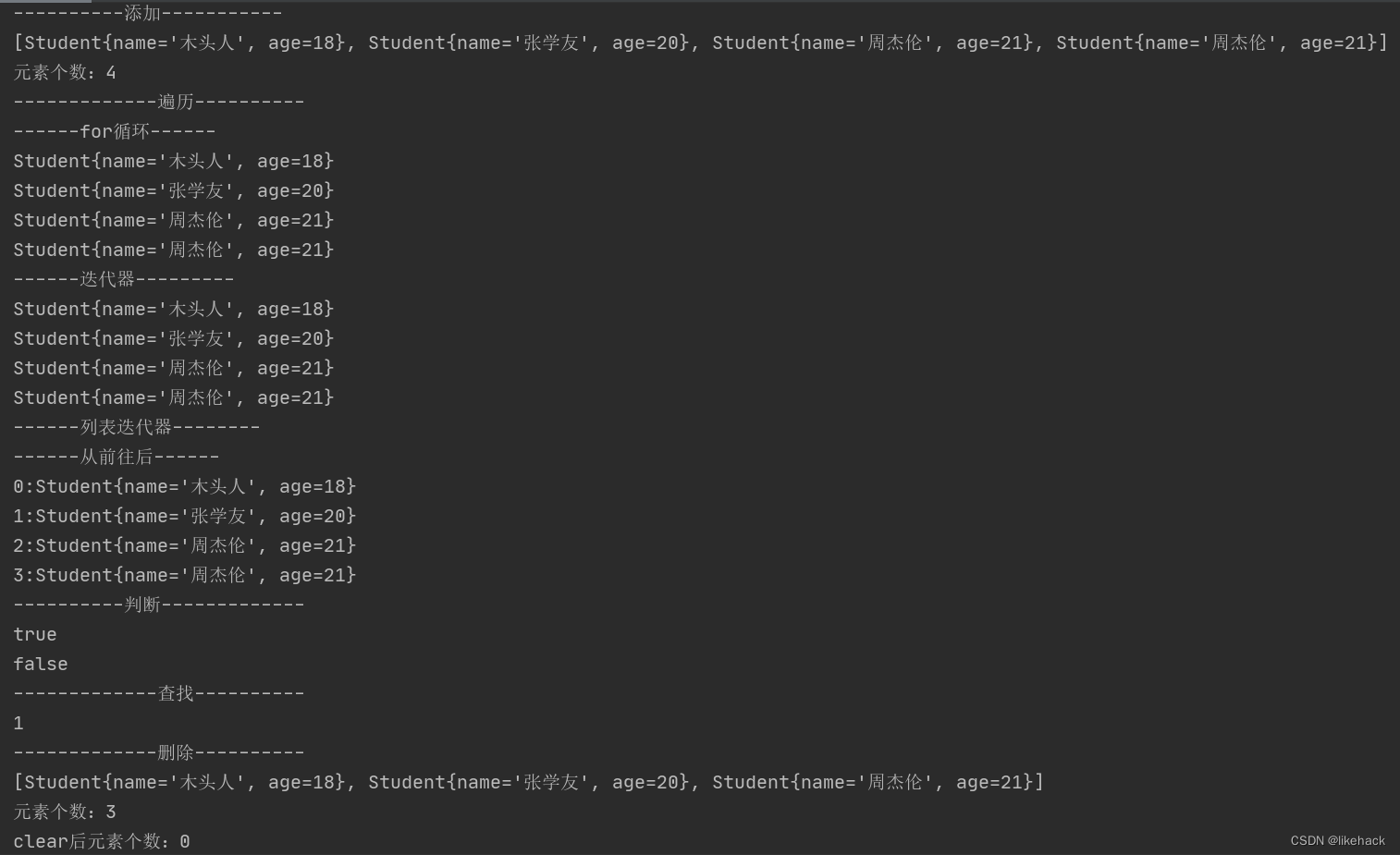
代码执行结果
Vector
特点
- 数组结构实现,查询快,增删慢
- jdk1.0版本引入,运行效率慢,线程安全
案例
public class testVector {
    public static void main(String[] args) {
        Vector vector=new Vector();
        Student s1=new Student("木头人",18);
        Student s2=new Student("张学友",20);
        Student s3=new Student("周杰伦",21);

        //增加元素
        addElement(vector, s1, s2, s3);

        //遍历元素
        traverseElement(vector);

        //判断元素
        judgeElement(vector, s1);
//
        //查找元素
        System.out.println("-------------查找----------");
        System.out.println(vector.indexOf(new Student("张学友",20)));
        //删除元素
        deleteElement(vector, s3);

    }
    //删除
    private static void deleteElement(Vector vector, Student s3) {
        System.out.println("-------------删除----------");
        vector.remove(s3);
        System.out.println(vector);
        System.out.println("元素个数:"+vector.size());
        vector.clear();
        System.out.println("clear后元素个数:"+vector.size());
    }

    //判断
    private static void judgeElement(Vector vector, Student s1) {
        System.out.println("----------判断-------------");
        System.out.println(vector.contains(s1));
        System.out.println(vector.isEmpty());
    }

    //遍历
    private static void traverseElement(Vector vector) {
        System.out.println("-------------遍历----------");
        //增强for
        /*for (Object object:vector) {
            Student s=(Student) object;
            System.out.println(s.toString());
        }*/
        //迭代器
        System.out.println("------迭代器--------");
        Iterator iterator=vector.iterator();
        while (iterator.hasNext()){
            System.out.println(iterator.next());
//            iterator.remove();
        }
        //使用列表迭代器
        System.out.println("------列表迭代器--------");
        //ListIterator可以从前或者从后开始遍历,添加,删除,修改元素
        ListIterator listIterator=vector.listIterator();
        System.out.println("------从前往后------");
        while (listIterator.hasNext()){
            System.out.println(listIterator.nextIndex()+":"+listIterator.next());
        }
//        System.out.println("------从后往前------");
//        while (listIterator.hasPrevious()){
//            System.out.println(listIterator.previousIndex()+":"+listIterator.previous());
//        }
        }
        System.out.println("------枚举器--------");
        Enumeration en=vector.elements();
        while (en.hasMoreElements()){
            System.out.println(en.nextElement());
        }

    }

    //添加
    private static void addElement(Vector vector, Student s1, Student s2, Student s3) {
        System.out.println("----------添加-----------");
        vector.add(s1);
        vector.add(s2);
        vector.add(s3);
        //List接口实现类,可重复添加元素
        vector.add(s3);
        System.out.println(vector);
        System.out.println("元素个数:"+vector.size());
    }
}
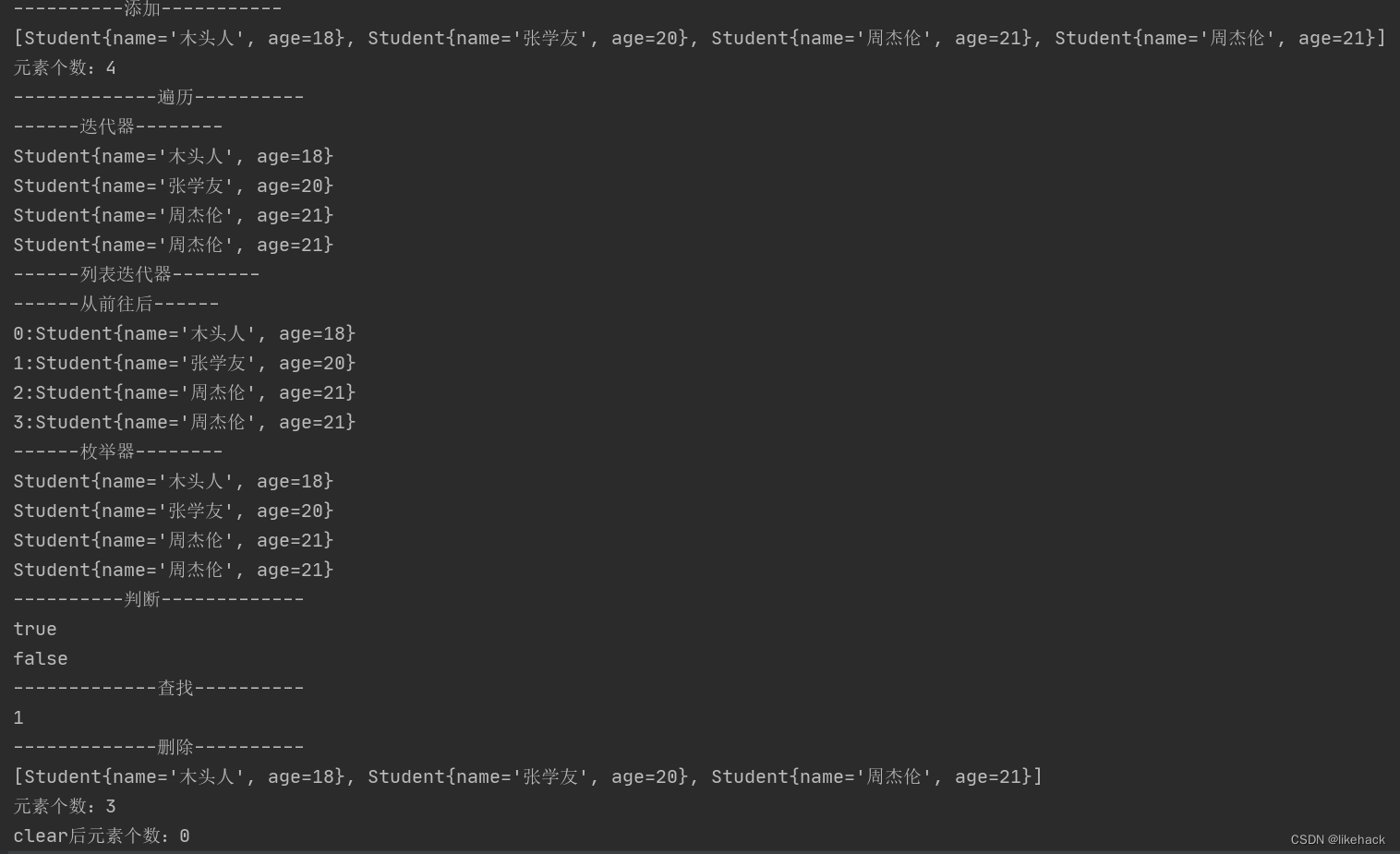
代码执行结果
Set接口
特点: 无序,无下标,元素不可重复。
实现类: HashSet,SortedSet,TreeSet
案例
public class testSet {
    public static void main(String[] args) {
        Set<String> set=new HashSet<>();
        addElement(set);
        traverseElement(set);
        judgeElement(set);
        deleteElement(set);
    }

    private static void judgeElement(Set<String> set) {
        System.out.println("----------判断-------------");
        System.out.println(set.contains("李四"));
        System.out.println(set.contains("木头人"));
        System.out.println(set.isEmpty());
    }


    //遍历元素
    private static void traverseElement(Set<String> set) {
        System.out.println("----------遍历-------------");
        //无序没有下标,所以不能使用常规for循环遍历
        //增强for
        System.out.println("------增强for------");
        for (String string:set) {
            System.out.println(string);
        }
        //使用迭代器
        System.out.println("------迭代器------");
        Iterator iterator=set.iterator();
        while(iterator.hasNext()){
            System.out.println(iterator.next());
            //使用迭代器删除集合中的元素
//            iterator.remove();
        }
        System.out.println(set.size());
    }

    private static void deleteElement(Set<String> set) {
        set.remove("张三");
        System.out.println(set);
        //清空
        set.clear();
        System.out.println(set);
    }

    private static void addElement(Set<String> set) {
        set.add("张三");
        set.add("李四");
        set.add("王五");
        set.add("张三");
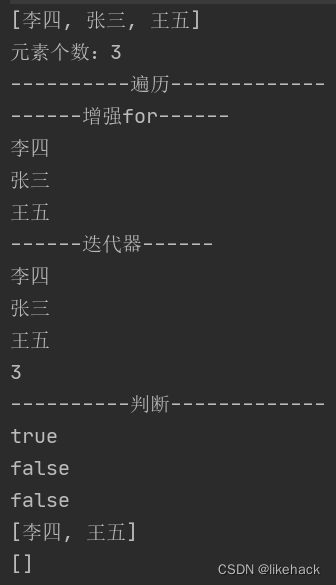
        //[李四, 张三, 王五]      无序
        System.out.println(set);
        //元素个数:3            不可重复
        System.out.println("元素个数:"+set.size());
    }
}
代码执行结果
HashSet
特点
- 基于HashCode计算元素存放位置,存入元素哈希码相同时,通过equals确认元素是否相同,相同则拒绝后者进入
- 存储结构:哈希表(数组+链表+红黑树(红黑树是一种含有红黑结点并能自平衡的二叉查找树。))
- 存储过程:
(1)根据hashcode计算存储位置,为空,直接存入,不为空执行第二步
(2)执行equals方法,如果为true,元素重复,不存入;否则,形成链表
案例
HashSet存储字符串信息
public class testHashSet {
    public static void main(String[] args) {
        HashSet<String> set=new HashSet<>();
        addElement(set);
        traverseElement(set);
        judgeElement(set);
        deleteElement(set);
    }

    private static void judgeElement(Set<String> set) {
        System.out.println("----------判断-------------");
        System.out.println(set.contains("李四"));
        System.out.println(set.contains("木头人"));
        System.out.println(set.isEmpty());
    }

    //遍历元素
    private static void traverseElement(Set<String> set) {
        System.out.println("----------遍历-------------");
        //增强for
        System.out.println("------增强for------");
        for (String string:set) {
            System.out.println(string);
        }
        //使用迭代器
        System.out.println("------迭代器------");
        Iterator iterator=set.iterator();
        while(iterator.hasNext()){
            System.out.println(iterator.next());
            //使用迭代器删除集合中的元素
//            iterator.remove();
        }
        System.out.println(set.size());
    }

    private static void deleteElement(Set<String> set) {
        System.out.println("------删除------");
        set.remove("张三");
        System.out.println(set);
        //清空
        set.clear();
        System.out.println(set);
    }

    private static void addElement(Set<String> set) {
        set.add("张三");
        set.add("李四");
        set.add("王五");
        set.add("张三");
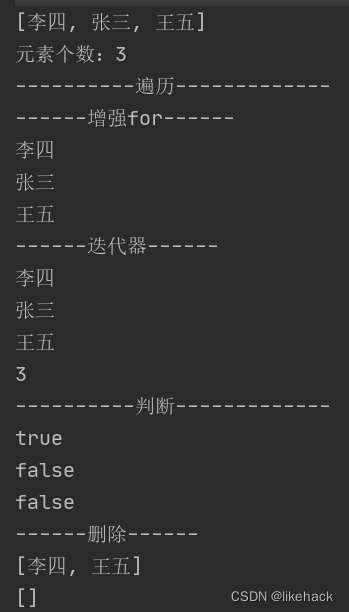
        //[李四, 张三, 王五]      无序
        System.out.println(set);
        //元素个数:3            不可重复
        System.out.println("元素个数:"+set.size());
    }
}
代码执行结果
HashSet存储自定义类对象
public class testHashSetForStudent {
    public static void main(String[] args) {
        HashSet<Student> hashSet=new HashSet<>();
        Student s1=new Student("小明",18);
        Student s2=new Student("小红",20);
        Student s3=new Student("小华",19);
        Student s4=s1;

        addStudent(hashSet, s1, s2, s3, s4);

        traverseElement(hashSet);

        judgeElement(hashSet, s1);

        deleteElement(hashSet, s2);

    }

    private static void judgeElement(HashSet<Student> hashSet, Student s1) {
        System.out.println("----------判断-------------");
        System.out.println(hashSet.contains(s1));
        System.out.println(hashSet.isEmpty());
    }

    private static void traverseElement(HashSet<Student> hashSet) {
        System.out.println("-------------遍历------------");
        //增强for
        System.out.println("------增强for--------");
        for (Object object:hashSet) {
            Student s=(Student) object;
            System.out.println(s.toString());
        }
        //迭代器
        System.out.println("------迭代器--------");
        Iterator iterator=hashSet.iterator();
        while (iterator.hasNext()){
            System.out.println(iterator.next());
//            iterator.remove();
        }
    }

    private static void deleteElement(HashSet<Student> hashSet, Student s2) {
        System.out.println("----------删除---------");
        hashSet.remove(s2);
        hashSet.remove(new Student("小明",18));
        System.out.println(hashSet);
        hashSet.clear();
        System.out.println(hashSet);
    }

    private static void addStudent(HashSet<Student> set1, Student s1, Student s2, Student s3, Student s4) {
        System.out.println("----------添加---------");
        set1.add(s1);
        set1.add(s2);
        set1.add(s3);
        set1.add(s4);
        set1.add(new Student("小明",18));
        System.out.println(set1);
        System.out.println("元素个数:"+set1.size());
    }
}
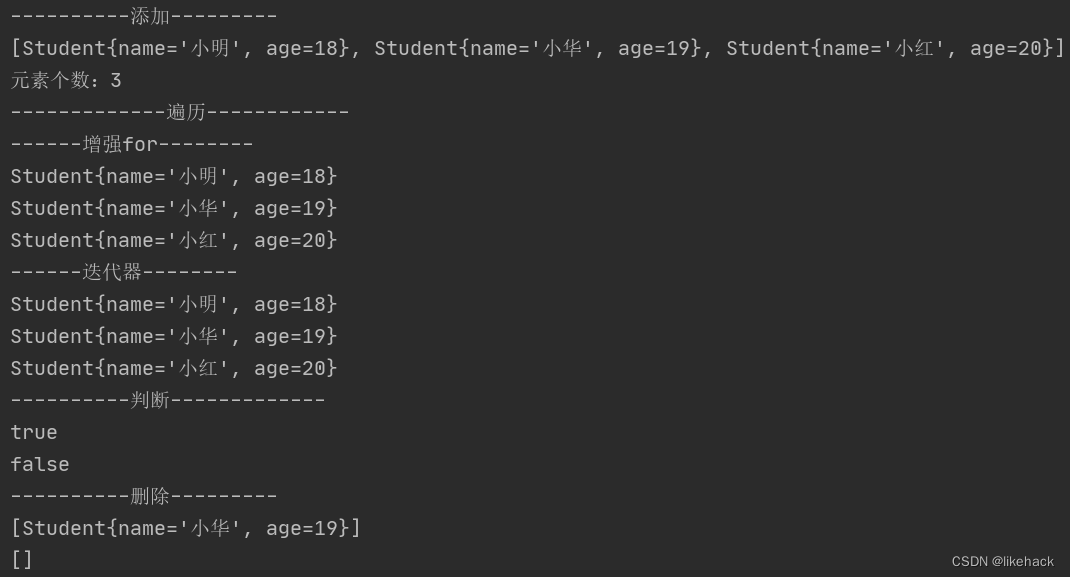
代码执行结果
TreeSet
特点
- 基于排序顺序实现元素不重复
- 实现了SortedSet接口,对集合元素自动排序
- 元素对象的类型必须实现Comparable接口,指定排序规则
- 通过CompareTo来确定重复元素
案例
public class testTreeSet {
    public static void main(String[] args) {
        TreeSet<String> treeSet=new TreeSet<>();
        addElement(treeSet);
        traverseElement(treeSet);
        judgeElement(treeSet);
        deleteElement(treeSet);
    }

    private static void judgeElement(TreeSet<String> TreeSet) {
        System.out.println("----------判断-------------");
        System.out.println(TreeSet.contains("李四"));
        System.out.println(TreeSet.contains("木头人"));
        System.out.println(TreeSet.isEmpty());
    }

    //遍历元素
    private static void traverseElement(TreeSet<String> TreeSet) {
        System.out.println("----------遍历-------------");
        //增强for
        System.out.println("------增强for------");
        for (String string:TreeSet) {
            System.out.println(string);
        }
        //使用迭代器
        System.out.println("------迭代器------");
        Iterator iterator=TreeSet.iterator();
        while(iterator.hasNext()){
            System.out.println(iterator.next());
            //使用迭代器删除集合中的元素
//            iterator.remove();
        }
        System.out.println(TreeSet.size());
    }

    private static void deleteElement(TreeSet<String> TreeSet) {
        System.out.println("------删除------");
        TreeSet.remove("张三");
        System.out.println(TreeSet);
        //清空
        TreeSet.clear();
        System.out.println(TreeSet);
    }

    private static void addElement(TreeSet<String> TreeSet) {
        TreeSet.add("李四");
        TreeSet.add("张三");
        TreeSet.add("王五");
        TreeSet.add("张三");
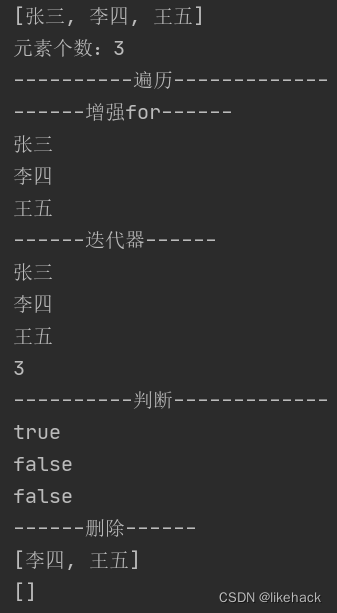
        //[李四, 张三, 王五]      无序
        System.out.println(TreeSet);
        //元素个数:3            不可重复
        System.out.println("元素个数:"+TreeSet.size());
    }
}
代码执行结果
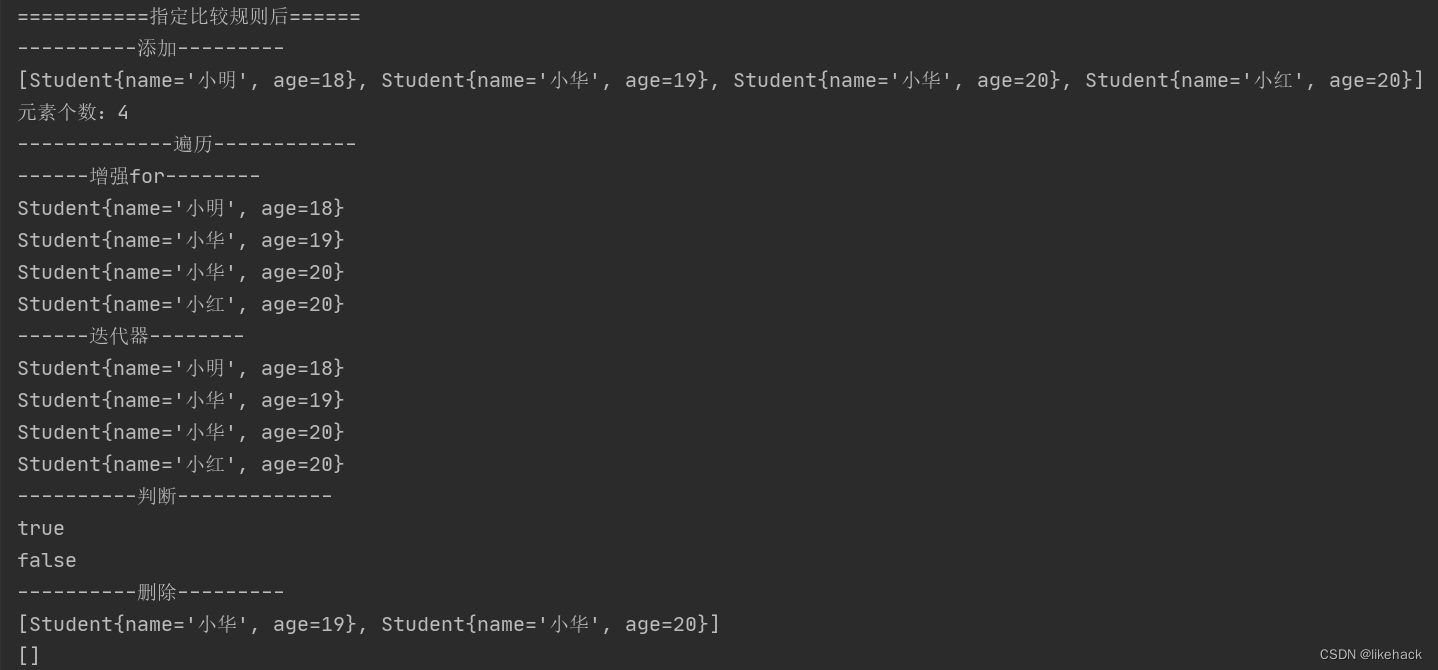
指定排序规则有两种方法:
- 自定义类对象实现Comparable接口,指定排序规则(见Student类中的compareTo方法)
- 创建集合时指定排序规则
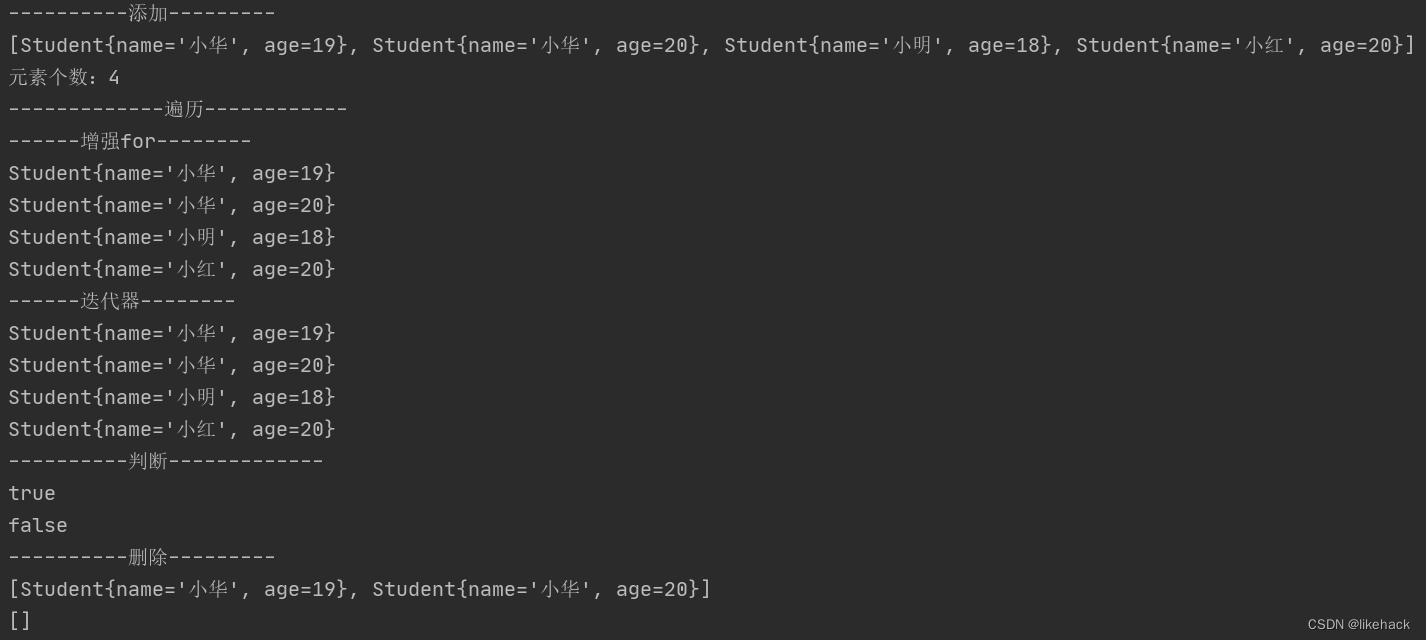
public class testTreeSetForStudent {
    public static void main(String[] args) {
        TreeSet<Student> treeSet=new TreeSet<>();
        Student s1=new Student("小明",18);
        Student s2=new Student("小红",20);
        Student s3=new Student("小华",19);
        Student s4=new Student("小华",20);

        addStudent(treeSet, s1, s2, s3, s4);
        traverseElement(treeSet);
        judgeElement(treeSet, s1);
        deleteElement(treeSet, s2);

        //创建集合并指定比较规则
        TreeSet<Student> students=new TreeSet<>(new Comparator<Student>() {
            @Override
            public int compare(Student o1, Student o2) {
                int n1=o1.getAge()-o2.getAge();
                int n2=o1.getName().compareTo(o2.getName());
                return n1==0?n2:n1;
            }
        });
        System.out.println("===========指定比较规则后======");
        addStudent(students, s1, s2, s3, s4);
        traverseElement(students);
        judgeElement(students, s1);
        deleteElement(students, s2);
    }

    private static void judgeElement(TreeSet<Student> treeSet, Student s1) {
        System.out.println("----------判断-------------");
        System.out.println(treeSet.contains(s1));
        System.out.println(treeSet.isEmpty());
    }

    private static void traverseElement(TreeSet<Student> treeSet) {
        System.out.println("-------------遍历------------");
        //增强for
        System.out.println("------增强for--------");
        for (Object object:treeSet) {
            Student s=(Student) object;
            System.out.println(s.toString());
        }
        //迭代器
        System.out.println("------迭代器--------");
        Iterator iterator=treeSet.iterator();
        while (iterator.hasNext()){
            System.out.println(iterator.next());
//            iterator.remove();
        }
    }

    private static void deleteElement(TreeSet<Student> treeSet, Student s2) {
        System.out.println("----------删除---------");
        treeSet.remove(s2);
        treeSet.remove(new Student("小明",18));
        System.out.println(treeSet);
        treeSet.clear();
        System.out.println(treeSet);
    }

    private static void addStudent(TreeSet<Student> treeSet, Student s1, Student s2, Student s3, Student s4) {
        System.out.println("----------添加---------");
        treeSet.add(s1);
        treeSet.add(s2);
        treeSet.add(s3);
        treeSet.add(s4);
        treeSet.add(new Student("小明",18));
        System.out.println(treeSet);
        System.out.println("元素个数:"+treeSet.size());
    }
}
代码执行结果
其他相关文章
- Java知识梳理:Java知识梳理
- Java知识梳理–内部类:Java知识梳理–内部类
- Java常用类–Object类:Java常用类–Object类
- Java常用类–包装类:Java常用类–包装类
- Java常用类–String类:java常用类–String类
- Java常用类–时间相关类:Java常用类–时间相关类
- Java常用类–BigDecimal类和System类:Java常用类–BigDecimal类和System类


 2万+


 扫一扫


 被折叠的 条评论
为什么被折叠?
 到【灌水乐园】发言


