


 文章介绍了GitHub上的imagecorruptions库,用于在Python中对图像进行15种类型的增强,如噪声、模糊、失真等。提供了安装方法、函数用法和示例,演示了如何使用该库进行图像增强并保存结果。
1.函数库安装
pip install imagecorruptions
2.函数介绍
def corrupt(image, severity=1, corruption_name=None, corruption_number=-1)
    """This function returns a corrupted version of the given image.

    Args:
        image (numpy.ndarray):      image to corrupt; a numpy array in [0, 255], expected datatype is np.uint8
                                    expected shape is either (height x width x channels) or (height x width);
                                    width and height must be at least 32 pixels;
                                    channels must be 1 or 3;
        severity (int):             strength with which to corrupt the image; an integer in [1, 5]
        corruption_name (str):      specifies which corruption function to call, must be one of
                                        'gaussian_noise', 'shot_noise', 'impulse_noise', 'defocus_blur',
                                        'glass_blur', 'motion_blur', 'zoom_blur', 'snow', 'frost', 'fog',
                                        'brightness', 'contrast', 'elastic_transform', 'pixelate', 'jpeg_compression',
                                        'speckle_noise', 'gaussian_blur', 'spatter', 'saturate';
                                    the last four are validation corruptions
        corruption_number (int):    the position of the corruption_name in the above list; an integer in [0, 18];
                                        useful for easy looping; 15, 16, 17, 18 are validation corruption numbers
    Returns:
        numpy.ndarray:              the image corrupted by a corruption function at the given severity; same shape as input
    """
severity为图像增强的强度,强度区间为[1,5]
corruption_name为增强的类型:分别为是 ‘gaussian_noise’, ‘shot_noise’, ‘impulse_noise’, ‘defocus_blur’, ‘glass_blur’, ‘motion_blur’, ‘zoom_blur’, ‘snow’, ‘frost’, ‘fog’, ‘brightness’, ‘contrast’, ‘elastic_transform’, ‘pixelate’, ‘jpeg_compression’,‘speckle_noise’, ‘gaussian_blur’, ‘spatter’, ‘saturate’ 共15种类型
3.使用教程
from imagecorruptions import corrupt
import cv2
import numpy as np

image = cv2.imread('2.jpg')   #被处理的图片
corrupted_image = corrupt(image, corruption_name='snow', severity=5)
cv2.imshow('Image', image)
cv2.imshow('corrupted_image', corrupted_image)   #显示增强结果
cv2.imwrite('corrupted_image.jpg',corrupted_image)	#保存增强结果
cv2.waitKey(0)
如果想处理多张图像,加个循环即可。
4.处理效果
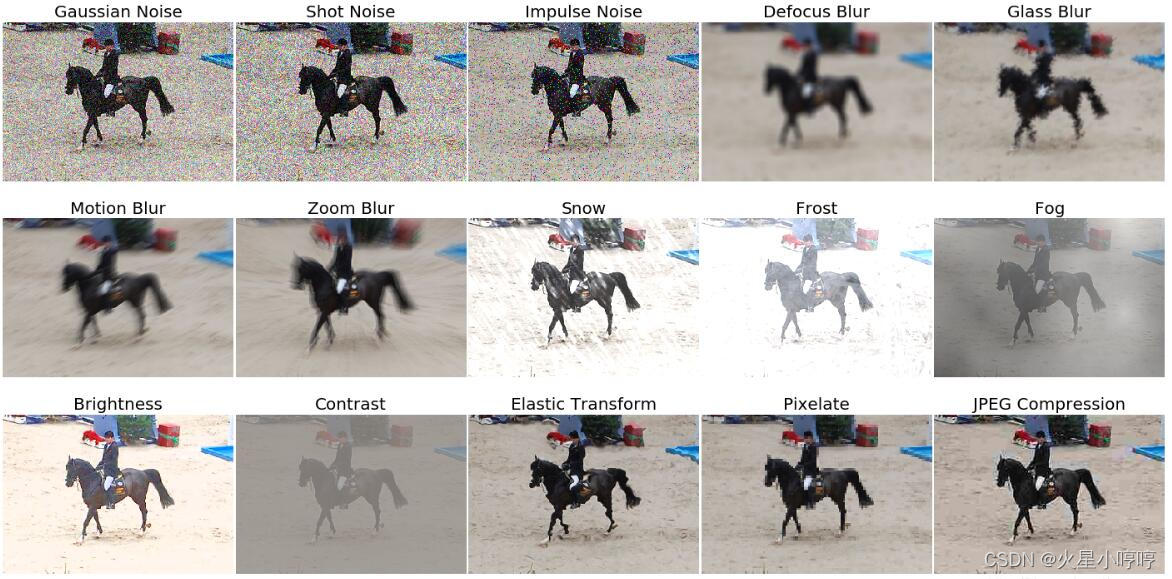 15种增强方式的处理效果






 扫一扫
扫一扫


 1784
1784

 被折叠的 条评论
为什么被折叠?
被折叠的 条评论
为什么被折叠?
 到【灌水乐园】发言





