


 本文通过对mybatis执行流程的源码分析,介绍了从项目搭建到SqlSessionFactory创建的步骤。首先,按照官方教程配置环境,然后详细解析了SqlSessionFactoryBuilder如何从配置文件中构建SqlSessionFactory。在SqlSession打开后,逐步剖析了mybatis如何进行初始化和操作数据库的准备工作,但尚未涉及具体的JDBC内容。
mybatis执行流程源码分析
mybatis官网 https://mybatis.org/mybatis-3/
需要准备的环境:mysql、maven、idea
根据官网的入门教程进行项目搭建
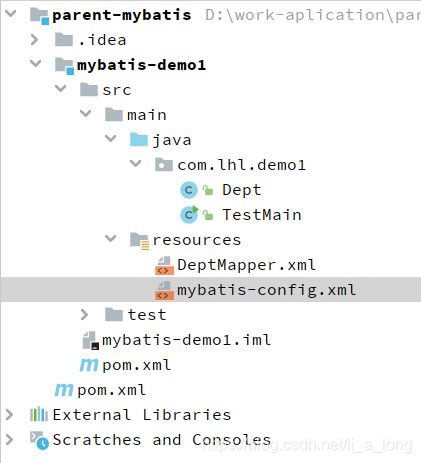
项目结构图
pom文件配置
我这项目存在父工程,可以把parent标签删除
<?xml version="1.0" encoding="UTF-8"?>
<project xmlns="http://maven.apache.org/POM/4.0.0"
         xmlns:xsi="http://www.w3.org/2001/XMLSchema-instance"
         xsi:schemaLocation="http://maven.apache.org/POM/4.0.0 http://maven.apache.org/xsd/maven-4.0.0.xsd">
    <parent>
        <artifactId>parent-mybatis</artifactId>
        <groupId>org.example</groupId>
        <version>1.0-SNAPSHOT</version>
    </parent>
    <modelVersion>4.0.0</modelVersion>

    <artifactId>mybatis-demo1</artifactId>

    <dependencies>
        <dependency>
            <groupId>org.mybatis</groupId>
            <artifactId>mybatis</artifactId>
            <version>3.5.5</version>
        </dependency>

        <dependency>
            <groupId>mysql</groupId>
            <artifactId>mysql-connector-java</artifactId>
            <version>5.1.49</version>
        </dependency>
    </dependencies>

</project>
mybatis configuration 文件
<?xml version="1.0" encoding="UTF-8" ?>
<!DOCTYPE configuration
        PUBLIC "-//mybatis.org//DTD Config 3.0//EN"
        "http://mybatis.org/dtd/mybatis-3-config.dtd">
<configuration>
    <environments default="development">
        <environment id="development">
            <transactionManager type="JDBC"/>
            <dataSource type="POOLED">
                <property name="driver" value="com.mysql.jdbc.Driver"/>
                <property name="url" value="jdbc:mysql://localhost:3306/mybatis-test"/>
                <property name="username" value="xxx"/>
                <property name="password" value="xxx"/>
            </dataSource>
        </environment>
    </environments>
    <mappers>
        <!--        配置资源文件-->
        <mapper resource="DeptMapper.xml"/>
    </mappers>
</configuration>
mybatis 资源文件
<?xml version="1.0" encoding="UTF-8" ?>
<!DOCTYPE mapper
        PUBLIC "-//mybatis.org//DTD Mapper 3.0//EN"
        "http://mybatis.org/dtd/mybatis-3-mapper.dtd">

        <!-- namespace 代表了一个唯一的类,如果唯一可以去掉包名如:
        <mapper namespace="Dept"> 或者通过配置文件可以进行别名配置(自行百度。)-->

<mapper namespace="com.lhl.demo1.Dept">
    <insert id="insertDept" >
        insert into dept(name,loc) values(#{name},#{loc})
    </insert>
</mapper>
实体类自行加getset或者用lombok
public class Dept {

    private int id;

    private String name;

    private String loc;
}
测试类
package com.lhl.demo1;

import org.apache.ibatis.io.Resources;
import org.apache.ibatis.session.SqlSession;
import org.apache.ibatis.session.SqlSessionFactory;
import org.apache.ibatis.session.SqlSessionFactoryBuilder;

import java.io.IOException;
import java.io.InputStream;


public class TestMain {

    public static void main(String[] args) {
        String resource = "mybatis-config.xml";
        InputStream inputStream = null;
        try {
            inputStream = Resources.getResourceAsStream(resource);
        } catch (IOException e) {
            e.printStackTrace();
        }
        SqlSessionFactory sqlSessionFactory = new SqlSessionFactoryBuilder().build(inputStream);
        SqlSession sqlSession = sqlSessionFactory.openSession();
        Dept dept =new Dept();
        dept.setLoc("湖北");
        dept.setName("金融事业单位");
        int insertDept = sqlSession.insert("insertDept", dept);
        sqlSession.commit();
        System.out.println(insertDept);
    }


}
源码解析
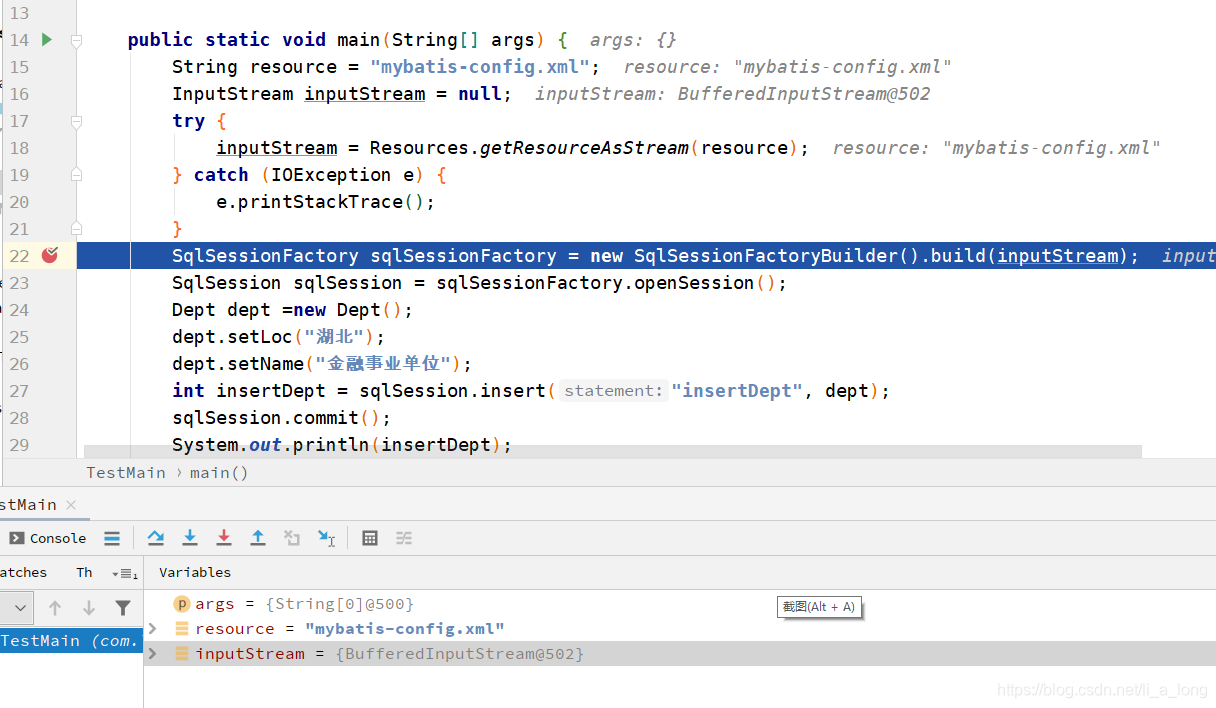
1、首先在第22行打下断点,14-22行就是一个读取mybatis配置文件的输入流通过debug的变量可以看到获取到的是一个缓冲输入流 BufferedInputStream对象
2、在第22行可以发现调用了SqlSessionFactoryBuilder的builder方法获取到了一个SqlSessionFactory对象。首先进入SqlSessionFactoryBuilder类下发现使用默认空参构造方法无任何代码存在。
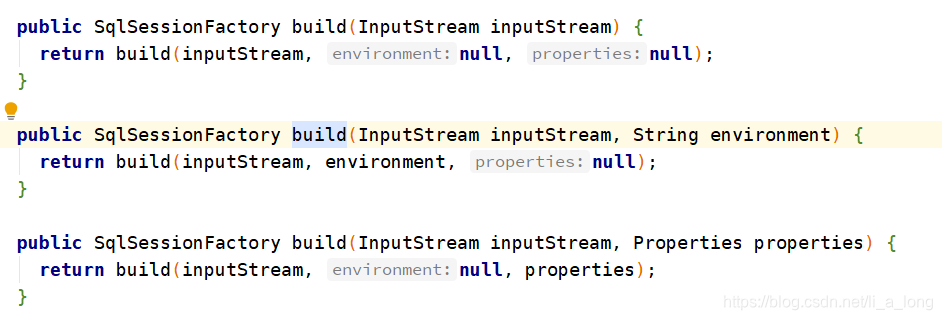
builder 方法是一个重载方法,最终调用方法提供三个参数的builder方法
 public SqlSessionFactory build(InputStream inputStream, String environment, Properties properties) {
    try {
    	// 第一步调用 XMLConfigBuilder 三个参数的构造方法
      XMLConfigBuilder parser = new XMLConfigBuilder(inputStream, environment, properties);
      // 调用parse的parse方法返回Configuration,包含了配置文件中的所有属性值,调用build方法传递Configuration到DefaultSqlSessionFactory构造方法生成DefaultSqlSessionFactory实例
      return build(parser.parse());
    } catch (Exception e) {
      throw ExceptionFactory.wrapException("Error building SqlSession.", e);
    } finally {
      ErrorContext.instance().reset();
      try {
        inputStream.close();
      } catch (IOException e) {
        // Intentionally ignore. Prefer previous error.
      }
    }
  }
public SqlSessionFactory build(Configuration config) {
    return new DefaultSqlSessionFactory(config);
  }
// XMLConfigBuilder类
 public Configuration parse() {
    if (parsed) {
      throw new BuilderException("Each XMLConfigBuilder can only be used once.");
    }
    parsed = true;
    parseConfiguration(parser.evalNode("/configuration"));
    return configuration;
  }
  // 根据mybatis配置文件dtd约束文档的标签进行解析xml文件封装成configuration对象的属性
private void parseConfiguration(XNode root) {
    try {
      // issue #117 read properties first
      //第一个举例说明
      propertiesElement(root.evalNode("properties"));
      Properties settings = settingsAsProperties(root.evalNode("settings"));
      loadCustomVfs(settings);
      loadCustomLogImpl(settings);
      typeAliasesElement(root.evalNode("typeAliases"));
      pluginElement(root.evalNode("plugins"));
      objectFactoryElement(root.evalNode("objectFactory"));
      objectWrapperFactoryElement(root.evalNode("objectWrapperFactory"));
      reflectorFactoryElement(root.evalNode("reflectorFactory"));
      settingsElement(settings);
      // read it after objectFactory and objectWrapperFactory issue #631
      environmentsElement(root.evalNode("environments"));
      databaseIdProviderElement(root.evalNode("databaseIdProvider"));
      typeHandlerElement(root.evalNode("typeHandlers"));
      mapperElement(root.evalNode("mappers"));
    } catch (Exception e) {
      throw new BuilderException("Error parsing SQL Mapper Configuration. Cause: " + e, e);
    }
  }

 private void propertiesElement(XNode context) throws Exception {
    if (context != null) {
      Properties defaults = context.getChildrenAsProperties();
      String resource = context.getStringAttribute("resource");
      String url = context.getStringAttribute("url");
      if (resource != null && url != null) {
        throw new BuilderException("The properties element cannot specify both a URL and a resource based property file reference.  Please specify one or the other.");
      }
      if (resource != null) {
        defaults.putAll(Resources.getResourceAsProperties(resource));
      } else if (url != null) {
        defaults.putAll(Resources.getUrlAsProperties(url));
      }
      Properties vars = configuration.getVariables();
      if (vars != null) {
        defaults.putAll(vars);
      }
      parser.setVariables(defaults);
      //解析出来的值最终封装成立了configuration的属性
      configuration.setVariables(defaults);
    }
  }
第23行 SqlSession sqlSession = sqlSessionFactory.openSession();
// DefaultSqlSessionFactory类的实现
 @Override
  public SqlSession openSession() {
    return openSessionFromDataSource(configuration.getDefaultExecutorType(), null, false);
  }
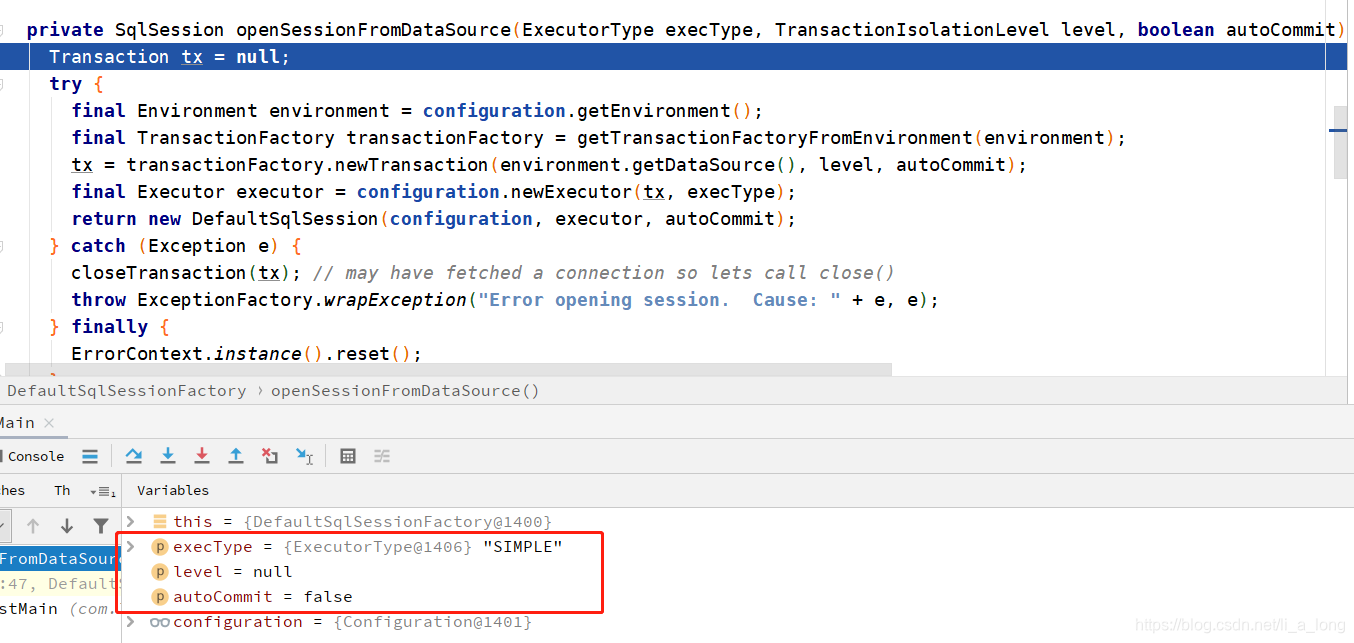
  // 打开session从数据源,三个参数值如下图
private SqlSession openSessionFromDataSource(ExecutorType execType, TransactionIsolationLevel level, boolean autoCommit) {
    Transaction tx = null;
    try {
    // 从configuration获取各种配置信息,
      final Environment environment = configuration.getEnvironment();
      final TransactionFactory transactionFactory = getTransactionFactoryFromEnvironment(environment);
      //生成事务实例tx
      tx = transactionFactory.newTransaction(environment.getDataSource(), level, autoCommit);
      // 根据配置信息生成新的执行器
      final Executor executor = configuration.newExecutor(tx, execType);
      // 最终创建DefaultSqlSession对象
      return new DefaultSqlSession(configuration, executor, autoCommit);
    } catch (Exception e) {
      closeTransaction(tx); // may have fetched a connection so lets call close()
      throw ExceptionFactory.wrapException("Error opening session.  Cause: " + e, e);
    } finally {
      ErrorContext.instance().reset();
    }
  }
//Configuration类
// mybatis实现了多个执行器
public Executor newExecutor(Transaction transaction, ExecutorType executorType) {
    executorType = executorType == null ? defaultExecutorType : executorType;
    executorType = executorType == null ? ExecutorType.SIMPLE : executorType;
    Executor executor;
    if (ExecutorType.BATCH == executorType) {
      executor = new BatchExecutor(this, transaction);
    } else if (ExecutorType.REUSE == executorType) {
      executor = new ReuseExecutor(this, transaction);
    } else {
      executor = new SimpleExecutor(this, transaction);
    }
    if (cacheEnabled) {
      executor = new CachingExecutor(executor);
    }
    executor = (Executor) interceptorChain.pluginAll(executor);
    return executor;
  }
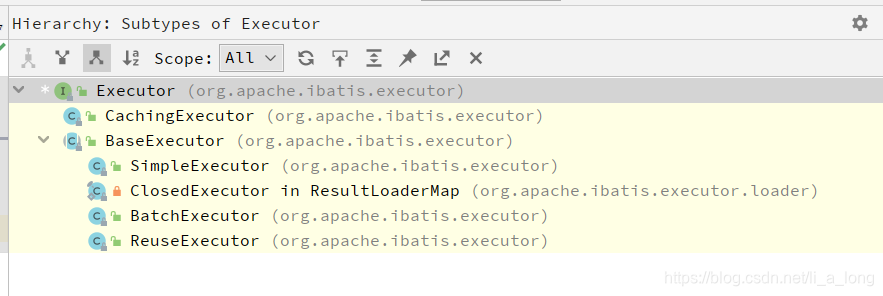
到这步也未看到跟jdbc有关的内容,都是基于配置文件mybatis-config.xml做的初始化工作,继续进行下步工作,初始化并赋值dept对象,然后调用sqlSession对象的insert方法
// DefaultSqlSession
 @Override
  public int insert(String statement, Object parameter) {
  // 调用update方法
    return update(statement, parameter);
  }

  @Override
  public int update(String statement) {
    return update(statement, null);
  }

  @Override
  public int update(String statement, Object parameter) {
    try {
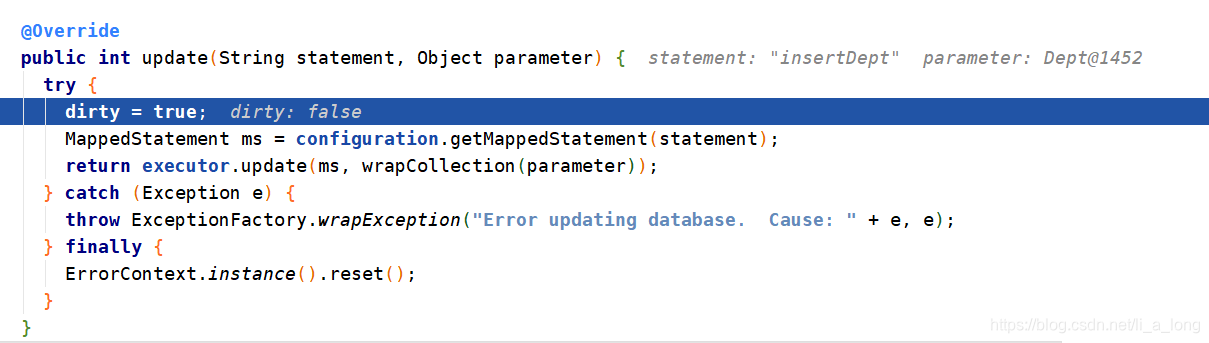
    // DefaultSqlSession存在一个属性dirty ,赋值为true,初始值看到是false,先不管。。
      dirty = true;
      // 调用configuration获取MappedStatement 对象,跟源码发现是在初始化时创建了一个
      //protected final Map<String, MappedStatement> mappedStatements = new //StrictMap<MappedStatement>("Mapped Statements collection")
   //   .conflictMessageProducer((savedValue, targetValue) ->
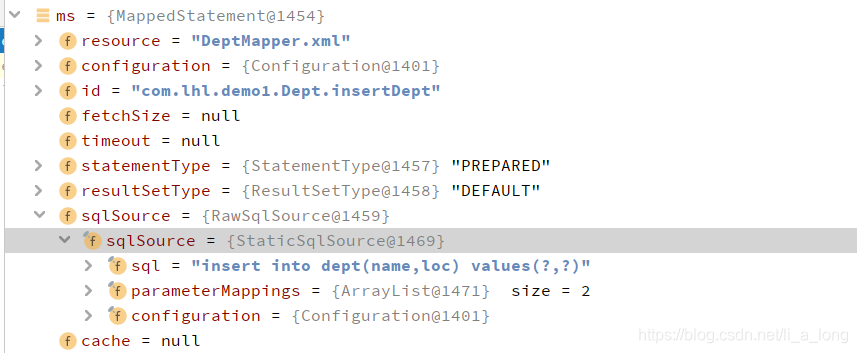
    //      ". please check " + savedValue.getResource() + " and " + //targetValue.getResource()); 来进行内存存储的。从下面debug内容可以看到,他是根据statement来进行查找到已经配置好的内容,如类型信息,namespace,sql语句等。。
      MappedStatement ms = configuration.getMappedStatement(statement);
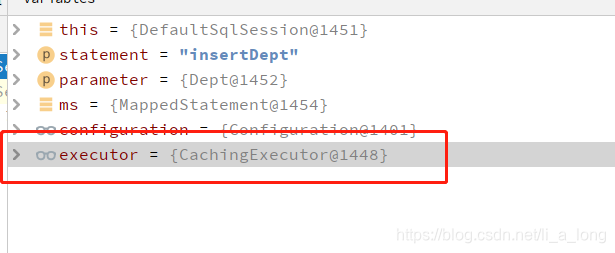
      // 调用executor的update方法
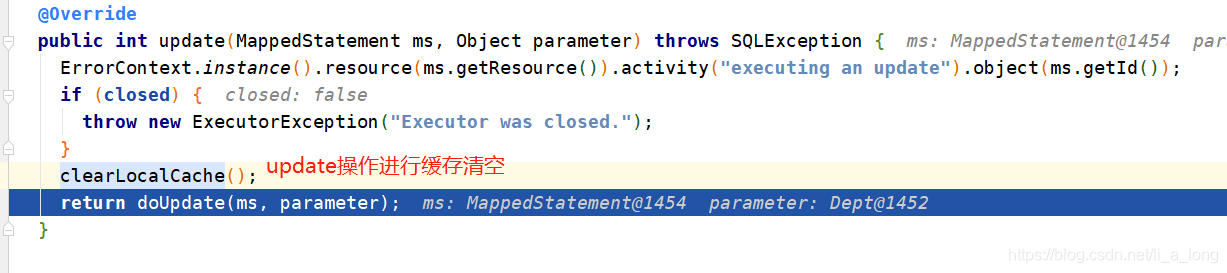
      return executor.update(ms, wrapCollection(parameter));
    } catch (Exception e) {
      throw ExceptionFactory.wrapException("Error updating database.  Cause: " + e, e);
    } finally {
      ErrorContext.instance().reset();
    }
  }

 private Object wrapCollection(final Object object) {
    return ParamNameResolver.wrapToMapIfCollection(object, null);
  }
// 包装对象,将Collection、array类型进行包装
public static Object wrapToMapIfCollection(Object object, String actualParamName) {
    if (object instanceof Collection) {
      ParamMap<Object> map = new ParamMap<>();
      map.put("collection", object);
      if (object instanceof List) {
        map.put("list", object);
      }
      Optional.ofNullable(actualParamName).ifPresent(name -> map.put(name, object));
      return map;
    } else if (object != null && object.getClass().isArray()) {
      ParamMap<Object> map = new ParamMap<>();
      map.put("array", object);
      Optional.ofNullable(actualParamName).ifPresent(name -> map.put(name, object));
      return map;
    }
    return object;
  }

 @Override
  public int doUpdate(MappedStatement ms, Object parameter) throws SQLException {
    Statement stmt = null;
    try {
      Configuration configuration = ms.getConfiguration();
      // 根据ms创建StatementHandler 对象
      StatementHandler handler = configuration.newStatementHandler(this, ms, parameter, RowBounds.DEFAULT, null, null);
      // 根据StatementHandler 对象创建Statement 对象
      stmt = prepareStatement(handler, ms.getStatementLog());
      // 执行最终的stmt对象
      return handler.update(stmt);
    } finally {
      closeStatement(stmt);
    }
  }
 private Statement prepareStatement(StatementHandler handler, Log statementLog) throws SQLException {
    Statement stmt;
    //jdbc操作 获取数据库连接
    Connection connection = getConnection(statementLog);
    // 创建prepareStatement对象
    stmt = handler.prepare(connection, transaction.getTimeout());
    //处理prepareStatement对象
    handler.parameterize(stmt);
    return stmt;
  }

  protected Connection getConnection(Log statementLog) throws SQLException {
  // 从transaction对象的datasource连接池里拿出来一个连接
    Connection connection = transaction.getConnection();
    if (statementLog.isDebugEnabled()) {
      return ConnectionLogger.newInstance(connection, statementLog, queryStack);
    } else {
      return connection;
    }
  }

// RoutingStatementHandler
 @Override
  public Statement prepare(Connection connection, Integer transactionTimeout) throws SQLException {
  // 委托
    return delegate.prepare(connection, transactionTimeout);
  }

// BaseStatementHandler
@Override
  public Statement prepare(Connection connection, Integer transactionTimeout) throws SQLException {
    ErrorContext.instance().sql(boundSql.getSql());
    Statement statement = null;
    try {
    // 实例化
      statement = instantiateStatement(connection);
     // 设置属性如超时时间等
      setStatementTimeout(statement, transactionTimeout);
      setFetchSize(statement);
      return statement;
    } catch (SQLException e) {
      closeStatement(statement);
      throw e;
    } catch (Exception e) {
      closeStatement(statement);
      throw new ExecutorException("Error preparing statement.  Cause: " + e, e);
    }
  }


@Override
  protected Statement instantiateStatement(Connection connection) throws SQLException {
   // 获取sql语句
    String sql = boundSql.getSql();
    if (mappedStatement.getKeyGenerator() instanceof Jdbc3KeyGenerator) {
      String[] keyColumnNames = mappedStatement.getKeyColumns();
      if (keyColumnNames == null) {
        return connection.prepareStatement(sql, PreparedStatement.RETURN_GENERATED_KEYS);
      } else {
        return connection.prepareStatement(sql, keyColumnNames);
      }
    } else if (mappedStatement.getResultSetType() == ResultSetType.DEFAULT) {
      return connection.prepareStatement(sql);
    } else {
      return connection.prepareStatement(sql, mappedStatement.getResultSetType().getValue(), ResultSet.CONCUR_READ_ONLY);
    }
  }

//对sql语句的参数进行赋值
 @Override
  public void setParameters(PreparedStatement ps) {
    ErrorContext.instance().activity("setting parameters").object(mappedStatement.getParameterMap().getId());
    List<ParameterMapping> parameterMappings = boundSql.getParameterMappings();
    if (parameterMappings != null) {
      for (int i = 0; i < parameterMappings.size(); i++) {
        ParameterMapping parameterMapping = parameterMappings.get(i);
        if (parameterMapping.getMode() != ParameterMode.OUT) {
          Object value;
          String propertyName = parameterMapping.getProperty();
          if (boundSql.hasAdditionalParameter(propertyName)) { // issue #448 ask first for additional params
            value = boundSql.getAdditionalParameter(propertyName);
          } else if (parameterObject == null) {
            value = null;
          } else if (typeHandlerRegistry.hasTypeHandler(parameterObject.getClass())) {
            value = parameterObject;
          } else {
            MetaObject metaObject = configuration.newMetaObject(parameterObject);
            value = metaObject.getValue(propertyName);
          }
          TypeHandler typeHandler = parameterMapping.getTypeHandler();
          JdbcType jdbcType = parameterMapping.getJdbcType();
          if (value == null && jdbcType == null) {
            jdbcType = configuration.getJdbcTypeForNull();
          }
          try {
            typeHandler.setParameter(ps, i + 1, value, jdbcType);
          } catch (TypeException | SQLException e) {
            throw new TypeException("Could not set parameters for mapping: " + parameterMapping + ". Cause: " + e, e);
          }
        }
      }
    }
  }

@Override
  public int update(Statement statement) throws SQLException {
    PreparedStatement ps = (PreparedStatement) statement;
    //jdbc
    ps.execute();
    int rows = ps.getUpdateCount();
    Object parameterObject = boundSql.getParameterObject();
    KeyGenerator keyGenerator = mappedStatement.getKeyGenerator();
    keyGenerator.processAfter(executor, mappedStatement, ps, parameterObject);
    //返回影响的行数
    return rows;
  }
 @Override
  public void commit() {
    commit(false);
  }

@Override
  public void commit(boolean force) {
    try {
    // force初始为false
      executor.commit(isCommitOrRollbackRequired(force));
      dirty = false;
    } catch (Exception e) {
      throw ExceptionFactory.wrapException("Error committing transaction.  Cause: " + e, e);
    } finally {
      ErrorContext.instance().reset();
    }
  }

 private boolean isCommitOrRollbackRequired(boolean force) {
 	//dirty 用来进行是否提交的
    return (!autoCommit && dirty) || force;
  }

// 只有进行了
 @Override
  public void commit(boolean required) throws SQLException {
    if (closed) {
      throw new ExecutorException("Cannot commit, transaction is already closed");
    }
    clearLocalCache();
    flushStatements();
    // 如果为false,不进行事务提交
    if (required) {
      transaction.commit();
    }
  }





 扫一扫
扫一扫


 934
934

 被折叠的 条评论
为什么被折叠?
被折叠的 条评论
为什么被折叠?
 到【灌水乐园】发言





