



 本文介绍了如何在SpringBoot项目中集成Netty来处理UDP的收发。通过Netty,服务端能够响应特定消息并返回随机内容,客户端则能发送请求并接收响应。同时,还展示了SpringBoot中配置Netty进行UDP通信的方式,包括服务端监听、客户端发送和接收功能,并提供了测试示例。
在springboot工程中集成netty框架实现UDP的接收与发送,话不多说,直接上代码。
1、Java中基于netty实现
- 客户端向服务端发送“成语”或“谚语”时,服务端会随机生成对应的成语和谚语返回给客户端;
- 服务端如果接收到除“谚语”和“成语”的其他字符串则发送“请发送‘谚语’或‘成语’”的提示语;
1.1、服务端
public class UdpServer {

    public static void main(String[] args) throws InterruptedException {
        EventLoopGroup group = new NioEventLoopGroup();
        try {
            Bootstrap bootstrap = new Bootstrap();
            bootstrap
                    .group(group)
                    .channel(NioDatagramChannel.class)
                    .option(ChannelOption.SO_BROADCAST, true)
                    .handler(new UdpServerHandler());
            bootstrap
                    .bind(8082)
                    .sync()
                    .channel()
                    .closeFuture()
                    .sync();
        } finally {
            group.shutdownGracefully();
        }
    }
}
public class UdpServerHandler extends SimpleChannelInboundHandler<DatagramPacket> {

    private static final String[] proverbs = { "只要功夫深,铁棒磨成针。", "旧时王谢堂前燕,飞入寻常百姓家。", "洛阳亲友如相问,一片冰心在玉壶。", "一寸光阴一寸金,寸金难买寸光阴。", "老骥伏枥,志在千里。烈士暮年,壮心不已!" };
    private static final String[] idioms = { "马到成功", "狐假虎威", "虎头虎脑", "生龙活虎", "如雷贯耳", "持之以恒" };

    /**
     * 随机返回谚语
     */
    private String nextProverb() {
        int nextInt = ThreadLocalRandom.current().nextInt(proverbs.length);
        return proverbs[nextInt];
    }

    /**
     * 随机返回成语
     */
    private String nextIdiom() {
        int nextInt = ThreadLocalRandom.current().nextInt(idioms.length);
        return idioms[nextInt];
    }

    @Override
    protected void channelRead0(ChannelHandlerContext ctx, DatagramPacket datagramPacket) throws Exception {
        String message = datagramPacket.content().toString(CharsetUtil.UTF_8);
        System.out.println("服务端接收到的消息:" + message);
        String sendMessage;
        if ("谚语".equals(message)) {
            sendMessage = nextProverb();
        } else if ("成语".equals(message)) {
            sendMessage = nextIdiom();
        } else {
            sendMessage = "请发送:“谚语”或者“成语”";
        }
        DatagramPacket res = new DatagramPacket(Unpooled.copiedBuffer(sendMessage, CharsetUtil.UTF_8), datagramPacket.sender());
        ctx.writeAndFlush(res);
    }

    @Override
    public void exceptionCaught(ChannelHandlerContext ctx, Throwable cause) throws Exception {
        cause.printStackTrace();
        ctx.close();
    }

}
1.2、客户端
public class UdpClient {

    public static void main(String[] args) throws InterruptedException {
        EventLoopGroup group = new NioEventLoopGroup();
        try {
            Bootstrap bootstrap = new Bootstrap();
            bootstrap
                    .group(group)
                    .channel(NioDatagramChannel.class)
                    .option(ChannelOption.SO_BROADCAST, true)
                    .handler(new UdpClientHandler());
            Channel channel = bootstrap.bind(8081).sync().channel();
            Scanner sc = new Scanner(System.in);
            while (sc.hasNext()) {
                String sendMessage = sc.next();
                if ("quit".equals(sendMessage)) {
                    break;
                }
                // 向网段内的所有广播机广播UDP消息
                channel.writeAndFlush(new DatagramPacket(Unpooled.copiedBuffer(sendMessage, CharsetUtil.UTF_8), new InetSocketAddress("127.0.0.1", 8082)));
            }
            sc.close();
            channel.close();
        } finally {
            group.shutdownGracefully();
        }
    }
}
public class UdpClientHandler extends SimpleChannelInboundHandler<DatagramPacket> {

    @Override
    protected void channelRead0(ChannelHandlerContext ctx, DatagramPacket datagramPacket) throws Exception {
        String receiveMessage = datagramPacket.content().toString(CharsetUtil.UTF_8);
        System.out.println("客户端接收到的消息:" + receiveMessage);
    }

    @Override
    public void exceptionCaught(ChannelHandlerContext ctx, Throwable cause) throws Exception {
        cause.printStackTrace();
        ctx.close();
    }

}
1.3、测试
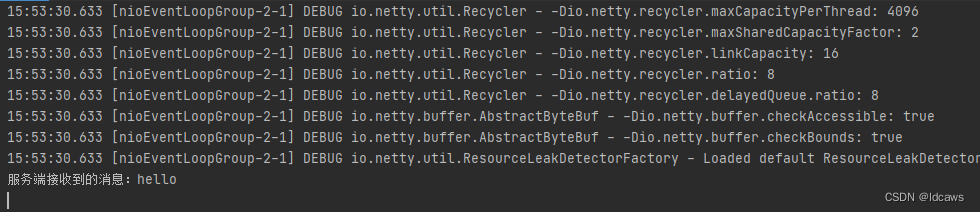
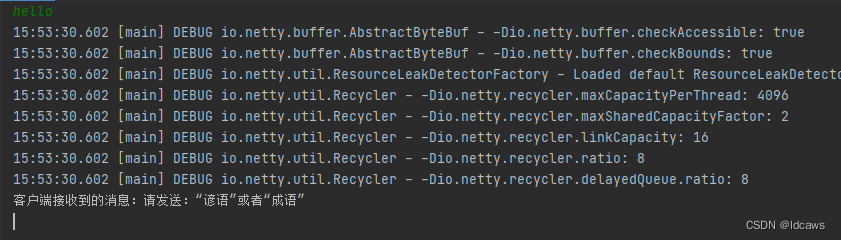
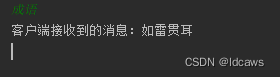
先后启动服务端和客户端,测试结果示意如下
服务端控制台:
或

客户端控制台:
或
2、Springboot中基于netty实现
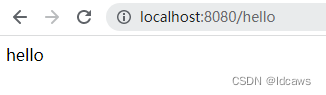
- 用户发起http请求,通过客户端向服务端发送”hello“,服务端会返回ok给客户端;
- 服务端监听指定端口,接收客户端发来的报文;
2.1、服务端
@Component
@EnableAsync
public class NettyUdpServer {

    @Autowired
    NettyUdpServerHandler nettyUdpServerHandler;

    @Async
    public void init(int port) {
        EventLoopGroup group = new NioEventLoopGroup();
        try {
            Bootstrap bootstrap = new Bootstrap();
            bootstrap
                    .group(group)
                    .channel(NioDatagramChannel.class)
                    .localAddress(new InetSocketAddress(port))
                    .option(ChannelOption.SO_BROADCAST, true)
                    .handler(nettyUdpServerHandler);
            ChannelFuture channelFuture = bootstrap.bind().sync();
            System.out.println("NettyUdpServer started and listened on " + channelFuture.channel().localAddress());
            channelFuture.channel().closeFuture().sync();
        } catch (Exception e) {
            e.printStackTrace();
        } finally {
            group.shutdownGracefully();
        }
    }

}
@Component
public class NettyUdpServerHandler extends SimpleChannelInboundHandler<DatagramPacket> {

    @Override
    protected void channelRead0(ChannelHandlerContext ctx, DatagramPacket datagramPacket) throws Exception {
        String message = datagramPacket.content().toString(CharsetUtil.UTF_8);
        System.out.println("NettyUdpServer接收到的消息:" + message);
        String resMessage = "ok";
        DatagramPacket res = new DatagramPacket(Unpooled.copiedBuffer(resMessage, CharsetUtil.UTF_8), datagramPacket.sender());
        ctx.writeAndFlush(res);
    }

    @Override
    public void exceptionCaught(ChannelHandlerContext ctx, Throwable cause) throws Exception {
        cause.printStackTrace();
        ctx.close();
    }

}
2.2、客户端
@Component
@EnableAsync
public class NettyUdpClient {

    private Channel channel;

    @Autowired
    NettyUdpClientHandler nettyUdpClientHandler;

    @Async
    public void init(int port) {
        EventLoopGroup group = new NioEventLoopGroup();
        try {
            Bootstrap bootstrap = new Bootstrap();
            bootstrap
                    .group(group)
                    .channel(NioDatagramChannel.class)
                    .localAddress(new InetSocketAddress(port))
                    .option(ChannelOption.SO_BROADCAST, true)
                    .handler(nettyUdpClientHandler);
            ChannelFuture channelFuture = bootstrap.bind().sync();
            System.out.println("NettyUdpClient started and listened on " + channelFuture.channel().localAddress());
            channel = channelFuture.channel();
            channelFuture.channel().closeFuture().sync();
        } catch (Exception e) {
            e.printStackTrace();
        } finally {
            group.shutdownGracefully();
        }
    }

    public void send(String sendMessage) {
        // 向网段内的所有广播机广播UDP消息
        channel.writeAndFlush(new DatagramPacket(Unpooled.copiedBuffer(sendMessage, CharsetUtil.UTF_8), new InetSocketAddress("127.0.0.1", 50000)));
    }

}
@Component
public class NettyUdpClientHandler extends SimpleChannelInboundHandler<DatagramPacket> {

    @Override
    protected void channelRead0(ChannelHandlerContext ctx, DatagramPacket datagramPacket) throws Exception {
        String receiveMessage = datagramPacket.content().toString(CharsetUtil.UTF_8);
        System.out.println("NettyUdpClient接收到的消息:" + receiveMessage);
    }

    @Override
    public void exceptionCaught(ChannelHandlerContext ctx, Throwable cause) throws Exception {
        cause.printStackTrace();
        ctx.close();
    }

}
2.3、测试
启动springboot服务,会看到启动了2个基于netty的udp监听,一个作为服务端:接收报文,一个作为客户端:发送和接收报文。

测试结果示意如下






 扫一扫
扫一扫


 10万+
10万+


 到【灌水乐园】发言



