



 本文详细介绍了在Linux环境下如何查看并修改MySQL的配置文件my.cnf,以实现表名大小写敏感性的调整。通过五个步骤,包括定位配置文件、查看当前设置、编辑配置项、重启服务和验证更改,帮助读者掌握MySQL核心配置的调整方法。
第一步:Linux下查看mysql默认采用的配置文件(正确找到mysql加载的my.cnf文件)
[root@localhost init.d]# mysql --help | grep 'Default options' -A 1
Default options are read from the following files in the given order:
/etc/my.cnf /etc/mysql/my.cnf /usr/local/mysql/etc/my.cnf ~/.my.cnf
从左至右依次加载,如果存在则加载引用,否则,文件不存在则向后继续查找;
第二步:查看当前属性
SHOW variables LIKE '%table_names%';
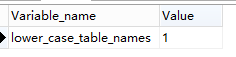
value值为0:大小写敏感
value值为1:不区分大小写
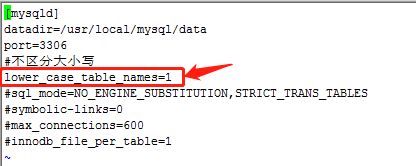
第三步:配置过程(通常/etc/my.cnf由手工复制创建,名字及后缀要正确)
[root@localhost etc]# ll /etc/my.cnf
-rw-r--r--. 1 root root 211 9月 4 15:47 /etc/my.cnf
[root@localhost etc]# vi my.cnf
在my.cnf中[mysqId]下方添加lower_case_table_names=1
第四步:重启mysql
[root@localhost etc]# cat /etc/system-release //查看一下系统版本
CentOS Linux release 7.8.2003 (Core)
开始重启mysql
[root@localhost etc]# systemctl restart mysql.service
第五步:测试是否生效
检查variables值&&选择SQL查询测试





 扫一扫
扫一扫


 888
888

 被折叠的 条评论
为什么被折叠?
被折叠的 条评论
为什么被折叠?
 到【灌水乐园】发言





