

Vue中的插槽slot使用

本文介绍Vue中的插槽(slot)机制,通过示例演示如何利用插槽提高组件复用性。展示了如何在一个通用子组件中使用slot预留位置,以便在不同场景下插入不同内容。

Vue中的插槽slot

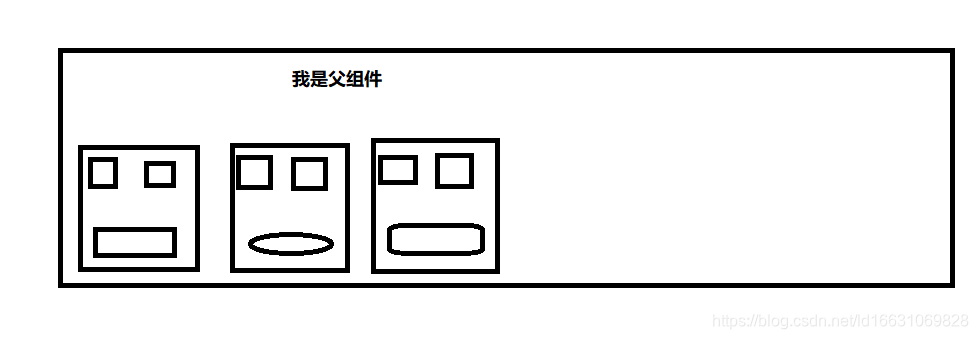
1.首先在了解这个插槽这个概念之前,我想通过一个图片来更加形象说一下。
在这里插入图片描述
下面简单说一下这个图片,我们可以看到父组件中包含了各个大小相同的子组件,这些子组件中的布局上面的布局是一样的,唯一不相同的是下方不同的形状。
首先我们会想着先做好一个子组件,比如说是cpn1,这个组件做好后,我复制两份然后再修改他们不同的地方,这样作其实看来也是可以的,但是这样做导致了组件的复用性是特别差的.
然后我们用到slot插槽后,就可以这样来做:我可以单单创建一个子组件然后用slot标签给布局不同的部分提供空余地方,当我们想要用的时候只需要再父组件中加入我们想要添加的布局即可。下面我通过具体的代码进行演示。

<!DOCTYPE html>
<html>
	<head>
		<meta charset="utf-8">
		<title>组件之slot</title>
		<script type="text/javascript" src="../node_modules/vue/dist/vue.min.js"></script>
	</head>
	<!-- 插槽中slot 是默认-->
	<body>
		<div id="app">
			<cpn><button type="button">按钮</button></cpn>
			<cpn><span>span</span></cpn>
			<cpn><i>i标签</i></cpn>
		</div>
	</body>
	<template id="cpn">
		<div>
			<h2>我是子组件</h2>
			<h1>{{anther}}</h1>
			<slot></slot>
		</div>

	</template>
	<script type="text/javascript">
		const app = new Vue({
			el: '#app',
			data: {
				message: 'hello'
			},
			components: {
				cpn: {
					template: '#cpn',
					data() {
						return {
							anther: '枫叶在飘呀'
						}
					}
				}
			}
		})
	</script>
</html>

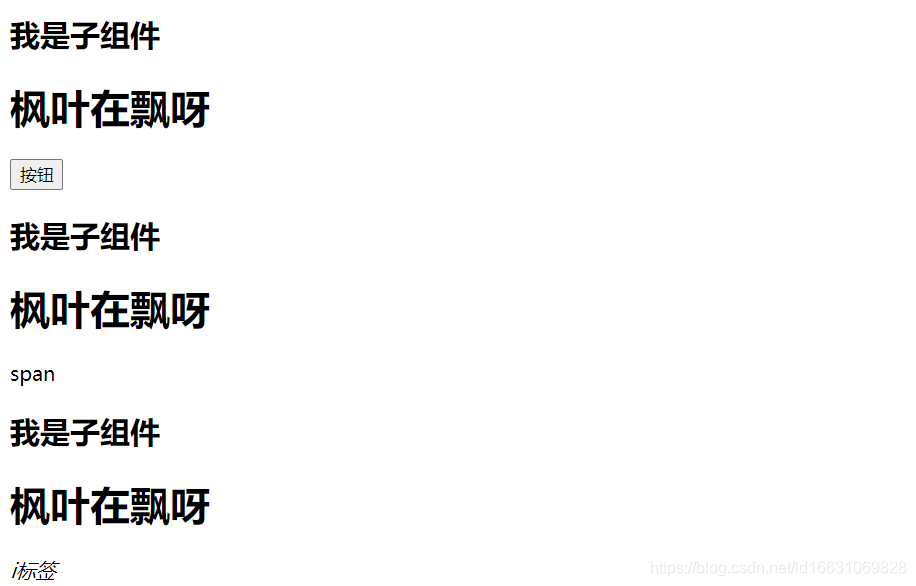
运行效果:
在这里插入图片描述
通过代码和效果演示,我只做了一个子组件然后在子组件中写入一个slot插槽,
然后在父组件中,我分别写入不同的内容添加到子组件中slot就会默认将你添加进来的标签放入自己的囊中。
显而易见,这样实现组件的复用性效果是非常好的。

### Vue.js Slot 插槽使用教程 #### 默认插槽 默认插槽是最简单的形式,它允许父组件向子组件传递任意内容。当子组件中只有一个未命名的 `<slot>` 标签时,默认插槽会自动接收来自父组件的内容。 ```html <!-- 子组件 ChildComponent.vue --> <template> <div class="child"> <h2>这是子组件</h2> <slot></slot> </div> </template> <script> export default { name: 'ChildComponent' } </script> ``` ```html <!-- 父组件 ParentComponent.vue --> <template> <div class="parent"> <h1>这是父组件</h1> <ChildComponent> 这里是通过默认插槽传入的内容。 </ChildComponent> </div> </template> <script> import ChildComponent from './ChildComponent.vue' export default { components: { ChildComponent } } </script> ``` #### 具名插槽 具名插槽允许多个不同的位置插入内容。通过给 `<slot>` 添加 `name` 属性,在父组件中可以指定具体哪个具名插槽应该被填充。 ```html <!-- 子组件 NamedSlotsExample.vue --> <template> <div class="named-slots-example"> <header> <slot name="header"></slot> </header> <main> <slot></slot> </main> <footer> <slot name="footer">这里是备用内容。</slot> </footer> </div> </template> ``` ```html <!-- 父组件 UsingNamedSlots.vue --> <template> <div class="using-named-slots"> <NamedSlotsExample> <!-- 向 header 名字的 slot 填充内容 --> <template v-slot:header> <h1>这里是从父级传来的头部内容</h1> </template> <!-- 默认插槽内容 --> <p>这是一些普通的段落文本。</p> <!-- 向 footer 名字的 slot 填充内容 --> <template #footer> <p>这里是从父级传来的底部内容</p> </template> </NamedSlotsExample> </div> </template> <script> import NamedSlotsExample from './NamedSlotsExample.vue'; export default { components: { NamedSlotsExample }, }; </script> ``` #### 作用域插槽 作用域插槽让子组件能够将数据暴露给父组件使用的模板片段内。这意味着可以在父组件中访问到子组件的数据并基于这些数据显示自定义内容。 ```html <!-- 子组件 ScopedSlotExample.vue --> <template> <ul> <li v-for="(item, index) in items" :key="index"> <slot :text="item.text">{{ item.text }}</slot> </li> </ul> </template> <script> export default { data() { return { items: [ { text: "苹果" }, { text: "香蕉" }, { text: "橙子" } ] }; } } </script> ``` ```html <!-- 父组件 UseScopedSlot.vue --> <template> <div class="use-scoped-slot"> <ScopedSlotExample v-slot:default="{ text }"> {{ text }} </ScopedSlotExample> </div> </template> <script> import ScopedSlotExample from "./ScopedSlotExample"; export default { components: { ScopedSlotExample } }; </script> ```
评论 1
添加红包

请填写红包祝福语或标题

红包个数最小为10个

红包金额最低5元

当前余额3.43前往充值 >
需支付:10.00
成就一亿技术人!
领取后你会自动成为博主和红包主的粉丝 规则
hope_wisdom
发出的红包
实付
使用余额支付
点击重新获取
扫码支付
钱包余额 0

抵扣说明:

1.余额是钱包充值的虚拟货币,按照1:1的比例进行支付金额的抵扣。
2.余额无法直接购买下载,可以购买VIP、付费专栏及课程。

余额充值


