





 本文详细介绍了MyBatis如何处理ORM映射失效问题,提出使用列别名和结果映射(ResultMap)两种解决方案。接着,深入探讨了MyBatis对OneToOne、OneToMany和ManyToMany关联关系的处理方式,通过实例展示了配置XML和实体类的实现过程。最后,总结了关系映射中的一方和多方关系处理原则。
一、ORM映射【重点】
1.1 MyBatis自动ORM失效
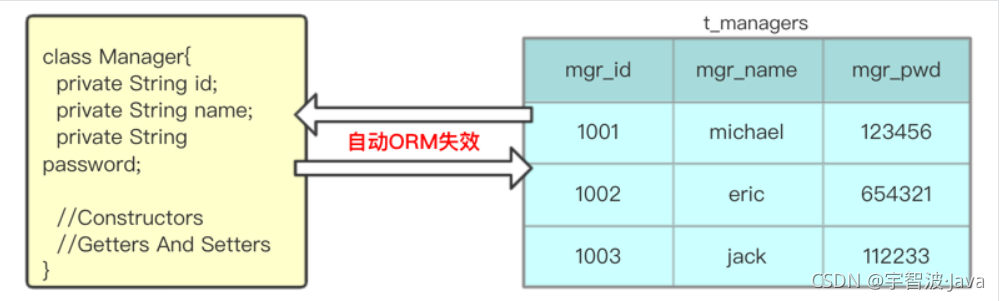
MyBatis只能自动维护库表”列名“与”属性名“相同时的一一对应关系,二者不同时,无法自动ORM。
| 自动ORM失效 |
|---|
 |
1.2 方案一:列的别名
在SQL中使用 as 为查询字段添加列别名,以匹配属性名。
<mapper namespace="com.qf.mybatis.part2.orm.ManagerDao">
    <select id="selectManagerByIdAndPwd" resultType="com.qf.mybatis.part2.orm.Manager">
        SELECT mgr_id AS id , mgr_name AS username , mgr_pwd AS password
        FROM t_managers
        WHERE mgr_id = #{id} AND mgr_pwd = #{pwd}
    </select>
</mapper>
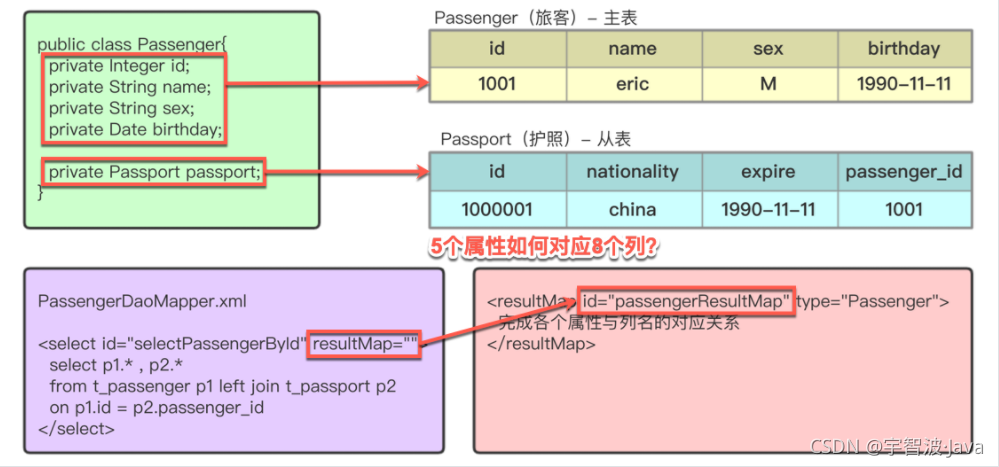
1.3 方案二:结果映射(ResultMap - 查询结果的封装规则)
通过< resultMap id="" type="" >映射,匹配列名与属性名。
<mapper namespace="com.qf.mybatis.part2.orm.ManagerDao">
<!--定义resultMap标签-->
<resultMap id="managerResultMap" type="com.qf.mybatis.part2.orm.Manager">
<!--关联主键与列名-->
<id property="id" column="mgr_id" />
<!--关联属性与列名-->
<result property="username" column="mgr_name" />
<result property="password" column="mgr_pwd" />
</resultMap>
<!--使用resultMap作为ORM映射依据-->
<select id="selectAllManagers" resultMap="managerResultMap">
SELECT mgr_id , mgr_name , mgr_pwd
FROM t_managers
</select>
</mapper>二、MyBatis处理关联关系-多表连接【重点】
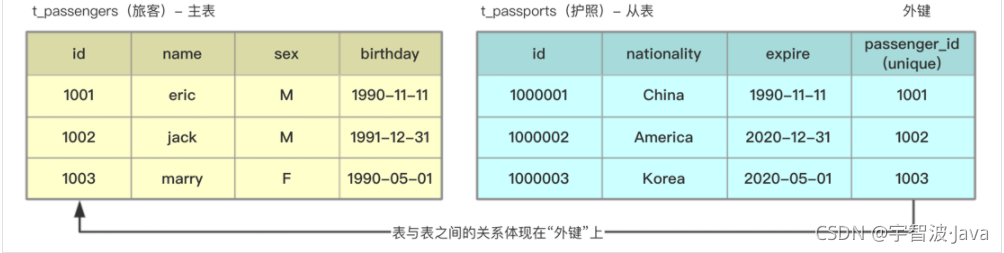
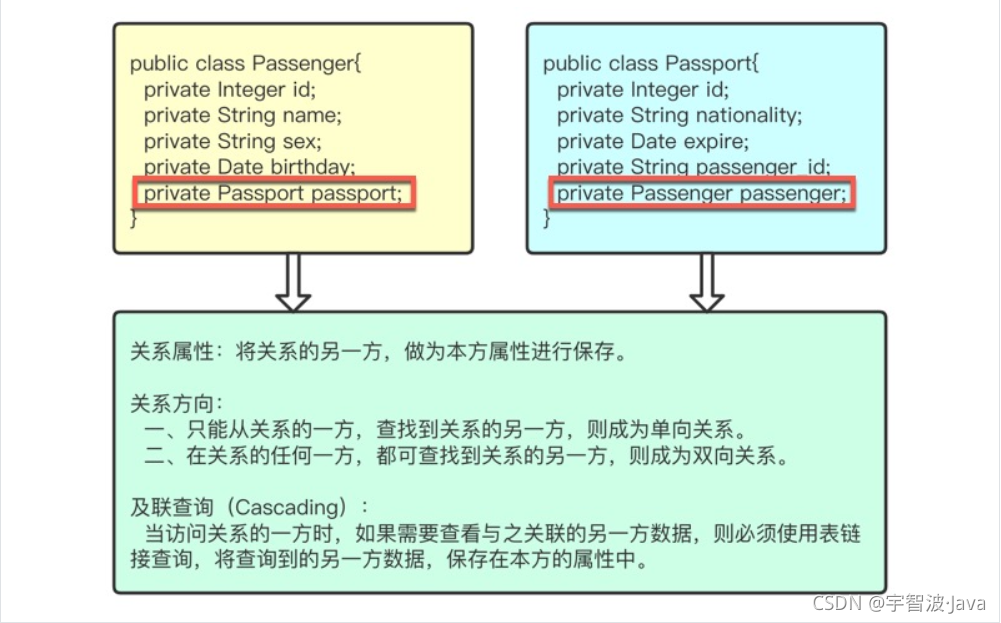
实体间的关系:关联关系(拥有 has、属于 belong)
OneToOne:一对一关系(Passenger --- Passport):一个旅客只有一个护照,一个护照只对应一个旅客
OneToMany:一对多关系(Department --- Employee):一个部门有多个员工,一个员工只属于一个部门
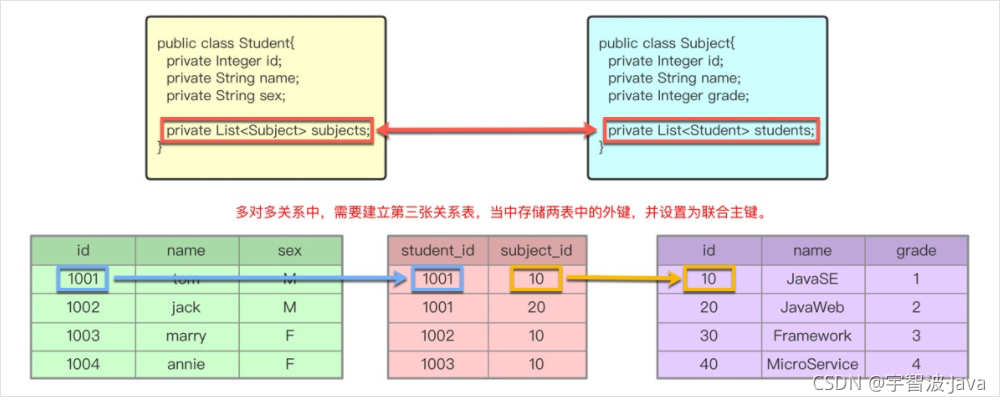
ManyToMany:多对多关系(Student --- Subject):一个学生学习多门课程,一个课程被多个学生学习
| Table建立外键关系 |
|---|
 |
| Entity添加关系属性 |
|---|
 |
| Mapper中将属性与列名对应 |
|---|
 |
2.1 OneToOne
1.导入依赖,把之前的db.properties,log4j.properties,mybatis-config.xml拷贝过来并稍作适当修改
<dependencies>
<dependency>
<groupId>org.mybatis</groupId>
<artifactId>mybatis</artifactId>
<version>3.5.4</version>
</dependency>
<dependency>
<groupId>mysql</groupId>
<artifactId>mysql-connector-java</artifactId>
<version>8.0.21</version>
</dependency>
<dependency>
<groupId>org.projectlombok</groupId>
<artifactId>lombok</artifactId>
<version>1.18.12</version>
</dependency>
<dependency>
<groupId>junit</groupId>
<artifactId>junit</artifactId>
<version>4.13</version>
</dependency>
<dependency>
<groupId>log4j</groupId>
<artifactId>log4j</artifactId>
<version>1.2.17</version>
</dependency>
</dependencies>2.创建旅客表以及护照表
-- 旅客表
CREATE TABLE t_passenger(
id INT PRIMARY KEY AUTO_INCREMENT,
NAME VARCHAR(50),
sex VARCHAR(1),
birthday DATE
)DEFAULT CHARSET =utf8;
INSERT INTO t_passenger VALUES(1,'zhansan','f','2020-11-11');
INSERT INTO t_passenger VALUES(2,'lucy','m','2020-12-12');
-- 护照表
CREATE TABLE t_passport(
id INT PRIMARY KEY AUTO_INCREMENT,
nationality VARCHAR(50),
expire DATE,
passenger_id INT UNIQUE
)DEFAULT CHARSET =utf8;
INSERT INTO t_passport VALUES(10001,'China','2030-11-11',1);
INSERT INTO t_passport VALUES(10002,'America','2030-12-12',2);3.创建对应的实体类
package com.coffee.entity;

import lombok.Data;
import java.util.Date;
@Data
public class Passenger {
    private Integer id;
    private String name;
    private String sex;
    private Date birthday;
    private Passport passport;
}
package com.coffee.entity;

import lombok.Data;

import java.util.Date;

@Data
public class Passport {
    private Integer id;
    private String nationality;
    private Date expire;
    private Integer passengerId;
}
4.创建Dao
package com.coffee.dao;

import com.coffee.entity.Passenger;

public interface PassengerDao {
    Passenger findById(Integer id);
}
5.创建PassengerDao.xml 和 mybatis-config.xml配置文件
<?xml version="1.0" encoding="UTF-8" ?>
<!DOCTYPE mapper
        PUBLIC "-//mybatis.org//DTD Mapper 3.0//EN"
        "http://mybatis.org/dtd/mybatis-3-mapper.dtd">

<!--传入接口的地址-->
<mapper namespace="com.coffee.dao.PassengerDao">
    <!--    手动写入映射 id为这个的id  type 为实体类 因为在mybatis-config.xml中重命名过-->
    <resultMap id="passengerMap" type="Passenger">
        <id property="id" column="id"></id>
        <result property="name" column="name"></result>
        <result property="sex" column="sex"></result>
        <result property="birthday" column="birthday"></result>
        <!-- 描述 passportId nationality expire 和  passport 映射规则 -->
        <association property="passport" javaType="Passport" >
            <id property="id" column="passport_id"></id>
            <result property="nationality" column="nationality"></result>
            <result property="expire" column="expire"></result>
        </association>
    </resultMap>
    <!-- 查询旅客及其护照,由于两个表都有名为id的列,需要在查询时区分,否则相同列名的值会被覆盖 -->
    <select id="findById" resultMap="passengerMap">
          SELECT p1.id,p1.name,p1.sex,p1.birthday,
          p2.id passport_id,p2.nationality,p2.expire
          FROM t_passenger p1 INNER JOIN t_passport p2
          ON p1.id = p2.passenger_id
          WHERE p1.id=#{id};
    </select>


</mapper>-
<?xml version="1.0" encoding="UTF-8" ?>
<!DOCTYPE configuration
        PUBLIC "-//mybatis.org//DTD Config 3.0//EN"
        "http://mybatis.org/dtd/mybatis-3-config.dtd">
<configuration>
<!--    导入properties文件-->
    <properties resource="db.properties"></properties>
    <typeAliases>
<!--        <typeAlias -->
        <package name="com.coffee.entity"/>
    </typeAliases>
    <environments default="development">
        <environment id="development">
            <transactionManager type="JDBC"/>
            <dataSource type="com.coffee.util.DruidDataSourceFactory">
                <property name="driverClassName" value="${db.driverClassName}"/>
                <property name="url" value="${db.url}"/>
                <property name="username" value="${db.username}"/>
                <property name="password" value="${db.password}"/>
            </dataSource>
        </environment>
    </environments>
    <mappers>
<!--        映射到接口的xml文件-->
<!--        <mapper resource="com/coffee/dao/StudentDao.xml"/>-->
<!--        映射到接口-->
<!--        <mapper class="com.coffee.dao.StudentDao"></mapper>-->
<!--        按照包名映射-->
        <package name="com.coffee.dao"/>
    </mappers>
</configuration>
6.测试
 @org.junit.Test
    public void find() throws IOException {
        String resource = "mybatis-config.xml";
        InputStream resourceAsStream = Resources.getResourceAsStream(resource);
        SqlSessionFactory sqlSessionFactory = new SqlSessionFactoryBuilder().build(resourceAsStream);
        SqlSession sqlSession = sqlSessionFactory.openSession();
        PassengerDao mapper = sqlSession.getMapper(PassengerDao.class);
        Passenger byId = mapper.findById(2);
        System.out.println(byId);
        sqlSession.close();
        resourceAsStream.close();
    }
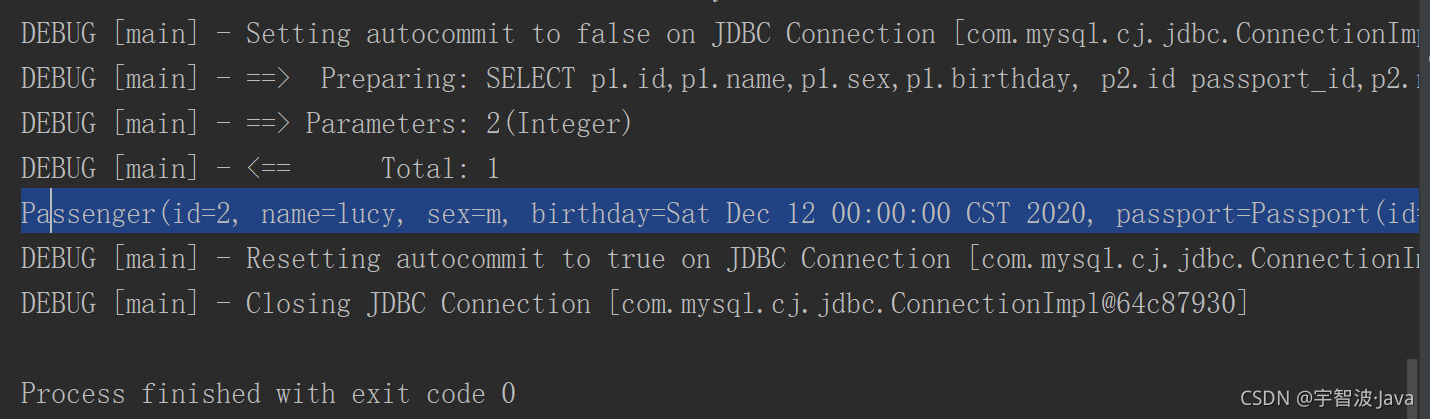
运行结果:
2.2 OneToMany
1.创建表
CREATE TABLE t_department(
id INT PRIMARY KEY AUTO_INCREMENT,
NAME VARCHAR(50),
location VARCHAR(100)
)DEFAULT CHARSET =utf8;
INSERT INTO t_department VALUES(1,"教学部","北京"),(2,"研发部","上海");
CREATE TABLE t_employee(
id INT PRIMARY KEY AUTO_INCREMENT,
NAME VARCHAR(50),
salary DOUBLE,
dept_id INT
)DEFAULT CHARSET =utf8;
INSERT INTO t_employee VALUES(1,"jack",1000.5,1);
INSERT INTO t_employee VALUES(2,"rose",2000.5,1);
INSERT INTO t_employee VALUES(3,"张三",3000.5,2);
INSERT INTO t_employee VALUES(4,"李四",4000.5,2);2.创建实体类
package com.qianwz.entity;

import lombok.Data;

import java.util.List;

@Data
public class Department {
    private Integer id;
    private String name;
    private String location;

    List<Employee> employees;
}
package com.qianwz.entity;

import lombok.Data;
@Data
public class Employee {
    private Integer id;
    private String name;
    private String salary;

    private List<Department> departments;
}
3.创建Dao
package com.qianwz.dao;

import com.qianwz.entity.Department;


public interface DepartmentDao {
    Department findById(Integer id);
}
package com.qianwz.dao;

import com.qianwz.entity.Employee;

public interface EmployeeDao {
    Employee findById(Integer id);
}
4.创建EmployeeDao.xml配置文件
<?xml version="1.0" encoding="UTF-8" ?>
<!DOCTYPE mapper
        PUBLIC "-//mybatis.org//DTD Mapper 3.0//EN"
        "http://mybatis.org/dtd/mybatis-3-mapper.dtd">

<!--传入接口的地址-->
<mapper namespace="com.qianwz.dao.EmployeeDao">
    <!--    手动写入映射 id为这个的id  type 为实体类 因为在mybatis-config.xml中重命名过-->
    <resultMap id="employeeMap" type="com.qianwz.entity.Employee">
        <id property="id" column="id"></id>
        <result property="name" column="name"></result>
        <result property="salary" column="salary"></result>
        <collection property="departments" ofType="com.qianwz.entity.Department" >
            <id property="id" column="deptId"></id>
            <result property="name" column="deptName"></result>
            <result property="location" column="location"></result>
        </collection>
    </resultMap>
    <select id="findById" resultMap="employeeMap">
          select e.id,e.name,salary,d.id deptId,d.name deptName,location
          from t_employee e
          inner join t_department d
          on e.dept_id=d.id
          where e.id = #{id}
    </select>

</mapper>
5.创建DepartmentDao.xml配置文件
<?xml version="1.0" encoding="UTF-8" ?>
<!DOCTYPE mapper
        PUBLIC "-//mybatis.org//DTD Mapper 3.0//EN"
        "http://mybatis.org/dtd/mybatis-3-mapper.dtd">

<!--传入接口的地址-->
<mapper namespace="com.qianwz.dao.DepartmentDao">
    <!--    手动写入映射 id为这个的id  type 为实体类 因为在mybatis-config.xml中重命名过-->
    <resultMap id="departmentMap" type="com.qianwz.entity.Department">
        <id property="id" column="id"></id>
        <result property="name" column="name"></result>
        <result property="location" column="location"></result>

        <collection property="employees" ofType="com.qianwz.entity.Employee" >
            <id property="id" column="employeeId"></id>
            <result property="name" column="employeeName"></result>
            <result property="salary" column="salary"></result>
        </collection>
    </resultMap>

    <select id="findById" resultMap="departmentMap">
          select d.id,d.name,location,e.id employeeId,e.name employeeName,salary
          from t_department d
          inner join t_employee e
          on d.id = e.dept_id
          where d.id = #{id}
    </select>

</mapper>6.测试
import com.qianwz.dao.DepartmentDao;
import com.qianwz.dao.EmployeeDao;
import com.qianwz.entity.Department;
import com.qianwz.entity.Employee;
import org.apache.ibatis.io.Resources;
import org.apache.ibatis.session.SqlSession;
import org.apache.ibatis.session.SqlSessionFactory;
import org.apache.ibatis.session.SqlSessionFactoryBuilder;

import java.io.IOException;
import java.io.InputStream;

public class Test {
    @org.junit.Test
    public void test() throws IOException {
        String resourrce = "mybatis-config.xml";
        InputStream inputStream = Resources.getResourceAsStream(resourrce);
        SqlSessionFactory build = new SqlSessionFactoryBuilder().build(inputStream);
        SqlSession sqlSession = build.openSession();
        DepartmentDao mapper = sqlSession.getMapper(DepartmentDao.class);
        Department byId = mapper.findById(1);
        System.out.println(byId);
        sqlSession.close();
        inputStream.close();
    }
    @org.junit.Test
    public void test2() throws IOException {
        String resourrce = "mybatis-config.xml";
        InputStream inputStream = Resources.getResourceAsStream(resourrce);
        SqlSessionFactory build = new SqlSessionFactoryBuilder().build(inputStream);
        SqlSession sqlSession = build.openSession();
        EmployeeDao mapper = sqlSession.getMapper(EmployeeDao.class);
        Employee dById = mapper.findById(1);
        System.out.println(dById);
        sqlSession.close();
        inputStream.close();
    }
}


2.3 ManyToMany
| 建立第三张关系表 |
|---|
 |
1.创建表
CREATE TABLE t_student(
id INT PRIMARY KEY AUTO_INCREMENT,
NAME VARCHAR(50),
sex VARCHAR(1)
)DEFAULT CHARSET = utf8;
INSERT INTO t_student VALUES(1,'jack','m');
INSERT INTO t_student VALUES(2,'rose','f');
CREATE TABLE t_subject(
id INT PRIMARY KEY AUTO_INCREMENT,
NAME VARCHAR(50),
grade INT
)DEFAULT CHARSET = utf8;
INSERT INTO t_subject VALUES(1001,'JavaSE',1);
INSERT INTO t_subject VALUES(1002,'JavaEE',2);
CREATE TABLE t_stu_sub(
student_id INT,
subject_id INT
)DEFAULT CHARSET = utf8;
INSERT INTO t_stu_sub VALUES(1,1001);
INSERT INTO t_stu_sub VALUES(1,1002);
INSERT INTO t_stu_sub VALUES(2,1001);
INSERT INTO t_stu_sub VALUES(2,1002);2.创建实体类
package com.qwz.entity;

import lombok.Data;

import java.util.List;
@Data
public class Student {
    private Integer id;
    private String name;
    private String sex;

    private List<Subject> subjects;
}
package com.qwz.entity;

import lombok.Data;

import java.util.List;

@Data
public class Subject {
    private Integer id;
    private String name;
    private Integer grade;

    private List<Student> students;
}
3.创建Dao
package com.qwz.dao;

import com.qwz.entity.Student;

import java.util.List;

public interface StudentDao {
    List<Student> findStudentSubject();
}
package com.qwz.dao;

import com.qwz.entity.Subject;

import java.util.List;

public interface SubjectDao {
    List<Subject> findSubjectStudent();
}
4.创建StudentDao.xml
<?xml version="1.0" encoding="UTF-8" ?>
<!DOCTYPE mapper
        PUBLIC "-//mybatis.org//DTD Mapper 3.0//EN"
        "http://mybatis.org/dtd/mybatis-3-mapper.dtd">

<!--传入接口的地址-->
<mapper namespace="com.qwz.dao.StudentDao">
    <!--    手动写入映射 id为这个的id  type 为实体类 因为在mybatis-config.xml中重命名过-->
    <resultMap id="studentMap" type="com.qwz.entity.Student">
        <id property="id" column="id"></id>
        <result property="name" column="name"></result>
        <result property="sex" column="sex"></result>
        <!-- 描述 passportId nationality expire 和  passport 映射规则 -->
        <collection property="subjects" ofType="com.qwz.entity.Subject" >
            <id property="id" column="jId"></id>
            <result property="name" column="jName"></result>
            <result property="grade" column="grade"></result>
        </collection>
    </resultMap>
    <!-- 查询旅客及其护照,由于两个表都有名为id的列,需要在查询时区分,否则相同列名的值会被覆盖 -->
    <select id="findStudentSubject" resultMap="studentMap">
         select s.id,s.name,s.sex,j.id jId,j.name jName,grade
         from t_student s
         inner join t_stu_sub t
         on t.student_id = s.id
         inner join t_subject j
         on j.id = t.subject_id
    </select>

</mapper>
5.创建mybatis-config.xml
<?xml version="1.0" encoding="UTF-8" ?>
<!DOCTYPE configuration
        PUBLIC "-//mybatis.org//DTD Config 3.0//EN"
        "http://mybatis.org/dtd/mybatis-3-config.dtd">
<configuration>
    <!--    导入properties文件-->
    <properties resource="db.properties"></properties>
    <!--    将studentDao中查询需要的实体类按照包重命名 默认为类名首字母小写-->
    <typeAliases>
        <!--        <typeAlias -->
        <package name="com.qwz.entity"/>
    </typeAliases>
    <environments default="development">
        <environment id="development">
            <transactionManager type="JDBC"/>
            <dataSource type="com.qwz.util.DruidDataSourceFactory">
                <property name="driverClassName" value="${db.driverClassName}"/>
                <property name="url" value="${db.url}"/>
                <property name="username" value="${db.username}"/>
                <property name="password" value="${db.password}"/>
            </dataSource>
        </environment>
    </environments>
    <mappers>
        <!--        映射到接口的xml文件-->
        <!--        <mapper resource="com/coffee/dao/StudentDao.xml"/>-->
        <!--        映射到接口-->
        <!--        <mapper class="com.coffee.dao.StudentDao"></mapper>-->
        <!--        按照包名映射-->
        <package name="com.qwz.dao"/>
    </mappers>
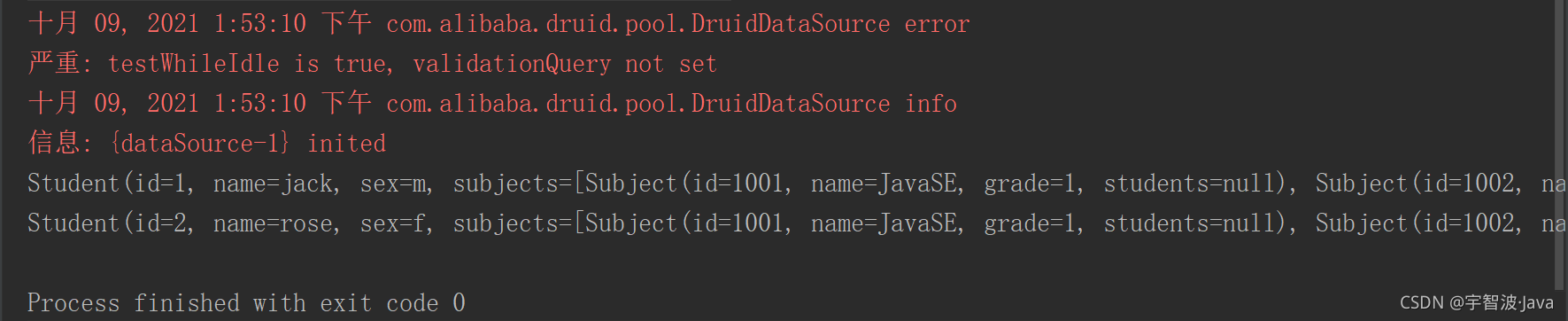
</configuration>6.测试
import com.qwz.dao.StudentDao;
import com.qwz.entity.Student;
import org.apache.ibatis.io.Resources;
import org.apache.ibatis.session.SqlSession;
import org.apache.ibatis.session.SqlSessionFactory;
import org.apache.ibatis.session.SqlSessionFactoryBuilder;

import java.io.IOException;
import java.io.InputStream;
import java.util.List;

public class Test {
    @org.junit.Test
    public void test() throws IOException {
        String resource = "mybatis-config.xml";
        InputStream  inputStream= Resources.getResourceAsStream(resource);
        SqlSessionFactoryBuilder sqlSessionFactoryBuilder = new SqlSessionFactoryBuilder();
        SqlSessionFactory build = sqlSessionFactoryBuilder.build(inputStream);
        SqlSession sqlSession = build.openSession();
        StudentDao mapper = sqlSession.getMapper(StudentDao.class);
        List<Student> studentSubject = mapper.findStudentSubject();
        for (Student student : studentSubject) {
            System.out.println(student);
        }
        sqlSession.close();
        inputStream.close();
    }
}
2.4 关系总结
一方,添加集合;多方,添加对象。
双方均可建立关系属性,建立关系属性后,对应的Mapper文件中需使用< ResultMap >完成多表映射。
持有对象关系属性,使用< association property="***" javaType="***" >
持有集合关系属性,使用< collection property="***" ofType="***" >





 扫一扫
扫一扫


 被折叠的 条评论
为什么被折叠?
被折叠的 条评论
为什么被折叠?
 到【灌水乐园】发言





