



 本文详细介绍了如何在MyEclipse中使用Spring和CXF框架创建和调用WebService,包括创建Web服务项目、配置JAX-WS库、Spring框架搭建、CXF的使用步骤、解决依赖冲突问题,以及调用接口的方法。同时,文章还探讨了WebService与WebApi的区别。
1 回顾
【系统开发系列 之MyEclipse创建WebService详细教程和调用教程】介绍了使用JWS实现WebService接口的发布和调用,主要涉及的点有:
(1)MyEclipse点击File->New->Web services project,选择JAX-WS 版本为2.0;
(2)添加相应的JAX-WSLibrary,右键项目->properties->JavaBuildPath->Libraries,搜索JAX选择确认,右键项目->properties->JavaBuildPath->Libraries如下如图,点击选中JAX-WS Library在点击Edit,将JAX-WS Library另外两个包添加进去;
(3)添加对应的业务主类并利用tomcat发布接口。
详细内容可参考:https://blog.youkuaiyun.com/Zmj_Dns/article/details/104435559 MyEclipse创建WebService最详细(避坑)教程
2 使用spring框架+maven+CXF框架实现
(1)介绍CXF框架
CXF可以用来构建和开发 WebService,这些服务可以支持多种协议,比如:SOAP、POST/HTTP、HTTP ,CXF 大大简化了WebService并且可以天然地和 Spring 进行无缝集成。
SOAP:HTTP 协议 + XML 数据格式
WSDL:WebService Description Language基于Xml语言,用来描述WebService 以及其函数、参数和返回值
(2)操作步骤【亲测实现 + 详细步骤,整合了许多资料,避坑手册】
Step1:运行用spring框架搭建maven web项目
MyEclipse中选择File —> New —> Other —> Maven Project —> webapp:
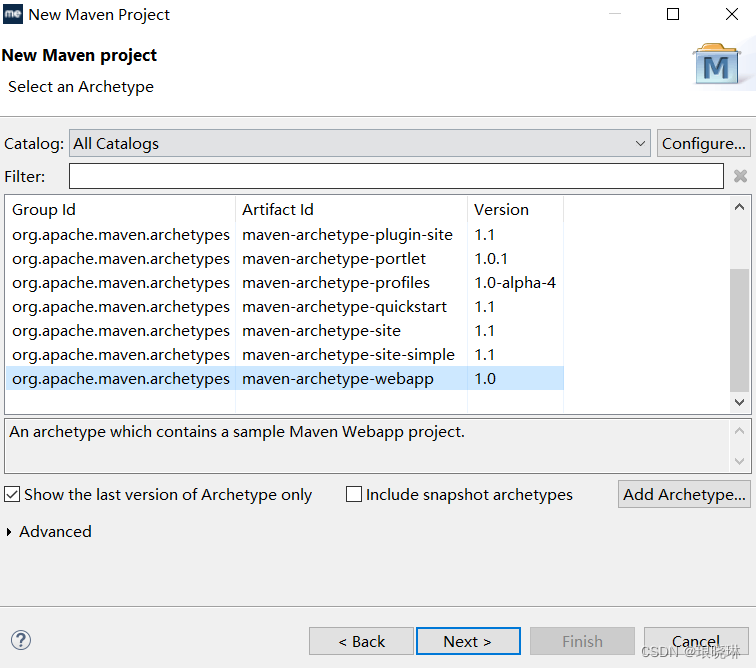
设置group id和artifact id —> 点击finish
在resource目录下创建一个spring.xml的配置文件 —> 去spring的官网找到spring框架的文档,将IOC容器的配置文件的格式拷贝到自己刚刚创建的spring.xml中,参考样例为:
<?xml version="1.0" encoding="UTF-8"?>
<beans xmlns="http://www.springframework.org/schema/beans"
   xmlns:xsi="http://www.w3.org/2001/XMLSchema-instance"
   xmlns:context="http://www.springframework.org/schema/context"
   xmlns:jaxws="http://cxf.apache.org/jaxws"
xsi:schemaLocation="http://www.springframework.org/schema/beans
                    http://www.springframework.org/schema/beans/spring-beans-3.0.xsd
                    http://www.springframework.org/schema/context
                    http://www.springframework.org/schema/context/spring-context-3.0.xsd
                    http://cxf.apache.org/jaxws
                    http://cxf.apache.org/schemas/jaxws.xsd">

</beans>
Step2:使用POM的方式引入依赖
<!--添加cxf支持  -->
<dependency>
    <groupId>org.apache.cxf</groupId>
    <artifactId>cxf-rt-frontend-jaxws</artifactId>
    <version>3.1.9</version>
</dependency>
<dependency>
    <groupId>org.apache.cxf</groupId>
    <artifactId>cxf-rt-transports-http-jetty</artifactId>
    <version>3.1.9</version>
</dependency>
<dependency>
    <groupId>org.apache.cxf</groupId>
    <artifactId>cxf-core</artifactId>
    <version>3.1.9</version>
</dependency>
Step3:创建WebService接口和接口实现类
参考资料:https://blog.youkuaiyun.com/qq_39826207/article/details/127100871 【WebService笔记02】使用CXF框架实现WebService接口的发布和调用
import javax.jws.WebService;

@WebService // 标记当前接口是 WebService 服务
public interface DemoInvokeService {
    /**
     * 对外提供的接口方法
     * @param xml 接口请求参数
     * @return
     */
    String demoInvoke(String xml);
}


import javax.jws.WebService;

@WebService
public class DemoInvokeServiceImpl implements DemoInvokeService {

    public String demoInvoke(String xml) {
        // 这里就可以就行各种接口逻辑的处理
        System.out.println("WebService接口的请求入参: " + xml);
        return "接口调用成功";
    }
}
Step4:spring.xml配置
参考资料:https://www.cnblogs.com/liulihaha/p/10518214.html?ivk_sa=1024320u spring+maven实现webservice
<jaxws:endpoint id="demoInvokeService" implementor="com.test.DemoInvokeServiceImpl" address="/test"/>
Step5:web.xml配置
<?xml version="1.0" encoding="UTF-8"?>
<web-app xmlns:xsi="http://www.w3.org/2001/XMLSchema-instance" xmlns="http://java.sun.com/xml/ns/javaee" xsi:schemaLocation="http://java.sun.com/xml/ns/javaee http://java.sun.com/xml/ns/javaee/web-app_2_5.xsd" id="WebApp_ID" version="2.5">

    <context-param>
        <param-name>contextConfigLocation</param-name>
        <param-value>classpath:spring-cxf.xml</param-value>
    </context-param>
    <listener>
        <listener-class>org.springframework.web.context.ContextLoaderListener</listener-class>
    </listener>
    <servlet>
        <servlet-name>cxf</servlet-name>
        <servlet-class>org.apache.cxf.transport.servlet.CXFServlet</servlet-class>
        <load-on-startup>1</load-on-startup>
    </servlet>
    <servlet-mapping>
        <servlet-name>cxf</servlet-name>
        <url-pattern>/service/*</url-pattern>
    </servlet-mapping>
</web-app>
启动服务器访问http://localhost:8080/项目名/service/test?wsdl 即可
可能遇到的坑:启动后报错:java.lang.NoSuchFieldError: REFLECTION
解决方法:
首先用 mvn dependency:tree,查看依赖包的树 (mvn dependency:tree > tree.txt 是将查找内容写到txt中);
搜索关键字 com.sun.xml.bind,如果有主版本号不一致的问题,需要将版本改成一致的高版本。
com.sun.xml.bind为JAXB使用所依赖的pom,主要操作步骤为:
Step1:使用较新的版本,添加如下代码到pom.xml的dependencies当中:
<!-- http://mvnrepository.com/artifact/com.sun.xml.bind/jaxb-core -->
<dependency>
    <groupId>com.sun.xml.bind</groupId>
    <artifactId>jaxb-core</artifactId>
    <version>2.2.11</version>
</dependency>
<!-- http://mvnrepository.com/artifact/javax.xml/jaxb-api -->
<dependency>
    <groupId>javax.xml</groupId>
    <artifactId>jaxb-api</artifactId>
    <version>2.1</version>
</dependency>
<!-- http://mvnrepository.com/artifact/com.sun.xml.bind/jaxb-impl -->
<dependency>
    <groupId>com.sun.xml.bind</groupId>
    <artifactId>jaxb-impl</artifactId>
    <version>2.2.11</version>
</dependency>
Step2:将将XML转换成对象解析:
参考资料:https://blog.youkuaiyun.com/weixin_34009794/article/details/86392930 JAXB简单样例
https://blog.youkuaiyun.com/weixin_40118044/article/details/121588060 xml转换工具类
import java.io.File;

import javax.xml.bind.JAXBContext;
import javax.xml.bind.JAXBException;
import javax.xml.bind.Unmarshaller;

public class JAXBUnmarshallExample {
    public static void main(String[] args) {
        try {
            File file = new File("D:\\testFile.xml");
            JAXBContext jaxbContext = JAXBContext.newInstance(Customer.class);

            Unmarshaller jaxbUnmarshaller = jaxbContext.createUnmarshaller();
            Customer customer = (Customer) jaxbUnmarshaller.unmarshal(file);
            System.out.println(customer);
        } catch (JAXBException e) {
            e.printStackTrace();
        }
    }
}
3 CXF框架调用接口
Step1:创建项目选择Web Service Client
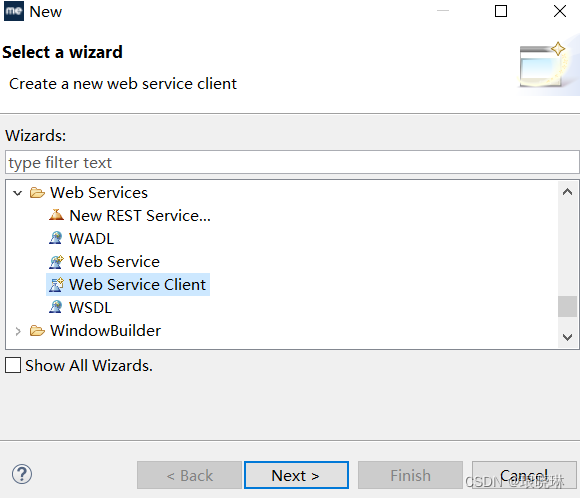
Step2:输入wsdl地址,选择下载代码的路径
Step3:写调用方法调用下载下来的WebService中的java类中的方法,代码为:
参考资料:https://blog.youkuaiyun.com/qq_41694906/article/details/88029533 WebService接口的生成和调用(WebService接口)
import com.pcm.ws.jws.JwsServiceHello;
import com.pcm.ws.jws.JwsServiceHelloService;

/**
 *
* Title: JwsClientHello
* Description: webService 客户端调用
 */
public class JwsClientHello {

    public static void main(String[] args) {
         //调用webservice
        JwsServiceHello returnCode = new JwsServiceHelloService().getJwsServiceHelloPort().getValue("panchengming");
        System.out.println(returnCode);
    }
}
也利用dos命令生成代码的方式调用webService。
4 WebService和WebApi的区别(补充 个人理解)
参考资料:https://www.cnblogs.com/songjuntao/p/16172156.html WebService与WebApi的区别
(1)WebService基于SOAP协议,用户web上交换结构化信息和类型信息。SOAP请求是HTTP POST的一个专用版本,遵循一种特殊的xml消息格式,Content-type设置为: text/xml,任何数据都可以xml化;
(2)WebApi基于HTTP协议,我们日常网站、系统都是使用这种形式进行访问我们的应用程序;
(3)均可通过框架方式实现,客户端调用时需要建立WebClient程序调用WebService,WebApi可通过URL直接调用。





 扫一扫
扫一扫


 1万+
1万+

 被折叠的 条评论
为什么被折叠?
被折叠的 条评论
为什么被折叠?
 到【灌水乐园】发言





